
Android APK的安装
打开packages\apps\PackageInstaller下的清单文件
<?xml version="1.0" encoding="utf-8"?>

<manifest xmlns:android="http://schemas.android.com/apk/res/android"

          package="com.android.packageinstaller">

    <original-package android:name="com.android.packageinstaller" />

    <uses-permission android:name="android.permission.INSTALL_PACKAGES" />

    <uses-permission android:name="android.permission.DELETE_PACKAGES" />

    <uses-permission android:name="android.permission.CLEAR_APP_CACHE" />

    <uses-permission android:name="android.permission.READ_PHONE_STATE" />

    <uses-permission android:name="android.permission.CLEAR_APP_USER_DATA" />

    <application android:label="@string/app_name">

        <activity android:name=".PackageInstallerActivity"

                android:configChanges="orientation|keyboardHidden"

                android:theme="@style/TallTitleBarTheme">

            <intent-filter>

                <action android:name="android.intent.action.VIEW" />

                <category android:name="android.intent.category.DEFAULT" />

                <data android:scheme="content" />

                <data android:scheme="file" />

                <data android:mimeType="application/vnd.android.package-archive" />

            </intent-filter>

        </activity>

        <activity android:name=".InstallAppProgress"

                android:configChanges="orientation|keyboardHidden"

                android:theme="@style/TallTitleBarTheme">

        </activity>

        <activity android:name=".UninstallerActivity"

                android:configChanges="orientation|keyboardHidden"

                android:theme="@style/TallTitleBarTheme">

            <intent-filter>

                <action android:name="android.intent.action.VIEW" />

                <action android:name="android.intent.action.DELETE" />

                <category android:name="android.intent.category.DEFAULT" />

                <data android:scheme="package" />

            </intent-filter>

        </activity>

        <activity android:name=".UninstallAppProgress"

                android:configChanges="orientation|keyboardHidden"

                android:theme="@style/TallTitleBarTheme">

        </activity>

    </application>

</manifest>
项目布局:
<LinearLayout xmlns:android="http://schemas.android.com/apk/res/android"

    xmlns:tools="http://schemas.android.com/tools"

    android:layout_width="match_parent"

    android:layout_height="match_parent"

    android:orientation="vertical"

    tools:context=".MainActivity" >

    <EditText

        android:id="@+id/et_path"

        android:layout_width="fill_parent"

        android:layout_height="wrap_content"

        android:text="请输入apk的路径" />

    <Button

        android:onClick="click"

         android:layout_width="fill_parent"

        android:layout_height="wrap_content"

        android:text="安装"

        />

</LinearLayout>
逻辑代码如下:
public class MainActivity extends Activity {

    private EditText et_path;

    @Override

    protected void onCreate(Bundle savedInstanceState) {

        super.onCreate(savedInstanceState);

        setContentView(R.layout.activity_main);

        et_path = (EditText) findViewById(R.id.et_path);

    }

    public void click(View view) {

        String path = et_path.getText().toString().trim();

        /*

         * <action android:name="android.intent.action.VIEW" /> <category

         * android:name="android.intent.category.DEFAULT" /> <data

         * android:scheme="content" /> <data android:scheme="file" /> <data

         * android:mimeType="application/vnd.android.package-archive" />

         */

        Intent intent = new Intent();

        intent.setAction("android.intent.action.VIEW");

        intent.addCategory("android.intent.category.DEFAULT");

        intent.setDataAndType(Uri.fromFile(new File(path)), "application/vnd.android.package-archive");

        startActivity(intent);

    }

}
首先需要AndroidManifest.xml中加入安装程序权限:
<!-- 安装程序权限 -->
<uses-permission android:name="android.permission.INSTALL_PACKAGES"/>
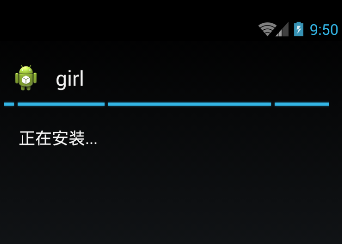
接着将一个名为girl.apk的apk导入sdcard,然后运行项目效果如下
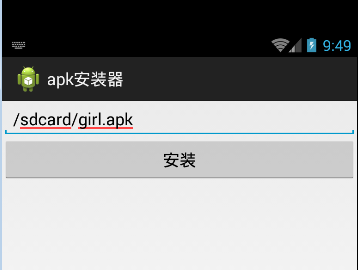
点击安装
Android APK的安装的更多相关文章
- android apk静默安装
转载请注明出处:http://blog.csdn.net/guolin_blog/article/details/47803149 之前有很多朋友都问过我,在Android系统中怎样才能实现静默安装呢 ...
- android APK应用安装过程以及默认安装路径[转]
一:安装过程 APK是类似Symbian Sis或Sisx的文件格式.通过将APK文件直接传到Android模拟器或Android手机中执行即可安装. Android应用安装有如下四种方式 1. ...
- Android apk 的安装过程
Android应用安装有如下四种方式 1.系统应用安装――开机时完成,没有安装界面 2.网络下载应用安装――通过market应用完成,没有安装界面 3.ADB工具安装――没有安装界面. 4.第三方应用 ...
- Android apk的安装、卸载、更新升级(通过Eclipse实现静默安装)
一.通过Intent消息机制发送消息,调用系统应用进行,实现apk的安装/卸载 . (1) 调用系统的安装应用,让系统自动进行apk的安装 String fileName = "/data/ ...
- 【Android】Android apk默认安装位置设置
在Android工程中,设置apk的默认安装位置 在AndroidManifest.xml文件Manifest标签中添加android:installLocation属性 android:instal ...
- Android APK安装过程学习笔记
1.什么是APK APK,即Android Package,Android安装包.不同平台的安装文件格式都不同,类似于Windows的安装包是二进制的exe格式,Mac的安装包是dmg格式.APK可以 ...
- Python Python实现批量安装android apk包
基于Python实现批量安装android apk包 by:授客 QQ:1033553122 1.相关软件包及文件下载 下载地址:adb软件包及批量安装apk包的py文件.zip 2.测试环境 Win ...
- Android为TV端助力 apk静默安装
转载请注明出处:http://blog.csdn.net/guolin_blog/article/details/47803149 之前有很多朋友都问过我,在Android系统中怎样才能实现静默安装呢 ...
- 【树莓派】在树莓派的Android系统中安装APK应用
树莓派3 Android TV安装APK应用教程 本文摘自:http://www.mz6.net/news/android/6867.html 树莓派3 Android TV怎样安装软件?对于熟悉AD ...
随机推荐
- shell脚本专题之-----------全自动编译安装mysql
mysql的编译安装,在博客 开源服务专题之--------mysql的编译安装 中已经说明了,但是还是比较麻烦,尤其是一大堆命令,来手动执行,稍有不慎,就会出错.生产上一般都是先在本地测试环境进行自 ...
- js学习笔记(一)
1.数组实用方法大全 //给数组添加个方法,返回数组中的最大值 Array.prototype.max = function() { return Math.max.apply(null,this); ...
- 使用Nodejs+Protractor搭建测试环境
Protractor是一个end-to-end的测试框架,从网络上得到的答案是Protractor是作为Angular JS应用程序的测试框架.它的构建基于Selenium WebDriver之上,且 ...
- C#--属性
- 别误用IsDigit与IsNumber函数(转)
1.起因 最近发现程序中有一段控制TextBox数字输入的代码,相信大家都不会太陌生,如下: void int_KeyPress(object sender, KeyPressEventArgs e) ...
- 不可或缺 Windows Native (11) - C++: hello c++, C++ 与 C语言的区别小介
[源码下载] 不可或缺 Windows Native (11) - C++: hello c++, C++ 与 C语言的区别小介 作者:webabcd 介绍不可或缺 Windows Native 之 ...
- Csharp: Create Excel Workbook or word from a Template File using aspose.Word 14.5 and aspose.Cell 8.1
winform: /// <summary> /// /// </summary> /// <param name="sender"></ ...
- Oracle 数据库 基础学习 (一) SQL基本知识
Oracle 从零开始,不知所措.要掌握一种技能,最好的方式是先学会怎么使用它,然后再深入学习,先有样子,再有技术. 一,什么是数据库? 为什么需要数据库? 数据库实质上是一个信息的列表,或者是一 ...
- Java分布式开发
分布式概念的引入是基于性能的提升,应用的可靠性而提出的.所谓Java分布式,即是在使用Java语言进行企业级应用开发的过程中,采用分布式技术解决业务逻辑的高并发.高可用性的一些架构设计方案. 1. R ...
- HTTP协议简解
1.什么是http协议 http协议: 浏览器客户端 与 服务器端 之间数据传输的规范 2.查看http协议的工具 1)使用火狐的firebug插件(右键->查看元素->网络) 2)使用 ...