
UITableview cell 的多选
利用NSMutableDictionary key值 来改变cell的状态
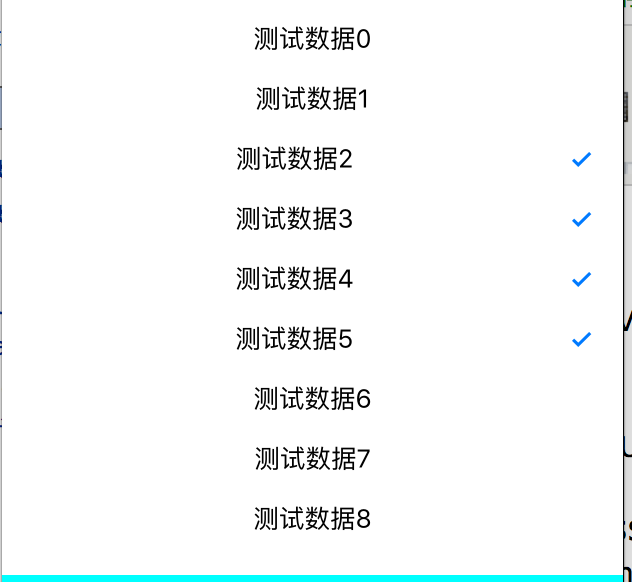
-(void)createUI{
table = [[UITableView alloc]initWithFrame:CGRectMake(0, 100, [UIScreen mainScreen].bounds.size.width, [UIScreen mainScreen].bounds.size.height/2.0) style:UITableViewStylePlain];
[table setSeparatorStyle:UITableViewCellSeparatorStyleNone];
table.delegate = self;
table.dataSource = self;
[self.view addSubview:table];
}
-(void)createData{
dataArr = [[NSMutableArray alloc]init];
SelectArr = [[NSMutableArray alloc]init];
for (int i=0; i<50; i++) {
NSString * string = [NSString stringWithFormat:@"测试数据%d",i];
[dataArr addObject:string];
NSMutableDictionary * dic = [[NSMutableDictionary alloc]init];
[dic setObject:@"no" forKey:@"key"];
[SelectArr addObject:dic];
}
}
-(UITableViewCell*)tableView:(UITableView *)tableView cellForRowAtIndexPath:(NSIndexPath *)indexPath{
static NSString * stri = @"str";
UITableViewCell * cell = [tableView dequeueReusableCellWithIdentifier:stri];
if (cell == nil) {
cell = [[UITableViewCell alloc]initWithStyle:UITableViewCellStyleDefault reuseIdentifier:stri];
}
cell.textLabel.text = dataArr[indexPath.row];
cell.textLabel.textAlignment = NSTextAlignmentCenter;
//多选
NSString * string = [NSString stringWithFormat:@"%@",SelectArr[indexPath.row][@"key"]];
//可随意更改 图片或者按钮状态
if (![string isEqualToString:@"no"])
{
cell.accessoryType =UITableViewCellAccessoryCheckmark;
}else
{
cell.accessoryType =UITableViewCellAccessoryNone;
}
return cell;
}
-(NSInteger)tableView:(UITableView *)tableView numberOfRowsInSection:(NSInteger)section{
return dataArr.count;
}
-(CGFloat)tableView:(UITableView *)tableView heightForRowAtIndexPath:(NSIndexPath *)indexPath{
return 40;
}
-(void)tableView:(UITableView *)tableView didSelectRowAtIndexPath:(NSIndexPath *)indexPath{
UITableViewCell *cell = [table cellForRowAtIndexPath:indexPath];
cell.backgroundColor=[UIColor whiteColor];
//多选
NSString * string = [NSString stringWithFormat:@"%@",SelectArr[indexPath.row][@"key"]];
if ([string isEqualToString:@"no"]) {
[SelectArr[indexPath.row] setValue:@"yes" forKey:@"key"];
}else{
[SelectArr[indexPath.row] setValue:@"no" forKey:@"key"];
}
//刷新tableview 改变点击状态
[table reloadData];
}
UITableview cell 的多选的更多相关文章
- UITableView cell复用出错问题 页面滑动卡顿问题 & 各杂七杂八问题
UITableView 的cell 复用机制节省了内存,但是有时对于多变的自定义cell,重用时会出现界面出错(例如复用出错,出现cell混乱重影).滑动卡顿等问题,这里只简单敲下几点复用出错时的解决 ...
- Why does uitableview cell remain highlighted?
What would cause a tableview cell to remain highlighted after being touched? I click the cell and ca ...
- UITableView cell中label自动换行和自定义label自动换行
换行的前提必须是有足够的高度 才能换 否则不显示超出部分 所以,在设置label换行的时候 要考虑cell的高度,cell的高度也要变化,废话不多说,来段代码: cell.label.text=[di ...
- UITableView Cell 弹簧动画效果
- (void)tableView:(UITableView *)tableView willDisplayCell:(UITableViewCell *)cell forRowAtIndexPath ...
- Swift - UIView,UItableView,Cell设置边框方法
// 设置边框的宽度 cell.layer.borderWidth = 1 // 设置边框的颜色 cell.layer.borderColor = UIColor.blackColor().CGCol ...
- UITableview cell中多个按钮
xib的 //不使用这种- (IBAction)button:(UIButton *)sender; //使用这种 @property (weak, nonatomic) IBOutlet UIBut ...
- UITableView cell 半透明效果,改变cell高度时背景不闪的解决方法
如果直接指定cell.backgroundColor = = [UIColor colorWithRed:255.0/255.0 green:255.0/255.0 blue:255.0/255.0 ...
- 【iOS】UITableview cell 顶部空白的n种设置方法
我知道没人会主动设置这个东西,但是大家一定都遇到过这个问题,下面总结下可能是哪些情况: 1, self.automaticallyAdjustsScrollViewInsets = NO; 这个应该 ...
- 设置cell背景色和选中色
// 设置cell的背景色 UIView *bg = [[[UIView alloc] init] autorelease]; bg.backgroundColor = [UIColor colorW ...
随机推荐
- Tomcat JMX
http://tomcat.apache.org/tomcat-6.0-doc/monitoring.html#Enabling_JMX_Remote
- CI如何接受POST请求中的JSON数据
PHP默认只识别application/x-www.form-urlencoded标准的数据类型 “php://input可以读取没有处理过的POST数据.相较于$HTTP_RAW_POST_DATA ...
- ava中Class.forName的作用浅谈
转自:http://www.jb51.net/article/42648.htm Class.forName(xxx.xx.xx) 返回的是一个类 一.首先你要明白在java里面任何class都要装载 ...
- Eigen相关介绍
最近在用Matlab处理图像,现在要做的是将其用C++语言进行翻译,由于要进行大量的矩阵计算,就研究了一下可以进行矩阵计算的开源库,详细的介绍可以参照http://my.oschina.net/cvn ...
- android JNI调用(转)
Android jni开发资料--NDK环境搭建 android开发人员注意了 谷歌改良了ndk的开发流程,对于Windows环境下NDK的开发,如果使用的NDK是r7之前的版本,必须要安装Cygwi ...
- ubuntu apt-get 总结 install xxx -d能下载安装包(含依赖)不安装_和卸载(转载)
[举例] 目前常用的 ========== *更新本机中的数据库缓存: sudo apt-get update *查找包含部分关键字的软件包: sudo apt-cache search <你要 ...
- 补间动画TweenAnimation
animation_translate = AnimationUtils.loadAnimation(MainActivity.this, R.anim.transalte); imageview.s ...
- php常用的日期时间操作
//把当前日期时间以指定的格式转成字符串 $date_out=date ( 'Y-m-d H:i:s', time () ); //把时间字符串改成时间戳 $aab=strtotime($date_o ...
- JS一个根据时区输出时区时间的函数
做项目遇到的坑爹问题,需要根据时区获取时区中轴线的时间.为此搜了好久网上都没什么JS的代码描述到这一方面,最后自己翻了下高中地理才写了个函数出来. 此图可以看出来,全球分为了0时区,东西1-11区,第 ...
- 浅析C#中的Attribute(转)
最近用到了,所以静下心来找些资料看了一下,终于把这东西搞清楚了. 一.什么是Attribute 先看下面的三段代码: 1.自定义Attribute类:VersionAttribute [Attribu ...