
UITableview cell 的多选
利用NSMutableDictionary key值 来改变cell的状态
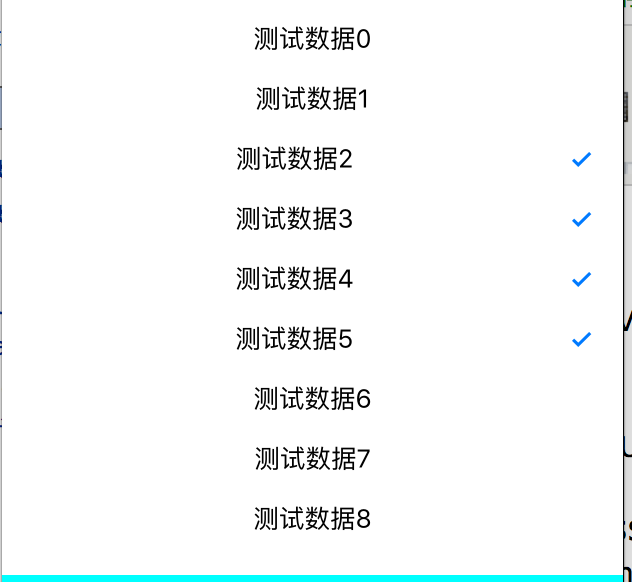
-(void)createUI{
table = [[UITableView alloc]initWithFrame:CGRectMake(0, 100, [UIScreen mainScreen].bounds.size.width, [UIScreen mainScreen].bounds.size.height/2.0) style:UITableViewStylePlain];
[table setSeparatorStyle:UITableViewCellSeparatorStyleNone];
table.delegate = self;
table.dataSource = self;
[self.view addSubview:table];
}
-(void)createData{
dataArr = [[NSMutableArray alloc]init];
SelectArr = [[NSMutableArray alloc]init];
for (int i=0; i<50; i++) {
NSString * string = [NSString stringWithFormat:@"测试数据%d",i];
[dataArr addObject:string];
NSMutableDictionary * dic = [[NSMutableDictionary alloc]init];
[dic setObject:@"no" forKey:@"key"];
[SelectArr addObject:dic];
}
}
-(UITableViewCell*)tableView:(UITableView *)tableView cellForRowAtIndexPath:(NSIndexPath *)indexPath{
static NSString * stri = @"str";
UITableViewCell * cell = [tableView dequeueReusableCellWithIdentifier:stri];
if (cell == nil) {
cell = [[UITableViewCell alloc]initWithStyle:UITableViewCellStyleDefault reuseIdentifier:stri];
}
cell.textLabel.text = dataArr[indexPath.row];
cell.textLabel.textAlignment = NSTextAlignmentCenter;
//多选
NSString * string = [NSString stringWithFormat:@"%@",SelectArr[indexPath.row][@"key"]];
//可随意更改 图片或者按钮状态
if (![string isEqualToString:@"no"])
{
cell.accessoryType =UITableViewCellAccessoryCheckmark;
}else
{
cell.accessoryType =UITableViewCellAccessoryNone;
}
return cell;
}
-(NSInteger)tableView:(UITableView *)tableView numberOfRowsInSection:(NSInteger)section{
return dataArr.count;
}
-(CGFloat)tableView:(UITableView *)tableView heightForRowAtIndexPath:(NSIndexPath *)indexPath{
return 40;
}
-(void)tableView:(UITableView *)tableView didSelectRowAtIndexPath:(NSIndexPath *)indexPath{
UITableViewCell *cell = [table cellForRowAtIndexPath:indexPath];
cell.backgroundColor=[UIColor whiteColor];
//多选
NSString * string = [NSString stringWithFormat:@"%@",SelectArr[indexPath.row][@"key"]];
if ([string isEqualToString:@"no"]) {
[SelectArr[indexPath.row] setValue:@"yes" forKey:@"key"];
}else{
[SelectArr[indexPath.row] setValue:@"no" forKey:@"key"];
}
//刷新tableview 改变点击状态
[table reloadData];
}
UITableview cell 的多选的更多相关文章
- UITableView cell复用出错问题 页面滑动卡顿问题 & 各杂七杂八问题
UITableView 的cell 复用机制节省了内存,但是有时对于多变的自定义cell,重用时会出现界面出错(例如复用出错,出现cell混乱重影).滑动卡顿等问题,这里只简单敲下几点复用出错时的解决 ...
- Why does uitableview cell remain highlighted?
What would cause a tableview cell to remain highlighted after being touched? I click the cell and ca ...
- UITableView cell中label自动换行和自定义label自动换行
换行的前提必须是有足够的高度 才能换 否则不显示超出部分 所以,在设置label换行的时候 要考虑cell的高度,cell的高度也要变化,废话不多说,来段代码: cell.label.text=[di ...
- UITableView Cell 弹簧动画效果
- (void)tableView:(UITableView *)tableView willDisplayCell:(UITableViewCell *)cell forRowAtIndexPath ...
- Swift - UIView,UItableView,Cell设置边框方法
// 设置边框的宽度 cell.layer.borderWidth = 1 // 设置边框的颜色 cell.layer.borderColor = UIColor.blackColor().CGCol ...
- UITableview cell中多个按钮
xib的 //不使用这种- (IBAction)button:(UIButton *)sender; //使用这种 @property (weak, nonatomic) IBOutlet UIBut ...
- UITableView cell 半透明效果,改变cell高度时背景不闪的解决方法
如果直接指定cell.backgroundColor = = [UIColor colorWithRed:255.0/255.0 green:255.0/255.0 blue:255.0/255.0 ...
- 【iOS】UITableview cell 顶部空白的n种设置方法
我知道没人会主动设置这个东西,但是大家一定都遇到过这个问题,下面总结下可能是哪些情况: 1, self.automaticallyAdjustsScrollViewInsets = NO; 这个应该 ...
- 设置cell背景色和选中色
// 设置cell的背景色 UIView *bg = [[[UIView alloc] init] autorelease]; bg.backgroundColor = [UIColor colorW ...
随机推荐
- svn: warning: 'xxxxxx' is already under version control
[root@NGINX-APACHE-SVN pm]# svn status ? plugins ? files ? images ? data ? resources [root@NGINX-APA ...
- zabbix 修改管理员用户密码
mysql> use zabbix mysql> desc users; +----------------+---------------------+------+-----+---- ...
- WPF中的常用类汇总:
1.FrameworkElement: WPF中大部分的控件都可以转化成FrameworkElement,利用FrameworkElement属性获取相应的值: 2.WPF获取当前工作区域的宽度和高度 ...
- PHP描述冒泡排序和快速排序算法
使用PHP描述冒泡排序和快速排序算法,对象可以是一个数组.使用PHP描述顺序查找和二分查找(也叫做折半查找)算法,顺序查找必须考虑效率,对象可以是一个有序数组.写一个二维数组排序算法函数,能够具有通用 ...
- 面向对象之对象,作用域及this
object eg: var o = { a : 2, b : 3 }; console.log(o); console.log(typeof o); console.log(o.a.toFixed( ...
- 2^x mod n = 1
Time Limit: 2000/1000 MS (Java/Others) Memory Limit: 65536/32768 K (Java/Others)Total Submission( ...
- Fibonacci Again
Problem Description There are another kind of Fibonacci numbers: F(0) = 7, F(1) = 11, F(n) = F(n-1) ...
- BZOJ3249 : [ioi2013]game
线段树套Treap 外层的线段树需要动态开节点 内层Treap需要注意的是,相同y坐标的点不一定是同一个点,所以需要再次离散 空间$O(n\log n)$ 时间$O(n\log^2n)$ #inclu ...
- BZOJ3734 : [Ontak2013]Miny
将所有炸弹按坐标排序 x<-y连边表示x爆炸了y也会爆炸 如果是DAG则直接拓扑排序+DP求出每个点出发能走到的最左端和最右端的点 有环则SCC缩点后再拓扑 用线段树优化建图的过程 边数$O(n ...
- Html A标签中 href 和 onclick 同时使用的问题 优先级别
我们在制作网页的时候用得最多的就是 A 标签 超连接 但有时候需要在 A 里同时用到 href 和 onclick属性 下面我们先来分析一下 ,在不同的浏览器下有不同的效果 1 顺序 ie 6 : h ...