
Java 学习笔记之 Sleep停止线程
Sleep停止线程:
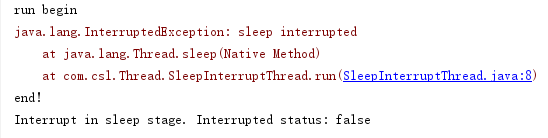
在Sleep状态下被interrupt,interrupted 状态会被擦除,返回false。
线程在Sleep状态下被interrupt:
public class SleepInterruptThread extends Thread{

    @Override

    public void run() {

        try {

            System.out.println("run begin");

            Thread.sleep(2000000);

            System.out.println("run end");

        } catch (InterruptedException e) {

            System.out.println("Interrupt in sleep stage. Interrupted status: " + this.isInterrupted());

            e.printStackTrace();

        }

    }

}

public class ThreadRunMain {

    public static void main(String[] args) {

        testSleepInterruptThread();

    }

    public static void testSleepInterruptThread(){

        try {

            SleepInterruptThread sit = new SleepInterruptThread();

            sit.start();

            Thread.sleep(1000);

            sit.interrupt();

        } catch (InterruptedException e) {

            System.out.println("Main catch");

            e.printStackTrace();

        }

        System.out.println("end!");

    }

}
运行结果:
线程在Sleep之前被interrupt:
public class BeforeSleepInterruptThread extends Thread{

    @Override

    public void run() {

        try {

            for (int i=0;i<100000;i++){

                System.out.println("i="+(i+1));

            }

            System.out.println("run begin");

            Thread.sleep(2000000);

            System.out.println("run end");

        } catch (InterruptedException e) {

            System.out.println("First interrupt, then sleep. Interrupted status: " + this.isInterrupted());

            System.out.println("First interrupt, then sleep. Interrupted status: " + Thread.interrupted());

            e.printStackTrace();

        }

    }

}

public class ThreadRunMain {

    public static void main(String[] args) {

        testBeforeSleepInterruptThread();

    }

    public static void testBeforeSleepInterruptThread(){

        try {

            BeforeSleepInterruptThread bsit = new BeforeSleepInterruptThread();

            bsit.start();

            Thread.sleep(100);

            bsit.interrupt();

            System.out.println("end!");

        } catch (InterruptedException e) {

            e.printStackTrace();

        }

    }

}
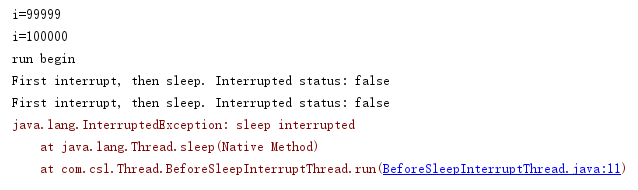
运行结果:
Java 学习笔记之 Sleep停止线程的更多相关文章
- Java 学习笔记之 Stop停止线程
Stop停止线程: 使用stop()方法停止线程是非常暴力的,会抛出java.lang.ThreadDeath Error,但是我们无需显示捕捉, 以下捕捉只是为了看得更清晰. public clas ...
- Java 学习笔记之 Return停止线程
Return停止线程: 使用interrupt()和return结合也可以实现停止线程的效果.不过还是建议使用“抛异常“的方法,因为在catch块中可以将异常向上抛,使线程停止的事件得以传播. pub ...
- Java学习笔记-基础语法Ⅹ-进程线程
学习快一个月了,现在学到了黑马Java教程的300集 打印流的特点: 只负责输出数据,不负责读取数据 有自己的特有方法 字节打印流:PrintStream,使用指定的文件名创建新的打印流 import ...
- java学习笔记15--多线程编程基础2
本文地址:http://www.cnblogs.com/archimedes/p/java-study-note15.html,转载请注明源地址. 线程的生命周期 1.线程的生命周期 线程从产生到消亡 ...
- java学习笔记14--多线程编程基础1
本文地址:http://www.cnblogs.com/archimedes/p/java-study-note14.html,转载请注明源地址. 多线程编程基础 多进程 一个独立程序的每一次运行称为 ...
- Java学习笔记-多线程-创建线程的方式
创建线程 创建线程的方式: 继承java.lang.Thread 实现java.lang.Runnable接口 所有的线程对象都是Thead及其子类的实例 每个线程完成一定的任务,其实就是一段顺序执行 ...
- 《Java学习笔记(第8版)》学习指导
<Java学习笔记(第8版)>学习指导 目录 图书简况 学习指导 第一章 Java平台概论 第二章 从JDK到IDE 第三章 基础语法 第四章 认识对象 第五章 对象封装 第六章 继承与多 ...
- 20145330第六周《Java学习笔记》
20145330第六周<Java学习笔记> . 这周算是很忙碌的一周.因为第六周陆续很多实验都开始进行,开始要准备和预习的科目日渐增多,对Java分配的时间不知不觉就减少了,然而第十和十一 ...
- 并发编程学习笔记(14)----ThreadPoolExecutor(线程池)的使用及原理
1. 概述 1.1 什么是线程池 与jdbc连接池类似,在创建线程池或销毁线程时,会消耗大量的系统资源,因此在java中提出了线程池的概念,预先创建好固定数量的线程,当有任务需要线程去执行时,不用再去 ...
随机推荐
- CF940B Our Tanya is Crying Out Loud
Our Tanya is Crying Out Loud time limit per test 1 second memory limit per test 256 megabytes input ...
- to_char()、to_date()的区别
to_char 是把日期或数字转换为字符串 to_date 是把字符串转换为数据库中得日期类型 还记得以前初次接触oracle时对一些函数还不是很熟悉,老是弄错,比如在mysql中可以运行,但在ora ...
- 【Offer】[31] 【栈的压入、弹出序列】
题目描述 思路分析 测试用例 Java代码 代码链接 题目描述 输入两个整数序列,第一个序列表示栈的压入顺序,请判断第二个序列是否为该栈的弹出顺序.假设压入栈的所有数字均不相等.例如,序列{1,2,3 ...
- Linux基础提高_sudo,行为审计,跳板机
sudo 临时给普通用户赋予root权限的一种方式 echo "%wheel ALL=(ALL) NOPASSWD: ALL" >>/etc/ ...
- 5分钟理解 SpringBoot 响应式的核心-Reactor
目录 一.前言 二. Mono 与 Flux 构造器 三. 流计算 1. 缓冲 2. 过滤/提取 3. 转换 4. 合并 5. 合流 6. 累积 四.异常处理 五.线程调度 小结 参考阅读 一.前言 ...
- FreeSql (二十四)Linq To Sql 语法使用介绍
原本不支持 IQueryable 主要出于使用习惯的考虑,如果继承 IQueryable,编写代码的智能总会提示出现一堆你不想使用的方法(对不起,我有强迫症),IQueryable 自身提供了一堆没法 ...
- 原创 | 手摸手带您学会 Elasticsearch 单机、集群、插件安装(图文教程)
欢迎关注笔者的公众号: 小哈学Java, 每日推送 Java 领域干货文章,关注即免费无套路附送 100G 海量学习.面试资源哟!! 个人网站: https://www.exception.site/ ...
- HTML5为什么只需要写<!DOCTYPE HTML>?
HTML4.01中的doctype需要对DTD进行引用,因为HTML4.01基于SGML.而HTML5不基于SGML,因此不需要对DTD进行引用,但是需要doctype来规范浏览器的行为.其中,SGM ...
- 策略模式+注解 干掉业务代码中冗余的if else...
前言: 之前写过一个工作中常见升级模式-策略模式 的文章,里面讲了具体是怎样使用策略模式去抽象现实中的业务代码,今天来拿出实际代码来写个demo,这里做个整理来加深自己对策略模式的理解. 一.业务 ...
- 即时聊天APP(六) - 消息的接收以及EventBus使用
通常我们在接收消息的时候会有声音和震动的提示,因此我也加了代码达到这样的效果,这就要用到EventBus了,当然这里我也用到了自定义的广播,所以首先在Mainfests文件中加入以下代码: <r ...