
kubernetes搭建(可访问外网环境部署)
版权声明:本文为博主原创文章,支持原创,转载请附上原文出处链接和本声明。
本文链接地址:https://www.cnblogs.com/wannengachao/p/11947621.html
一、前期环境准备
三台服务器资源即可部署:1台master、2台node。(使用VMware即可部署)
1.内存2G以上、硬盘30G以上、cpu2核以上
2.主机可以访问外网。(如使用vmware部署,网络选择NAT模式即可)
3.所有服务器时间保持一致。(可配置ntp时间同步)
4.关闭swap分区:
临时关闭:swapoff -a
永久关闭:
[root@chushi ~]# vi /etc/fstab
#
# /etc/fstab
# Created by anaconda on Mon Nov 25 11:30:42 2019
#
# Accessible filesystems, by reference, are maintained under '/dev/disk'
# See man pages fstab(5), findfs(8), mount(8) and/or blkid(8) for more info
#
/dev/mapper/centos-root / xfs defaults 0 0
UUID=014cea5b-23d5-4d08-955c-de294f604c24 /boot xfs defaults 0 0
/dev/mapper/centos-swap swap swap defaults 0 0
将 /dev/mapper/centos-swap swap swap defaults 0 0 注释掉即可
4.关闭防火墙:
临时关闭:systemctl stop firewalld.service
永久关闭:systemctl disable firewalld.service
5.关闭selinux机制
临时关闭:setenforce 0
永久关闭:
修改/etc/selinux/config 文件
将SELINUX=enforcing改为SELINUX=disabled
重启机器即可
6.在master节点上增加主机名称解析
#vi /etc/hosts
192.x.x.x master (名字根据主机实际名称填写)
192.x.x.x node1
192.x.x.x node2
7.将桥接ipv4流量传递到iptables链路
7.1 临时修改
#cat << EOF > /etc/sysctl.d/k8s.conf
> net.bridge.bridge-cf-call-ip6tables = 1
> net.bridge.bridge-cf-call-iptables = 1
> EOF
7.2 修改后依次执行:
sysctl --system
systemctl daemon-reload
7.3 永久修改:
[root@chushi ~]# vi /usr/lib/sysctl.d/00-system.conf
# Kernel sysctl configuration file
#
# For binary values, 0 is disabled, 1 is enabled. See sysctl(8) and
# sysctl.conf(5) for more details.
# Disable netfilter on bridges.
net.bridge.bridge-nf-call-ip6tables = 0 #将0修改为1
net.bridge.bridge-nf-call-iptables = 0 #将0修改为1
net.bridge.bridge-nf-call-arptables = 0
7.4 修改后依次执行:
sysctl --system
systemctl daemon-reload (在此步骤可能会报错:[警告IsDockerSystemdCheck]:检测到“cgroupfs”作为Docker cgroup驱动程序。 推荐的驱动程序是“systemd”。详见下图)

解决:更换驱动,在/etc/docker下创建daemon.json
touch /etc/docker/daemon.json
daemon.json添加内容见下:
{
"exec-opts":["native.cgroupdriver=systemd"]
}
二、为所有服务器安装docker、kubeadm、kubelet、kubectl
1、安装docker
获取docker的repo:
wget -P /etc/yum.repos.d/ https://mirrors.aliyun.com/docker-ce/linux/centos/docker-ce.repo
安装docker:
yum -y install docker-ce-18.06.1.ce-3.el7
启动docker,并设置开机自启动:
systemctl start docker
systemctl enable docker
2、配置阿里云kubernetes yum源:
#vi /etc/yum.repos.d/kubernetes.repo
[kubernetes]
baseurl=https://mirrors.aliyun.com/kubernetes/yum/repos/kubernetes-el7-x86_64/
gpgcheck=1
gpgkey=https://mirrors.aliyun.com/kubernetes/yum/doc/rpm-package-key.gpg
https://mirrors.aliyun.com/kubernetes/yum/doc/yum-key.gpg
查看(开启的)资源库:yum repolist
3、为node与master安装kubeadm、kubelet、kubelet:
yum -y install kubeadm-1.15.0 kubelet-1.15.0 kubectl-1.15.0
设置kubelet为开机自启动:
systemctl enable kubelet
三、部署master
1、初始化kubeadm init:
kubeadm init --apiserver-advertise-address=192.168.1.7 --image-repository registry.aliyuncs.com/google_containers --kubernetes-version v1.15.0 --service-cidr=10.1.0.0/16 --pod-network-cidr=10.244.0.0/16
注释: --apiserver-advertise-address=192.168.1.7 为masterIP, --service-cidr=10.1.0.0/16 为serviceIP段可自定义, --pod-network-cidr=10.244.0.0/16 为podIP段可自定义。
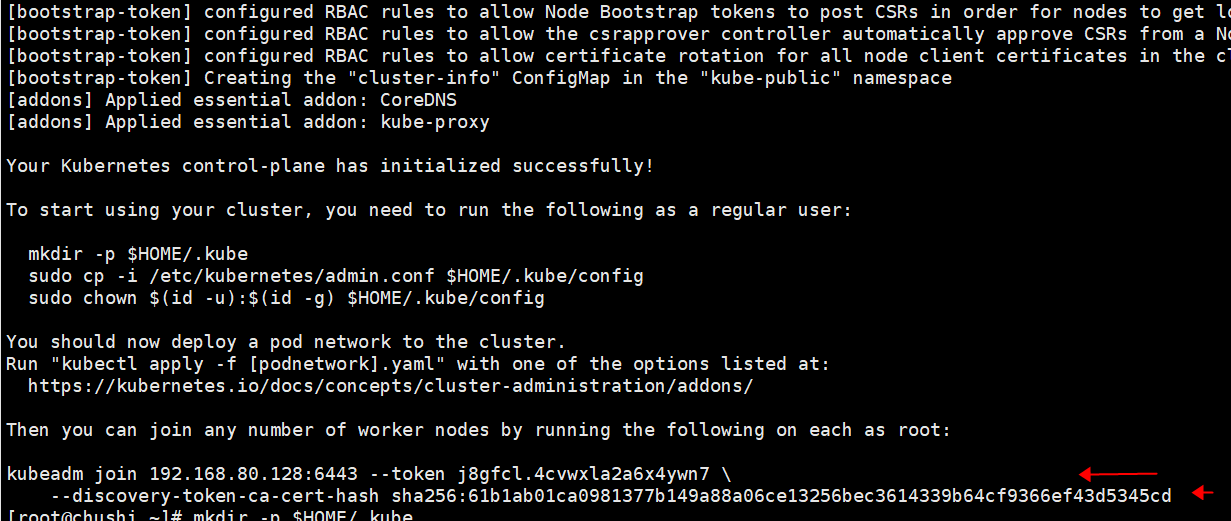
执行初始后会生成一个token CA 见下图,此token会在后面使用到记得保存:
2.创建kubernetes用户(root即可)
mkdir -p $HOME/.kube
cp -i /etc/kubernetes/admin.conf $HOME/.kube/config
chown $(id -u):$(id -g) $HOME/.kube/config
查看master是否部署并加入到集群中:kubectl get node ### NoteReady目前为正常,后续安装好flannel即可为Ready状态

四、在master上部署网络插件flannel:
1.部署flannel两种方法:
1.1 通过外网获取kube-flannel.yml文件:
curl -O https://raw.githubusercontent.com/coreos/flannel/master/Documentation/kube-flannel.yml
1.2 手动创建kube-flannel.yml文件,内容见下:
---
apiVersion: policy/v1beta1
kind: PodSecurityPolicy
metadata:
name: psp.flannel.unprivileged
annotations:
seccomp.security.alpha.kubernetes.io/allowedProfileNames: docker/default
seccomp.security.alpha.kubernetes.io/defaultProfileName: docker/default
apparmor.security.beta.kubernetes.io/allowedProfileNames: runtime/default
apparmor.security.beta.kubernetes.io/defaultProfileName: runtime/default
spec:
privileged: false
volumes:
- configMap
- secret
- emptyDir
- hostPath
allowedHostPaths:
- pathPrefix: "/etc/cni/net.d"
- pathPrefix: "/etc/kube-flannel"
- pathPrefix: "/run/flannel"
readOnlyRootFilesystem: false
# Users and groups
runAsUser:
rule: RunAsAny
supplementalGroups:
rule: RunAsAny
fsGroup:
rule: RunAsAny
# Privilege Escalation
allowPrivilegeEscalation: false
defaultAllowPrivilegeEscalation: false
# Capabilities
allowedCapabilities: ['NET_ADMIN']
defaultAddCapabilities: []
requiredDropCapabilities: []
# Host namespaces
hostPID: false
hostIPC: false
hostNetwork: true
hostPorts:
- min: 0
max: 65535
# SELinux
seLinux:
# SELinux is unused in CaaSP
rule: 'RunAsAny'
---
kind: ClusterRole
apiVersion: rbac.authorization.k8s.io/v1beta1
metadata:
name: flannel
rules:
- apiGroups: ['extensions']
resources: ['podsecuritypolicies']
verbs: ['use']
resourceNames: ['psp.flannel.unprivileged']
- apiGroups:
- ""
resources:
- pods
verbs:
- get
- apiGroups:
- ""
resources:
- nodes
verbs:
- list
- watch
- apiGroups:
- ""
resources:
- nodes/status
verbs:
- patch
---
kind: ClusterRoleBinding
apiVersion: rbac.authorization.k8s.io/v1beta1
metadata:
name: flannel
roleRef:
apiGroup: rbac.authorization.k8s.io
kind: ClusterRole
name: flannel
subjects:
- kind: ServiceAccount
name: flannel
namespace: kube-system
---
apiVersion: v1
kind: ServiceAccount
metadata:
name: flannel
namespace: kube-system
---
kind: ConfigMap
apiVersion: v1
metadata:
name: kube-flannel-cfg
namespace: kube-system
labels:
tier: node
app: flannel
data:
cni-conf.json: |
{
"name": "cbr0",
"cniVersion": "0.3.1",
"plugins": [
{
"type": "flannel",
"delegate": {
"hairpinMode": true,
"isDefaultGateway": true
}
},
{
"type": "portmap",
"capabilities": {
"portMappings": true
}
}
]
}
net-conf.json: |
{
"Network": "10.244.0.0/16",
"Backend": {
"Type": "vxlan"
}
}
---
apiVersion: apps/v1
kind: DaemonSet
metadata:
name: kube-flannel-ds-amd64
namespace: kube-system
labels:
tier: node
app: flannel
spec:
selector:
matchLabels:
app: flannel
template:
metadata:
labels:
tier: node
app: flannel
spec:
affinity:
nodeAffinity:
requiredDuringSchedulingIgnoredDuringExecution:
nodeSelectorTerms:
- matchExpressions:
- key: beta.kubernetes.io/os
operator: In
values:
- linux
- key: beta.kubernetes.io/arch
operator: In
values:
- amd64
hostNetwork: true
tolerations:
- operator: Exists
effect: NoSchedule
serviceAccountName: flannel
initContainers:
- name: install-cni
image: quay.io/coreos/flannel:v0.11.0-amd64
command:
- cp
args:
- -f
- /etc/kube-flannel/cni-conf.json
- /etc/cni/net.d/10-flannel.conflist
volumeMounts:
- name: cni
mountPath: /etc/cni/net.d
- name: flannel-cfg
mountPath: /etc/kube-flannel/
containers:
- name: kube-flannel
image: quay.io/coreos/flannel:v0.11.0-amd64
command:
- /opt/bin/flanneld
args:
- --ip-masq
- --kube-subnet-mgr
resources:
requests:
cpu: "100m"
memory: "50Mi"
limits:
cpu: "100m"
memory: "50Mi"
securityContext:
privileged: false
capabilities:
add: ["NET_ADMIN"]
env:
- name: POD_NAME
valueFrom:
fieldRef:
fieldPath: metadata.name
- name: POD_NAMESPACE
valueFrom:
fieldRef:
fieldPath: metadata.namespace
volumeMounts:
- name: run
mountPath: /run/flannel
- name: flannel-cfg
mountPath: /etc/kube-flannel/
volumes:
- name: run
hostPath:
path: /run/flannel
- name: cni
hostPath:
path: /etc/cni/net.d
- name: flannel-cfg
configMap:
name: kube-flannel-cfg
---
apiVersion: apps/v1
kind: DaemonSet
metadata:
name: kube-flannel-ds-arm64
namespace: kube-system
labels:
tier: node
app: flannel
spec:
selector:
matchLabels:
app: flannel
template:
metadata:
labels:
tier: node
app: flannel
spec:
affinity:
nodeAffinity:
requiredDuringSchedulingIgnoredDuringExecution:
nodeSelectorTerms:
- matchExpressions:
- key: beta.kubernetes.io/os
operator: In
values:
- linux
- key: beta.kubernetes.io/arch
operator: In
values:
- arm64
hostNetwork: true
tolerations:
- operator: Exists
effect: NoSchedule
serviceAccountName: flannel
initContainers:
- name: install-cni
image: quay.io/coreos/flannel:v0.11.0-arm64
command:
- cp
args:
- -f
- /etc/kube-flannel/cni-conf.json
- /etc/cni/net.d/10-flannel.conflist
volumeMounts:
- name: cni
mountPath: /etc/cni/net.d
- name: flannel-cfg
mountPath: /etc/kube-flannel/
containers:
- name: kube-flannel
image: quay.io/coreos/flannel:v0.11.0-arm64
command:
- /opt/bin/flanneld
args:
- --ip-masq
- --kube-subnet-mgr
resources:
requests:
cpu: "100m"
memory: "50Mi"
limits:
cpu: "100m"
memory: "50Mi"
securityContext:
privileged: false
capabilities:
add: ["NET_ADMIN"]
env:
- name: POD_NAME
valueFrom:
fieldRef:
fieldPath: metadata.name
- name: POD_NAMESPACE
valueFrom:
fieldRef:
fieldPath: metadata.namespace
volumeMounts:
- name: run
mountPath: /run/flannel
- name: flannel-cfg
mountPath: /etc/kube-flannel/
volumes:
- name: run
hostPath:
path: /run/flannel
- name: cni
hostPath:
path: /etc/cni/net.d
- name: flannel-cfg
configMap:
name: kube-flannel-cfg
---
apiVersion: apps/v1
kind: DaemonSet
metadata:
name: kube-flannel-ds-arm
namespace: kube-system
labels:
tier: node
app: flannel
spec:
selector:
matchLabels:
app: flannel
template:
metadata:
labels:
tier: node
app: flannel
spec:
affinity:
nodeAffinity:
requiredDuringSchedulingIgnoredDuringExecution:
nodeSelectorTerms:
- matchExpressions:
- key: beta.kubernetes.io/os
operator: In
values:
- linux
- key: beta.kubernetes.io/arch
operator: In
values:
- arm
hostNetwork: true
tolerations:
- operator: Exists
effect: NoSchedule
serviceAccountName: flannel
initContainers:
- name: install-cni
image: quay.io/coreos/flannel:v0.11.0-arm
command:
- cp
args:
- -f
- /etc/kube-flannel/cni-conf.json
- /etc/cni/net.d/10-flannel.conflist
volumeMounts:
- name: cni
mountPath: /etc/cni/net.d
- name: flannel-cfg
mountPath: /etc/kube-flannel/
containers:
- name: kube-flannel
image: quay.io/coreos/flannel:v0.11.0-arm
command:
- /opt/bin/flanneld
args:
- --ip-masq
- --kube-subnet-mgr
resources:
requests:
cpu: "100m"
memory: "50Mi"
limits:
cpu: "100m"
memory: "50Mi"
securityContext:
privileged: false
capabilities:
add: ["NET_ADMIN"]
env:
- name: POD_NAME
valueFrom:
fieldRef:
fieldPath: metadata.name
- name: POD_NAMESPACE
valueFrom:
fieldRef:
fieldPath: metadata.namespace
volumeMounts:
- name: run
mountPath: /run/flannel
- name: flannel-cfg
mountPath: /etc/kube-flannel/
volumes:
- name: run
hostPath:
path: /run/flannel
- name: cni
hostPath:
path: /etc/cni/net.d
- name: flannel-cfg
configMap:
name: kube-flannel-cfg
---
apiVersion: apps/v1
kind: DaemonSet
metadata:
name: kube-flannel-ds-ppc64le
namespace: kube-system
labels:
tier: node
app: flannel
spec:
selector:
matchLabels:
app: flannel
template:
metadata:
labels:
tier: node
app: flannel
spec:
affinity:
nodeAffinity:
requiredDuringSchedulingIgnoredDuringExecution:
nodeSelectorTerms:
- matchExpressions:
- key: beta.kubernetes.io/os
operator: In
values:
- linux
- key: beta.kubernetes.io/arch
operator: In
values:
- ppc64le
hostNetwork: true
tolerations:
- operator: Exists
effect: NoSchedule
serviceAccountName: flannel
initContainers:
- name: install-cni
image: quay.io/coreos/flannel:v0.11.0-ppc64le
command:
- cp
args:
- -f
- /etc/kube-flannel/cni-conf.json
- /etc/cni/net.d/10-flannel.conflist
volumeMounts:
- name: cni
mountPath: /etc/cni/net.d
- name: flannel-cfg
mountPath: /etc/kube-flannel/
containers:
- name: kube-flannel
image: quay.io/coreos/flannel:v0.11.0-ppc64le
command:
- /opt/bin/flanneld
args:
- --ip-masq
- --kube-subnet-mgr
resources:
requests:
cpu: "100m"
memory: "50Mi"
limits:
cpu: "100m"
memory: "50Mi"
securityContext:
privileged: false
capabilities:
add: ["NET_ADMIN"]
env:
- name: POD_NAME
valueFrom:
fieldRef:
fieldPath: metadata.name
- name: POD_NAMESPACE
valueFrom:
fieldRef:
fieldPath: metadata.namespace
volumeMounts:
- name: run
mountPath: /run/flannel
- name: flannel-cfg
mountPath: /etc/kube-flannel/
volumes:
- name: run
hostPath:
path: /run/flannel
- name: cni
hostPath:
path: /etc/cni/net.d
- name: flannel-cfg
configMap:
name: kube-flannel-cfg
---
apiVersion: apps/v1
kind: DaemonSet
metadata:
name: kube-flannel-ds-s390x
namespace: kube-system
labels:
tier: node
app: flannel
spec:
selector:
matchLabels:
app: flannel
template:
metadata:
labels:
tier: node
app: flannel
spec:
affinity:
nodeAffinity:
requiredDuringSchedulingIgnoredDuringExecution:
nodeSelectorTerms:
- matchExpressions:
- key: beta.kubernetes.io/os
operator: In
values:
- linux
- key: beta.kubernetes.io/arch
operator: In
values:
- s390x
hostNetwork: true
tolerations:
- operator: Exists
effect: NoSchedule
serviceAccountName: flannel
initContainers:
- name: install-cni
image: quay.io/coreos/flannel:v0.11.0-s390x
command:
- cp
args:
- -f
- /etc/kube-flannel/cni-conf.json
- /etc/cni/net.d/10-flannel.conflist
volumeMounts:
- name: cni
mountPath: /etc/cni/net.d
- name: flannel-cfg
mountPath: /etc/kube-flannel/
containers:
- name: kube-flannel
image: quay.io/coreos/flannel:v0.11.0-s390x
command:
- /opt/bin/flanneld
args:
- --ip-masq
- --kube-subnet-mgr
resources:
requests:
cpu: "100m"
memory: "50Mi"
limits:
cpu: "100m"
memory: "50Mi"
securityContext:
privileged: false
capabilities:
add: ["NET_ADMIN"]
env:
- name: POD_NAME
valueFrom:
fieldRef:
fieldPath: metadata.name
- name: POD_NAMESPACE
valueFrom:
fieldRef:
fieldPath: metadata.namespace
volumeMounts:
- name: run
mountPath: /run/flannel
- name: flannel-cfg
mountPath: /etc/kube-flannel/
volumes:
- name: run
hostPath:
path: /run/flannel
- name: cni
hostPath:
path: /etc/cni/net.d
- name: flannel-cfg
configMap:
name: kube-flannel-cfg
2.创建flannel:
kubectl apply -f kube-flannel.yml
docker pull lizhenliang/flannel:v0.11.0-amd64
查看 kube-system空间的flannel pod是否正常:kubectl get pods -n kube-system
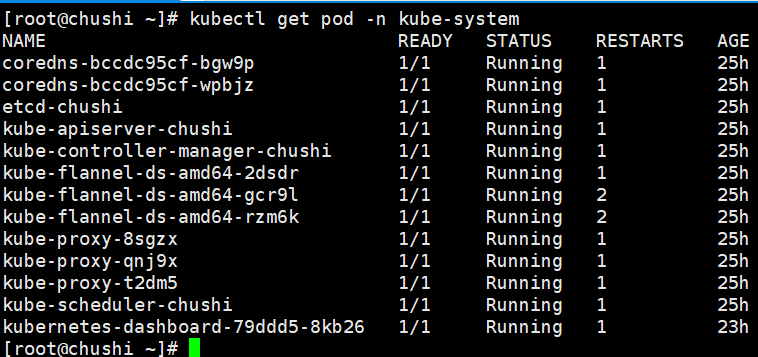
查看master是否ready状态:kubectl get node

五、部署node,join到master
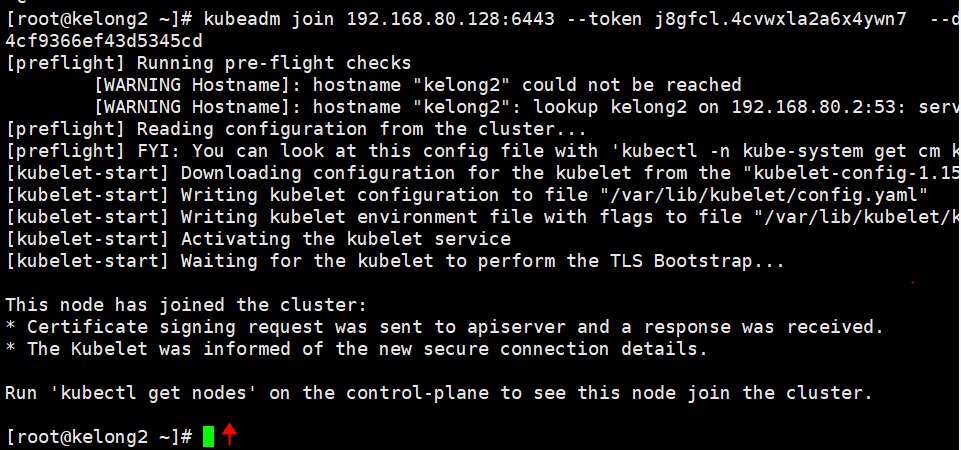
1.所有node节点下载flannel,此处使用上面master生成的token
kubeadm join 192.168.80.128:6443 --token j8gfcl.4cvwxla2a6x4ywn7 --discovery-token-ca-cert-hash sha256:61b1ab01ca0981377b149a88a06ce13256bec3614339b64cf9366ef43d5345cd
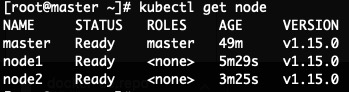
2.登录master查看node是否加入到集群中:
kubectl get node
六、测试kubernetes
1.登录master创建deployment控制器:
kubectl create deployment nginx --image=nginx
2.设置nginx应用端口80映射到node上的端口对外暴漏
kubectl expose deployment nginx --port=80 --type=NodePort
3.查看nginx pod及对外暴漏的node端口
kubectl get pod,svc
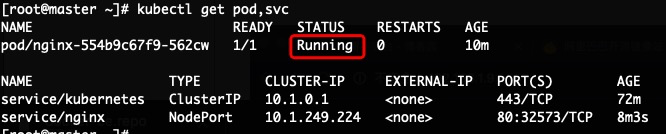
上图中PORT下的80:32573,80为nginx pod端口,32573为映射的对外暴漏的node端口,pod中的status状态为running即正常。
3.nginx pod running后 执行kubectl get pod -o wide 查看nginx pod所在的node
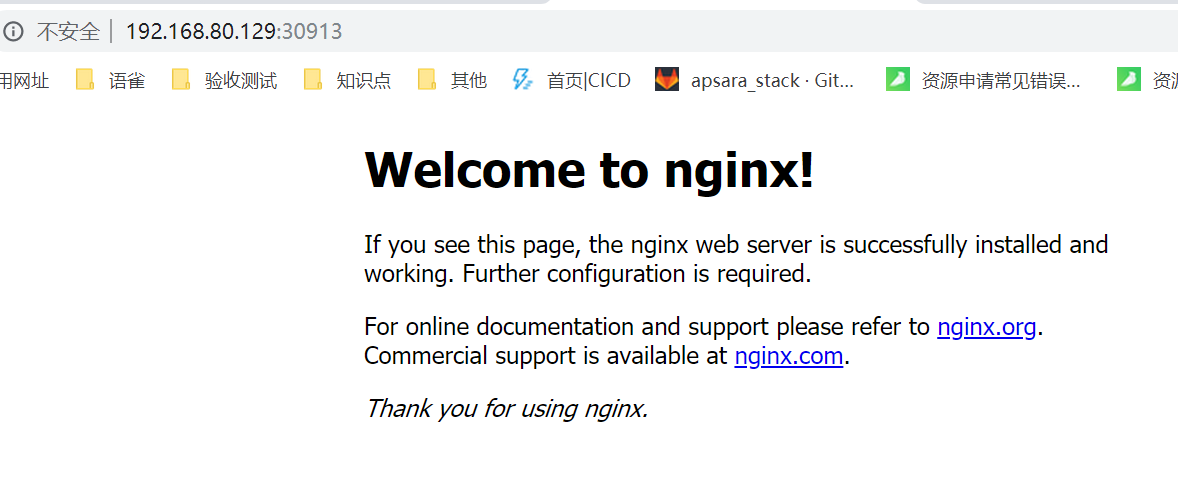
4.打开浏览器输入上步骤中获取到的node IP 及端口号测试是否可以访问nginx
kubernetes搭建(可访问外网环境部署)的更多相关文章
- VMWare中CentOS7 设置固定IP且能够访问外网
最近搭建kubernetes集群环境时遇到一个问题,CentOS7在重启后IP发生变化导致集群中etcd服务无法启动后集群环境变得不可用,针对这种情况,必须要对CentOS7设置固定IP且可以访问外网 ...
- 内网服务器通过Squid代理访问外网
环境说明 项目整体需部署Zabbix监控并配置微信报警,而Zabbix Server并不能访问外网,故运维小哥找了台能访问外网的服务器做Suqid代理,Zabbix Server服务器通过代理服务器访 ...
- OpenStack Neutron配置虚拟机访问外网
配置完成后的网络拓扑如下: 当前环境: X86服务器1台 Ubuntu 16.04 DevStack搭建OpenStack 网络拓扑: 外部网络:192.168.98.0/24 内部网络:10.0.0 ...
- 6.DNS公司PC访问外网的设置 + 主DNS服务器和辅助DNS服务器的配置
网站部署之~Windows Server | 本地部署 http://www.cnblogs.com/dunitian/p/4822808.html#iis DNS服务器部署不清楚的可以看上一篇:ht ...
- 1 Openwrt无线中继设置并访问外网
https://www.cnblogs.com/wsine/p/5238465.html 配置目标 主路由器使用AP模式发射Wifi 从路由器使用Client模式接受Wifi 从路由器使用Master ...
- Neutron:访问外网
instance 如何与外部网络通信? 这里的外部网络是指的租户网络以外的网络. 租户网络是由 Neutron 创建和维护的网络. 外部网络不由 Neutron 创建. 如果是私有云,外部网络通 ...
- Openwrt无线中继设置并访问外网
Openwrt无线中继设置并访问外网 本篇博文参考来自:http://blog.csdn.net/pifangsione/article/details/13162023 配置目标 主路由器使用AP模 ...
- 阿里云CentOS 7无外网IP的ECS访问外网(配置网关服务器)
说明: 1.必须要有一台机器具有外网IP的ECS. 2.如果不想配置具有外网IP的ECS时,可以购买NAT网关,但需要钱,贵.下面会说明NAT网关的配置. 3.最后吐槽一下阿里云VPC网关导致不能按照 ...
- sockets+proxychains代理,使内网服务器可以访问外网
Socks5+proxychains做正向代理 1. 应用场景: 有一台能上外网的机子,内网机子都不能连外网,需求是内网机子程序需要访问外网,做正向代理. 2. 软件 ...
随机推荐
- Appium之环境搭建
Appium:是开源.跨平台.多语言支持的移动应用自动化工具 测试对象主要有:① 原生app ② 混合app(h5 + web前端基础) ③ 移动web app 测试对象APPy运行平台: ① io ...
- iOS开发 为何 大不如前?原因竟然是这个?
前言: 近期,社会上对iOS开发行业的负面信息越来越多,并且还被一些黑骗机构的胡诌八扯越描越黑,现在iOS开发按照开发者与公司招聘的数量上来看,是显示的供大于求,但是从各公司的招人计划上来看,明显是供 ...
- 各大中间件底层技术-分布式一致性协议 Raft 详解
前言 正式介绍 Raft 协议之前,我们先来举个职场产研团队的一个例子
- 3步轻松搞定Spring Boot缓存
作者:谭朝红 前言 本次内容主要介绍基于Ehcache 3.0来快速实现Spring Boot应用程序的数据缓存功能.在Spring Boot应用程序中,我们可以通过Spring Caching来快速 ...
- 3年java开发面试BAT,你必须彻底搞定Maven!
前言 现在的Java项目中,Maven随处可见. Maven的仓库管理.依赖管理.继承和聚合等特性为项目的构建提供了一整套完善的解决方案,如果你搞不懂Maven,那么一个多模块的项目足以让你头疼,依赖 ...
- 天天动听API
本次分析的是天天动听API,天天动听有一点比较好,就是搜索返回直接有歌曲播放的地址了,并且有无损的音频 搜索歌曲API:http://so.ard.iyyin.com/s/song_with_out? ...
- 利用sklearn对多分类的每个类别进行指标评价
今天晚上,笔者接到客户的一个需要,那就是:对多分类结果的每个类别进行指标评价,也就是需要输出每个类型的精确率(precision),召回率(recall)以及F1值(F1-score). 对于 ...
- 第01讲 Android开发系列---Activity
一. Android系统版本及详细信息 最新数据 https://developer.android.com/about/dashboards/ 二. Android项目初探 1. 使用a ...
- 集合系列 Map(十三):LinkedHashMap
我们之前说过 LinkedHashMap 是在 HashMap 的基础上,增加了对插入元素的链表维护.那么其到底是怎么实现的呢?今天这篇文章就带我们来一探究竟. public class Linked ...
- VS2019 开发Django(三)------连接MySQL
导航:VS2019开发Django系列 下班回到家,洗漱完毕,夜已深.关于Django这个系列的博文,我心中的想法就是承接之前的微信小程序的内容,做一个服务端的管理中心,上新菜单,调整价格啊!之类的, ...