
styled-components:解决react的css无法作为组件私有样式的问题
react中的css在一个文件中导入,是全局的,对其他组件标签都会有影响。
使用styled-components第三方模块来解决,并且styled-components还可以将标签和样式写到一起,作为一个有样式的组件,这样样式就是这个组件的私有样式,不会给其他组件造成影响,也很方便。
下包:
npm i styled-components
公共类的写法如下:把.css文件改为.js文件,代码如下:
import {createGlobalStyle} from 'styled-components';

export const GlobalStyled = createGlobalStyle`

html, body, div, span, applet, object, iframe,

    h1, h2, h3, h4, h5, h6, p, blockquote, pre,

    a, abbr, acronym, address, big, cite, code,

    del, dfn, em, img, ins, kbd, q, s, samp,

    small, strike, strong, sub, sup, tt, var,

    b, u, i, center,

    dl, dt, dd, ol, ul, li,

    fieldset, form, label, legend,

    table, caption, tbody, tfoot, thead, tr, th, td,

    article, aside, canvas, details, embed,

    figure, figcaption, footer, header, hgroup,

    menu, nav, output, ruby, section, summary,

    time, mark, audio, video {

        margin: 0;

        padding: 0;

        border: 0;

        font-size: 100%;

        font: inherit;

        vertical-align: baseline;

    }

    /* HTML5 display-role reset for older browsers */

    article, aside, details, figcaption, figure,

    footer, header, hgroup, menu, nav, section {

        display: block;

    }

    body {

        line-height: 1;

    }

    ol, ul {

        list-style: none;

    }

    blockquote, q {

        quotes: none;

    }

    blockquote:before, blockquote:after,

    q:before, q:after {

        content: '';

        content: none;

    }

    table {

        border-collapse: collapse;

        border-spacing: 0;

    }`
再将公共的css组件放入到App根组件中,这样style.js中的css样式全局通用了
import React from 'react';

import {GlobalStyled} from './style.js';

import Header from './common/header'

function App() {

  return (

    <div className="App">

      <GlobalStyled/>

      <Header/>

    </div>

  );

}

export default App;
组件的私有类,写法如下:注意下导入写法
import styled from 'styled-components'

import logoPic from '../../statics/jianshulogo.png'

export const HeaderWrapper = styled.div`

    position: relative;

    height: 56px;

    border-bottom: 1px solid #f0f0f0;

`

export const Logo = styled.a`

    position: absolute;

    top: 0;

    left: 0;

    display: block;

    width: 100px;

    height: 56px;

    background: url(${logoPic});

    background-size: contain;

`
有样式的组件,哪里需要放哪里就行了,styled-components构造出来的组件,一般react标签有的属性,组件都有, 不过react标签中ref属性,在styled组件中是用innerRef。
import React,{Component} from "react"

import {HeaderWrapper,Logo} from "./style"

class Header extends Component {

    render(){

        return (

            <HeaderWrapper>

                <Logo href="/"></Logo>

            </HeaderWrapper>

        )

    }

}

export default Header
也可以把属性写到组件内,如下:
export const Logo = styled.a.attr({

    href: '/'

})`

    position: absolute;

    top: 0;

    left: 0;

    display: block;

    width: 100px;

    height: 56px;

    background: url(${logoPic});

    background-size: contain;

`
再注意一个问题,之前学习配置webpack的时候,我们知道.css,.less,sacs等样式文件,webpack配置后是可以将其解析的,像background:url(),根据路径webpack会打包图片也是没有问题的,但是这里用styled-components,是不会解析background:url(),不会解析路径,获取图片的,而只是当成一个路径字符串,返回到网页中去
例如如下图的代码:
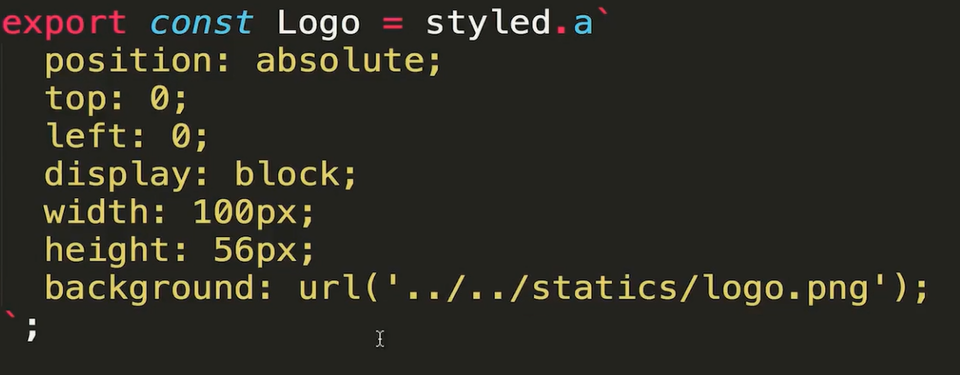
网页中返回的是一个路径字符串,webpack并没有帮我们把图片打包出来, 如下图,当然localhost:3000是没有上一级目录的,找不到图片的

所以这时候我们需要手动导入图片
import styled from 'styled-components'

import logoPic from '../../statics/jianshulogo.png'

export const HeaderWrapper = styled.div`

    position: relative;

    height: 56px;

    border-bottom: 1px solid #f0f0f0;

`

export const Logo = styled.a`

    position: absolute;

    top: 0;

    left: 0;

    display: block;

    width: 100px;

    height: 56px;

    background: red url(${logoPic})

`
styled-components:解决react的css无法作为组件私有样式的问题的更多相关文章
- CSS Modules 解决 react 项目 css 样式互相影响的问题
1. CSS Modules引入目的 写过CSS的人,应该都对一大长串选择器选中一个元素不陌生吧,这种方式,其实定义的就是全局样式,我们时常会因为选择器权重问题,没有把我们想要的样式加上去. 另外,每 ...
- Github css加载失败,样式混乱解决办法
github被墙的解决办法 Github css加载失败,样式混乱解决办法 打开cmd,输入 nslookup github.com 8.8.8.8 ,下面就会显示出github的服务器地址列 ...
- styled components草根中文版文档
1.styled components官网网址 https://www.styled-components.com/docs 以组件的形式来写样式. 1.1安装 yarn add styled-c ...
- 解决React首屏加载白屏的问题
众所周知,在项目中如果在资源加载请求还未完成的时候,由于阻塞机制,会出现首页白屏的问题,产生很差的用户体验.本文以react为例,提供一个解决方法. 解决原理:使用 onreadystatechang ...
- [React] Render Basic SVG Components in React
React loves svg just as much as it loves html. In this lesson we cover how simple it is to make SVG ...
- 解决React Native unable to load script from assets index.android.bundle on windows
React Native运行的时候,经常碰到React Native unable to load script from assets index.android.bundle on windows ...
- 解决React Native使用Fetch API请求网络报Network request failed
问题来源: 1 . 在测试fetch数据请求时,Xcode9.0以上的无法请求https, 需要在Xcode中加载项目后修改Info.plist的相关配置,具体如下参考 问题及解决方法一模一样,不再重 ...
- springboot 解决配置js/css/img缓存问题
# 解决配置js/css/img缓存问题 spring.resources.chain.strategy.content.enabled=true spring.resources.chain.str ...
- react 调用 function 的写法 及 解决 react onClick 方法自动执行
1.react 调用方法的写法 (1)方式一 onClick={this.getFetchData.bind(this,item.id)} (2)方式二 getFetchData(e){ this.s ...
随机推荐
- hadoop全分布式的搭建
修改主机名:vim /etc/sysconfig/network 1 修改 hadoop-env.sh 2 修改core-site.xml /hadoop/tmpdir: 产生 namenode中fs ...
- 实战webpack系列02
02. 开始使用webpack 1.1.安装 Webpack可以使用npm安装,新建一个空的练习文件夹(此处命名为webpack sample project),在终端中转到该文件夹后执行下述指令就可 ...
- 安装iris框架
1.导语 目前Go语言已经为大多数人所熟知,越来越多的开发人员选择使用Go语言来进行开发,但是如何使用 Go来进行web开发,在其他编程语言中都有对应的开发框架,当然在Go中也有,就是即将要介绍的-- ...
- 腾讯iphone面试题(转)
1Objective-C内部的实现 2CALayer和View的关系 3 http协议,tcp/ip 4 UITableView的那些元素是可以自定义的? 5 c语言的,定义变量,比如int,在什么情 ...
- 浅析vue混入(mixin)
vue中的混入,可以在一定程度上提高代码的复用性.通俗来说,混入类似于“继承”,当前组件对象继承于组件对象,一般情况下遵循“就近原则”.但是与继承不同的是,继承一般都跟随着属性的重写与合并,混入在不同 ...
- 第三章 学习Shader所需的数学基础(4)
法线变换 法线(normal),也被称为法矢量(normal vector).在以前我们已经讲过如何使用变换矩阵来变换一个顶点或方向矢量,但法线是需要我们特殊处理的一种方向矢量.在游戏中,模型的顶点往 ...
- #华为云·寻找黑马程序员#【代码重构之路】使用Pattern的正确姿势
1.问题 在浏览项目时,发现一段使用正则表达式的代码 这段代码,在循环里执行了Pattern.matches()方法进行正则匹配判断. 查看matches方法的源码,可以看到 每调用一次matches ...
- SI522和RC522/ZS3801/FM17520的区别
小编最近在测试一颗新的芯片,是国内知名厂家中科微研发的,主打超低功耗的厂家. 经过测试和比较小编发现 相对于MFRC522,SI522可以完全替换,不需要做任何更改,同时接受模式下功耗低10mA左右, ...
- [TimLinux] CSS float和position详解
1.1. 定义 摘自w3school:float 属性定义元素在哪个方向浮动.以往这个属性总应用于图像,使文本围绕在图像周围,不过在 CSS 中,任何元素都可以浮动.浮动元素会生成一个块级框,而不论它 ...
- Docker私有仓库搭建与界面化管理
一.关于Registry 官方的Docker hub是一个用于管理公共镜像的好地方,我们可以在上面找到我们想要的镜像,也可以把我们自己的镜像推送上去. 但是有时候我们的使用场景需要我们拥有一个私有的镜 ...