
styled-components:解决react的css无法作为组件私有样式的问题
react中的css在一个文件中导入,是全局的,对其他组件标签都会有影响。
使用styled-components第三方模块来解决,并且styled-components还可以将标签和样式写到一起,作为一个有样式的组件,这样样式就是这个组件的私有样式,不会给其他组件造成影响,也很方便。
下包:
npm i styled-components
公共类的写法如下:把.css文件改为.js文件,代码如下:
import {createGlobalStyle} from 'styled-components';

export const GlobalStyled = createGlobalStyle`

html, body, div, span, applet, object, iframe,

    h1, h2, h3, h4, h5, h6, p, blockquote, pre,

    a, abbr, acronym, address, big, cite, code,

    del, dfn, em, img, ins, kbd, q, s, samp,

    small, strike, strong, sub, sup, tt, var,

    b, u, i, center,

    dl, dt, dd, ol, ul, li,

    fieldset, form, label, legend,

    table, caption, tbody, tfoot, thead, tr, th, td,

    article, aside, canvas, details, embed,

    figure, figcaption, footer, header, hgroup,

    menu, nav, output, ruby, section, summary,

    time, mark, audio, video {

        margin: 0;

        padding: 0;

        border: 0;

        font-size: 100%;

        font: inherit;

        vertical-align: baseline;

    }

    /* HTML5 display-role reset for older browsers */

    article, aside, details, figcaption, figure,

    footer, header, hgroup, menu, nav, section {

        display: block;

    }

    body {

        line-height: 1;

    }

    ol, ul {

        list-style: none;

    }

    blockquote, q {

        quotes: none;

    }

    blockquote:before, blockquote:after,

    q:before, q:after {

        content: '';

        content: none;

    }

    table {

        border-collapse: collapse;

        border-spacing: 0;

    }`
再将公共的css组件放入到App根组件中,这样style.js中的css样式全局通用了
import React from 'react';

import {GlobalStyled} from './style.js';

import Header from './common/header'

function App() {

  return (

    <div className="App">

      <GlobalStyled/>

      <Header/>

    </div>

  );

}

export default App;
组件的私有类,写法如下:注意下导入写法
import styled from 'styled-components'

import logoPic from '../../statics/jianshulogo.png'

export const HeaderWrapper = styled.div`

    position: relative;

    height: 56px;

    border-bottom: 1px solid #f0f0f0;

`

export const Logo = styled.a`

    position: absolute;

    top: 0;

    left: 0;

    display: block;

    width: 100px;

    height: 56px;

    background: url(${logoPic});

    background-size: contain;

`
有样式的组件,哪里需要放哪里就行了,styled-components构造出来的组件,一般react标签有的属性,组件都有, 不过react标签中ref属性,在styled组件中是用innerRef。
import React,{Component} from "react"

import {HeaderWrapper,Logo} from "./style"

class Header extends Component {

    render(){

        return (

            <HeaderWrapper>

                <Logo href="/"></Logo>

            </HeaderWrapper>

        )

    }

}

export default Header
也可以把属性写到组件内,如下:
export const Logo = styled.a.attr({

    href: '/'

})`

    position: absolute;

    top: 0;

    left: 0;

    display: block;

    width: 100px;

    height: 56px;

    background: url(${logoPic});

    background-size: contain;

`
再注意一个问题,之前学习配置webpack的时候,我们知道.css,.less,sacs等样式文件,webpack配置后是可以将其解析的,像background:url(),根据路径webpack会打包图片也是没有问题的,但是这里用styled-components,是不会解析background:url(),不会解析路径,获取图片的,而只是当成一个路径字符串,返回到网页中去
例如如下图的代码:
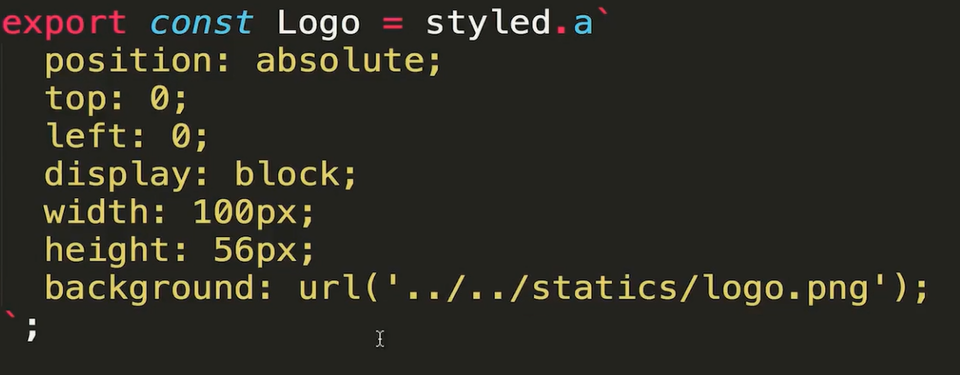
网页中返回的是一个路径字符串,webpack并没有帮我们把图片打包出来, 如下图,当然localhost:3000是没有上一级目录的,找不到图片的

所以这时候我们需要手动导入图片
import styled from 'styled-components'

import logoPic from '../../statics/jianshulogo.png'

export const HeaderWrapper = styled.div`

    position: relative;

    height: 56px;

    border-bottom: 1px solid #f0f0f0;

`

export const Logo = styled.a`

    position: absolute;

    top: 0;

    left: 0;

    display: block;

    width: 100px;

    height: 56px;

    background: red url(${logoPic})

`
styled-components:解决react的css无法作为组件私有样式的问题的更多相关文章
- CSS Modules 解决 react 项目 css 样式互相影响的问题
1. CSS Modules引入目的 写过CSS的人,应该都对一大长串选择器选中一个元素不陌生吧,这种方式,其实定义的就是全局样式,我们时常会因为选择器权重问题,没有把我们想要的样式加上去. 另外,每 ...
- Github css加载失败,样式混乱解决办法
github被墙的解决办法 Github css加载失败,样式混乱解决办法 打开cmd,输入 nslookup github.com 8.8.8.8 ,下面就会显示出github的服务器地址列 ...
- styled components草根中文版文档
1.styled components官网网址 https://www.styled-components.com/docs 以组件的形式来写样式. 1.1安装 yarn add styled-c ...
- 解决React首屏加载白屏的问题
众所周知,在项目中如果在资源加载请求还未完成的时候,由于阻塞机制,会出现首页白屏的问题,产生很差的用户体验.本文以react为例,提供一个解决方法. 解决原理:使用 onreadystatechang ...
- [React] Render Basic SVG Components in React
React loves svg just as much as it loves html. In this lesson we cover how simple it is to make SVG ...
- 解决React Native unable to load script from assets index.android.bundle on windows
React Native运行的时候,经常碰到React Native unable to load script from assets index.android.bundle on windows ...
- 解决React Native使用Fetch API请求网络报Network request failed
问题来源: 1 . 在测试fetch数据请求时,Xcode9.0以上的无法请求https, 需要在Xcode中加载项目后修改Info.plist的相关配置,具体如下参考 问题及解决方法一模一样,不再重 ...
- springboot 解决配置js/css/img缓存问题
# 解决配置js/css/img缓存问题 spring.resources.chain.strategy.content.enabled=true spring.resources.chain.str ...
- react 调用 function 的写法 及 解决 react onClick 方法自动执行
1.react 调用方法的写法 (1)方式一 onClick={this.getFetchData.bind(this,item.id)} (2)方式二 getFetchData(e){ this.s ...
随机推荐
- 解决“无法完成域加入,原因是试图加入的域的SID与本计算机的SID相同
原文链接:http://www.cnblogs.com/xiaoyou2018/p/10677437.html Windows server 2012 R2 解决"无法完成域加入,原因是试图 ...
- CentOS 7 ETCD集群配置大全
目录 前言 环境准备 安装 静态集群 配置 node01 配置文件 node02 配置文件 node03 配置文件 启动测试 查看集群状态 生成TLS证书 etcd证书创建 安装cfssl工具集 生成 ...
- CentOS 7 Keepalive 脚本不执行解决
目录 问题 问题一 括号问题 问题二 脚本名称问题 问题 起因是在测试部署 Altls + Keepalive 高可用读写分离,测试停止Atlas服务的时候,发现Keepalive不会自动主从切换,就 ...
- 复习sed实例操作
第6周复习课(5月2日) 课程内容: 复习 扩展1.打印某行到某行之间的内容http://ask.apelearn.com/question/5592.sed转换大小写 http://ask.apel ...
- C#中的委托和事件(二)
引言 如果你看过了 C#中的委托和事件 一文,我想你对委托和事件已经有了一个基本的认识.但那些远不是委托和事件的全部内容,还有很多的地方没有涉及.本文将讨论委托和事件一些更为细节的问题,包括一些大家常 ...
- 硬核! 逛了4年Github ,一口气把我收藏的 Java 开源项目分享给你!
Awsome Java Great Java project on Github(Github 上非常棒的 Java 开源项目). English Version 大家都知道 Github 是一个程序 ...
- Git的安装和使用教程详解
---恢复内容开始--- 本篇笔记聊聊Git的安装和使用教程 一.认 识 Git ...
- docker tomcat镜像部署springbootwar包
springboot打war包 1.在pom文件中增加插件 <build> <finalName>xx</finalName> <plugins> &l ...
- luogu P5058 [ZJOI2004]嗅探器
题目描述 某军搞信息对抗实战演习,红军成功地侵入了蓝军的内部网络,蓝军共有两个信息中心,红军计划在某台中间服务器上安装一个嗅探器,从而能够侦听到两个信息中心互相交换的所有信息,但是蓝军的网络相当的庞大 ...
- 放大镜效果 --- enlarge.js
html页面: 注释:遮罩层的大小取决于 ===>layerwidth/layerheight = largewidth/largeheight enlarge.js页面 /* jqu ...