
【Android】5.3 单选和复选
分类:C#、Android、VS2015;
创建日期:2016-02-07
一、简介
1、CheckBox
复选
【Checked】属性:是否选中。
2、RadioButton
单选
【Checked】属性:是否选中。
【RadioGroup】属性:RadioButton的分组容器。注意必须将RadioButton包含在RadioGroup内。
二、示例4—Demo04CheckBoxRadioButton
1、运行截图
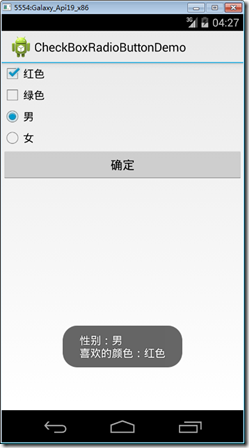
2、添加demo04_CheckBoxRadioButton.axml文件
在layout文件夹下添加该文件。
从【工具箱】中向设计界面拖放2个【CheckBox】控件,1个【RadioGroup】控件,然后直接在【源】中将其修改为下面的内容:
<?xml version="1.0" encoding="utf-8"?>

<LinearLayout xmlns:android="http://schemas.android.com/apk/res/android"

    android:orientation="vertical"

    android:layout_width="match_parent"

    android:layout_height="match_parent">

    <CheckBox

        android:text="红色"

        android:layout_width="match_parent"

        android:layout_height="wrap_content"

        android:id="@+id/checkBoxRed" />

    <CheckBox

        android:text="绿色"

        android:layout_width="wrap_content"

        android:layout_height="wrap_content"

        android:id="@+id/checkBoxGreen" />

    <RadioGroup

        android:minWidth="25px"

        android:minHeight="25px"

        android:layout_width="match_parent"

        android:layout_height="wrap_content"

        android:id="@+id/radioGroupGander">

        <RadioButton

            android:layout_width="wrap_content"

            android:layout_height="wrap_content"

            android:checked="true"

            android:text="男"

            android:id="@+id/radioButtonMale" />

        <RadioButton

            android:layout_width="wrap_content"

            android:layout_height="wrap_content"

            android:text="女"

            android:id="@+id/radioButtonFamale" />

    </RadioGroup>

    <Button

        android:id="@+id/btnOK"

        android:layout_width="fill_parent"

        android:layout_height="wrap_content"

        android:text="确定" />

</LinearLayout>
3、添加Demo04CheckBoxRadioButton.cs文件
在SrcActivity文件夹下添加该文件。
using System;

using Android.App;

using Android.OS;

using Android.Widget;

namespace ch05demos.SrcActivity

{

    [Activity(Label = "CheckBoxRadioButtonDemo")]

    public class Demo04CheckBoxRadioButton : Activity

    {

        CheckBox red, green;

        RadioButton nan, nv;

        protected override void OnCreate(Bundle savedInstanceState)

        {

            base.OnCreate(savedInstanceState);

            SetContentView(Resource.Layout.demo04_CheckBoxRadioButton);

            red = FindViewById<CheckBox>(Resource.Id.checkBoxRed);

            green = FindViewById<CheckBox>(Resource.Id.checkBoxGreen);

            nan = FindViewById<RadioButton>(Resource.Id.radioButtonMale);

            nv = FindViewById<RadioButton>(Resource.Id.radioButtonFamale);

            var button = FindViewById<Button>(Resource.Id.btnOK);

            button.Click += Button_Click;

        }

        private void Button_Click(object sender, EventArgs e)

        {

            string s1 = "性别:" + (nan.Checked ? "男" : "女");

            string s2 = "喜欢的颜色:";

            if (red.Checked) s2 += red.Text;

            if (green.Checked) s2 += " " + green.Text;

            Toast.MakeText(this,

                string.Format("{0}\n{1}", s1, s2),

                ToastLength.Long).Show();

        }

    }

}
运行观察该例子的效果。
提示:通过【Checked】属性或Toggle()方法都可以改变RadioButton的状态。
【Android】5.3 单选和复选的更多相关文章
- 关于通过jq /js 实现验证单选框 复选框是否都有被选中
今天项目中遇到一个问题 就是要实现,单选框,复选框 同时都被选中才能进行下一步的问题,开始用js原生来写 怎么写都觉得不合适,通过for循环得出 复选框被选中的,在通过for循环得出单选框被选中的,问 ...
- Webfrom 生成流水号 组合查询 Repeater中单选与复选控件的使用 JS实战应用
Default.aspx 网页界面 <%@ Page Language="C#" AutoE ...
- Webfrom 生成流水号 组合查询 Repeater中单选与复选控件的使用 JS实战应用
Default.aspx 网页界面 <%@ Page Language="C#" AutoE ...
- php一些单选、复选框的默认选择方法(示例)
转载 http://www.php.cn/php-weizijiaocheng-360029.html 一. radio和checkbox及php select默认选择的实现代码 1.radio单选框 ...
- Python3+Selenium3+webdriver学习笔记8(单选、复选框、弹窗处理)
#!/usr/bin/env python# -*- coding:utf-8 -*-'''Selenium3+webdriver学习笔记8(单选.复选框.弹窗处理)''' from selenium ...
- iCheck获取单选和复选框的值和文本
//获取单选和复选框的值//parameters.type:"radio","checkbox"//parameters.name:input-name//pa ...
- [Swift通天遁地]二、表格表单-(17)制作在表单左侧添加单选和复选组件的表单行
★★★★★★★★★★★★★★★★★★★★★★★★★★★★★★★★★★★★★★★★➤微信公众号:山青咏芝(shanqingyongzhi)➤博客园地址:山青咏芝(https://www.cnblogs. ...
- 在微信框架模块中,基于Vue&Element前端,通过动态构建投票选项,实现单选、复选的投票操作
最近把微信框架的前端改造一下,在原来基于Bootstrap框架基础上的微信后台管理,增加一套Vue&Element的前端,毕竟Vue的双向绑定开发起来也还是很方便的,而且Element本身也提 ...
- android 中单选和复选框监听操作
单选按钮RadioGroup.复选框CheckBox都有OnCheckedChangeListener事件,我们一起了解一下. package com.genwoxue.oncheckedchange ...
随机推荐
- ionic3打包失败的解决办法
使用命令行: $ ionic cordova build android --release 打包android的时候,提示生成失败,原因是没有找到gradle,我的电脑因为安装了Android St ...
- STL - Unorderedset - 自定义哈希函数
1. hash工具类 hashval.hpp #ifndef _Core_HashVal_H_ #define _Core_HashVal_H_ #include <functional> ...
- UVa 10642 - Can You Solve It?
题目:二维平面上的整数点.用路径链接起来(0,0)->(1.0)->(0.1)->(2,0)->.. 给你两点坐标.求两点间步长(在路径上的距离). 分析:简单题. 我们发现点 ...
- ftpclient 编码备忘
if (FTPReply.isPositiveCompletion(ftpClient.sendCommand("OPTS UTF8", "ON"))) {// ...
- adb shell settings 控制安卓系统设置(转)
Android4.2的源码android-17\com\android\commands目录下较之前的版本多了一个settings命令,查看其中的SettingsCmd.java文件,末尾有命令的帮助 ...
- 用javascript的isNan()函数,可以判断是否为数字
var getstockid = $.trim($("#SearchString").val()); if (!isNaN(getstockid)) alert('是数字!'); ...
- 类的专有方法(__init__)
# -*- coding: utf-8 -*- #python 27 #xiaodeng #http://www.cnblogs.com/zyxstar2003/archive/2011/03/21/ ...
- CentOS关闭休眠和屏保模式
CentOS关闭休眠和屏保模式 本人因为特殊需求,想让某台Linux主机始终显示某个程序,显示器不能关机或者休眠或进入屏保模式. 环境:Ubuntu 11.10 最小化模式安装并安装有轻量级桌面o ...
- 源代码解说ActionBar的各种使用方法
1. Navigation Drawer 很多应用程序都使用了Navigation Drawer,如网易邮箱client.该控件位于 android.support.v4.widget.DrawerL ...
- Oracle创建库
oracle创建表空间 SYS用户在CMD下以DBA身份登陆: 在CMD中打sqlplus /nolog 然后再 conn / as sysdba --如果路径不存在则要创建路径 --创建临时表空间 ...