
MVC三级联动无刷新
本篇实现有关客户、订单和产品的无刷新三级联动,先看最终效果:
没有选择时,后2个Select状态为禁用: 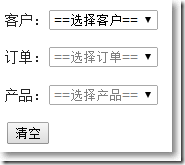
当选择第1个Select,第2个Select可供选择,第3个Select依旧禁用: 
当选择第2个Select,第3个Select可供选择: 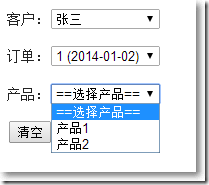
当选择第3个Select,界面出现"显示产品信息"按钮: 
当点击"显示产品信息"按钮,显示产品信息: 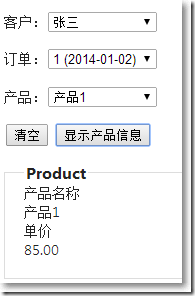
当点击"清空"按钮,恢复到初始状态: 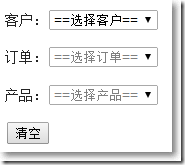
View Models
Model之间的关系为: 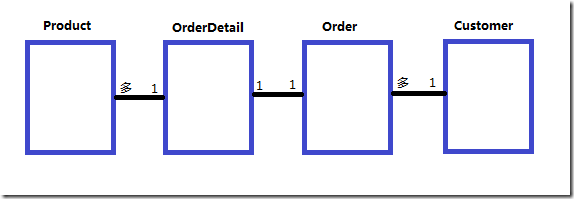
1: using System;
2: using System.Collections.Generic;
3: using System.ComponentModel.DataAnnotations;
4:
5: namespace MvcApplication2.Models
6: {
7: public class Customer
8: {
9: public int CustomerID { get; set; }
10: public string Name { get; set; }
11: }
12:
13: public class Order
14: {
15: public int OrderID { get; set; }
16: public int CustomerID { get; set; }
17: public DateTime OrderTime { get; set; }
18: }
19:
20: public class OrderDetail
21: {
22: public int OrderDetailID { get; set; }
23: public int OrderID { get; set; }
24: public List<Product> Products { get; set; }
25: }
26:
27: public class Product
28: {
29: public int ProductID { get; set; }
30: [Display(Name = "产品名称")]
31: public string Name { get; set; }
32:
33: [Display(Name = "单价")]
34: public decimal UnitPrice { get; set; }
35: }
36: }
37:
显示客户的Select
□ 服务层方法
1: //获取客户信息
2: public static List<Customer> GetCustomers()
3: {
4: List<Customer> customers = new List<Customer>();
5: customers.Add(new Customer(){CustomerID = 1,Name = "张三"});
6: customers.Add(new Customer(){CustomerID = 2, Name = "李四"});
7: return customers;
8: }
□ 控制器方法
1: public ActionResult Index()
2: {
3: List<Customer> customers = Service.GetCustomers();
4: List<SelectListItem> items = new List<SelectListItem>();
5: foreach (Customer customer in customers)
6: {
7: SelectListItem item = new SelectListItem()
8: {
9: Text = customer.Name,
10: Value = customer.CustomerID.ToString()
11: };
12: items.Add(item);
13: }
14: ViewData["c"] = items;
15: return View();
16: }
□ 视图
客户:@Html.DropDownList("Customers", (List<SelectListItem>)ViewData["c"],"==选择客户==",new {id = "Customers"} )
选择客户Select,显示订单Select
□ 服务层方法
1: //根据客户获取订单
2: public static List<Order> GetOrdersByCustomer(int customerID)
3: {
4: List<Order> orders = new List<Order>();
5: orders.Add(new Order(){OrderID = 1,CustomerID = 1,OrderTime = new DateTime(2014,1,2)});
6: orders.Add(new Order() { OrderID = 2, CustomerID = 1, OrderTime = new DateTime(2014, 1, 3) });
7: orders.Add(new Order() { OrderID = 3, CustomerID = 2, OrderTime = new DateTime(2014,1,4) });
8: orders.Add(new Order() { OrderID = 4, CustomerID = 2, OrderTime = new DateTime(2014,1,5) });
9:
10: return orders.Where(o => o.CustomerID == customerID).ToList();
11: }
□ 控制器方法
1: //根据客户获取订单
2: [HttpPost]
3: public JsonResult Orders(string customerID)
4: {
5: List<KeyValuePair<string,string>> items = new List<KeyValuePair<string, string>>();
6: if (!string.IsNullOrEmpty(customerID))
7: {
8: var orders = Service.GetOrdersByCustomer(int.Parse(customerID));
9: if (orders.Count() > 0)
10: {
11: foreach (Order order in orders)
12: {
13: items.Add(new KeyValuePair<string, string>(
14: order.OrderID.ToString(),
15: string.Format("{0} ({1:yyyy-MM-dd})",order.OrderID,order.OrderTime)));
16: }
17:
18: }
19: }
20: return Json(items);
21: }
□ 视图
1: <p>
2: 客户:@Html.DropDownList("Customers", (List<SelectListItem>)ViewData["c"],"==选择客户==",new {id = "Customers"} )
3: </p>
4: <p>
5: 订单:<select id="Orders" name="Orders">
6: <option value="">==选择订单==</option>
7: </select>
8: </p>
□ 视图js部分
1: @section scripts
2: {
3: <script type="text/javascript">
4: $(function () {
5:
6: //初始化
7: init();
8:
9: //点击客户触发
10: $('#Customers').change(function() {
11: changeCustomer();
12: });
13: });
14:
15: //初始化
16: function init() {
17: $('#ButtonSubmit').hide();
18: $('#Orders').attr("disabled", "true");
19: $('#Products').attr("disabled", "true");
20: }
21:
22: //点击客户事件
23: function changeCustomer() {
24: var selectedValue = $('#Customers option:selected').val();
25: if ($.trim(selectedValue).length > 0) {
26: getOrders(selectedValue);
27: }
28: }
29:
30: //点击客户显示订单
31: function getOrders(customerID) {
32: $.ajax({
33: url: '@Url.Action("Orders","Home")',
34: data: { customerID: customerID },
35: type: 'post',
36: cache: false,
37: async: false,
38: dataType: 'json',
39: success: function(data) {
40: if (data.length > 0) {
41: $('#Orders').removeAttr("disabled");
42: $('#Orders').empty();
43: $('#Orders').append($('<option></option>').val('').text('==选择订单=='));
44: $.each(data, function(i, item) {
45: $('#Orders').append($('<option></option>').val(item.Key).text(item.Value));
46: });
47: }
48: }
49: });
50: }
51:
52: </script>
53: }
54:
选择订单Select,显示产品Select
□ 服务层方法
1: //根据订单获取产品,订单和产品之间有中间表订单明细
2: public static List<Product> GetProductsByOrder(int orderID)
3: {
4: List<Product> products = new List<Product>();
5: products.Add(new Product(){ProductID = 1, Name = "产品1", UnitPrice = 85m});
6: products.Add(new Product() { ProductID = 2, Name = "产品2", UnitPrice = 95m });
7: products.Add(new Product() { ProductID = 3, Name = "产品3", UnitPrice = 65m });
8: products.Add(new Product() { ProductID = 4, Name = "产品4", UnitPrice = 75m });
9:
10: List<OrderDetail> orderDetails = new List<OrderDetail>();
11: orderDetails.Add(new OrderDetail(){OrderDetailID = 1, OrderID = 1, Products = new List<Product>()
12: {
13: products[0],
14: products[1]
15: }});
16:
17: orderDetails.Add(new OrderDetail()
18: {
19: OrderDetailID = 2,
20: OrderID = 2,
21: Products = new List<Product>()
22: {
23: products[2],
24: products[3]
25: }
26: });
27:
28: orderDetails.Add(new OrderDetail()
29: {
30: OrderDetailID = 3,
31: OrderID = 3,
32: Products = new List<Product>()
33: {
34: products[1],
35: products[3]
36: }
37: });
38:
39: orderDetails.Add(new OrderDetail()
40: {
41: OrderDetailID = 4,
42: OrderID = 4,
43: Products = new List<Product>()
44: {
45: products[0],
46: products[2]
47: }
48: });
49:
50: OrderDetail orderDetailsTemp = orderDetails.Where(od => od.OrderID == orderID).FirstOrDefault();
51: return orderDetailsTemp.Products;
52: }
53:
□ 控制器方法
1: //根据订单获取产品
2: [HttpPost]
3: public JsonResult Products(string orderID)
4: {
5: List<KeyValuePair<string,string>> items = new List<KeyValuePair<string, string>>();
6: int id = 0; //需要传入服务层方法的id
7: if (!string.IsNullOrEmpty(orderID) && int.TryParse(orderID, out id))
8: {
9: var products = Service.GetProductsByOrder(id);
10: if (products.Count() > 0)
11: {
12: foreach (Product product in products)
13: {
14: items.Add(new KeyValuePair<string, string>(
15: product.ProductID.ToString(),
16: product.Name
17: ));
18: }
19: }
20: }
21: return Json(items);
22: }
□ 视图
1: <p>
2: 客户:@Html.DropDownList("Customers", (List<SelectListItem>)ViewData["c"],"==选择客户==",new {id = "Customers"} )
3: </p>
4: <p>
5: 订单:<select id="Orders" name="Orders">
6: <option value="">==选择订单==</option>
7: </select>
8: </p>
9: <p>
10: 产品:<select id="Products" name="Products">
11: <option value="">==选择产品==</option>
12: </select>
13: </p>
□ 视图js部分
1: @section scripts
2: {
3: <script type="text/javascript">
4: $(function () {
5:
6: //初始化
7: init();
8:
9: //点击客户触发
10: $('#Customers').change(function() {
11: changeCustomer();
12: });
13:
14: //点击订单触发
15: $('#Orders').change(function() {
16: changeOrder();
17: });
18: });
19:
20: //初始化
21: function init() {
22: $('#ButtonSubmit').hide();
23: $('#Orders').attr("disabled", "true");
24: $('#Products').attr("disabled", "true");
25: }
26:
27: //点击客户事件
28: function changeCustomer() {
29: var selectedValue = $('#Customers option:selected').val();
30: if ($.trim(selectedValue).length > 0) {
31: getOrders(selectedValue);
32: }
33: }
34:
35: //点击客户显示订单
36: function getOrders(customerID) {
37: $.ajax({
38: url: '@Url.Action("Orders","Home")',
39: data: { customerID: customerID },
40: type: 'post',
41: cache: false,
42: async: false,
43: dataType: 'json',
44: success: function(data) {
45: if (data.length > 0) {
46: $('#Orders').removeAttr("disabled");
47: $('#Orders').empty();
48: $('#Orders').append($('<option></option>').val('').text('==选择订单=='));
49: $.each(data, function(i, item) {
50: $('#Orders').append($('<option></option>').val(item.Key).text(item.Value));
51: });
52: }
53: }
54: });
55: }
56:
57: //点击订单事件
58: function changeOrder() {
59: var selectedValue = $('#Orders option:selected').val();
60: if ($.trim(selectedValue).length > 0) {
61: getProducts(selectedValue);
62: }
63: }
64:
65: //点击订单显示产品
66: function getProducts(orderID) {
67: $.ajax({
68: url: '@Url.Action("Products","Home")',
69: data: { orderID: orderID },
70: type: 'post',
71: cache: false,
72: async: false,
73: dataType: 'json',
74: success: function(data) {
75: if (data.length > 0) {
76: $('#Products').removeAttr("disabled");
77: $('#Products').empty();
78: $('#Products').append($('<option></option>').val('').text('==选择产品=='));
79: $.each(data, function(i, item) {
80: $('#Products').append($('<option></option>').val(item.Key).text(item.Value));
81: });
82: }
83: }
84: });
85: }
86: </script>
87: }
88:
选择产品Select项,点击"显示产品信息"按钮,显示产品信息
□ 服务层方法
1: //根据产品ID获得产品信息
2: public static Product GetProduct(int productId)
3: {
4: List<Product> products = new List<Product>();
5: products.Add(new Product() { ProductID = 1, Name = "产品1", UnitPrice = 85m });
6: products.Add(new Product() { ProductID = 2, Name = "产品2", UnitPrice = 95m });
7: products.Add(new Product() { ProductID = 3, Name = "产品3", UnitPrice = 65m });
8: products.Add(new Product() { ProductID = 4, Name = "产品4", UnitPrice = 75m });
9:
10: return products.Where(p => p.ProductID == productId).FirstOrDefault();
11: }
□ 控制器方法
1: //根据产品ID获得产品
2: public ActionResult ProductInfo(string productID)
3: {
4: int id = 0;
5: if (!string.IsNullOrEmpty(productID) && int.TryParse(productID, out id))
6: {
7: var product = Service.GetProduct(id);
8: ViewData.Model = product;
9: }
10: return PartialView("_ProductInfo");
11: }
□ _ProductInfo部分视图
1: @model MvcApplication2.Models.Product
2:
3: <fieldset>
4: <legend>Product</legend>
5:
6: <div class="display-label">
7: @Html.DisplayNameFor(model => model.Name)
8: </div>
9: <div class="display-field">
10: @Html.DisplayFor(model => model.Name)
11: </div>
12:
13: <div class="display-label">
14: @Html.DisplayNameFor(model => model.UnitPrice)
15: </div>
16: <div class="display-field">
17: @Html.DisplayFor(model => model.UnitPrice)
18: </div>
19: </fieldset>
20:
□ 视图
1: <div id="wrapper">
2: <p>
3: 客户:@Html.DropDownList("Customers", (List<SelectListItem>)ViewData["c"],"==选择客户==",new {id = "Customers"} )
4: </p>
5: <p>
6: 订单:<select id="Orders" name="Orders">
7: <option value="">==选择订单==</option>
8: </select>
9: </p>
10: <p>
11: 产品:<select id="Products" name="Products">
12: <option value="">==选择产品==</option>
13: </select>
14: </p>
15: <p>
16: <input type ="button" id ="ButtonReset" value ="清空" />
17: <input type ="button" id ="ButtonSubmit" value ="显示产品信息" />
18:
19: </p>
20: </div>
21:
□ 视图js部分
1: @section scripts
2: {
3: <script type="text/javascript">
4: $(function () {
5:
6: //初始化
7: init();
8:
9: //点击客户触发
10: $('#Customers').change(function() {
11: changeCustomer();
12: });
13:
14: //点击订单触发
15: $('#Orders').change(function() {
16: changeOrder();
17: });
18:
19: //点击产品显示按钮
20: $('#Products').change(function() {
21: changeProuct();
22: });
23:
24: //点击显示产品
25: $('#ButtonSubmit').click(function() {
26: displayProductById();
27: });
28:
29: //清空按钮
30: $('#ButtonReset').click(function() {
31: resetContent();
32: });
33: });
34:
35: //初始化
36: function init() {
37: $('#ButtonSubmit').hide();
38: $('#Orders').attr("disabled", "true");
39: $('#Products').attr("disabled", "true");
40: }
41:
42: //点击客户事件
43: function changeCustomer() {
44: var selectedValue = $('#Customers option:selected').val();
45: if ($.trim(selectedValue).length > 0) {
46: getOrders(selectedValue);
47: }
48: }
49:
50: //点击客户显示订单
51: function getOrders(customerID) {
52: $.ajax({
53: url: '@Url.Action("Orders","Home")',
54: data: { customerID: customerID },
55: type: 'post',
56: cache: false,
57: async: false,
58: dataType: 'json',
59: success: function(data) {
60: if (data.length > 0) {
61: $('#Orders').removeAttr("disabled");
62: $('#Orders').empty();
63: $('#Orders').append($('<option></option>').val('').text('==选择订单=='));
64: $.each(data, function(i, item) {
65: $('#Orders').append($('<option></option>').val(item.Key).text(item.Value));
66: });
67: }
68: }
69: });
70: }
71:
72: //点击订单事件
73: function changeOrder() {
74: var selectedValue = $('#Orders option:selected').val();
75: if ($.trim(selectedValue).length > 0) {
76: getProducts(selectedValue);
77: }
78: }
79:
80: //点击订单显示产品
81: function getProducts(orderID) {
82: $.ajax({
83: url: '@Url.Action("Products","Home")',
84: data: { orderID: orderID },
85: type: 'post',
86: cache: false,
87: async: false,
88: dataType: 'json',
89: success: function(data) {
90: if (data.length > 0) {
91: $('#Products').removeAttr("disabled");
92: $('#Products').empty();
93: $('#Products').append($('<option></option>').val('').text('==选择产品=='));
94: $.each(data, function(i, item) {
95: $('#Products').append($('<option></option>').val(item.Key).text(item.Value));
96: });
97: }
98: }
99: });
100: }
101:
102: //根据产品ID获取产品信息
103: function displayProductById() {
104: var selectedValue = $('#Products option:selected').val();
105: if ($.trim(selectedValue).length > 0) {
106: $.ajax({
107: url: '@Url.Action("ProductInfo","Home")',
108: data: { productID: selectedValue },
109: type: 'post',
110: cache: false,
111: async: false,
112: dataType: 'html',
113: success: function(data) {
114: if (data.length > 0) {
115: $('#ProductInfo').empty();
116: $('#ProductInfo').html(data);
117: }
118: }
119: });
120: }
121: }
122:
123: //点击产品显示按钮
124: function changeProuct() {
125: var selectedValue = $('#Products option:selected').val();
126: if ($.trim(selectedValue).length > 0) {
127: $('#ButtonSubmit').show();
128: } else {
129: $('#ButtonSubmit').hide();
130: $('#Products').empty();
131: }
132: }
133:
134: //点击清空按钮
135: function resetContent() {
136: $('#Customers option:eq(0)').attr('selected', true);
137:
138: //订单Select,禁用,清空并显示第一项
139: $('#Orders').attr("disabled", "true");
140: $('#Orders').empty();
141: $('#Orders').append($('<option></option>').val('').text('==选择订单=='));
142:
143: //产品Select,禁用,清空并显示第一项
144: $('#Products').attr("disabled", "true");
145: $('#Products').empty();
146: $('#Products').append($('<option></option>').val('').text('==选择产品=='));
147:
148: $('#ButtonSubmit').hide();
149: $('#ProductInfo').empty();
150: }
151: </script>
152: }
153:
关于本篇的部分源码:下载
参考资料:
※ Kevin Tseng
MVC三级联动无刷新的更多相关文章
- [Ajax三级联动 无刷新]
三级联动 的效果图 html页面: <body> <label class="fl">区域:</label> <select class= ...
- ASP.NET MVC使用jQuery无刷新上传
昨晚网友有下载了一个jQuery无刷新上传的小功能,他尝试搬至ASP.NET MVC应用程序中去,在上传死活无效果.Insus.NET使用Teamviewer远程桌面,操作一下,果真是有问题.网友是说 ...
- Asp.net MVC Vue Axios无刷新请求数据和响应数据
Model层Region.cs using System; using System.Collections.Generic; using System.Linq; using System.Web; ...
- MVC ajaxfileupload 实现无刷新导入或上传功能
直接上代码吧 前台 先引用 ajaxfileupload.js <script src="~/Scripts/ajaxfileupload.js"></scrip ...
- JAVA EE 中之AJAX 无刷新地区下拉列表三级联动
JSP页面 <html> <head> <meta http-equiv="Content-Type" content="text/html ...
- JQuery中国省市区无刷新三级联动查询
之前有写过用<Ajax控件来实现中国的省市区无刷新查询> 今天用JQuery来实现,用Ajax控件和JQuery的优缺点就先不说了. 效果图如下: 下面来结合代码来详细说明一下如何用JQu ...
- Hibernate+DWR无刷新三级联动
DWR(Direct Web Remoting)是一个用于改善web页面与Java类交互的远程服务器端Ajax开源框架,可以帮助开发人员开发包含AJAX技术的网站.它可以允许在浏览器里的代码使用运行在 ...
- Hibernate+struts+JqueryAjax+jSON实现无刷新三级联动
看网上JqueryAjax三级联动的例子讲不是很全,代码也给的不是很全,给初学者带来一定的难度.小弟自己写了一个,可能有些地方不是很好,希望大家能够提出建议. 用的是Hibernate+struts2 ...
- Ajax省市区无刷新单表联动查询
方法一: 在很多时候都需要用到无刷新级联查询,本文将以省市区的级联查询作为例子.注:此为单表三级联动 环境:Vistual Studio 2015 .MSSQL 1.首先下载AjaxControlTo ...
随机推荐
- Centos简介
Centos作为主流的一种Linux操作系统,以后项目中,比如后期Redis,以及部署一些项目,会把Centos作为服务器操作系统,我们选用Centos,主要是免费,以及稳定. Centos详细介绍, ...
- EXEC与sp_executesql的区别及应用
在项目中需要将内部DECLARE的参数通过EXEC赋值后再作为下面一个EXEC参数的时候,发现都使用EXEC时,问题就不是那么简单了.趁着没有睡意研究下.EXEC的使用与缺点EXEC命令有两种用法,一 ...
- MySQL学习笔记:insert into select
从一个表复制数据插入到另外一个表,目标表中任何已存在的行都不会受影响. 语法: INSERT INTO table_xxx VALUES(); INSERT INTO table_xxx SELECT ...
- 宝塔Linux常用命令
https://www.bt.cn/bbs/thread-1186-1-1.html 2017年3月8日发布全新架构的宝塔Linux 面板3.1Beta版,到现在的5.2.0正式版,历经100多天打磨 ...
- HTTPS、SPDY和HTTP/2的性能比较
http://www.infoq.com/cn/news/2015/02/https-spdy-http2-comparison/ https://segmentfault.com/a/1190000 ...
- day6 SYS模块
SYS模块 用于提供对Python解释器相关的操作: (1)sys.argv 命令行参数List,第一个元素是程序本身路径 >>> sys.argv [' ...
- 30分钟LINQ教程的学习笔记
原文章 : http://www.cnblogs.com/liulun/archive/2013/02/26/2909985.html 一.11个与LINQ有关的语言特性: [隐式类型.匿名类型.对象 ...
- O(n log log n)实现FGT和FLT(Fast GCD/LCM Transformation)
本文是作者看不懂分治FFT之后开始娱乐一下自己写的 看到一道题时候询问了正解后,推出了一个奇怪的变换,发现这个很Transformation,我和正解推出来的奇怪的东西是一样的,但还是想写一下思路.. ...
- bzoj 1212: [HNOI2004]L语言
思路:字典树+dp, dp[ i ] 表示 前缀到 i 能不能被理解, 如果dp[ i ] 是能被理解的那么, 把i + 1, i + 2 .... 在字典树上走,走到一个单词就转移. ,这样可行的 ...
- 1. python 类型和运算
类型和运算 (Types and Operations) Introducing Python Object Types 在非正式的意义上, 在 Python 中, 我们用一些东西做事情. " ...