
java web前端easyui(layout+tree+双tabs)布局+树+2个选项卡tabs
1.列出要实现的样式:

2.实现的代码:
分三大部分:
1):页面主体部分:mian.vm
<html>

<head>

  <title>Ks UI</title>

  #parse("ui:include")

  <style>

      body{padding:0;margin:0}

  </style>

  <script>

      $(document).ready(function(){

        var tabs_content = $("#content");

        tabs_content.tabs({

            border:false,

            fit:true

        });

        //添加tab页面

        function addTabs(tab){

            tabs_content.tabs("add",{

                title:tab.text,

                closable:true,

                content : '<iframe frameborder="0" scrolling="auto" width="100%" height="100%" src="${path}'+tab.url+'"></iframe>'

            });

        }

        $("#tree_menu").tree({

            onClick: function(node){

                console.log(node);

                if(!tabs_content.tabs('exists',node.text)){

                    if(node.url){

                        addTabs(node);

                    }

                }else{

                    tabs_content.tabs("select",node.text);

                }

            }

        });

        //添加欢迎页面

        addTabs({

            text:'欢迎使用Ks UI',

            url:'/cn/com/ksplatform/ui/demo/main/views/fcomponents/welcome.vm'

        });

    });

  </script>

</head>

<body class="easyui-layout">

        <div data-options="region:'north'" style="height:70px"></div>

        <div data-options="region:'west',split:true" title="菜单" style="width:240px;">

            <ul class="easyui-tree" id="tree_menu" data-options="url:'$path/ui/resource/demo/data/tree.json',method:'get',animate:true"></ul>

        </div>

        <div data-options="region:'center'">

            <div  class="easyui-tabs" id="content" >

            </div>

        </div>

</body>

</html>
说明:这部分代码负责完成效果页面的整体框架和效果页面center上面的tabs,重点看tabs是如何实现的(代码<script>函数部分)
2):center中竖着的tabs部分:
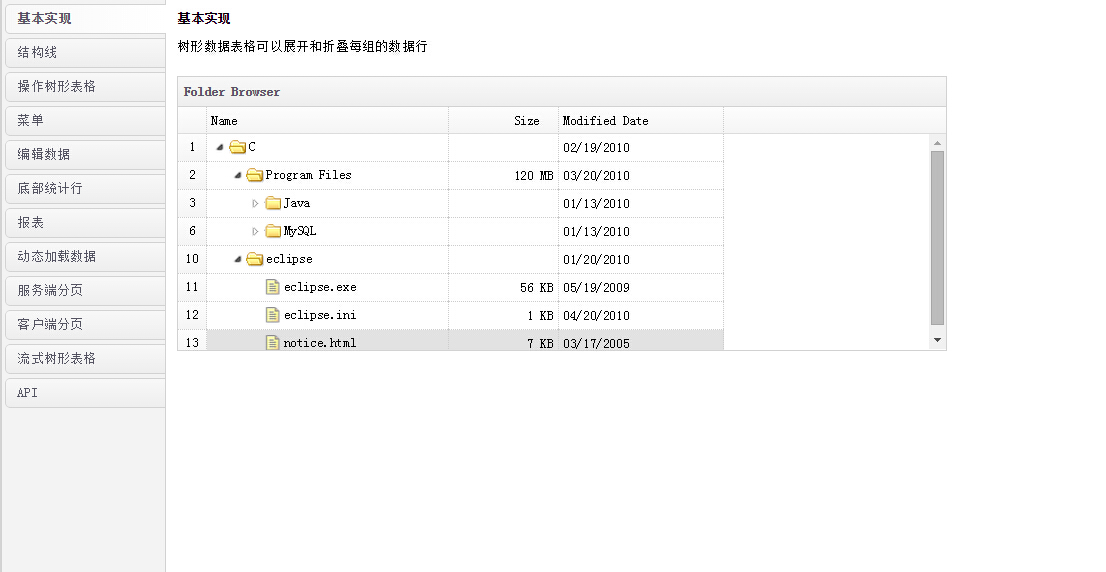
就是index.vm文件
<html>

<head>

  <title></title>

  #parse("ui:include")

  <script>

      $(document).ready(function(){

        $("#tt").tabs({

            tabPosition:'left',

            fit:true,

            onSelect:function(title,index){

                open(index);

            }

        });

        function open(index){

            var tab = $("#tt").tabs("getTab",index);

            //console.log(tab);

            //console.log(tab[0]);

            //不重复打开

            if(tab.attr("opend")){

                return;

            }

            var url = tab.panel("options").url;

            //var op=tab.panel("options");

            //console.log(op);

            if(url){

                $(tab[0]).html('<iframe frameborder="0" scrolling="auto" width="100%" height="100%" src="${path}'+url+'"></iframe>');

                tab.attr("opend",true);

            }

        }

        open(0);

    });

  </script>

</head>

<body>

<div id="tt" class="easyui-tabs">

   <div title="基本实现" style="padding:10px;" data-options="url:'/cn/com/ksplatform/ui/demo/main/views/fcomponents/panel/base.vm'">

   </div>

   <div title="面板工具栏" style="padding:10px;" data-options="url:'/cn/com/ksplatform/ui/demo/main/views/fcomponents/panel/mbgjl.vm'">

   </div>

   <div title="自定义工具栏" style="padding:10px;" data-options="url:'/cn/com/ksplatform/ui/demo/main/views/fcomponents/panel/zdygjl.vm'">

   </div>

    <div title="面板页脚" style="padding:10px;" data-options="url:'/cn/com/ksplatform/ui/demo/main/views/fcomponents/panel/mbyj.vm'">

   </div>

   <div title="加载面板内容" style="padding:10px;" data-options="url:'/cn/com/ksplatform/ui/demo/main/views/fcomponents/panel/jzmbnr.vm'">

   </div>

   <div title="面板嵌套" style="padding:10px;" data-options="url:'/cn/com/ksplatform/ui/demo/main/views/fcomponents/panel/mbqt.vm'">

   </div>

   <div title="流式面板" style="padding:10px;" data-options="url:'/cn/com/ksplatform/ui/demo/main/views/fcomponents/panel/lsmb.vm'">

   </div>

   <div title="API" style="padding:10px;" data-options="url:'/cn/com/ksplatform/ui/demo/main/views/fcomponents/panel/api.vm'">

   </div>

</div>

</body>

</html>
3):竖着的tabs中的每个小窗口的示例文件:base.vm
<html>

<head>

  <title></title>

  #parse("ui:include")

</head>

<body>

    <h2>基本面板Basic Panel</h2>

    <p>面板是其他组件或元素的容器</p>

    <div style="margin:20px 0 10px 0;">

        <a href="#" class="easyui-linkbutton" onclick="javascript:$('#p').panel('open')">打开</a>

        <a href="#" class="easyui-linkbutton" onclick="javascript:$('#p').panel('close')">关闭</a>

    </div>

    <div id="p" class="easyui-panel" title="Basic Panel" style="width:700px;height:200px;padding:10px;">

        <p style="font-size:14px">jQuery EasyUI framework helps you build your web pages easily.</p>

        <ul>

            <li>easyui is a collection of user-interface plugin based on jQuery.</li>

            <li>easyui provides essential functionality for building modem, interactive, javascript applications.</li>

            <li>using easyui you don't need to write many javascript code, you usually defines user-interface by writing some HTML markup.</li>

            <li>complete framework for HTML5 web page.</li>

            <li>easyui save your time and scales while developing your products.</li>

            <li>easyui is very easy but powerful.</li>

        </ul>

    </div>

</body>

</html>
附上:mian.vm中用到的tree.json:
[{

    "text":"基础组件",

    "children":[

        {"text":"面板Panel","url":"/cn/com/ksplatform/ui/demo/main/views/fcomponents/panel/index.vm"},

        {"text":"数据表格DataGrid","url":"/cn/com/ksplatform/ui/demo/main/views/fcomponents/datagrid/index.vm"},

        {"text":"树形数据表格TreeGrid","url":"/cn/com/ksplatform/ui/demo/main/views/fcomponents/treegrid/index.vm"},

        {"text":"分割按钮SplitButton","url":"/cn/com/ksplatform/ui/demo/main/views/fcomponents/splitbutton/index.vm"},

        {"text":"表单Form","url":"/cn/com/ksplatform/ui/demo/main/views/fcomponents/form/index.vm"},

        {"text":"下拉列表框ComboBox","url":"/cn/com/ksplatform/ui/demo/main/views/fcomponents/combobox/index.vm"},

        {"text":"数字文本框微调NumberSpinner","url":"/cn/com/ksplatform/ui/demo/main/views/fcomponents/numberspinner/index.vm"},

        {"text":"时间框微调TimeSpinner","url":"/cn/com/ksplatform/ui/demo/main/views/fcomponents/timespinner/index.vm"},

        {"text":"窗口Window","url":"/cn/com/ksplatform/ui/demo/main/views/fcomponents/window/index.vm"},

        {"text":"放置Droppable","url":"/cn/com/ksplatform/ui/demo/main/views/fcomponents/droppable/index.vm"},

        {"text":"手风琴菜单Accordion","url":"/cn/com/ksplatform/ui/demo/main/views/fcomponents/accordion/index.vm"},

        {"text":"数据列表DataList","url":"/cn/com/ksplatform/ui/demo/main/views/fcomponents/datalist/index.vm"},

        {"text":"链接按钮LinkButton","url":"/cn/com/ksplatform/ui/demo/main/views/fcomponents/linkbutton/index.vm"},

        {"text":"分页Pagination","url":"/cn/com/ksplatform/ui/demo/main/views/fcomponents/pagination/index.vm"},

        {"text":"文本框TextBox","url":"/cn/com/ksplatform/ui/demo/main/views/fcomponents/textbox/index.vm"},

        {"text":"数据表格下拉框ComboGrid","url":"/cn/com/ksplatform/ui/demo/main/views/fcomponents/combogrid/index.vm"},

        {"text":"日历Calendar","url":"/cn/com/ksplatform/ui/demo/main/views/fcomponents/calendar/index.vm"},

        {"text":"日期时间框微调DateTimeSpinner","url":"/cn/com/ksplatform/ui/demo/main/views/fcomponents/datatimespinner/index.vm"},

        {"text":"对话框Dialog","url":"/cn/com/ksplatform/ui/demo/main/views/fcomponents/dialog/index.vm"},

        {"text":"调整大小Resizable","url":"/cn/com/ksplatform/ui/demo/main/views/fcomponents/resizable/index.vm"},

        {"text":"选项卡Tabs","url":"/cn/com/ksplatform/ui/demo/main/views/fcomponents/tabs/index.vm"},

        {"text":"属性网格PropertyGrid","url":"/cn/com/ksplatform/ui/demo/main/views/fcomponents/propertygrid/index.vm"},

        {"text":"菜单Menu","url":"/cn/com/ksplatform/ui/demo/main/views/fcomponents/menu/index.vm"},

        {"text":"进度条ProgressBar","url":"/cn/com/ksplatform/ui/demo/main/views/fcomponents/progressbar/index.vm"},

        {"text":"文件框FileBox","url":"/cn/com/ksplatform/ui/demo/main/views/fcomponents/filebox/index.vm"},

        {"text":"树形下拉框ComboTree","url":"/cn/com/ksplatform/ui/demo/main/views/fcomponents/combotree/index.vm"},

        {"text":"日期框DateBox","url":"/cn/com/ksplatform/ui/demo/main/views/fcomponents/datebox/index.vm"},

        {"text":"滑动条Slider","url":"/cn/com/ksplatform/ui/demo/main/views/fcomponents/slider/index.vm"},

        {"text":"消息框Messager","url":"/cn/com/ksplatform/ui/demo/main/views/fcomponents/messager/index.vm"},

        {"text":"提示框Tooltip","url":"/cn/com/ksplatform/ui/demo/main/views/fcomponents/tooltip/index.vm"},

        {"text":"布局Layout","url":"/cn/com/ksplatform/ui/demo/main/views/fcomponents/layout/index.vm"},

        {"text":"树Tree","url":"/cn/com/ksplatform/ui/demo/main/views/fcomponents/tree/index.vm"},

        {"text":"菜单按钮MenuButton","url":"/cn/com/ksplatform/ui/demo/main/views/fcomponents/menubutton/index.vm"},

        {"text":"搜索框SearchBox","url":"/cn/com/ksplatform/ui/demo/main/views/fcomponents/searchbox/index.vm"},

        {"text":"自定义下拉框Combo","url":"/cn/com/ksplatform/ui/demo/main/views/fcomponents/combo/index.vm"},

        {"text":"数字文本框NumberBox","url":"/cn/com/ksplatform/ui/demo/main/views/fcomponents/numberbox/index.vm"},

        {"text":"日期时间框DateTimeBox","url":"/cn/com/ksplatform/ui/demo/main/views/fcomponents/datetimebox/index.vm"},

        {"text":"验证框ValidateBox","url":"/cn/com/ksplatform/ui/demo/main/views/fcomponents/validatebox/index.vm"},

        {"text":"拖动Draggable","url":"/cn/com/ksplatform/ui/demo/main/views/fcomponents/draggable/index.vm"}

    ]

},{

    "text":"组合组件",

    "children":[

    ]

},{

    "text":"功能组件",

    "children":[

        {"text":"分页数据列表"}

    ]

}]
这篇博文的目的主要是学习,各个main.vm和index.vm中<script></script>间函数的写法,如何能熟练正确的使用easyui各个模块的属性和方法:
其中通过chrome浏览器的console平台,借助console.log()方法,打印出index.vm文件中比较难理解的几个变量值:onSelect:function(title,index)中的title和index分别是tabs中各个子窗口的标题和索引号,索引号从0开始;
var tab = $("#tt").tabs("getTab",index); 打印出这里的var tab变量是整个大的页面;
console.log(tab[0]); 注意console输出的这个tab[0]恰好是tabs中选中的子窗口页面;
var url = tab.panel("options").url 中的url就是:/cn/com/ksplatform/ui/demo/main/views/fcomponents/panel/base.vm,也就是在index.vm中每个子窗口的地址;
easyui中tree模块的属性:
$("#tree_menu").tree({
onClick: function(node){
console.log(node);
if(!tabs_content.tabs('exists',node.text)){
if(node.url){
addTabs(node);
}
}else{
tabs_content.tabs("select",node.text);
}
}
});
这个函数中的node是什么呢?
这点可以看easyui中tree的api(当然也可以直接console输出):
每个节点都具备以下属性:
- id:节点ID,对加载远程数据很重要。
- text:显示节点文本。
- state:节点状态,'open' 或 'closed',默认:'open'。如果为'closed'的时候,将不自动展开该节点。
- checked:表示该节点是否被选中。
- attributes: 被添加到节点的自定义属性。
- children: 一个节点数组声明了若干节点。
前端还是经验的积累,所以多看api!!,多参加实践!!
java web前端easyui(layout+tree+双tabs)布局+树+2个选项卡tabs的更多相关文章
- Java Web 前端高性能优化(二)
一.上文回顾 上回我们主要从图片的合并.压缩等方面介绍前端性能优化问题(详见Java Web 前端高性能优化(一)) 本次我们主要从图像BASE64 编码.GZIP压缩.懒加载与预加载以及 OneAP ...
- Java Web 前端高性能优化(一)
Web 发展的速度让许多人叹为观止,层出不穷的组件.技术,只需要合理的组合.恰当的设置,就可以让 Web 程序性能不断飞跃.所有 Web 的思想都是通用的,它们也可以运用到 Java Web.这一系列 ...
- Java Web 前端资源文件的路径问题
WEB-INF是Java Web应用的安全目录,在部署时用于存放class文件.项目用到的库(jar包).Java Web应用的配置文件web.xml. 浏览器不能访问此目录下的资源,比如在WEB-I ...
- Java Web前端到后台常用框架介绍
一.SpringMVC http://blog.csdn.net/evankaka/article/details/45501811 Spring Web MVC是一种基于Java的实现了Web MV ...
- Java后台+数据库+Java web前端(新手)
实现简单页面上对数据的增删改查:Java后台+数据库表+Jsp前端网页设计 这里做一个简单的学生课程信息管理系统,做之前一定要先有自己的思路,要不然对新手来说,很容易乱的. 另有一完整的代码可供参考, ...
- Java web 前端面试知识点总结
经过几家大厂面试,目前成功拿到唯品会offer,分享一下我的面试知识点总结: 耦合性:也称块间联系.指软件系统结构中各模块间相互联系紧密程度的一种度量.模块之间联系越紧密,其耦合性就越强,模块的独立性 ...
- Java后台+数据库+Java web前端——记账本
下面是本人实现的网页版(设计思路见上一篇https://www.cnblogs.com/sengzhao666/p/10445984.html) 代码如下: 运行截图: 首页: 创建: 账本删除:(先 ...
- java web 前端页面的分页逻辑
<div class="divBody"> <div class="divContent"> <!--上一页 --> < ...
- java web前端调试手段
1.console.log() 2. jQuery.ajax({ url:"/task1/com/guodiantong/servlet/JsonTo ...
随机推荐
- java script sleep synchronous
function sleep(milliseconds) { var start = new Date().getTime(); for (var i = 0; i < 1e7; i++) { ...
- win10关闭后台应用程序进程的方法
一)win10系统后台应用有两大特点: 1.win10系统有许多系统自带应用软件,在系统任务栏中看不到任何自带的应用程序运行 2.但通过任务管理器的进程中,可直观的看到许多非系统进程正在运行. 二)后 ...
- mysql for update语句
我们都知道for update语句会锁住一张表,锁表的细节很多人却不太清楚,下面我们举例看下. 在表上我们有个索引,如下: 现在在我们通过索引store_id锁表: 我们再开一个客户端,还是锁住同一个 ...
- java中checked和unchecked 异常处理
有两种类型的异常:一种是checked异常一种是unchecked异常,在这篇文章中我们将利用实例来学习这两种异常,checked的异常和unchecked异常最大的区别就是checked去唱是在编译 ...
- referer null
Referer表示超链接源的URL!你想看到实验效果,要从a-->(能过<a href="b.jsp")b页面,然后在B里可以取得Refere参数! String ur ...
- luoguP1080 国王游戏 (贪心+高精度)
题目链接:https://www.luogu.org/problemnew/show/P1080 参考:https://www.luogu.org/problemnew/solution/P1080 ...
- 1.Two Sum (Array; HashTable)
Given an array of integers, find two numbers such that they add up to a specific target number. The ...
- c++ stl常用
#include<iostream>#include<string>#include<vector>#include<list>#include< ...
- Django的cookie学习
为什么要有cookie,因为http是无状态的,每次请求都是独立的,但是我们还需要保持状态,所以就有了cookie cookie就是保存在客户端浏览器上的键值对,别人可以利用他来做登陆 rep = r ...
- .NET获得上传图片宽高
代码: //图片大小限制--------------------------- System.Drawing.Image txtStoryimage = System.Drawing.Image.Fr ...