
smtp outlook邮件发送非授权码模式
1.起因:send fail SMTP AUTH extension not supported by server. 使用端口25 和587均失效出现此问题
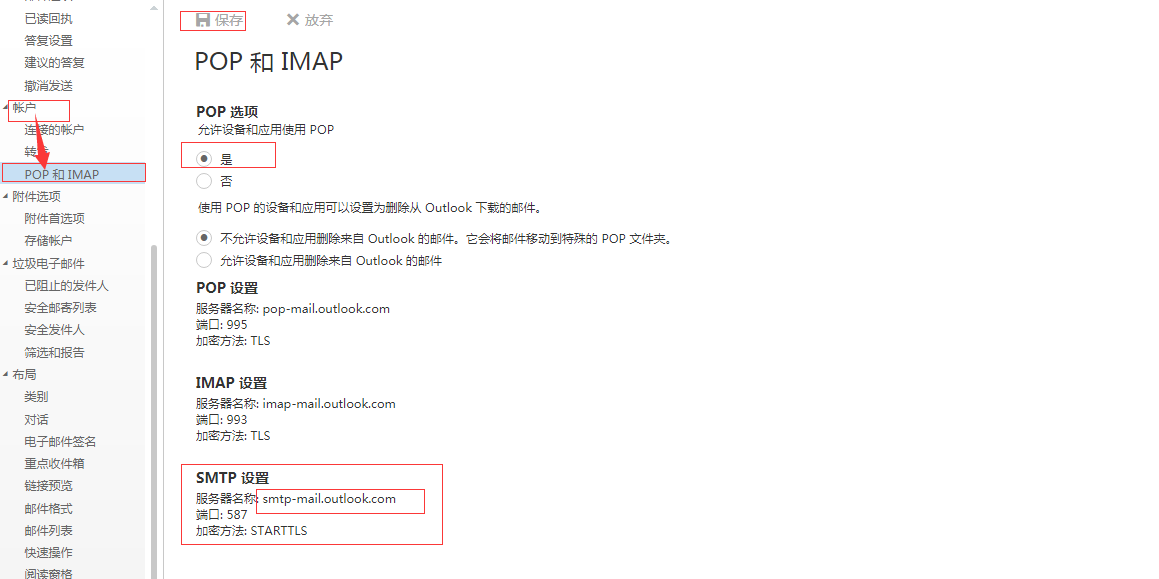
首先前往outlook修改设置pop和IMAP开启,允许第三方调用:https://outlook.live.com/owa/?path=/options/popandimap
【在使用QQ邮箱IOS端的APP添加outlook邮箱时,显示IMAP没有开启】是否意指当您在iOS手机设备中进行配置微软帐户至第三方域名邮箱(QQ邮箱)时,
系统提示Outlook邮箱中的IMAP并未开启?
- 请您前往网页版Outlook邮箱的【POP和IMAP】;
- 接着,请您在【POP选项】选择【是】;
- 在【使用POP的设备和应用可以设置为删除重Outlook下载的邮件】中,我们建议您点选【不允许设备和应用删除来自Outlook的邮件。它会将邮件移动到特殊的POP文件夹】,这是为了防止您的邮件丢失的情况;
- 请完成以上步骤后,单击【保存】即可。
查询原因:版本使用python3.7,官网做出如下变动:server_hostname cannot be an empty string or start with a leading dot.
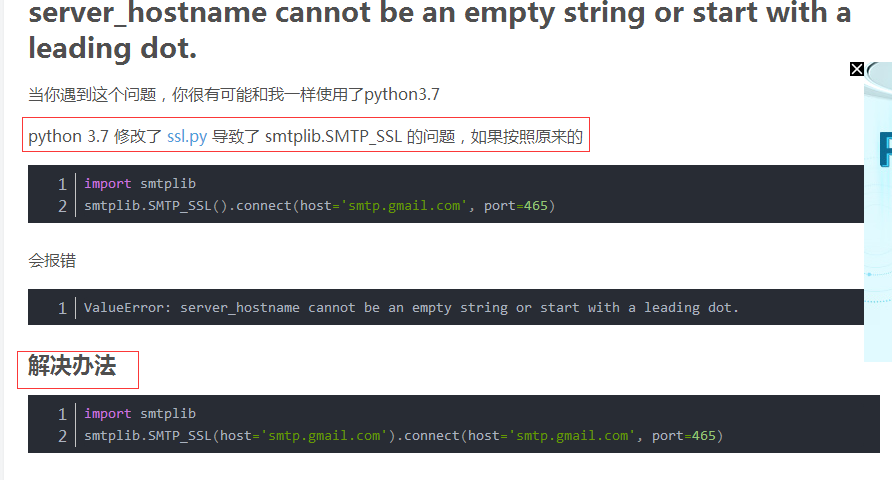
也就是说现在对于3.7需要对非ssl模式传入smtp server对象传入str模式的host地址再进行server对象创建连接
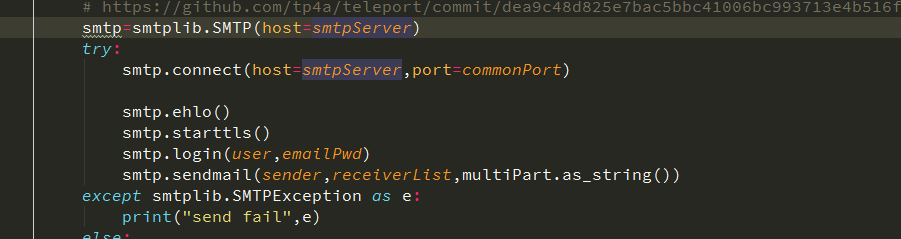
或者:


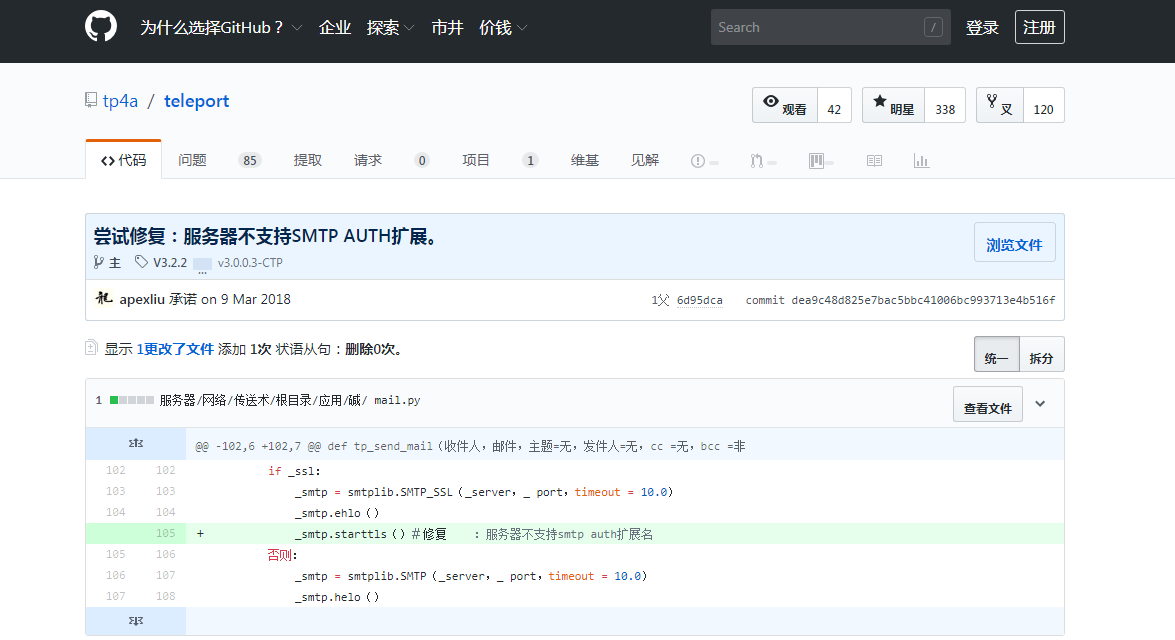
在github有人曾给出如下修复针对ssl,非ssl
https://github.com/tp4a/teleport/commit/dea9c48d825e7bac5bbc41006bc993713e4b516f
尝试修复:服务器不支持SMTP AUTH扩展。
最终及解决代码如下:

#!/usr/bin/python3

import os

import smtplib

from email.mime.text import MIMEText

from email.mime.multipart import MIMEMultipart

from email.header import Header

from email.mime.image import MIMEImage

def main():

    sender='chen1054@outlook.com'

    receiverList=['chen1054@outlook.com']

    user='chen1054@outlook.com'

    emailPwd='youroutlookpwd'#用户邮箱密码无需开通授权码

    smtpServer=r'smtp-mail.outlook.com'

    commonPort=587 # 25也有效

    emailTitle='Hello,World!'

    htmlPath=r'F:/eclipse/readme/readme_eclipse.html'

    attachPathList=[r'C:\Users\Administrator\PycharmProjects\Supro\src\logs\Info\20190330.log',r'C:\Users\Administrator\PycharmProjects\Supro\src\logs\Info\testpc.png']

    emailChanel(sender,receiverList,user,emailPwd,smtpServer,commonPort,emailTitle,htmlPath,attachPathList)

def emailChanel(sender,receiverList,user,emailPwd,smtpServer,commonPort,emailTitle,htmlPath=None,attachPathList=None):

    multiPart=MIMEMultipart()

    multiPart['From']=sender

    multiPart['To']=','.join(receiverList)

    subject=emailTitle

    multiPart['Subject']=Header(subject,"utf-8")

    if os.path.isfile(htmlPath):

        if os.path.exists(htmlPath):

            pass

        else:

            raise IOError("htmlPath not exist")

    else:

        raise IOError("html path is not file..")

    emailBody=MIMEText(_text=open(htmlPath,'rb').read(),_subtype='html',_charset="utf-8")

    multiPart.attach(emailBody)

    if isinstance(attachPathList,list):

            for attachPath in attachPathList:

                if os.path.exists(attachPath):

                    pass

                else:

                    raise  IOError("attachPath not exist")

    else:

        raise TypeError("expected type is list,but get {}".format(type(attachPathList).__name__))

    for attachPath in attachPathList:

        if os.path.splitext(attachPath)[-1]==".log":

            attach=MIMEText(open(attachPath, 'rb').read(), 'base64', 'utf-8')

            attach["Content-Type"] = 'application/octet-stream'

            attach["Content-Disposition"] = 'attachment; filename="dailyLog.log"' # filename not strict

            multiPart.attach(attach)

        if os.path.splitext(attachPath)[-1]==".png":

            fp = open(attachPath, 'rb')

            msgImage = MIMEImage(fp.read(),_subtype='octet-stream')

            fp.close()

            msgImage.add_header('Content-Disposition', 'attachment', filename="attach.png")

            multiPart.attach(msgImage)

    # https://github.com/tp4a/teleport/commit/dea9c48d825e7bac5bbc41006bc993713e4b516f

    smtp=smtplib.SMTP("{}:{}".format(smtpServer,commonPort))

    try:

        smtp.ehlo()

        smtp.starttls()

        smtp.login(user,emailPwd)

        smtp.sendmail(sender,receiverList,multiPart.as_string())

    except smtplib.SMTPException as e:

        print("send fail",e)

    else:

        print("success")

    finally:

        try:

            smtp.quit()

        except smtplib.SMTPException:

            print("quit fail")

        else:

            print("quit success")

if __name__ == '__main__':

    main()

如果你对上面问题还有疑问可以加群咨询我:
smtp outlook邮件发送非授权码模式的更多相关文章
- Oauth2.0认证---授权码模式
目录: 1.功能描述 2.客户端的授权模式 3.授权模式认证流程 4.代码实现 1.功能描述 OAuth在"客户端"与"服务提供商"之间,设置了一个授权层(au ...
- asp.net权限认证:OWIN实现OAuth 2.0 之授权码模式(Authorization Code)
asp.net权限认证系列 asp.net权限认证:Forms认证 asp.net权限认证:HTTP基本认证(http basic) asp.net权限认证:Windows认证 asp.net权限认证 ...
- OAuth 2.0之授权码模式
转载自:http://www.ruanyifeng.com/blog/2014/05/oauth_2_0.html OAuth 2.0授权码模式 授权码模式(authorization code)是功 ...
- 学习Spring Security OAuth认证(一)-授权码模式
一.环境 spring boot+spring security+idea+maven+mybatis 主要是spring security 二.依赖 <dependency> <g ...
- oauth2.0授权码模式详解
授权码模式原理 授权码模式(authorization code)是功能最完整.流程最严密的授权模式.它的特点就是通过客户端的后台服务器,与"服务提供商"的认证服务器进行互动. 它 ...
- Spring Cloud2.0之Oauth2环境搭建(授权码模式和密码授权模式)
oauth2 server 微服务授权中心, github源码 https://github.com/spring-cloud/spring-cloud-security 对微服务接口做一些权 ...
- Oauth2认证模式之授权码模式实现
Oauth2认证模式之授权码模式(authorization code) 本示例实现了Oauth2之授权码模式,授权码模式(authorization code)是功能最完整.流程最严密的授权模式.它 ...
- 微信授权就是这个原理,Spring Cloud OAuth2 授权码模式
上一篇文章Spring Cloud OAuth2 实现单点登录介绍了使用 password 模式进行身份认证和单点登录.本篇介绍 Spring Cloud OAuth2 的另外一种授权模式-授权码模式 ...
- Spring Security OAuth2 Demo —— 授权码模式
本文可以转载,但请注明出处https://www.cnblogs.com/hellxz/p/oauth2_oauthcode_pattern.html 写在前边 在文章OAuth 2.0 概念及授权流 ...
随机推荐
- 关于CSRF跨域请求伪造的解决办法
中秋节时候我们的应用在短信验证码这块被恶意刷单,比如被用来做垃圾短信之类的,如果大规模被刷也能造成不小的损失.这还只是短信验证码,如果重要的API遭到CSRF的攻击,损失不可估量.所以紧急加班解决了C ...
- 【代码笔记】iOS-左右可滑动的选择条
一,效果图. 二,工程图. 三,代码. RootViewController.h #import <UIKit/UIKit.h> @interface RootViewController ...
- mysql 导入时报错:Got a packet bigger than‘max_allowed_packet’bytes
原因是max_allowed_packet 值设置过小. 网上粘贴一段定义: max_allowed_packet:指代mysql服务器端和客户端在一次传送数据包的过程当中数据包的大小这个是定义mys ...
- intent调用代码总结
进入联系人界面 Intent intent = new Intent(); intent.setAction(Intent.ACTION_VIEW); intent.setData(People.CO ...
- JS弹出div简单样式
<div id="dialog" style="display:none;z-index:9999;position: absolute;border:1px so ...
- 由于使用JDBC ResultSet的滚动功能而导致的内存溢出
前天一去公司,老大说,服务器全挂了! 最后排查了半天,结论是内存溢出! 在WAS的DUMP日志中,看得我头晕眼花,终于找到了罪魁祸首,原来是有同事写代码的时候使用了可滚动的结果集导致内存溢出. 什么是 ...
- November 27th 2016 Week 48th Sunday
It is never too late to be what you might have been. 勇敢做自己,永远不嫌迟. What I might have been? Experienci ...
- 团队作业—预则立&&他山之石(改)
首先特别感谢刘乾学长腾出他宝贵的时间接受我的采访,为我们提出宝贵的建议,深表感谢. 1.他山之石,可以攻玉.借鉴前人的经验可以使我们减少很多走弯路的地方,这也是本次采访的目的,参考历届学长的经验,让我 ...
- kudu安装部署
安装部署节点规划 节点 kudu-master kudu-tserver node01 是 是 node02 是 是 node03 是 是 配置本地Yum的Repository 下载kudu安装yum ...
- [微信小程序直播平台开发]___(三)Nginx-rtmp事件回调
1.一个可以忽略的前言 发起直播后可以在Nginx的自带的页面上查看到统计,那怎么知道发起了直播或者关闭了直播呢?我想到了这个统计页,于是查看一下里面的内容看看如何获取到的数据, 找到后发现是个xsl ...