
PAT 1001A+B Format
题目速览
1.解题的思路过程
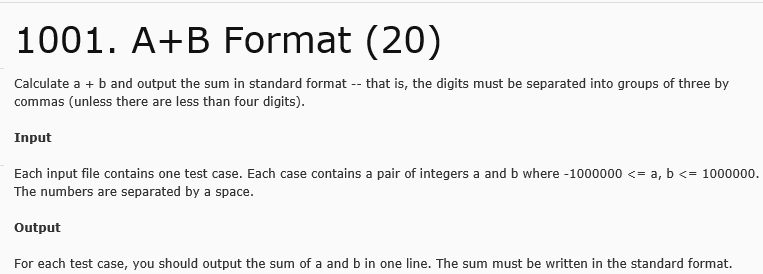
- 认真读题,题目为A+BFormat,简单的计算a+b问题,特殊在于输出的形式。
- 输入形式为每个输入文件包含一个测试样例,每个测试样例仅包含一对整型a与b。
- 数字大小范围为-1000000到1000000,确定使用整型类型表示和。
- 输出较为特殊,结果必须使用标准形式输出,即结果为四位数及以上的必须从最后开始每三位数字前添加一个逗号,增强结果的可读性。
- 问题的代码实现
采用取余的方法从最后开始将三位三位取出来。
题目结果最大值为2,000,000最小值为-2000000,最多需要使用两个逗号。
我认为较简单的方法是采用分类,分为不需要逗号(-1000<sum<1000),需要一个逗号(-1,000,000<sum<1,000,000),和其他需要两个逗号。
考虑到有的三位是000,010等情况,取余后仅出现0,10等,printf使用%03d(前面自动补零)。
2.编码过程中调试
检测题目给出样例-1000000 9时出现bug,输出结果为-999,-991,意识到当为负数时,分次输出每次都为负数。我使用绝对值函数将后面的结果变为非负,如此便只留下最开头的负号,与输出相符。
3.上线测试(提交代码)后的bug发现与修改过程
代码
    #include<stdio.h>

    #include<math.h>

    int main()

    {

    int a,b,sum;

    scanf("%d%d",&a,&b);

    sum=a+b;

    if(sum<1000&&sum>-1000)

        printf("%d",sum);

    else if(sum<1000000&&sum>-1000000)

    printf("%d,%03d",sum/1000%1000,abs(sum%1000));

    else

    printf("%d,%03d,%03d",sum/1000000%1000,abs(sum/1000%1000),abs(sum%1000));

    return 0;

    }
后来我看了其他同学的代码,得到了启发,当和为负数可以先取绝对值,打印出负号,这样代码更为简单。
    #include<stdio.h>

    int main()

    {

    int a,b,sum;

    scanf("%d%d",&a,&b);

    sum=a+b;

        if(sum<0)

        {

	        sum=-sum;

        printf("-");

        }

        if(sum<1000)

    printf("%d",sum);

    else if(sum<1000000)

    printf("%d,%03d",sum/1000%1000,sum%1000);

    else

    printf("%d,%03d,%03d",sum/1000000%1000,sum/1000%1000,sum%1000);

    return 0;

    }
在PAT上的提交记录列表截图

今天做了一题类似的输出三位分组问题,题目数据保证输入输出为整型。这次开了数组来存储数据,第一次没有考虑到0的输出导致错误。
    while(result)

    {

	    num[i++]=result%10;

	    result/=10;

    }

    for(j=i-1;j>=0;j--)

    {

        cout<<num[j];

       if(j%3==0 && j!=0)

       {

            cout<<",";

       }

    }
PAT 1001A+B Format的更多相关文章
- 第二次作业 编程题 PAT 1001A+B Format
Github的object-oriented仓库:1001.A+BFormat(20) 1.解题的思路过程 在之前学习C语言时曾经碰到过类似的将数字转换成字符输出的情况,这道题目要求输出的数字每三个间 ...
- [PAT]A+B Format[简单]
1001 A+B Format (20)(20 分) Calculate a + b and output the sum in standard format -- that is, the dig ...
- PAT (Advanced Level) Practice 1001 A+B Format (20 分) 凌宸1642
PAT (Advanced Level) Practice 1001 A+B Format (20 分) 凌宸1642 题目描述: Calculate a+b and output the sum i ...
- PAT甲级 1001. A+B Format (20)
题目原文: Calculate a + b and output the sum in standard format -- that is, the digits must be separated ...
- PAT (Advanced Level) Practise:1001. A+B Format
[题目链接] Calculate a + b and output the sum in standard format -- that is, the digits must be separate ...
- pat 1001 A+B Format
题目链接:传送门 题目简述: 1. 给定两个整数值a,b: 2.范围-1000000 <= a, b <= 1000000: 3.按指定格式输出结果 例:-100000 9 输出: -99 ...
- PAT甲级真题打卡:1001.A+B Format
题目: Calculate a + b and output the sum in standard format -- that is, the digits must be separated i ...
- PAT (Advanced Level) Practice 1001 A+B Format (20 分)
题目链接:https://pintia.cn/problem-sets/994805342720868352/problems/994805528788582400 Calculate a+b and ...
- PAT甲级 1001 A+B Format
题目链接:https://pintia.cn/problem-sets/994805342720868352/problems/994805528788582400 1001 A+B Format ( ...
随机推荐
- [转载]Angular4 组件通讯方法大全
组件通讯,意在不同的指令和组件之间共享信息.如何在两个多个组件之间共享信息呢. 最近在项目上,组件跟组件之间可能是父子关系,兄弟关系,爷孙关系都有.....我也找找了很多关于组件之间通讯的方法,不同的 ...
- 浅析人脸检测之Haar分类器方法:Haar特征、积分图、 AdaBoost 、级联
浅析人脸检测之Haar分类器方法 一.Haar分类器的前世今生 人脸检测属于计算机视觉的范畴,早期人们的主要研究方向是人脸识别,即根据人脸来识别人物的身份,后来在复杂背景下的人脸检测需求越来越大,人脸 ...
- 17.async 函数
async 函数 async 函数 含义 ES2017 标准引入了 async 函数,使得异步操作变得更加方便. async 函数是什么?一句话,它就是 Generator 函数的语法糖. 前文有一个 ...
- UA 用户代理
User Agent中文名为用户代理,简称 UA,它是一个特殊字符串头,使得服务器能够识别客户使用的操作系统及版本.CPU 类型.浏览器及版本.浏览器渲染引擎.浏览器语言.浏览器插件等.被广泛用来标识 ...
- ADO----nDSN
//////////////链接数据库 非DSN模式///////////////////////////// //CString strOpen="DSN=DBAddressBook ...
- 三:vim常用快捷键
窗口移动操作: j或者Ctrl+e(就是Ctrl+e):向下细微滚动窗口. k或者Ctrl+y:向上细微滚动窗口. h:向左细微滚动窗口. l:向右细微滚动窗口. gg:跳转到页面的顶部. G(就是s ...
- Leet Palindrome Partitioning II
class Solution { public: int minCut(string s) { int len = s.length(); ]; char* s_dp = new char[len * ...
- problem-solving-with-algorithms-and-data-structure-usingpython(使用python解决算法和数据结构) -- 算法分析
1. 计算前n个整数的和 def sumOfN(n): theSum = 0 for i in range(1,n+1): theSum += i return theSum print(sumOfN ...
- 《css揭秘》下(伪元素,文字背景,垂直居中技巧,文字环绕)
本篇主要记录<CSS3揭秘>一书中后面几章的常用技巧. 1.伪元素换行 先看下HTML代码,如下 <div class="demo1"> <div c ...
- Ubuntu14.04安装Torch7笔记
Ubuntu14.04安装Torch7笔记 利用快捷键Ctrl+Alt+T打开Ubuntu终端 第一步: 获取安装LuauJIT(C语言编写的Lua的解释器)和Torch所必需的依赖包. 代码如下: ...