
英语笔记3(git)
一:
To create a new branch and switch to it at the same time, you can run the git checkout command with the -b switch:
$ git checkout -b iss53

Switched to a new branch "iss53"
This is shorthand for:
$ git branch iss53

$ git checkout iss53
https://git-scm.com/book/en/v2/Git-Branching-Basic-Branching-and-Merging
二:The iss53 branch has moved forward with your work
However, before you do that, note that if your working directory or staging area has uncommitted changes that conflict with the branch you’re checking out, Git won’t let you switch branches. It’s best to have a clean working state when you switch branches。
You can run your tests, make sure the hotfix is what you want, and finally merge the hotfixbranch back into your master branch to deploy to production. You do this with the git mergecommand:
$ git checkout master

$ git merge hotfix

Updating f42c576..3a0874c

Fast-forward

 index.html | 2 ++

 1 file changed, 2 insertions(+)
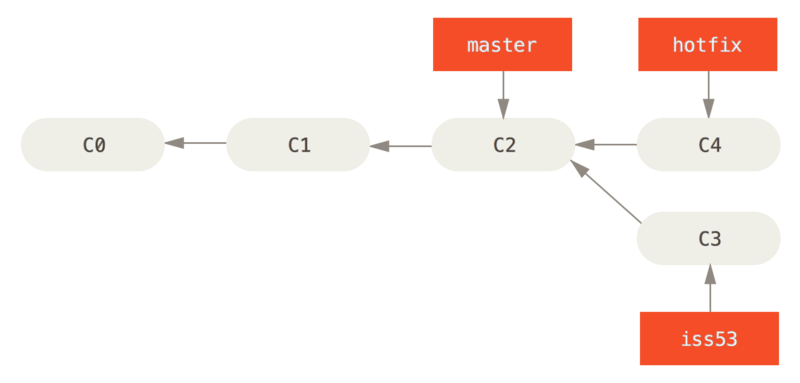
You’ll notice the phrase “fast-forward” in that merge. Because the commit C4 pointed to by the branch hotfix you merged in was directly ahead of the commit C2 you’re on, Git simply moves the pointer forward. To phrase that another way, when you try to merge one commit with a commit that can be reached by following the first commit’s history, Git simplifies things by moving the pointer forward because there is no divergent work to merge together — this is called a “fast-forward.”
三:
Suppose you’ve decided that your issue #53 work is complete and ready to be merged into your master branch. In order to do that, you’ll merge your iss53 branch into master, much like you merged your hotfix branch earlier. All you have to do is check out the branch you wish to merge into and then run the git merge command:
$ git checkout master

Switched to branch 'master'

$ git merge iss53

Merge made by the 'recursive' strategy.

index.html |    1 +

1 file changed, 1 insertion(+)
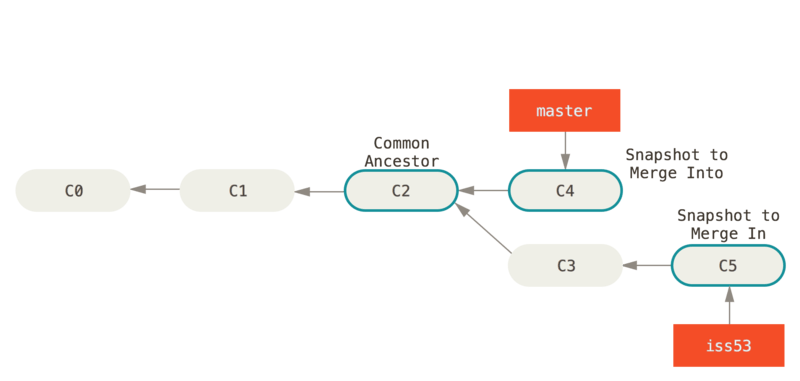
This looks a bit different than the hotfix merge you did earlier. In this case, your development history has diverged from some older point. Because the commit on the branch you’re on isn’t a direct ancestor of the branch you’re merging in, Git has to do some work. In this case, Git does a simple three-way merge, using the two snapshots pointed to by the branch tips and the common ancestor of the two.
英语笔记3(git)的更多相关文章
- Git 笔记三 Git的初步使用
Git 笔记三 Git的初步使用 在上一篇中,学习了如何配置Git环境,这一篇,开始学习Git的初步使用.Git的初步使用还是很简单的.总体上知道git init, git clone, git ad ...
- Git 笔记二-Git安装与初始配置
git 笔记二-Git安装与初始配置 Git的安装 由于我日常生活和工作基本上都是在Windows上,因此此处只说windows上的安装.Windows上的安装和其他程序一样,只需要到http://g ...
- 英语笔记3(git)
备注 一: Staging Modified Files Let’s change a file that was already tracked. (tracked 表示该文件已经被git管理过,再 ...
- Git 笔记一 Git简介
git 笔记一 什么是版本控制 所谓版本控制就是记录对文件的修改记录,这样以后就能回退到需要的 版本.比如你对一段代码进行了几次修改,有几次修改不想要了,如果 使用了版本控制,就可以回退到未做这些修改 ...
- git的学习笔记(二):git远程操作
1.创建ssh key ssh-keygen -t rsa -C "your_email@example.com" 执行命令后会在用户的家目录生成.ssh的隐藏文件夹,文件夹里有公 ...
- 项目管理---git----快速使用git笔记(一)------git的简单介绍
最近svn代码管理服务器崩溃了,切换到git来运作. 经过几天的使用,感觉很不错. 尤其是代码合并到正式版本之前 可以对代码进行 code review. 这样能很好的保证团队的代码质量和一些重复代码 ...
- 笔记:git和码云
背景:之前使用GitHub,无奈网速原因,有时候竟无法连接,搜索解决方案而又鱼龙混杂淹没在信息的海洋. 于是尝试码云,界面简单,全中文,用起来很是顺手. 码云使用git来管理,操作上都是git的基本指 ...
- 【学习笔记】Git的日常使用
Note:本笔记是我学习廖雪峰老师的Git教程整理得到,在此向廖老师的无私付出表示衷心的感谢! 0.Git的历史 Git是一个分布式的版本控制系统(C语言编写,一开始为Linux社区服务,替代BitK ...
- 【笔记】Git简明教程
前言 Git这个东西我曾经有学过,但学的内容太多了,有点懵,不太理解,磕磕碰碰的,走了不少弯路.不过最近我在B站上发现了一个讲的很好的教程:<表严肃讲Git>.因此,我决定用文字的方式分享 ...
随机推荐
- 【UER #8】雪灾与外卖
题解: 这个东西的模型是个费用流 但是直接跑费用流能拿到5分的高分 $(nm)*(nm)*log{nm}$ 考虑优化一下建图 我们可以不用对每个店和人都连边 而是对人和店都连一条链 然后对每个人连店刚 ...
- Snagit for mac(截图软件)中文版,截个图就是这么容易!
Snagit for mac是唯一具有内置高级图像编辑和屏幕录制功能的屏幕捕捉软件.它可以轻松抓取图像.文本和影音等多种内容形式,内置强大编辑器,捕捉.编辑一步到位.现为您带来Snagit for m ...
- 我的Python笔记补充:入门知识拾遗
声明:本文整理借鉴金角大王的Python之路,Day1 - Python基础1,仅供本人学习使用!!! 入门知识拾遗 一.bytes类型 二.三元运算 1 result = 值1 if 条件 else ...
- Codeforces 126B. Password (KMP)
<题目链接> 题目大意:给定一个字符串,从中找出一个前.中.后缀最长公共子串("中"代表着既不是前缀,也不是后缀的部分). 解题分析:本题依然是利用了KMP中next数 ...
- flask权限控制
大概思路为通过管理员id的查询角色,然后查看相应权限,为列表类型,然后通过id查询对应的路由规则,进而得出结论得出是否具有该权限 具体代码: def admin_auth(f): @wraps(f) ...
- 微信小程序 + nodeJs(loopback) 实现支付
实现小程序的支付,首先需要去微信官网先了解一下微信小程序支付相关接口文档:https://pay.weixin.qq.com/wiki/doc/api/wxa/wxa_api.php?chapter= ...
- 解决Spring boot中读取属性配置文件出现中文乱码的问题
问题描述: 在配置文件application.properties中写了 server.port=8081 server.servlet.context-path=/boy name=张三 age=2 ...
- [OC] NSTimer
注意NSTimer的销毁 NSTimer在初始化之后,加入RunLoop会导致当前界面被强引用, 所以不会执行dealloc, 需要在合适在逻辑上进行NSTimer的销毁 [_timer invali ...
- [数据结构] 希尔排序 C语言程序
//由小到大 //希尔排序 void shellSort( long int array[], int length) { int i; int j; int k; int gap; //gap是分组 ...
- Linux查看端口号是否使用
netstat -lntup|grep 80 如果令命无法执行 yum install net-tools