
原生js移除或添加样式
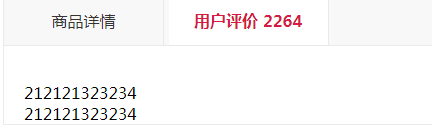
样式效果如下,点击商品详情 添加样式active

代码
<!doctype html>

<html lang="en">

<head>

    <meta charset="UTF-8">

    <meta name="Generator" content="EditPlus®">

    <meta name="Author" content="">

    <meta name="Keywords" content="">

    <meta name="Description" content="">

    <title>Document</title>

    <style>

        .P_nav {

            top: 0;

            position: absolute;

            width: 888px;

            height: 48px;

            border: 1px solid #eaeaea;

            background-color: #f8f8f8;

        }

            .P_nav .active {

                color: #d41c44;

                background-color: #fff;

                font-weight: bold;

            }

                .P_nav .active i {

                    position: absolute;

                    height: 45px;

                    line-height: 0;

                    width: 100%;

                    top: -1px;

                    left: 0;

                    border-top: 4px solid #d41c44;

                    border-bottom: 1px solid #fff;

                }

            .P_nav span {

                position: relative;

                display: inline-block;

                border-right: 1px solid #eaeaea;

                width: 159px;

                color: #333;

                text-align: center;

                height: 48px;

                line-height: 48px;

                font-size: 16px;

                cursor: pointer;

                vertical-align: top;

            }

        a, a:hover {

            color: #51b8f1;

        }

        .goods_parameter {

            padding: 15px 0 0 20px;

            overflow: hidden;

            *zoom: 1;

            position: relative;

            border-left: 1px solid #eaeaea;

            border-right: 1px solid #eaeaea;

            border-bottom: 1px solid #eaeaea;

        }

        ol, ul {

            list-style: none;

        }

        .goods_parameter li {

            float: left;

            width: 40%;

            height: 18px;

            line-height: 18px;

            font-size: 12px;

            color: #333;

            padding: 5px 0 0 0;

            margin-right: 3%;

        }

        .ellipsis {

            overflow: hidden;

            -o-text-overflow: ellipsis;

            text-overflow: ellipsis;

            white-space: nowrap;

            word-break: keep-all;

            word-wrap: normal;

        }

        .P_nav span em {

            color: #d41c44;

            font-style: normal;

        }

    </style>


</head>

<body>

    <span>11111</span>

    <div class="P_nav j-nav" style="">

        <span id="s1" class="j-imagedetailTab j-navtab active" style="cursor:pointer" onclick="showProductInfo(1)">商品详情<i></i></span>

        <span id="s2" class="j-userratingTab j-navtab" style="cursor:pointer" onclick="showProductInfo(2)">用户评价<em> <b id="commentCounts" class="commentCount v1 v0">2264</b> </em><i></i></span>

    </div>

    <div id="goodsDetail" class="j-imagedetail j-navinfo">


        <ul class="goods_parameter">

            <li title="5.8 英寸" class="ellipsis">屏幕尺寸:5.8 英寸</li>

            <li title="1200万像素" class="ellipsis">后置摄像头像素:1200万像素</li>

            <li title="A11+M11 运动协处理器" class="ellipsis">CPU型号:A11+M11 运动协处理器</li>

            <li title="5.6英寸及以上" class="ellipsis">屏幕尺寸:5.6英寸及以上</li>

            <li title="64GB" class="ellipsis">机身内存:64GB</li>

            <li title="全网通" class="ellipsis">网络类型:全网通</li>

            <li title="iPhone X" class="ellipsis">型号(宣传型号):iPhone X</li>

            <li title="2017.09.22" class="ellipsis">上市时间:2017.09.22</li>

        </ul>

    </div>

    <div id="userRating" class="goods_parameter">

        <br />

        <br />

        212121323234

        <br />

        212121323234

    </div>

    <script>

        function showProductInfo(a) {

            if (a == 1) {

                addClass(document.getElementById('s1'), 'active');

                removeClass(document.getElementById('s2'), 'active');

                document.getElementById('goodsDetail').style.display = "";

                document.getElementById('userRating').style.display = "none";

            }

            else {

                addClass(document.getElementById('s2'), 'active');

                removeClass(document.getElementById('s1'), 'active');

                document.getElementById('goodsDetail').style.display = "none";

                document.getElementById('userRating').style.display = "";

            }

        }

        function hasClass(ele, cls) {

            cls = cls || '';

            if (cls.replace(/\s/g, '').length == 0) return false; //当cls没有参数时,返回false

            return new RegExp(' ' + cls + ' ').test(' ' + ele.className + ' ');

        }

        function addClass(ele, cls) {

            if (!hasClass(ele, cls)) {

                ele.className = ele.className == '' ? cls : ele.className + ' ' + cls;

            }

        }

        function removeClass(ele, cls) {

            if (hasClass(ele, cls)) {

                var newClass = ' ' + ele.className.replace(/[\t\r\n]/g, '') + ' ';

                while (newClass.indexOf(' ' + cls + ' ') >= 0) {

                    newClass = newClass.replace(' ' + cls + ' ', ' ');

                }

                ele.className = newClass.replace(/^\s+|\s+$/g, '');

            }

        }

    </script>

</body>

</html>
原生js移除或添加样式的更多相关文章
- 天坑之路:用js给选中文字添加样式
前言 本例基于react,但是实际上就是用原生js做的.兼容性做到了IE9,但是按照这个思路做是可以做到IE8甚至更低的. 需求与最初的思路 当我拿到这个需求的时候以为很简单,就是可以给页面上的文章做 ...
- 原生js实现类的添加和删除,以及对数据的add和update、view ,ajax请求 ,页面离开的操作
1 类操作 function hasClass(cla, element) { if(element.className.trim().length === 0) return false; var ...
- 原生js实现点击添加购物车按钮出现飞行物飞向购物车
效果演示: 思路:核心->抛物线公式 let a = -((y2-y3)*x1 - (x2-x3)*y1 + x2*y3 - x3*y2) / ((x2-x3) * (x1-x2) * (x1- ...
- 通过原生JS实现为元素添加事件
自己写了一个为元素添加事件的方法,并封装到对象中. 说明: id : 目标元素的ID type: 事件的类型,注意的是不能加on fn:事件处理程序 isBubble :规定事件流 代码: var b ...
- 原生js获取元素非行内样式属性的方法
获取当前对象的样式DOM标准中的全局方法 getComputedStyle(obj).width (获取元素的宽度),但在非标准IE浏览器(IE8)以下有兼容问题IE8以下要这样写 obj.curre ...
- 原生JS怎样给div添加链接
html: <div href="http://www.atigege.com" target="_blank">个人网站</div> ...
- js实现分页列表添加样式
<script> var dUrl=window.location.href; var cUrl=(dUrl.substring(0, dUrl.indexOf('list_'))); v ...
- 原生js实现tab选项卡
1.html部分 <body> <div id="tab"> <div class="tab_menu& ...
- 原生JS+Canvas实现五子棋游戏
一.功能模块 先看下现在做完的效果: 线上体验:https://wj704.github.io/five_game.html 主要功能模块为: 1.人机对战功能 2.悔棋功能 3.撤销悔棋功能 二.代 ...
随机推荐
- centos出现could not resolve host:mirrorlist...错误
这意思是没联网. 看这篇:https://www.cnblogs.com/Sabre/p/10665173.html
- 19个实例学会plsql
--p1 begin dbms_output.put_line('你好 世界'); end; --p2 引入变量 declare age ; height ; begin dbms_output.pu ...
- 微信小程序区分点击,长按事件
在上代码之前,微信小程序点击事件,长按事件的触发顺序需要我们了解一下下 事务分类 touchstart:手指触摸 longtap:手指触摸后后,超过350ms离开 touchend:手指触摸动作结束 ...
- Spring Boot(一):环境搭建,建立简单项目
一.基本环境搭建 1.下载IntelliJ IDEA :http://www.jetbrains.com/idea/ 2.拖到页面最下面下载旗舰版 3.新建项目 4.设置本地Maven 5.删除多于文 ...
- 转载,matla滤波函数
转载地址http://blog.sina.com.cn/s/blog_6163bdeb0102e1dj.html 滤波器设计是一个创建满足指定滤波要求的滤波器参数的过程.滤波器的实现包括滤波器结构的选 ...
- API网关学习及介绍
一.什么是API网关 API网关是一个服务器,是系统的后端统一入口.首先,它会提供最基本的路由服务,将调用转发到上游服务.其次,作为一个入口,它还可以进行认证,鉴权,限流等操作,对上游服务保护.所以说 ...
- 3.2.3 SpringMVC注解式开发
SpringMVC注解式开发 1. 搭建环境 (1) 后端控制器无需实现接口 , 添加相应注解 Controller类添加注解 @Controller //该注解表将当前类交给spring容器管理 @ ...
- 跨平台技术实践案例: 用 reactxp 重写墨刀的移动端
Authors: Gao Cong, Perry Poon Illustrators: Shena Bian April 20, 2019 重新编写,又一次,我们又一次重新编写了移动端应用和移动端 ...
- Mac下vim7.4+vimgdb让vim支持gdb源码调试
下载vimgdb https://github.com/cpiger/vimgdb-for-vim7.4 下载vim7.4源码 将两个文件或者文件夹放到同一个目录解压 tar xjvf vim-7.4 ...
- 记一次ORACLE无法启动登陆事故
打开XSHELL 登陆ORACLE用户 1.sqlplus scott/scott 提示登陆失败 2.sqplus / as sysdba 启动数据库提示 3.查找日志 操作日志:$ORACLE_HO ...