
将markdown文档使用gulp转换为HTML【附带两套css样式】
将markdown文档使用gulp转换为HTML【附带两套css样式】
今天遇到一个需求,即将Markdown文档转为为HTML在网页展示,身为一名程序员,能用代码解决的问题,手动打一遍无疑是可耻的。上代码
首先是安装依赖
cnpm i gulp -g  //针对没有全局安装gulp的用户

cnpm i gulp gulp-markdown gulp-header --save-dev  //安装本地依赖
创建gulpfile.js
/*

 * @Author: Carl Elias

 * @Date: 2019-04-04 21:34:06

 * @Last Modified by: Carl Elias

 * @Last Modified time: 2019-04-04 21:37:52

 */

//将api文档编译为HTML

const gulp = require('gulp')

const markdown = require('gulp-markdown')

const header = require('gulp-header')

gulp.task('default', () =>

  gulp

    .src('./api.md')

    .pipe(header('<!doctype html><head><title>API文档</title><link rel="stylesheet" href="css/md.css"></head>\n\r')).pipe(
      markdown({

        headerIds: false,

      }),

    )

    .pipe(gulp.dest('./')),

)
运行gulp,将api文档转换为HTML页面
gulp
两个css样式
* {

  font-size: 16px;

  font-family: 幼圆;

}

body {

  background-color: #FDF6E3; line-height: 1.5em;

  max-width: 960px;

  margin: 0 auto;

}

/* !important的作用是提高指定样式规则的应用优先权。*/

body>*:first-child {

  margin-top: 0 !important;

}

body>*:last-child {

  margin-bottom: 0 !important;

}

/* <tt> 标签与 <code> 和 <kbd> 标签一样,<tt> 标签和必

需的 </tt> 结束标签告诉浏览器,要把其中包含的文本显示

为等宽字体。*/

/* 标题 h1~h2*/

/* ====================================================*/

h1 {

  font-size: 2.8em;

  color: #d33682;

  margin: 0.75em;

}

h2 {

  font-size: 2.4em;

  color: #9B31EA;

  margin: 0.75em;

}

h3 {

  font-size: 1.8em;

  color: #338000;

  margin: 0.75em;

}

h4 {

  font-size: 1.4em;

  margin: 0.75em;

}

/* p,a,,hr,list,table*/

/* ==================================================*/

/*<blockquote> 标签定义摘自另一个源的块引用。浏览器

通常会对 <blockquote> 元素进行缩进。

*/

blockquote {

  font-style: italic;

  border-left: 5px solid;

  margin-left: 2em;

  padding-left: 1em;

}

/* p*/

p {

  margin-bottom: 1.5em;

}

/* hr */

hr {

  clear: both;

  margin: 15px 0;

  height: 0px;

  overflow: hidden;

  border: none;

  background: transparent;

  border-bottom: 4px solid #ddd;

  padding:;

}

/*  link*/

a {

  color: #b58900;

  text-decoration: none;

}

a:focus {

  outline: thin dotted;

}

a:active,

a:hover {

  outline:;

}

a:hover {

  color: #cb4b16;

  text-decoration: underline;

}

a:visited {

  color: #cb4b16;

}

/* list */

ul,

ol {

  margin: 0 0 1.5em 1.5em;

}

ol li {

  list-style-type: decimal;

  list-style-position: outside;

}

ul li {

  list-style-type: disc;

  list-style-position: outside;

}

/* tables */

table thead,

table tr {

  border-top-width: 1px;

  border-top-style: solid;

  border-top-color: rgb(235, 242, 224);

}

table {

  border-bottom-width: 1px;

  border-bottom-style: solid;

  border-bottom-color: rgb(235, 242, 224);

}

thead,

table td:nth-child(1) {

  font-weight: bold;

  color: #7034ca;

}

/* Padding and font style */

table td,

table th {

  padding: 5px 10px;

  font-size: 12px;

  font-family: Verdana;

  color: rgb(149, 170, 109);

}

/* Alternating background colors */

table tr:nth-child(even) {

  background: rgb(230, 238, 214)

}

table tr:nth-child(odd) {

  background: #FFF

}

/* code */

/* =======================================*/

pre {

  margin-left: auto;

  margin-right: auto;

  padding: 20px;

  line-height: 1.2;

  color: #FFF;

  background: #111;

  border-radius: 20px;

}

pre,

code,

tt {

  font-size: 12px;

  font-family: Consolas, "Liberation Mono", Courier, monospace;

}

code,

tt {

  margin: 0 0px;

  padding: 0px 0px;

  white-space: pre-wrap;

  border: 1px solid #eaeaea;

  background-color: #f8f8f8;

  border-radius: 3px;

}

pre>code {

  margin:;

  padding:;

  white-space: pre-wrap;

  font-size: 16px;

  border: none;

  background: transparent;

  color: #a6e22e;

  font-family: Consolas, "Courier New", Courier, FreeMono, monospace;

  background: #111;

  border-radius: 2px;

}

pre code,

pre tt {

  background-color: transparent;

  border: none;

  word-break: break-all;

}

/*目录形成的范围*/

#outline-list {

  height: 325px;

  position: fixed;

  overflow-y: scroll;

  overflow-x: hidden;

  bottom: 80px;

  right: 15px;

  width: 220px;

}

/* 设置滚动条的样式 */

::-webkit-scrollbar {

  width: 12px;

}

/* 滚动槽 */

::-webkit-scrollbar-track {

  -webkit-box-shadow: inset006pxrgba(0, 0, 0, 0.3);

  border-radius: 10px;

}

/* 滚动条滑块 */

::-webkit-scrollbar-thumb {

  border-radius: 10px;

  background: rgba(0, 0, 0, 0.1);

  -webkit-box-shadow: inset006pxrgba(0, 0, 0, 0.5);

}

::-webkit-scrollbar-thumb:window-inactive {

  background: rgba(255, 0, 0, 0.4);

}

/* RESET

=============================================================================*/

html, body, div, span, applet, object, iframe, h1, h2, h3, h4, h5, h6, p, blockquote, pre, a, abbr, acronym, address, big, cite, code, del, dfn, em, img, ins, kbd, q, s, samp, small, strike, strong, sub, sup, tt, var, b, u, i, center, dl, dt, dd, ol, ul, li, fieldset, form, label, legend, table, caption, tbody, tfoot, thead, tr, th, td, article, aside, canvas, details, embed, figure, figcaption, footer, header, hgroup, menu, nav, output, ruby, section, summary, time, mark, audio, video {

  margin:;

  padding:;

  border:;

}

/* 设置滚动条的样式 */

::-webkit-scrollbar {

width:12px;

}

/* 滚动槽 */

::-webkit-scrollbar-track {

-webkit-box-shadow:inset006pxrgba(0,0,0,0.3);

border-radius:10px;

}

/* 滚动条滑块 */

::-webkit-scrollbar-thumb {

border-radius:10px;

background:rgba(0,0,0,0.1);

-webkit-box-shadow:inset006pxrgba(0,0,0,0.5);

}

::-webkit-scrollbar-thumb:window-inactive {

background:rgba(255,0,0,0.4);

}

/* BODY

=============================================================================*/

body {

  font-family: Helvetica, arial, freesans, clean, sans-serif;

  font-size: 14px;

  line-height: 1.6;

  color: #333;

  background-color: #FDF6E3;

  padding: 20px;

  max-width: 960px;

  margin: 0 auto;

}

body>*:first-child {

  margin-top: 0 !important;

}

body>*:last-child {

  margin-bottom: 0 !important;

}

/* BLOCKS

=============================================================================*/

p, blockquote, ul, ol, dl, table, pre {

  margin: 15px 0;

}

/* HEADERS

=============================================================================*/

h1, h2, h3, h4, h5, h6 {

  margin: 20px 0 10px;

  padding:;

  font-weight: bold;

  -webkit-font-smoothing: antialiased;

}

h1 tt, h1 code, h2 tt, h2 code, h3 tt, h3 code, h4 tt, h4 code, h5 tt, h5 code, h6 tt, h6 code {

  font-size: inherit;

}

h4,

h5,

h6 {

  color: #859900;

}

h1 {

  font-size: 2.8em;

  color: #d33682;

}

h2 {

  font-size: 2.4em;

  color: #9B31EA;

}

h3 {

  font-size: 1.8em;

  color: #338000;

}

h4 {

  font-size: 1.4em;

}

h5 {

  font-size: 1.3em;

}

h6 {

  font-size: 1.15em;

}

body>h2:first-child, body>h1:first-child, body>h1:first-child+h2, body>h3:first-child, body>h4:first-child, body>h5:first-child, body>h6:first-child {

  margin-top:;

  padding-top:;

}

a:first-child h1, a:first-child h2, a:first-child h3, a:first-child h4, a:first-child h5, a:first-child h6 {

  margin-top:;

  padding-top:;

}

h1+p, h2+p, h3+p, h4+p, h5+p, h6+p {

  margin-top: 10px;

}

/* LINKS

=============================================================================*/

a {

  color: #b58900;

  text-decoration: none;

}

a:focus {

  outline: thin dotted;

}

a:active,

a:hover {

  outline:;

}

a:hover {

  color: #cb4b16;

  text-decoration: underline;

}

a:visited {

  color: #cb4b16;

}

/* LISTS

=============================================================================*/

ul, ol {

  padding-left: 30px;

}

ul li > :first-child,

ol li > :first-child,

ul li ul:first-of-type,

ol li ol:first-of-type,

ul li ol:first-of-type,

ol li ul:first-of-type {

  margin-top: 0px;

}

ul ul, ul ol, ol ol, ol ul {

  margin-bottom:;

}

dl {

  padding:;

}

dl dt {

  font-size: 14px;

  font-weight: bold;

  font-style: italic;

  padding:;

  margin: 15px 0 5px;

}

dl dt:first-child {

  padding:;

}

dl dt>:first-child {

  margin-top: 0px;

}

dl dt>:last-child {

  margin-bottom: 0px;

}

dl dd {

  margin: 0 0 15px;

  padding: 0 15px;

}

dl dd>:first-child {

  margin-top: 0px;

}

dl dd>:last-child {

  margin-bottom: 0px;

}

/* CODE

=============================================================================*/

pre, code, tt {

  font-size: 12px;

  font-family: Consolas, "Liberation Mono", Courier, monospace;

}

code, tt {

  margin: 0 0px;

  padding: 0px 0px;

  white-space: nowrap;

  border: 1px solid #eaeaea;

  background-color: #f8f8f8;

  border-radius: 3px;

}

pre>code {

  margin:;

  padding:;

  white-space: pre;

  color: #338000;

  border: none;

  background: transparent;

}

pre {

  background-color: #f8f8f8;

  border: 1px solid #ccc;

  font-size: 13px;

  line-height: 19px;

  overflow: auto;

  padding: 6px 10px;

  border-radius: 3px;

}

pre code, pre tt {

  background-color: transparent;

  border: none;

}

/* QUOTES

=============================================================================*/

blockquote {

  border-left: 4px solid #DDD;

  padding: 0 15px;

  color: #777;

}

blockquote>:first-child {

  margin-top: 0px;

}

blockquote>:last-child {

  margin-bottom: 0px;

}

/* HORIZONTAL RULES

=============================================================================*/

hr {

  clear: both;

  margin: 15px 0;

  height: 0px;

  overflow: hidden;

  border: none;

  background: transparent;

  border-bottom: 4px solid #ddd;

  padding:;

}

/* TABLES

=============================================================================*/

table{

  margin: 0 auto;

}

table th {

  font-weight: bold;

}

table th, table td {

  border: 1px solid #ccc;

  padding: 6px 13px;

}

table tr {

  border-top: 1px solid #ccc;

  background-color: #fff;

}

table tr:nth-child(2n) {

  background-color: #f8f8f8;

}

/* IMAGES

=============================================================================*/

img {

  max-width: 100%

}

/* P

=============================================================================*/

p{

    font-size:1.2em;

}

/*目录形成的范围*/

#outline-list {

    height: 325px;

    position: fixed;

    overflow-y:scroll;

    overflow-x:hidden;

    bottom: 80px;

    right: 15px;

    width: 220px;

}
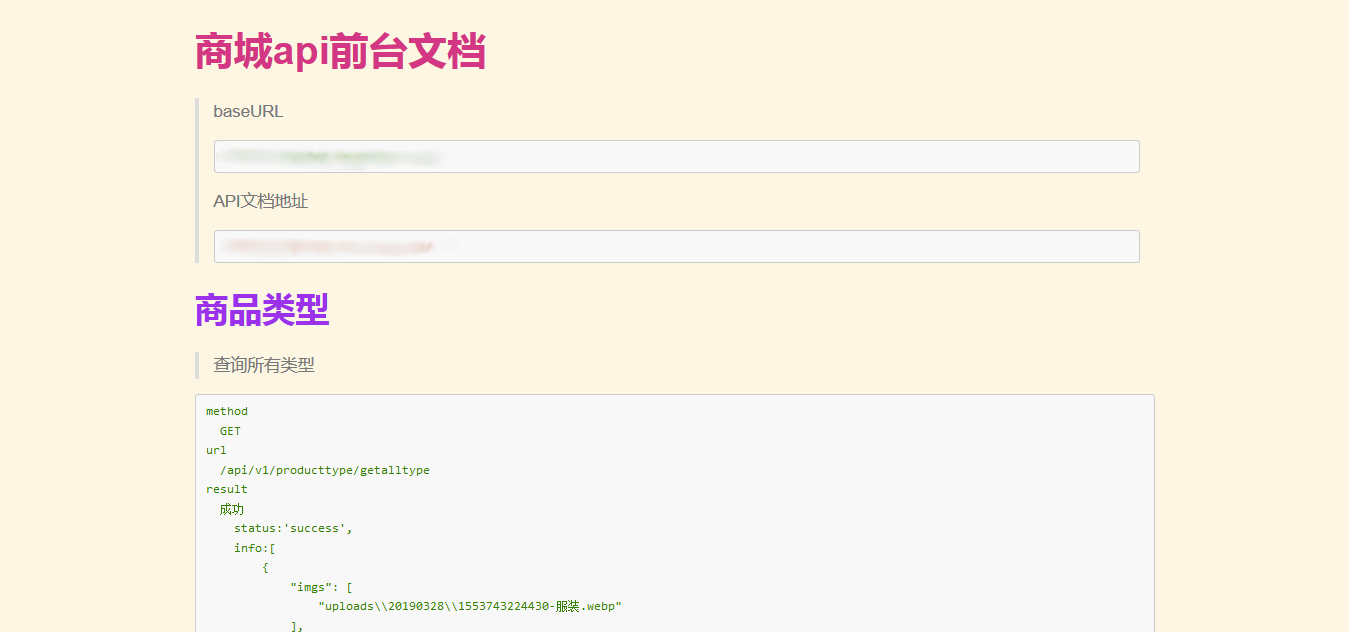
特别鸣谢:
杨立果:markdown的css样式
浮客:如何快速实现 markdown 转 HTML 文档?
将markdown文档使用gulp转换为HTML【附带两套css样式】的更多相关文章
- NET 5.0 Swagger API 自动生成MarkDown文档
目录 1.SwaggerDoc引用 主要接口 接口实现 2.Startup配置 注册SwaggerDoc服务 注册Swagger服务 引用Swagger中间件 3.生成MarkDown 4.生成示例 ...
- 使用Python从Markdown文档中自动生成标题导航
概述 知识与思路 代码实现 概述 Markdown 很适合于技术写作,因为技术写作并不需要花哨的排版和内容, 只要内容生动而严谨,文笔朴实而优美. 为了编写对读者更友好的文章,有必要生成文章的标题导航 ...
- Linux(Ubuntu)使用日记------markdown文档转化为word文档
Linux(Ubuntu)使用日记------markdown文档转化为word文档
- Markdown 文档生成工具
之前用了很多Markdown 文档生成工具,发现有几个挺好用的,现在整理出来,方便大家快速学习. loppo: 非常简单的静态站点生成器 idoc:简单的文档生成工具 gitbook:大名鼎鼎的文档协 ...
- ASP.NET 动态查找数据 并且生成xml文档 同时使用xslt转换为xhtml
前言 xsl是一门标签解析语言,很适合做动态网页的前台标签 www.bamn.cn 1 首先是aspx页面 添加一个输入框 按钮 还有一个用来显示解析后的xhtml代码的控件 <form id= ...
- 如何在Markdown文档中插入空格?
简单说 在 Markdown 文档中,可以直接采用 HTML 标记插入空格(blank space),而且无需任何其他前缀或分隔符.具体如下所示: 插入一个空格 (non-breaking space ...
- vscode使用Markdown文档编写
首先安装vscode工具,具体的使用可以参考之前的博文:<Visual Studio Code教程:基础使用和自定义设置> VScode已经默认集成markdown文档编辑插件.可以新建一 ...
- 使用shell脚本生成数据库markdown文档
学习shell脚本编程的一次实践,通过shell脚本生成数据库的markdown文档,代码如下: HOST=xxxxxx PORT=xxxx USER="xxxxx" PASSWO ...
- 01将图片嵌入到Markdown文档中
将图片内嵌入Markdown文档中 将图片嵌入Markdown文档中一直是一个比较麻烦的事情.通常的做法是将图片存入本地某个路径或者网络存储空间,使用URL链接的形式插入图片: ![image][ur ...
随机推荐
- Redis主从复制详解
1. 概述 主从复制:主节点负责写数据,从节点负责读数据,主节点定期把数据同步到从节点保证数据的一致性 2. 主从复制的相关操作 (1)配置文件:在从服务器的配置文件中加入 slaveof<ma ...
- 《Mysql 锁》
一:什么是锁? - 锁是计算机协调多个进程或纯线程并发访问某一资源的机制. - 通俗的来说,锁是一种对资源的保护形式. 二:锁分类 - 表级锁 - 开销小,加锁快,没有死锁,锁定粒度大,发生锁冲突的概 ...
- ElasticSearch - 信息聚合系列之聚合过滤
摘要 聚合范围限定还有一个自然的扩展就是过滤.因为聚合是在查询结果范围内操作的,任何可以适用于查询的过滤器也可以应用在聚合上. 版本 elasticsearch版本: elasticsearch-2. ...
- Spark入门到精通--(外传)Cloudera CDH5.5.4搭建
http://www.mamicode.com/info-detail-601202.html continue...
- H3C交换机引发的奇葩故障
设备:H3C S5120-28P-SI 故障:某个交换机的接口速率只有100Mbps. 描述:这个故障还是很特别的,因为按普通的测试办法很难第一时间判断是交换机的固件问题,我也是做了几乎所有外围设备和 ...
- JS全选反选功能
总选框:<input type="checkbox" class="all" name="all"> 子选框: <inpu ...
- MFC 对话框不显示,返回-1 原因
DoModal失败原因 1.MFC 通常对话框不显示的原因有 1 父窗口HWND无效 2 在ONINITDIALOG里用了ENDDIALOG 3 无效的对话框资源ID 4 使用没有注册的的自定义控件 ...
- 常用SQL语法
1.替換A表中B字段中第二个字符 ,), 2.根据 Score 字段 排序 并分页 * from (select row_number() over(order by Score DESC) as r ...
- DLLHijack漏洞原理
原理 当一个可执行文件运行时,windows加载器讲课执行模块映射到进程的地址空间中,加载器分析可执行模块的输入表,并设法找出任何需要的DLL,并将它们映射到进程的地址空间中. 由于输入表中只包含DL ...
- eclipse配置tomcat添加外部项目
在eclipse中配置tomcat,添加外部项目. 添加外部项目 然后直接启动服务器,服务器里面不能添加项目.