
Mybatis源码之StatementType
在mybatis中StatementType的值决定了由什么对象来执行我们的SQL语句。本文来分析下在mybatis中具体是怎么处理的。
StatementType
1.StatementType枚举
StatementType是一个枚举类型。如下:
/**

 * @author Clinton Begin

 */

public enum StatementType {

  STATEMENT, PREPARED, CALLABLE

}
| 选项 | 说明 |
|---|---|
| STATEMENT | 对应于Statement对象,有SQL注入的风险 |
| PREPARED | PreparedStatement,预编译处理 |
| CALLABLE | CallableStatement一般调用存储过程的时候使用 |
2.设置StatementType
我们可以在映射文件中通过‘statementType’属性设置,如下:
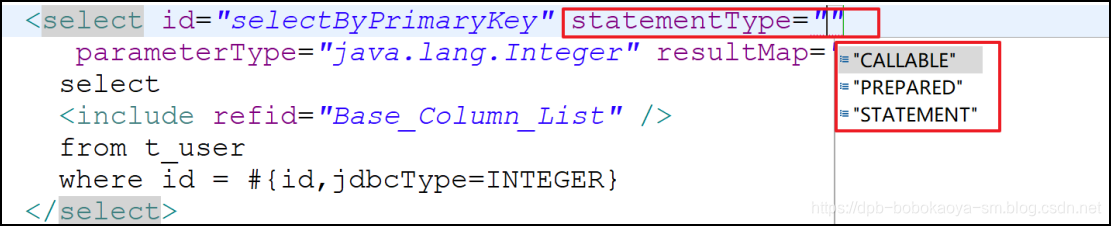
注意默认是'PREPARED ',通过源码分析我们可以查看到。
3.源码跟踪查看
我们要从源码中发现StatementType的处理,应该是从加载配置文件的地方开始查看,所以我们从'new SqlSessionFactoryBuilder().build(in);'这行代码入手
//InputStream in = Resources.getResourceAsStream("mybatis-config.xml");

InputStream in = TestMybatis.class.getResourceAsStream("/mybatis-config.xml");

// 获取SqlSessionFactory对象

SqlSessionFactory factory = new SqlSessionFactoryBuilder().build(in);
进入build方法中查看
  public SqlSessionFactory build(InputStream inputStream, String environment, Properties properties) {

    try {

      XMLConfigBuilder parser = new XMLConfigBuilder(inputStream, environment, properties);

      // 配置文件解析的重点是 'parser.parse()'这行代码

      return build(parser.parse());

    } catch (Exception e) {

      throw ExceptionFactory.wrapException("Error building SqlSession.", e);

    } finally {

      ErrorContext.instance().reset();

      try {

        inputStream.close();

      } catch (IOException e) {

        // Intentionally ignore. Prefer previous error.

      }

    }

  }
进入parse方法中
  public Configuration parse() {

    if (parsed) {

      throw new BuilderException("Each XMLConfigBuilder can only be used once.");

    }

    parsed = true;

    // 进入

    parseConfiguration(parser.evalNode("/configuration"));

    return configuration;

  }

  private void parseConfiguration(XNode root) {

    try {

      //issue #117 read properties first

      propertiesElement(root.evalNode("properties"));

      Properties settings = settingsAsProperties(root.evalNode("settings"));

      loadCustomVfs(settings);

      typeAliasesElement(root.evalNode("typeAliases"));

      pluginElement(root.evalNode("plugins"));

      objectFactoryElement(root.evalNode("objectFactory"));

      objectWrapperFactoryElement(root.evalNode("objectWrapperFactory"));

      reflectorFactoryElement(root.evalNode("reflectorFactory"));

      settingsElement(settings);

      // read it after objectFactory and objectWrapperFactory issue #631

      environmentsElement(root.evalNode("environments"));

      databaseIdProviderElement(root.evalNode("databaseIdProvider"));

      typeHandlerElement(root.evalNode("typeHandlers"));

      // 上面都是解析主配置文件中子节点,直接进入本方法

      mapperElement(root.evalNode("mappers"));

    } catch (Exception e) {

      throw new BuilderException("Error parsing SQL Mapper Configuration. Cause: " + e, e);

    }

  }
mapperElement方法,该方法会根据我们在mappers中不同的配置做出不同的处理。我们直接看resource的方式
  private void mapperElement(XNode parent) throws Exception {

    if (parent != null) {

      for (XNode child : parent.getChildren()) {

        if ("package".equals(child.getName())) {

          String mapperPackage = child.getStringAttribute("name");

          configuration.addMappers(mapperPackage);

        } else {

          String resource = child.getStringAttribute("resource");

          String url = child.getStringAttribute("url");

          String mapperClass = child.getStringAttribute("class");

          if (resource != null && url == null && mapperClass == null) {

            ErrorContext.instance().resource(resource);

            // 加载配置文件

            InputStream inputStream = Resources.getResourceAsStream(resource);

            XMLMapperBuilder mapperParser = new XMLMapperBuilder(inputStream, configuration, resource, configuration.getSqlFragments());

            // 解析配置文件的方法 进入

            mapperParser.parse();

          } else if (resource == null && url != null && mapperClass == null) {

            ErrorContext.instance().resource(url);

            InputStream inputStream = Resources.getUrlAsStream(url);

            XMLMapperBuilder mapperParser = new XMLMapperBuilder(inputStream, configuration, url, configuration.getSqlFragments());

            mapperParser.parse();

          } else if (resource == null && url == null && mapperClass != null) {

            Class<?> mapperInterface = Resources.classForName(mapperClass);

            configuration.addMapper(mapperInterface);

          } else {

            throw new BuilderException("A mapper element may only specify a url, resource or class, but not more than one.");

          }

        }

      }

    }

  }
进入 mapperParser.parse() 方法查看
  public void parse() {

    if (!configuration.isResourceLoaded(resource)) {

    	// 解析根节点

      configurationElement(parser.evalNode("/mapper"));

      configuration.addLoadedResource(resource);

      // 绑定名称空间

      bindMapperForNamespace();

    }

    parsePendingResultMaps();

    parsePendingCacheRefs();

    // 重点本方法,解析未处理的Statements

    parsePendingStatements();

  }
进入parsePendingStatements方法:
  private void parsePendingStatements() {

    Collection<XMLStatementBuilder> incompleteStatements = configuration.getIncompleteStatements();

    synchronized (incompleteStatements) {

      Iterator<XMLStatementBuilder> iter = incompleteStatements.iterator();

      while (iter.hasNext()) {

        try {

        	// 解析我们的select|update|insert|delete节点

          iter.next().parseStatementNode();

          iter.remove();

        } catch (IncompleteElementException e) {

          // Statement is still missing a resource...

        }

      }

    }

  }
进入parseStatementNode 方法
public void parseStatementNode() {

 String id = context.getStringAttribute("id");

 String databaseId = context.getStringAttribute("databaseId");

 if (!databaseIdMatchesCurrent(id, databaseId, this.requiredDatabaseId)) {

   return;

 }

 Integer fetchSize = context.getIntAttribute("fetchSize");

 Integer timeout = context.getIntAttribute("timeout");

 String parameterMap = context.getStringAttribute("parameterMap");

 String parameterType = context.getStringAttribute("parameterType");

 Class<?> parameterTypeClass = resolveClass(parameterType);

 String resultMap = context.getStringAttribute("resultMap");

 String resultType = context.getStringAttribute("resultType");

 String lang = context.getStringAttribute("lang");

 LanguageDriver langDriver = getLanguageDriver(lang);

 Class<?> resultTypeClass = resolveClass(resultType);

 String resultSetType = context.getStringAttribute("resultSetType");

 // 重点代码,看截图

 StatementType statementType = StatementType.valueOf(context.getStringAttribute("statementType", StatementType.PREPARED.toString()));

 ResultSetType resultSetTypeEnum = resolveResultSetType(resultSetType);

 String nodeName = context.getNode().getNodeName();

 SqlCommandType sqlCommandType = SqlCommandType.valueOf(nodeName.toUpperCase(Locale.ENGLISH));

 boolean isSelect = sqlCommandType == SqlCommandType.SELECT;

 boolean flushCache = context.getBooleanAttribute("flushCache", !isSelect);

 boolean useCache = context.getBooleanAttribute("useCache", isSelect);

 boolean resultOrdered = context.getBooleanAttribute("resultOrdered", false);

 // Include Fragments before parsing

 XMLIncludeTransformer includeParser = new XMLIncludeTransformer(configuration, builderAssistant);

 includeParser.applyIncludes(context.getNode());

 // Parse selectKey after includes and remove them.

 processSelectKeyNodes(id, parameterTypeClass, langDriver);

 // Parse the SQL (pre: <selectKey> and <include> were parsed and removed)

 SqlSource sqlSource = langDriver.createSqlSource(configuration, context, parameterTypeClass);

 String resultSets = context.getStringAttribute("resultSets");

 String keyProperty = context.getStringAttribute("keyProperty");

 String keyColumn = context.getStringAttribute("keyColumn");

 KeyGenerator keyGenerator;

 String keyStatementId = id + SelectKeyGenerator.SELECT_KEY_SUFFIX;

 keyStatementId = builderAssistant.applyCurrentNamespace(keyStatementId, true);

 if (configuration.hasKeyGenerator(keyStatementId)) {

   keyGenerator = configuration.getKeyGenerator(keyStatementId);

 } else {

   keyGenerator = context.getBooleanAttribute("useGeneratedKeys",

       configuration.isUseGeneratedKeys() && SqlCommandType.INSERT.equals(sqlCommandType))

       ? Jdbc3KeyGenerator.INSTANCE : NoKeyGenerator.INSTANCE;

 }

 builderAssistant.addMappedStatement(id, sqlSource, statementType, sqlCommandType,

     fetchSize, timeout, parameterMap, parameterTypeClass, resultMap, resultTypeClass,

     resultSetTypeEnum, flushCache, useCache, resultOrdered,

     keyGenerator, keyProperty, keyColumn, databaseId, langDriver, resultSets);

}
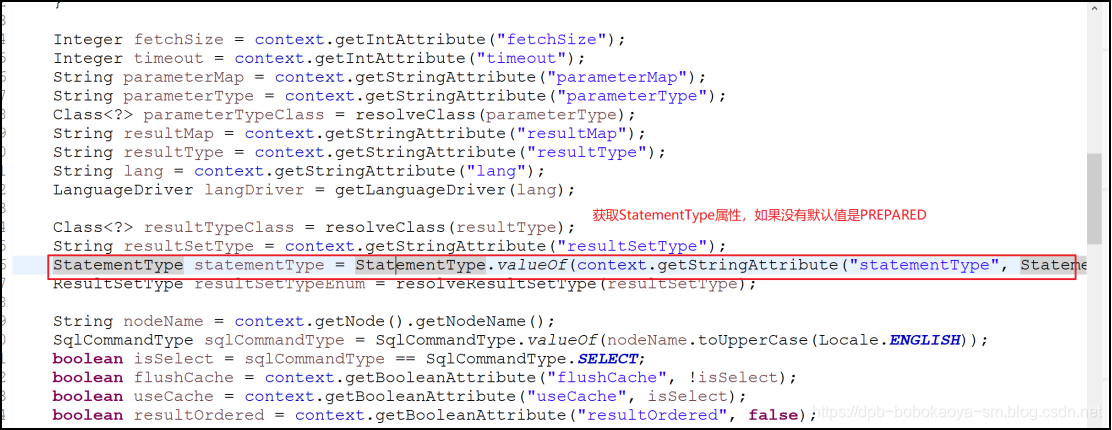

最后解析完这个select|insert|update|delete节点的信息被封装到了一个MapperedStatement对象中。

至此StatementType解析阶段的内容分析完了~
Mybatis源码之StatementType的更多相关文章
- MyBatis源码分析-SQL语句执行的完整流程
MyBatis 是支持定制化 SQL.存储过程以及高级映射的优秀的持久层框架.MyBatis 避免了几乎所有的 JDBC 代码和手动设置参数以及获取结果集.MyBatis 可以对配置和原生Map使用简 ...
- 【MyBatis源码分析】select源码分析及小结
示例代码 之前的文章说过,对于MyBatis来说insert.update.delete是一组的,因为对于MyBatis来说它们都是update:select是一组的,因为对于MyBatis来说它就是 ...
- Spring mybatis源码篇章-MybatisDAO文件解析(二)
前言:通过阅读源码对实现机制进行了解有利于陶冶情操,承接前文Spring mybatis源码篇章-MybatisDAO文件解析(一) 默认加载mybatis主文件方式 XMLConfigBuilder ...
- Spring mybatis源码篇章-MybatisDAO文件解析(一)
前言:通过阅读源码对实现机制进行了解有利于陶冶情操,承接前文Spring mybatis源码篇章-SqlSessionFactory 加载指定的mybatis主文件 Mybatis模板文件,其中的属性 ...
- Mybatis源码分析-BaseExecutor
根据前文Mybatis源码分析-SqlSessionTemplate的简单分析,对于SqlSession的CURD操作都需要经过Executor接口的update/query方法,本文将分析下Base ...
- Mybatis源码分析-StatementHandler
承接前文Mybatis源码分析-BaseExecutor,本文则对通过StatementHandler接口完成数据库的CRUD操作作简单的分析 StatementHandler#接口列表 //获取St ...
- mybatis源码分析(一)
mybatis源码分析(sqlSessionFactory生成过程) 1. mybatis框架在现在各个IT公司的使用不用多说,这几天看了mybatis的一些源码,赶紧做个笔记. 2. 看源码从一个d ...
- Mybatis源码分析之存储过程调用
这一篇博客我们学习一下Mybatis调用存储过程的使用和运行流程.首先我们先创建一个简单的存储过程 DELIMITER $ CREATE PROCEDURE mybatis.ges_user_coun ...
- MyBatis 源码分析 - 缓存原理
1.简介 在 Web 应用中,缓存是必不可少的组件.通常我们都会用 Redis 或 memcached 等缓存中间件,拦截大量奔向数据库的请求,减轻数据库压力.作为一个重要的组件,MyBatis 自然 ...
随机推荐
- 记录一次DataTable排序的问题
//dt.DefaultView.Sort = "字段名 方式"; 最开始用的上面的没好用,改成底下转换了一下就好用了0.0 DataView dv = new DataView( ...
- CSS矩形、三角形等
1.圆形 CSS代码如下:宽高一样,border-radius设为宽高的一半 #circle { width: 100px; height: 100px; background: red; -moz- ...
- 微信小程序开发---各代码文件简介
根据上一文,已建立QuickStart 项目,该项目系本人毕设部分内容,所以记录以便以后查阅 开发小程序就必须了解小程序项目目录结构和文件作用,接下来就根据我现在自学得到的知识把这些记录下来. 一.目 ...
- [LeetCode] Backspace String Compare 退格字符串比较
Given two strings S and T, return if they are equal when both are typed into empty text editors. # m ...
- Spring源码学习-容器BeanFactory(一) BeanDefinition的创建-解析资源文件
写在前面 从大四实习至今已一年有余,作为一个程序员,一直没有用心去记录自己工作中遇到的问题,甚是惭愧,打算从今日起开始养成写博客的习惯.作为一名java开发人员,Spring是永远绕不过的话题,它的设 ...
- cadence原理图设计
- JSP的执行原理
在一个JSP文件第一次被请求时,JSP引擎把该JSP文件转换成为一个Servlet.而这个引擎本身也是一个Servlet.JSP的运行过程如下所示: (1)JSP引擎先把该JSP文件转换成一个Java ...
- 主流数据库连接池性能比较 hikari druid c3p0 dbcp jdbc
背景 对现有的数据库连接池做调研对比,综合性能,可靠性,稳定性,扩展性等因素选出推荐出最优的数据库连接池 . NOTE: 本文所有测试均是MySQL库 测试结论 1:性能方面 hikariCP> ...
- toastr操作完成提示框
toastr.js组件 关于信息提示框,项目中使用的是toastr.js这个组件,这个组件最大的好处就是异步.无阻塞,提示后可设置消失时间,并且可以将消息提示放到界面的各个地方. 官方文档以及源码 源 ...
- 接口平台经常报server internal error(500)错误
查询日志,发现连接mysql报错,web页面显示server internal error(500) 解决方法:重启mysql服务器 systemctl start mysqld #安装mysql # ...