
【原创】运维基础之Nginx(1)简介、安装、使用

官方:http://nginx.org
nginx [engine x] is an HTTP and reverse proxy server, a mail proxy server, and a generic TCP/UDP proxy server, originally written by Igor Sysoev. For a long time, it has been running on many heavily loaded Russian sites including Yandex, Mail.Ru, VK, and Rambler. According to Netcraft, nginx served or proxied 25.89% busiest sites in December 2018. Here are some of the success stories: Dropbox, Netflix, Wordpress.com, FastMail.FM.
Nginx是一个Http服务器、反向代理服务器、邮件代理服务器、通用TCP/UDP代理服务器,目前已经占据25%的市场份额。
nginx has one master process and several worker processes. The main purpose of the master process is to read and evaluate configuration, and maintain worker processes. Worker processes do actual processing of requests. nginx employs event-based model and OS-dependent mechanisms to efficiently distribute requests among worker processes. The number of worker processes is defined in the configuration file and may be fixed for a given configuration or automatically adjusted to the number of available CPU cores.
nginx有一个master进程和多个worker进程,maste进程负责读取配置和管理worker进程,worker进程负责实际的请求处理;nginx使用事件模型和操作系统特有的机制来高效在worker进程中转发请求;
一 安装
官方下载页面:http://nginx.org/en/download.html
下载编译过程如下:
# wget http://nginx.org/download/nginx-1.14.2.tar.gz
# tar xvf nginx-1.14.2.tar.gz
# cd nginx-1.14.2# ./configure --prefix=/data/nginx-1.14.2 --with-http_ssl_module --with-stream
# make
# make install# ls /data/nginx-1.14.2/
conf html logs sbin
# ls /data/nginx-1.14.2/sbin
nginx
# ls /data/nginx-1.14.2/conf
fastcgi.conf fastcgi_params koi-utf mime.types nginx.conf scgi_params uwsgi_params win-utf
fastcgi.conf.default fastcgi_params.default koi-win mime.types.default nginx.conf.default scgi_params.default uwsgi_params.default
configure详细参数详见官方文档:http://nginx.org/en/docs/configure.html
configure过程可能报错:
1)./configure: error: C compiler cc is not found
yum install gcc
2)./configure: error: the HTTP rewrite module requires the PCRE library.
You can either disable the module by using --without-http_rewrite_module
option, or install the PCRE library into the system, or build the PCRE library
statically from the source with nginx by using --with-pcre=<path> option.
yum install pcre-devel
3)./configure: error: the HTTP gzip module requires the zlib library.
You can either disable the module by using --without-http_gzip_module
option, or install the zlib library into the system, or build the zlib library
statically from the source with nginx by using --with-zlib=<path> option.
yum install zlib-devel
4)./configure: error: SSL modules require the OpenSSL library.
You can either do not enable the modules, or install the OpenSSL library
into the system, or build the OpenSSL library statically from the source
with nginx by using --with-openssl=<path> option.
yum install openssl-devel
二 使用
1 配置
默认配置:$NGINX_HOME/conf/nginx.conf
如果改为其他名字,需要在启动时通过-c制定
nginx可以用作http代理(http module),也可以用作长连接代理(stream module)
1)端口
server {
listen 80;
server_name localhost;
可以修改端口,如果是80端口,必须使用root启动,因为只有root才能使用1024以下端口;
2)反向代理--负载均衡
  upstream test_backend {

    ip_hash;

    server 192.168.0.54:8080;

    server 192.168.0.55:8080;

   }
location / {
proxy_pass http://test_backend;
可以配置多个upstream,每个upstream指向一组后端服务器,比如一组tomcat,然后在server中制定哪些location的请求转发给哪些upstream,实现负载均衡;
2 命令
# sbin/nginx -h
nginx version: nginx/1.14.2
Usage: nginx [-?hvVtTq] [-s signal] [-c filename] [-p prefix] [-g directives]
Options:
-?,-h : this help
-v : show version and exit
-V : show version and configure options then exit
-t : test configuration and exit
-T : test configuration, dump it and exit
-q : suppress non-error messages during configuration testing
-s signal : send signal to a master process: stop, quit, reopen, reload
-p prefix : set prefix path (default: /data/nginx-1.14.2/)
-c filename : set configuration file (default: conf/nginx.conf)
-g directives : set global directives out of configuration file
2.1 启动
# nginx
or
# nginx -c conf/nginx.conf
启动之后进程如下:
# ps aux|grep nginx
root 3072 0.0 0.0 45852 1956 ? Ss 20:11 0:00 nginx: master process sbin/nginx -c conf/nginx.conf
nobody 3218 0.0 0.0 48396 2552 ? S 20:14 0:00 nginx: worker process
2.2 停止
# nginx -c conf/nginx.conf -s stop
2.3 刷新配置
# nginx -c conf/nginx.conf -s reload
三 登陆验证
1 安装htpasswd
# yum install httpd-tools
2 添加用户密码
# htpasswd -c /data/nginx-1.14.2/passwd test
New password:
Re-type new password:
Adding password for user test
3 添加配置在server下
auth_basic "Please input user&password";
auth_basic_user_file /data/nginx-1.14.2/passwd;
4 刷新配置
# nginx -c conf/nginx.conf -s reload
效果如下:
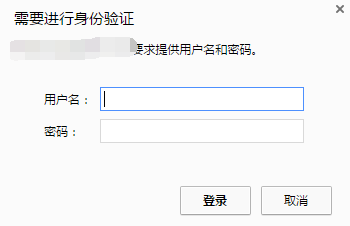
http代理完整配置如下:
http {
include mime.types;
default_type application/octet-stream;
sendfile on;
keepalive_timeout 65;
upstream test_backend {
ip_hash;
server 192.168.0.54:8080;
server 192.168.0.55:8080;
}
server {
listen 80;
server_name localhost;
auth_basic "Please input user&password";
auth_basic_user_file /data/nginx-1.14.2/passwd;
    location / {

        proxy_pass   http://test_backend;
}
}
}
stream代理完整配置如下:
stream {
upstream test_backend {
server $server1:21000;
server $server2:21000;
}
server {
listen 21000;
proxy_pass test_backend;
}
}
四 限制ip访问
server {
listen 80;
server_name test.com.internal;
location / {
allow 192.168.0.0/24;
deny all;
proxy_pass http://test_backend;
}
}
限制只有192.168.0.*网段可以访问该接口
五 以目录形式访问
    location ^~ /dir {

        root   /dir;

        autoindex  on;

    }
使用module:ngx_http_autoindex_module
【原创】运维基础之Nginx(1)简介、安装、使用的更多相关文章
- 【Apache运维基础(1)】Apache的安装与使用
安装 yum -y install httpd httpd-devel # 在Ubuntu里面叫做Apache2,输入localhost能打开就算成功了 额...当然专业的运维还是老老实实的去编译吧; ...
- 【原创】运维基础之Nginx(3)location和rewrite
nginx location =:精确匹配(必须全部相等) ~:大小写敏感,正则匹配 ~*:忽略大小写,正则匹配 ^~:只需匹配uri部分,精确匹配 @:内部服务跳转,精确匹配 优先级: Exact ...
- 【原创】运维基础之yum离线环境安装软件
首先查看系统版本号,然后根据版本号从 CentOS-7-x86_64-DVD-1708.iso 和 CentOS-7-x86_64-Everything-1708.iso 根据需要选择一个下载,我这里 ...
- linux运维基础知识
linux运维基础知识大全 一,序言 每一个微不足道的知识,也是未来的铺垫.每一份工作的薪资职位,也是曾经努力的结果. 二,服务器 1,运维人员工作职责: 1)保证数据不丢失:2)保证服务器24小时运 ...
- linux——运维基础,与常用命令
1 运维概述 1 什么是运维 服务器的运行维护 2 名词 IDC(互联网数据中心) 3 监控软件 zabbix(用的最多), nagios, cactti 4 常用的linux操作系统 1 CentO ...
- Linux运维基础
一.服务器硬件 二.Linux的发展史 三.Linux的系统安装和配置 四.Xshell的安装和优化 五.远程连接排错 六.Linux命令初识 七.Linux系统初识与优化 八.Linux目录结构 九 ...
- Linux系统运维笔记(四),CentOS 6.4安装Nginx
Linux系统运维笔记(四),CentOS 6.4安装Nginx 1,安装编译工具及库文件 yum -y install make zlib zlib-devel gcc-c++ libtool op ...
- 第一阶段·Linux运维基础-第1章·Linux基础及入门介绍
01-课程介绍-学习流程 02-服务器硬件-详解 03-服务器核心硬件-服务器型号-电源-CPU 01-课程介绍-学习流程 1.1. 光看不练,等于白干: 1.2 不看光练,思想怠慢: 1.3 即看又 ...
- Linux系统运维基础测试题
1 Linux运维基础测试题(第一关) 通过这段时间学习Linux基础命令,为了检测自己对Linux基础命令掌握的情况,从网上整理13到测试题,并将其整理出来供大家参考学习. 1.1 习题 ...
随机推荐
- 相约南湖,南京都昌信息亮相南湖HIT论坛
金秋十月,雨过南湖水似油 ,烟雾蒙蒙净长空 2017年10月15日, 南湖HIT论坛迎来了第六届.本次论坛吸引了500名来自全国各地医疗机构.卫生行政主管部门的信息化主管和医疗IT企业的精英,齐聚嘉兴 ...
- mongoDB操作详细
简介 它和我们使用的关系型数据库最大的区别就是约束性,可以说文件型数据库几乎不存在约束性,理论上没有主外键约束,没有存储的数据类型约束等等 关系型数据库中有一个 "表" 的概念,有 ...
- 04 | 链表(上):如何实现LRU缓存淘汰算法?
今天我们来聊聊“链表(Linked list)”这个数据结构.学习链表有什么用呢?为了回答这个问题,我们先来讨论一个经典的链表应用场景,那就是+LRU+缓存淘汰算法. 缓存是一种提高数据读取性能的技术 ...
- dubbo框架提供Main方法运行容器的几种方式(转)
本文使用的是dubbo提供的主类com.alibaba.dubbo.container.Main启动容器. 主要区别是提供不同插件的的启动方式. 目录 一.项目内容 1.1.目录结构图 1.2 ...
- python之常用模块一(time、random、os、sys)
摘要:时间模块time .随机模块random .os模块.sys模块 一.时间模块 三种格式 时间戳时间:浮点数 单位为秒 时间戳起始时间: 1970.1.1 0:0:0 英国伦敦时间 1970.1 ...
- docker完整配置nginx+php+mysql
首先了解一个方法: 使用docker exec进入Docker容器 docker在1.3.X版本之后还提供了一个新的命令exec用于进入容器,这种方式相对更简单一些,下面我们来看一下该命令的使用: s ...
- Codeforces 1077F1 Pictures with Kittens (easy version)(DP)
题目链接:Pictures with Kittens (easy version) 题意:给定n长度的数字序列ai,求从中选出x个满足任意k长度区间都至少有一个被选到的最大和. 题解:$dp[i][j ...
- sqlalchemy和pymysql通过ssh连接远程mysql服务器
首先需要一个模块sshtunnel,如果没有直接pip install sshtunnel 其实连个连接方式非常像: pymysql连接方式: import pymysql from sshtunne ...
- 【洛谷P2822 组合数问题】
题目连接 #include<iostream> #include<cstring> #include<cstdio> #include<cctype> ...
- c 判断文件或文件夹是否存在,多种方法, 为什么从一开始就不直接来个统一的呢?
具体内容,请看: https://blog.csdn.net/u012494876/article/details/51204615 判断文件或文件夹是否存在,竟然有这么多方法: GetFileAtt ...