
Android 入门(2)修改EditText下划线颜色 / 隐藏标题栏
1 添加颜色
colors.xml中增加
<color name="colorRed">#FF3300</color>
2 添加style
styles.xml中增加(我这里两个都设置为一样的)
<style name="MyEditText" parent="Theme.AppCompat.Light">

        <item name="colorControlNormal">@color/colorRed</item>

        <item name="colorControlActivated">@color/colorRed</item>

    </style>
3 LoginActivity中增加
<?xml version="1.0" encoding="utf-8"?>

<android.support.constraint.ConstraintLayout xmlns:android="http://schemas.android.com/apk/res/android"

    xmlns:app="http://schemas.android.com/apk/res-auto"

    xmlns:tools="http://schemas.android.com/tools"

    android:layout_width="match_parent"

    android:layout_height="match_parent"

    tools:context="com.example.tyler.scangun_kps.LoginActivity">

    <ImageView

        android:id="@+id/imageView"

        android:layout_width="wrap_content"

        android:layout_height="wrap_content"

        android:background="@drawable/login_bg"

        android:layout_marginLeft="0dp"

        android:layout_marginTop="0dp"

        app:layout_constraintStart_toStartOf="parent"

        app:layout_constraintTop_toTopOf="parent" />

    <EditText

        android:id="@+id/etAccount"

        android:layout_width="200sp"

        android:layout_height="wrap_content"

        android:layout_marginLeft="60dp"

        android:layout_marginTop="138dp"

        app:layout_constraintStart_toStartOf="parent"

        app:layout_constraintTop_toTopOf="parent"

        android:hint="@string/account"

        android:theme="@style/MyEditText"/>

    <EditText

        android:id="@+id/etPwd"

        android:layout_width="200sp"

        android:layout_height="wrap_content"

        android:layout_marginLeft="60dp"

        android:layout_marginTop="200dp"

        app:layout_constraintStart_toStartOf="parent"

        app:layout_constraintTop_toTopOf="parent"

        android:hint="@string/pwd"

        android:theme="@style/MyEditText"/>

    <com.gc.materialdesign.views.ButtonRectangle

        android:id="@+id/btnLogin"

        android:background="#1E88E5"

        android:layout_width="100sp"

        android:layout_height="wrap_content"

        android:layout_gravity="center"

        android:layout_marginLeft="110dp"

        android:layout_marginTop="270dp"

        android:text="@string/login"

        app:layout_constraintStart_toStartOf="parent"

        app:layout_constraintTop_toTopOf="parent"/>

</android.support.constraint.ConstraintLayout>
4 效果(我这里自己增加了背景图)
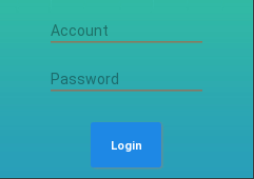
5 隐藏标题栏
AndroidManifest.xml 文件中
application(全局页面) / activity(局部页面)
android:theme="@style/Theme.AppCompat.Light.NoActionBar"
Android 入门(2)修改EditText下划线颜色 / 隐藏标题栏的更多相关文章
- TimePickerDialog -下划线颜色修改
首先就是去framework下去找与之相关的theme属性 最开始的时候,直接找的是<item name="datePickerStyle">@style/Widget ...
- iOS - UIButton设置文字标题下划线以及下划线颜色
创建button设置可以折行显示 - (void)viewDidLoad { [super viewDidLoad]; UIButton * button = [[UIButton alloc] in ...
- CSS改变字体下划线颜色
下图是网页中一个非常普通的列表. watermark/2/text/aHR0cDovL2Jsb2cuY3Nkbi5uZXQvQXVndXMzMzQ0/font/5a6L5L2T/fontsize/40 ...
- Android 如何自定义EditText 下划线?
项目要求: 笔者曾经做过一个项目,其中登录界面的交互令人印象深刻.交互设计师给出了一个非常作的设计,要求做出包含根据情况可变色的下划线,左侧有可变图标,右侧有可变删除标志的输入框,如图 记录制作过程: ...
- Android设置TextView的行间距,EditText下划线
textView用于显示文本,大量文字显示在一起显得过于紧凑.可通过在布局中更改TextView属性设置行间距. 1.android:lineSpacingMultiplier="1.5&q ...
- android:为TextView加入样式——下划线,颜色,设置链接样式及前背景色
实现下划线及颜色设置: public class AtActivity extends Activity { LinearLayout ll; /** Called when the acti ...
- Android开发之TextView的下划线添加
如何给TextView添加下划线呢,最近项目中需要这个,于是就用代码添加了下划线功能.主要就是用Paint的setFlags方法来实现,具体如下: ((TextView)mScrollView.fin ...
- android ------ 高版本的 Tablayout 下划线宽度
前面呢,有写过TabLayout的博客,最近开发用到了高本版遇到一些问题,来总结一下 Android--------TabLayout实现新闻客户端顶部导航栏 Android中Tablayout设置下 ...
- Delphi中Menu设置Images属性后快捷按键下划线被隐藏解决方法
现象:MainMenu设置Images属性后,看不到快捷按键的下划线,如:新建(&N) 分析:VCL中Menus.pas单元的代码,看到如下语句procedure TMenuItem.Adva ...
随机推荐
- vue项目利用apicloud打包成apk过程
最近公司要求我们用apicloud做一个app,正好利用这个机会学习下app的制作过程~ 页面的开发过程跟我们平时开发一样,利用vue把页面全部完成,最后进行npm run build将项目打包. 接 ...
- Python开发爬虫之静态网页抓取篇:爬取“豆瓣电影 Top 250”电影数据
所谓静态页面是指纯粹的HTML格式的页面,这样的页面在浏览器中展示的内容都在HTML源码中. 目标:爬取豆瓣电影TOP250的所有电影名称,网址为:https://movie.douban.com/t ...
- 当view为wrap_conten时获取一个view的具体宽高
int w = View.MeasureSpec.makeMeasureSpec(0, View.MeasureSpec.UNSPECIFIED); int h = View.MeasureSpec. ...
- Easyui datagrid 实现表格记录拖拽
datagrid 实现表格记录拖拽 by:授客 QQ:1033553122 测试环境 jquery-easyui-1.5.3 jquery-easyui-datagrid-dnd 下载地址: http ...
- 通过Erlang构建TCP服务应用案例(最原始方式)
文章来源:公众号-智能化IT系统. 案例介绍 本文介绍的案例是TCP网络服务器的构建,用最原始的方式(非OTP).其功能很简单,通过网络TCP接口接收数据,按照指定的格式解析,并把数据存储至Mongo ...
- mssql sqlserver 索引专题
摘要: 下文将详细讲述sql server 索引的相关知识,如下所示: 实验环境: sql server 2008 R2 sqlserver索引简介: mssql sqlsever 索引分类简介 ms ...
- SQL Server -- 回忆笔记(三):ADO.NET之C#操作数据库
SQL Server知识点回忆篇(三):ADO.NET之C#操作数据库 1.连接数据库 (1)创建连接字符串: 使用windows身份验证时的连接字符串: private string conStr= ...
- 苹果ios系统无法通过RD Client连接win10服务器远程错误0x00001307
问题描述: 1.RD Client无法远程Windows 10桌面,提示“错误 用户名或密码错误” 之前连接是没有问题的,但是更新了win10系统以后就出现问题了 [解决方法]: 最后找到了原因是因为 ...
- Redis学习笔记(5)——Redis数据持久化
出处http://www.cnblogs.com/xiaoxi/p/7065328.html 一.概述 Redis的强大性能很大程度上都是因为所有数据都是存储在内存中的,然而当Redis重启后,所有存 ...
- maven 出现错误 -source 1.5 中不支持 diamond 运算符
mvn clean package -DskipTests 出现如下错误: -source 1.5 中不支持 diamond 运算符 [ERROR] (请使用 -source 7 或更高版本以启用 d ...