
Android 入门(2)修改EditText下划线颜色 / 隐藏标题栏
1 添加颜色
colors.xml中增加
<color name="colorRed">#FF3300</color>
2 添加style
styles.xml中增加(我这里两个都设置为一样的)
<style name="MyEditText" parent="Theme.AppCompat.Light">

        <item name="colorControlNormal">@color/colorRed</item>

        <item name="colorControlActivated">@color/colorRed</item>

    </style>
3 LoginActivity中增加
<?xml version="1.0" encoding="utf-8"?>

<android.support.constraint.ConstraintLayout xmlns:android="http://schemas.android.com/apk/res/android"

    xmlns:app="http://schemas.android.com/apk/res-auto"

    xmlns:tools="http://schemas.android.com/tools"

    android:layout_width="match_parent"

    android:layout_height="match_parent"

    tools:context="com.example.tyler.scangun_kps.LoginActivity">

    <ImageView

        android:id="@+id/imageView"

        android:layout_width="wrap_content"

        android:layout_height="wrap_content"

        android:background="@drawable/login_bg"

        android:layout_marginLeft="0dp"

        android:layout_marginTop="0dp"

        app:layout_constraintStart_toStartOf="parent"

        app:layout_constraintTop_toTopOf="parent" />

    <EditText

        android:id="@+id/etAccount"

        android:layout_width="200sp"

        android:layout_height="wrap_content"

        android:layout_marginLeft="60dp"

        android:layout_marginTop="138dp"

        app:layout_constraintStart_toStartOf="parent"

        app:layout_constraintTop_toTopOf="parent"

        android:hint="@string/account"

        android:theme="@style/MyEditText"/>

    <EditText

        android:id="@+id/etPwd"

        android:layout_width="200sp"

        android:layout_height="wrap_content"

        android:layout_marginLeft="60dp"

        android:layout_marginTop="200dp"

        app:layout_constraintStart_toStartOf="parent"

        app:layout_constraintTop_toTopOf="parent"

        android:hint="@string/pwd"

        android:theme="@style/MyEditText"/>

    <com.gc.materialdesign.views.ButtonRectangle

        android:id="@+id/btnLogin"

        android:background="#1E88E5"

        android:layout_width="100sp"

        android:layout_height="wrap_content"

        android:layout_gravity="center"

        android:layout_marginLeft="110dp"

        android:layout_marginTop="270dp"

        android:text="@string/login"

        app:layout_constraintStart_toStartOf="parent"

        app:layout_constraintTop_toTopOf="parent"/>

</android.support.constraint.ConstraintLayout>
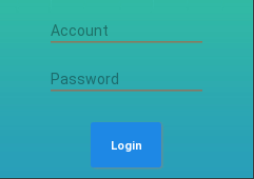
4 效果(我这里自己增加了背景图)
5 隐藏标题栏
AndroidManifest.xml 文件中
application(全局页面) / activity(局部页面)
android:theme="@style/Theme.AppCompat.Light.NoActionBar"
Android 入门(2)修改EditText下划线颜色 / 隐藏标题栏的更多相关文章
- TimePickerDialog -下划线颜色修改
首先就是去framework下去找与之相关的theme属性 最开始的时候,直接找的是<item name="datePickerStyle">@style/Widget ...
- iOS - UIButton设置文字标题下划线以及下划线颜色
创建button设置可以折行显示 - (void)viewDidLoad { [super viewDidLoad]; UIButton * button = [[UIButton alloc] in ...
- CSS改变字体下划线颜色
下图是网页中一个非常普通的列表. watermark/2/text/aHR0cDovL2Jsb2cuY3Nkbi5uZXQvQXVndXMzMzQ0/font/5a6L5L2T/fontsize/40 ...
- Android 如何自定义EditText 下划线?
项目要求: 笔者曾经做过一个项目,其中登录界面的交互令人印象深刻.交互设计师给出了一个非常作的设计,要求做出包含根据情况可变色的下划线,左侧有可变图标,右侧有可变删除标志的输入框,如图 记录制作过程: ...
- Android设置TextView的行间距,EditText下划线
textView用于显示文本,大量文字显示在一起显得过于紧凑.可通过在布局中更改TextView属性设置行间距. 1.android:lineSpacingMultiplier="1.5&q ...
- android:为TextView加入样式——下划线,颜色,设置链接样式及前背景色
实现下划线及颜色设置: public class AtActivity extends Activity { LinearLayout ll; /** Called when the acti ...
- Android开发之TextView的下划线添加
如何给TextView添加下划线呢,最近项目中需要这个,于是就用代码添加了下划线功能.主要就是用Paint的setFlags方法来实现,具体如下: ((TextView)mScrollView.fin ...
- android ------ 高版本的 Tablayout 下划线宽度
前面呢,有写过TabLayout的博客,最近开发用到了高本版遇到一些问题,来总结一下 Android--------TabLayout实现新闻客户端顶部导航栏 Android中Tablayout设置下 ...
- Delphi中Menu设置Images属性后快捷按键下划线被隐藏解决方法
现象:MainMenu设置Images属性后,看不到快捷按键的下划线,如:新建(&N) 分析:VCL中Menus.pas单元的代码,看到如下语句procedure TMenuItem.Adva ...
随机推荐
- 算法题丨Remove Duplicates from Sorted Array
描述 Given a sorted array, remove the duplicates in-place such that each element appear only once and ...
- Android application使用总结
简介: Application和Activity.Service一样,都是Android框架的一个系统组件,每一个应用都有一个Application,Application的生命周期也就是整个app的 ...
- 如何在linux下使用sudo命令不用输入密码
用过linux的小伙伴可能都知道,每次使用sudo的时候需要输入密码,这样很耽误事,那么接下来我会教大家如何去设置 一.1.输入su root进入root模式 2.输入visudo会打开/etc/su ...
- postman测试方法,出现400错误码
下午毛概课上帮同学debug了个错误: postman测试 ,得到返回 400的状态码错误: 查询博客: https://blog.csdn.net/zhangmengleiblog/article/ ...
- postgresql 日志报错could not write to log file: No space left on device,could not write lock file "postmaster.pid": No space left on device
今天遇到了一个特别奇怪的问题,我在用docker容器的时候,发现我的postgresql怎么也启动不起来 尝试了N多种办法,最后看了看postgresql的日志发现 postgresql 日志中报错 ...
- 彻底删除mysql服务(清理注册表)
由于安装某个项目的执行文件,提示要卸载MySQL以便它自身MySQL安装,然后我禁用了MYSQL服务,再把这个文件夹删除后,发现还是提示请卸载MYSQL服务. 解决步骤: 1.以管理员身份运行命令提示 ...
- 【笔记】基于Python的数字图像处理
[博客导航] [Python相关] 前言 基于Python的数字图像处理,离不开相关处理的第三方库函数.搜索网络资源,列出如下资源链接. Python图像处理库到底用哪家 python计算机视觉编程— ...
- spring异步执行报异常No qualifying bean of type 'org.springframework.core.task.TaskExecutor' available
最近观察项目运行日志的时候突然发现了一个异常, [2018-04-03 10:49:07] 100.0.1.246 http-nio-8080-exec-9 DEBUG org.springframe ...
- 并发框架Disruptor场景应用
今天用一个停车场问题来加深对Disruptor的理解.一个有关汽车进入停车场的问题.当汽车进入停车场时,系统首先会记录汽车信息.同时也会发送消息到其他系统处理相关业务,最后发送短信通知车主收费开始.看 ...
- 专治编译器编辑器vscode中文乱码输出 win10 配置系统默认utf-8编码
VS Code输出会出现乱码,很多人都遇到过.这是因为VS Code内部用的是utf-8编码,cmd/Powershell是gbk编码.直接编译,会把“你好”输出成“浣犲ソ”.如果把cmd的活动代码页 ...