
[译]使用NuGet管理共享代码
可以在内网部署自己的私人NuGet仓储服务。
Setting it up
本例中我们创建一个发邮件的类,将其作为我们自己的NuGet包:
using System;

using System.Net.Mail;

namespace MyCompany.WebCommon

{

    /// <summary>

    /// Contains code to send a HTML email using SMTP

    /// </summary>

    public class Emailer

    {

        /// <summary>

        /// Contains the error message if SendMail fails

        /// </summary>

        public string Error { get; private set; }

        /// <summary>

        /// Sends an email, returns false if failed

        /// </summary>

        /// <param name="emailAddress">Email address to send to - only one address allowed</param>

        /// <param name="subject">Subject line of email</param>

        /// <param name="emailBodyHtml">Contents of email - make sure to escape any HTML</param>

        /// <param name="emailFrom">Email address the email comes from (can be anything)</param>

        /// <param name="smtpServerName">Smtp server name</param>

        /// <returns>boolean indicating email was sent (not neccesarily delivered)</returns>

        public bool SendEmail(

            string emailAddress,

            string subject,

            string emailBodyHtml,

            string emailFrom,

            string smtpServerName = "localhost")

        {

            SmtpClient Smtp_Server = new SmtpClient();

            MailMessage e_mail = new MailMessage();

            Smtp_Server.Host = smtpServerName;

            e_mail = new MailMessage();

            e_mail.From = new MailAddress(emailFrom);

            e_mail.To.Add(emailAddress);

            e_mail.Subject = subject;

            e_mail.IsBodyHtml = true;

            e_mail.Body = emailBodyHtml;

            try

            {

                Smtp_Server.Send(e_mail);

            }

            catch (Exception e)

            {

                this.Error = e.ToString();

                return false;

            }

            return true;

        }

    }

}
假设我们有五个项目都要有发邮件的功能,我们希望这五个项目都能复用上面的类。
首先,创建一个解决方案,创建如上的类,编译项目:
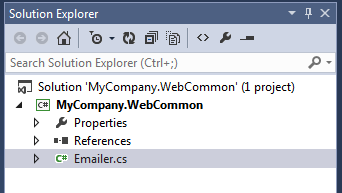
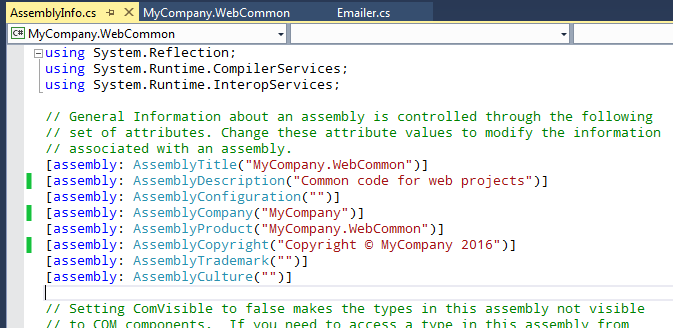
这里有两处要注意。首先编辑Properties/AssemblyInfo.cs文件为你的程序集添加描述。同时可以设置公司名,作者等。
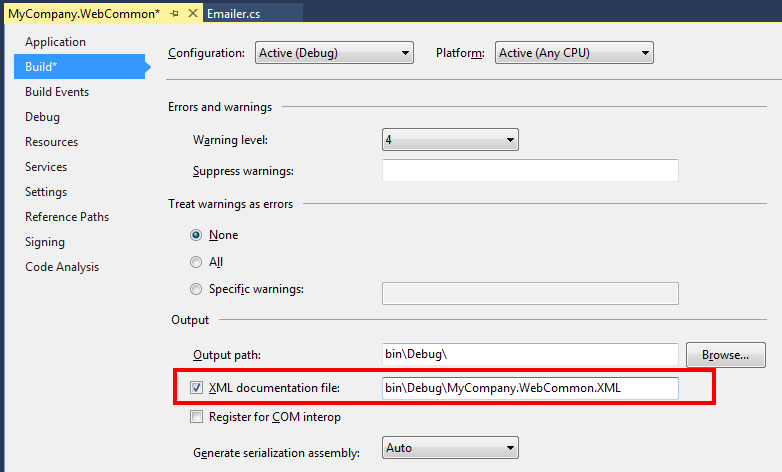
第二个要注意的是确保启用了xml comment文件生成,这样才有智能提示。注意修改XML扩展名为小写。
在控制台中cd到.csproj文件的所在目录,然后执行下面的命令:
nuget spec
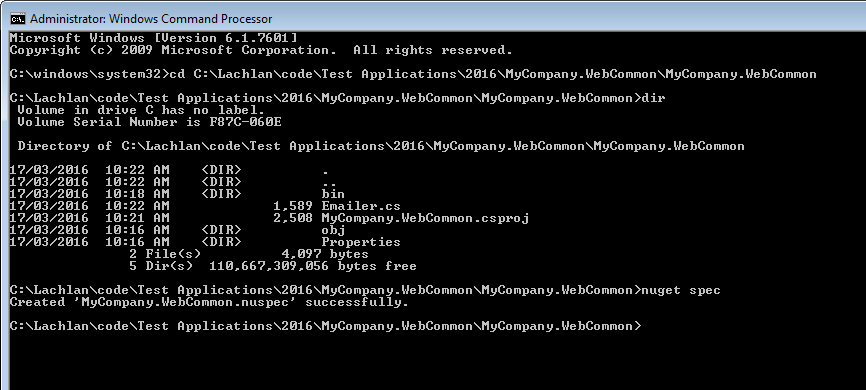
这会生成一个名为MyCompany.WebCommon.nuspec的文件,内容如下:
<?xml version="1.0"?>

<package >

  <metadata>

    <id>$id$</id>

    <version>$version$</version>

    <title>$title$</title>

    <authors>$author$</authors>

    <owners>$author$</owners>

    <requireLicenseAcceptance>false</requireLicenseAcceptance>

    <description>$description$</description>

    <projectUrl>http://myserver/wiki/MyCompany.WebCommon.html</projectUrl>

    <releaseNotes>Initial release of code library to send emails</releaseNotes>

    <copyright>Copyright 2016</copyright>

    <tags>MyCompany Web Common Emailer Emails</tags>

  </metadata>

</package>
这个文件被NuGet用来创建你的package。
注意上面的$XXX$,NuGet会自动查看AssemblyInfo.cs文件使用对应的meta data替代掉nuspec文件中的$XXX$。
然后编译项目,执行下面的命令:
NuGet Pack
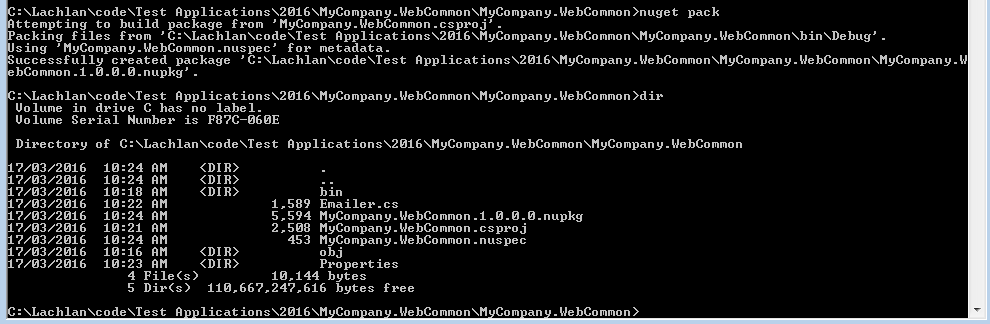
这将创建一个名为MyCompany.WebCommon.1.0.0.0.nupkg的文件 - 这个就是你的第一个package。
设置你的私有NuGet server
Tools -> options -> NuGet Package Manager -> Package Sources

注意添加/nuget到你的私有仓储url。
And you can now add the package to your project! Right click on your project, select Manage NuGet packages and you should see:
更新的你包
修改下SendEmail() :
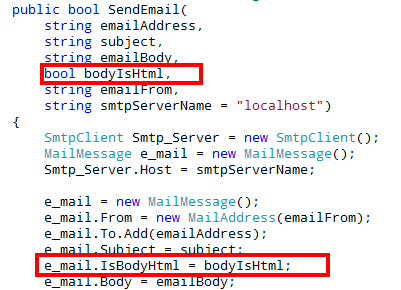
修改**AssemblyInfo.cs **文件中的AssemblyVersion和AssemblyFileVersion为1.1,重编译项目。然后使用nuget pack重新构建package。
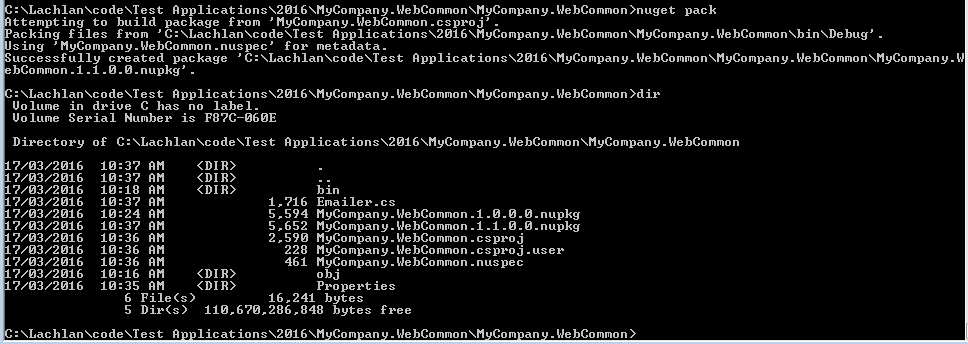
新package的版本为1.1。这意味将它发布到你的私人仓储中去不会覆盖1.0的版本。The new package has the 1.1 version number at the end. This means we can publish it to our repository and not lose our earlier version. It also means that once published, it's easy to update your code to use the new package. Simply right click on your project and go to Manage NuGet packages, and then click on the "Updates" section. From here you can see what packages have been updated along with it's release notes:
[译]使用NuGet管理共享代码的更多相关文章
- 完美解决--用VS中的Git做代码管理器,与他人共享代码
1.创建代码仓库,这里说一下为什么要创建仓库,Git不能够作为源代码管理器,vs中自带的也只能够在本地进行管理,要和他们共享的话必须要有服务器端去存储代码,类似于SVN,它就有客户端和服务器端,这里推 ...
- [资源]--完美解决--用VS中的Git做代码管理器,与他人共享代码
1.创建代码仓库,这里说一下为什么要创建仓库,Git不能够作为源代码管理器,vs中自带的也只能够在本地进行管理,要和他们共享的话必须要有服务器端去存储代码,类似于SVN,它就有客户端和服务器端,这里推 ...
- 【译】在 ASP.NET 和 ASP.NET Core 之间共享代码
原文 | Ken 翻译 | 郑子铭 随着 .NET 6 的发布,使用 ASP.NET Core 可以获得更多好处.但是将现有代码迁移到 ASP.NET Core 通常听起来像是一项巨大的投资.今天我们 ...
- Nuget 命令 NuGet 管理项目库
因为可视化库程序包管理器的局限性,有很多需要的功能在界面中无法完成. 以下技巧均需要在"程序包管理器控制台"中使用命令来完成. 一.改变项目目标框架后,更新程序包 当改变项目的目标 ...
- 使用NuGet管理项目类库引用
NuGet 是微软开发平台(包括.NET平台)的一个包管理器,这里只介绍和.NET相关的NuGet Visual Studio扩展客户端, 在VS2010 ,VS2012 ,VS2013中默认集成了N ...
- 【转】使用 NuGet 管理项目库-Phil Haack
原文地址:https://msdn.microsoft.com/zh-cn/magazine/hh547106.aspx 无论多么努力,Microsoft 也没办法提供开发人员所需要的每一个库. 虽然 ...
- 使用 NuGet 管理项目库
使用 NuGet 管理项目库 Phil Haack 本文转载自:http://msdn.microsoft.com/zh-cn/magazine/hh547106.aspx 无论多么努力,Micros ...
- NuGet管理
使用NuGet管理项目类库引用 NuGet 是微软开发平台(包括.NET平台)的一个包管理器,这里只介绍和.NET相关的NuGet Visual Studio扩展客户端, 在VS2010 ,VS2 ...
- [转载]使用 NuGet 管理项目库
原文:http://msdn.microsoft.com/zh-cn/magazine/hh547106.aspx 无论多么努力,Microsoft 也没办法提供开发人员所需要的每一个库. 虽然 Mi ...
随机推荐
- CodeVS1288埃及分数(IDA*)
在古埃及,人们使用单位分数的和(形如1/a的, a是自然数)表示一切有理数. 如:2/3=1/2+1/6,但不允许2/3=1/3+1/3,因为加数中有相同的. 对于一个分数a/b,表示方法有很多种,但 ...
- Centos 6.x/7.x yum安装php5.6.X
鉴于Centos 默认yum源的php版本太低了,手动编译安装又有点一些麻烦,那么如何采用Yum安装的方案安装最新版呢.那么,今天我们就来学习下如何用yum安装php最新版. 1.检查当前安装的PHP ...
- MYSQL timestamp NOT NULL插入NULL的报错问题
1. 在开发两个数据库数据同步功能的时候,需要在本地搭建一个本地的数据库作为一个本地库,然后用于同步开发库中的数据.在插入的时候出现了一个问题. 问题描述: 我们每张表中都会存在一个create_ti ...
- OpenLayers学习笔记(五)— 拖拽Feature图层
参考文档的例子可以知道如何拖动矢量图层feature GitHub: 八至 作者:狐狸家的鱼 本文链接:拖拽Feature图层 全部代码 <!DOCTYPE html> <html& ...
- Neovim中提示Error: Required vim compiled with +python
Neovim在编辑python文件时出现错误提示,如下图 原因 出现该错误的原因说明未安装Python2/3的支持 解决方法 使用包管理器安装Neovim的Python支持python-neovim ...
- Django 配置数据库
Django提到配置那大多数都是在settings.py配置文件 在配置文件里的 DATABASES 内进行设置 # 数据库配置 DATABASES = { #连接mysql 'default': { ...
- (转)source insight的使用方法逆天整理
转载自:https://www.cnblogs.com/xunbu7/p/7067427.html A. why SI: 为什么要用Source Insight呢?因为她比完整的IDE要更快啊,比一般 ...
- Could not install the app on the device, read the error above for details. Make sure you have an Android emulator running or a device connected and have set up your Android development environment:
Administrator@DESKTOP-EHCTIOR MINGW64 /d/react-native-eyepetizer (master) $ react-native run-android ...
- 网上找的Backbone.js
// Backbone.js 0.9.2 // (c) 2010-2012 Jeremy Ashkenas, DocumentCloud Inc. // Backbone may be freely ...
- Codeforces Round #524 (Div. 2) C. Masha and two friends(思维+计算几何?)
传送门 https://www.cnblogs.com/violet-acmer/p/10146350.html 题意: 有一块 n*m 的棋盘,初始,黑白块相间排列,且左下角为白块. 给出两个区间[ ...