
IDEA中,将项目加入maven管理。
在项目上右键-》Add Framework Support

Choose Maven

生成pom.xml
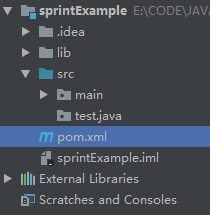
在<project>下配置国内仓库
    <properties><!-- 指定JDK1.8,默认1.5 -->

        <maven.compiler.source>1.8</maven.compiler.source>

        <maven.compiler.target>1.8</maven.compiler.target>

    </properties>

    <repositories><!-- 代码库 -->

        <repository>

            <id>maven-ali</id>

            <url>http://maven.aliyun.com/nexus/content/groups/public//</url>

            <releases>

                <enabled>true</enabled>

            </releases>

            <snapshots>

                <enabled>true</enabled>

                <updatePolicy>always</updatePolicy>

                <checksumPolicy>fail</checksumPolicy>

            </snapshots>

        </repository>

    </repositories>
<dependencies>
    <dependency>
        <groupId>org.springframework.boot</groupId>
        <artifactId>spring-boot-starter-web</artifactId>
    </dependency>

    <dependency>
        <groupId>org.springframework.boot</groupId>
        <artifactId>spring-boot-devtools</artifactId>
        <scope>runtime</scope>
        <optional>true</optional>
    </dependency>
    <dependency>
        <groupId>org.projectlombok</groupId>
        <artifactId>lombok</artifactId>
        <optional>true</optional>
    </dependency>
    <dependency>
        <groupId>org.springframework.boot</groupId>
        <artifactId>spring-boot-starter-test</artifactId>
        <scope>test</scope>
    </dependency>
    <dependency>
        <groupId>org.springframework.boot</groupId>
        <artifactId>spring-boot-starter-aop</artifactId>
    </dependency>
</dependencies>
eclipse-swt
    <properties>

        <swt.version>4.6.1</swt.version>

    </properties>

    </dependencies>

        <dependency>

            <groupId>org.eclipse.swt</groupId>

            <artifactId>org.eclipse.swt.win32.win32.x86</artifactId>

            <version>${swt.version}</version>

            <!-- To use the debug jar, add this -->

            <classifier>debug</classifier>

        </dependency>

        <dependency>

            <groupId>org.eclipse.swt</groupId>

            <artifactId>org.eclipse.swt.win32.win32.x86_64</artifactId>

            <version>${swt.version}</version>

        </dependency>

        <dependency>

            <groupId>org.eclipse.swt</groupId>

            <artifactId>org.eclipse.swt.gtk.linux.x86</artifactId>

            <version>${swt.version}</version>

        </dependency>

        <dependency>

            <groupId>org.eclipse.swt</groupId>

            <artifactId>org.eclipse.swt.gtk.linux.x86_64</artifactId>

            <version>${swt.version}</version>

        </dependency>

        <dependency>

            <groupId>org.eclipse.swt</groupId>

            <artifactId>org.eclipse.swt.cocoa.macosx.x86_64</artifactId>

            <version>${swt.version}</version>

        </dependency>

    </dependencies>

    <repositories>

        <repository>

            <id>maven-eclipse-repo</id>

            <url>http://maven-eclipse.github.io/maven</url>

        </repository>

    </repositories>
配置poi
    <properties>

        <poi.version>3.10-FINAL</poi.version>

    </properties>

    <dependencies>

        <dependency>

            <groupId>org.apache.poi</groupId>

            <artifactId>poi</artifactId>

            <version>${poi.version}</version>

        </dependency>

        <dependency>

            <groupId>org.apache.poi</groupId>

            <artifactId>poi-ooxml</artifactId>

            <version>${poi.version}</version>

        </dependency>

    </dependencies>
.
IDEA中,将项目加入maven管理。的更多相关文章
- intellij 创建java web项目(maven管理的SSH)
intellij 创建java web项目(maven管理的SSH) 环境intellij IDEA14.MAVEN.Spring.Struts2.Hibernate.Java Web.工程搭建. 1 ...
- java传统web项目添加maven管理jar包,log4j无法正常输出日志
本文适合1年以上编程基础的开发人员阅读,非技术创新,可作为故障排除实录参考/收藏. 背景 笔者最近在给公司一个老的web项目改造升级,项目使用springmvc+mybatis,由于项目比较久远,没有 ...
- eclipse中的项目受svn管理
1.我们在启动Eclipse的时候都会有例如以下图提示: 假设我们直接这样输入目录的名字,这个文件会在eclipse安装目录的同一级自己主动生成这样一个名字叫做njgzw的目录.接下来我们每次启动都用 ...
- (一)使用IDEA新建一个最简单的JavaWeb项目,Maven管理
1.项目环境 IDEA:2016.2 JDK:1.8.0_76 Maven:3.2.5 2.File-->New-->Project-->Maven 3.选择Project SDK: ...
- 【坑】解决maven管理SSM中mybatis的mapper文件扫描失败的问题
文章目录 前言 改进方式来替换原始的使用方式 后记 好久没有写博客了,11月底来到公司实习,上个月写个小demo,趁此回顾下SSM,今天将最近的积累记录下: 前言 在学习 mybatis 的时候,都知 ...
- Maven管理多模块应用
穿越至目录: 从0开始,构建前后端分离应用 对于概念的一些理解 Maven的作用 管理模块之间的依赖:根据业务需求,系统会划分很多模块,这些模块彼此之间存在着依赖关系.比如系统管理模块依赖着文件上传模 ...
- Spring-在IDEA2016中创建maven管理的SpringMVC项目
这是一套我自己摸索出来的创建项目方法,基本是用在创建用maven管理的 Spring+SpringMVC+Mybatis的J2EE项目时. 创建一个maven管理的webapp项目 在创建项目时,选择 ...
- Eclipse中发布Maven管理的Web项目时找不到类的问题根源和解决办法(转)
转自:http://blog.csdn.net/lvguanming/article/details/37812579?locationNum=12 写在前面的话 现在是越来越太原讨厌Eclipse这 ...
- 我是怎么从项目中的lib加JAR更换为maven管理的
原来我对maven的使用应该还是去年的时候吧,当时对maven并不感冒(请不要吐槽哈),认为为什么一定要用maven来管理呢,我自己管理jar不是一样么,当时还认为自己管理jar还各种方便还对mave ...
随机推荐
- 踩坑之VC报错 error RC2104 : undefined keyword or key name
.RC文件中第541行 MENUITEM "CNDev, ID_CNDEV 少了一个" 正确的应该是MENUITEM " ...
- ubuntu go环境安装搭建
一.安装必备环境 sudo apt-get install git golang-go vim sublime-text-installer 如果出现安装错误,进行修复安装: sudo apt-get ...
- Oracle根据主键获取对应表,Oracle根据外键获取相关表
Oracle根据主键获取对应表 select * from user_constraints a, USER_CONS_COLUMNS b where a.CONSTRAINT_TYPE = 'P' ...
- IntelliJ IDEA 常用插件
1.Alibaba Java Coding Guidelines(Java代码规约扫描插件) 阿里开发的此插件极大的改善程序员的代码质量,帮助程序员规范自己的代码 tools下可以切换中英文 地址:h ...
- 【python】python中的enumerate()函数【笔记】
结合实例来理解比较好,网上找了一下这个enumerate用法,自己也记录一下加深印象 看一下相关链接: 链接1:http://www.cnblogs.com/danielStudy/p/6576040 ...
- 字节码操作JAVAssist
字节码操作Javassist 字节码:字节码是设计被用来将代码高效的传送给多种软件平台.硬件平台,字节码的设计也实现了Java的平台无关性,字节码比机器码更抽象,它通常被认为是包含了一个可执行文件的二 ...
- jmeter+ant+jekins的持续集成自动化搭建-基于虚拟机的linux系统
准备软件: 1.ant压缩包,2.jmeter压缩包,3.jenkins的war包压缩包,4.tomcat压缩包,5.build.xml文件,6.jmeter生成的***.jmx格式文件. 基本原理: ...
- js:获取事件源的兼容性写法
XXX.onclick = function(e){ var event = e || window.event; var target = event.target || event.srvElem ...
- lombok踩坑与思考
虽然接触到lombok已经有很长时间,但是大量使用lombok以减少代码编写还是在新团队编写新代码维护老代码中遇到的. 我个人并不主张使用lombok,其带来的代价足以抵消其便利,但是由于团队编码风格 ...
- rm命令详解
1.简介: rm是常用的命令,该命令的功能为删除一个目录中的一个或多个文件或目录,它也可以将某个目录及其下的所有文件及子目录均删除.对于链接文件,只是删除了链接,原有文件均保持不变. 注意:rm是一个 ...