
Java框架spring Boot学习笔记(三):Controller的使用
Controller注解介绍
- @Controller:处理http请求
- @RestController: Spirng4之后新加的注解,其实是一个组合注解等同于@ResponseBody和@Controller的组合
- @RequestMapping: 用于配置url映射,期望用户通过url访问方法
- @PathVariable:获取url中的数据
- @RequestParam:使用和@PathVariable差不多,不过以?id=来传递值
@Controller的使用
需要在以前的代码结构基础上修改三个文件
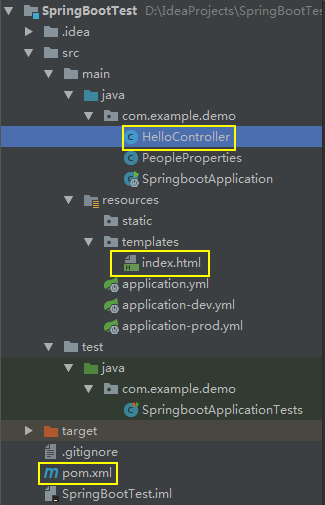
为pom.xml添加一个依赖
1 <dependency>

    <groupId>org.springframework.boot</groupId>

    <artifactId>spring-boot-starter-thymeleaf</artifactId>

 </dependency>
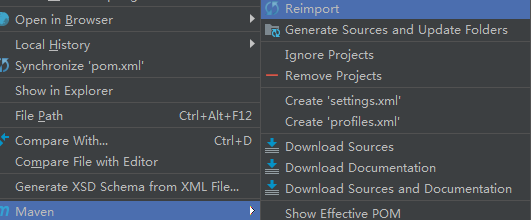
右击pom.xml,Reimport一下
新建一个index.html文件,添加一句话
<h1>Hello Spring Boot!</h1>
修改HelloController.java,使用Controller注解,并返回index.html文件
 package com.example.demo;

 import org.springframework.beans.factory.annotation.Autowired;

 import org.springframework.stereotype.Controller;

 import org.springframework.web.bind.annotation.RequestMapping;

 import org.springframework.web.bind.annotation.RequestMethod;

 @Controller

 public class HelloController {

     //自动装配注解

     @Autowired

     private PeopleProperties peopleProperties;

     @RequestMapping(value = "/hello" , method = RequestMethod.GET)

     public String say() {

         return "index";

     }

 }
运行,访问本地8082端口

@RestController的使用
@RestController相当于@ResponseBody和@Controller的组合注解
修改HelloController.java
 package com.example.demo;

 import org.springframework.beans.factory.annotation.Autowired;

 import org.springframework.web.bind.annotation.RequestMapping;

 import org.springframework.web.bind.annotation.RequestMethod;

 import org.springframework.web.bind.annotation.RestController;

 @RestController

 public class HelloController {

     @Autowired

     private PeopleProperties peopleProperties;

     @RequestMapping(value = {"/hello"} , method = RequestMethod.GET)

     public String say() {

         return peopleProperties.getName();

     }

 }
运行,访问本地8082端口
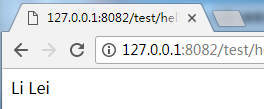
@PathVariable的使用
修改HelloController.java,获取url中的id值显示到页面上
 package com.example.demo;

 import org.springframework.beans.factory.annotation.Autowired;

 import org.springframework.stereotype.Controller;

 import org.springframework.web.bind.annotation.PathVariable;

 import org.springframework.web.bind.annotation.RequestMapping;

 import org.springframework.web.bind.annotation.RequestMethod;

 import org.springframework.web.bind.annotation.ResponseBody;

 @ResponseBody

 @Controller

 public class HelloController {

     @Autowired

     private PeopleProperties peopleProperties;

     @RequestMapping(value = {"/hello/{id}"} , method = RequestMethod.GET)

     public String say(@PathVariable("id") Integer id) {

         return "id: " +id;

     }

 }
运行,url中的id设为2
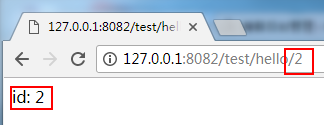
@RequestParam的使用
修改HelloController.java,用传统的方式?id=value,来获取url中的id值显示到页面上。
 package com.example.demo;

 import org.springframework.beans.factory.annotation.Autowired;

 import org.springframework.stereotype.Controller;

 import org.springframework.web.bind.annotation.*;

 @ResponseBody

 @Controller

 public class HelloController {

     @Autowired

     private PeopleProperties peopleProperties;

     @RequestMapping(value = {"/hello"} , method = RequestMethod.GET)

     public String say(@RequestParam(value = "id" ,required = false,defaultValue = "0") Integer id) {

         return "id: " +id;

     }

 }
运行

Java框架spring Boot学习笔记(三):Controller的使用的更多相关文章
- Java框架spring Boot学习笔记(六):Spring Boot事务管理
SpringBoot和Java框架spring 学习笔记(十九):事务管理(注解管理)所讲的类似,使用@Transactional注解便可以轻松实现事务管理.
- Java框架spring Boot学习笔记(二):Hello Spring Boot、以及项目属性配置
新建一个新建一个SpringBootTest工程 新建一个HelloController.java文件 package com.example.demo; import org.springframe ...
- Java框架spring Boot学习笔记(一):开始第一个项目
新建一个项目,选择Spring initializr 修改group和项目名 添加依赖包Web,MongoDB 设置保存位置和工程名 新建一个test的文件 输入代码: package com.xxx ...
- Java框架spring Boot学习笔记(五):Spring Boot操作MySQL数据库增、删、改、查
在pom.xml添加一下代码,添加操作MySQL的依赖jar包. <dependency> <groupId>org.springframework.boot</grou ...
- Java框架spring Boot学习笔记(十):传递数据到html页面的例子
新建一个templates文件夹和index.html <!DOCTYPE html> <html> <head lang="en"> < ...
- Java框架spring Boot学习笔记(四):Spring Boot操作MySQL数据库
在pom.xml添加一下代码,添加操作MySQL的依赖jar包. <dependency> <groupId>org.springframework.boot</grou ...
- Java框架spring Boot学习笔记(七):@Configuration,@bean注解
@Configuration作用在类上,相当于一个xml文件 @bean作用于方法上,相当于xml配置中的<bean>标签 一个例子: 新建一个Springboot工程 新建一个User类 ...
- Java框架spring Boot学习笔记(九):一个简单的RESTful API
RESTful API设计需求如下: User.java package com.springboot.test; public class User { private Long id; priva ...
- Java框架spring Boot学习笔记(八):@PropertySource,@Value注解
获取配置文件 忽略配置文件不存在时报错
随机推荐
- Mha-Atlas-MySQL高可用
Mha-Atlas-MySQL高可用 一.MHA简介 1.软件介绍 MHA在MySQL高可用是一个相对成熟的解决方案,是一套优秀的作为mysql高可用环境下故障切换和主从提升的高可用软件,在MySQL ...
- java 乱码问题集
场景1:刚复制来的java类乱码,反复修改无果 解:将java类用NotePat++打开,可正常显示,复制过来即可.
- Mybatis中 Integer 值为0时,默认为空字符串的解决办法。
需求是查询级别为0的用户 User对象里的level字段的值为0,查询时居然没有查到为level为0的用户. <select id="selectSelective" par ...
- gridview使用小知识
1.列改变为select,不能使用gridview.SelectedRow.Cells[0].Text 2.事件执行顺序 RowCommandPageIndexChangingPageIndexCha ...
- Tree Traversals Again
An inorder binary tree traversal can be implemented in a non-recursive way with a stack. For example ...
- DOM事件类
1.DOM中的事件级别 DOM0: element.onclick = function(){} DOM1: 没有与事件相关的设计 DOM2: element.addEventListener('cl ...
- CentOS 7修改系统时间及硬件时间
转载于:https://www.cnblogs.com/LouisZJ/p/8554991.html [root@nginx ~]# timedatectl --help timedatectl [O ...
- 我的第一个flutter程序
环境搭建好了之后,终于可以开始flutter的学习,废话少说先开始‘Hello World’. 创建好flutter项目之后,打开设备模拟器 打开之后 准备ok,开始编码 -------------- ...
- flask+redis实现抢购(秒杀)功能
今天面试了 一家非常高大上的公司,问了我关于redis的实用性问题,但是答的不是很好,所以下午通过再次学习 redis,实现相关实用性功能的一种. 对于抢购功能,难点在于 抢购时 由于高并发请求,导致 ...
- vue富文本编辑器
基于webpack和vue 一.npm 安装 vue-quill-editor 二.在main.js中引入 import VueQuillEditor from 'vue-quill-editor'/ ...