
基于jieba,TfidfVectorizer,LogisticRegression进行搜狐新闻文本分类
一、简介
此文是对利用jieba,word2vec,LR进行搜狐新闻文本分类的准确性的提升,数据集和分词过程一样,这里就不在叙述,读者可参考前面的处理过程
经过jieba分词,产生24000条分词结果(sohu_train.txt有24000行数据,每行对应一个分词结果)
with open('cutWords_list.txt') as file:

    cutWords_list = [ k.split() for k in file ]

1)TfidfVectorizer模型
调用sklearn.feature_extraction.text库的TfidfVectorizer方法实例化模型对象。TfidfVectorizer方法4个参数含义:
- 第1个参数是分词结果,数据类型为列表,其中的元素也为列表
- 第2个关键字参数stop_words是停顿词,数据类型为列表
- 第3个关键字参数min_df是词频低于此值则忽略,数据类型为int或float
- 第4个关键字参数max_df是词频高于此值则忽略,数据类型为int或float
from sklearn.feature_extraction.text import TfidfVectorizer

tfidf = TfidfVectorizer(cutWords_list, stop_words=stopword_list, min_df=40, max_df=0.3)
2)特征工程
X = tfidf.fit_transform(train_df['文章'])

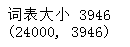
print('词表大小', len(tfidf.vocabulary_))

print(X.shape)
可见每篇文章内容被向量化,维度特征时3946
3)模型训练
3.1)LabelEncoder
from sklearn.preprocessing import LabelEncoder

import pandas as pd

train_df = pd.read_csv('sohu_train.txt', sep='\t', header=None)

labelEncoder = LabelEncoder()

y = labelEncoder.fit_transform(train_df[0])#一旦给train_df加上columns,就无法使用[0]来获取第一列了

y.shape

3.2)逻辑回归
from sklearn.linear_model import LogisticRegression

from sklearn.model_selection import train_test_split

train_X, test_X, train_y, test_y = train_test_split(X, y, test_size=0.2)

logistic_model = LogisticRegression(multi_class = 'multinomial', solver='lbfgs')

logistic_model.fit(train_X, train_y)

logistic_model.score(test_X, test_y)
其中逻辑回归参数官方文档:http://scikit-learn.org/stable/modules/generated/sklearn.linear_model.LogisticRegression.html

3.3)保存模型
调用pickle:pip install pickle
第1个参数是保存的对象,可以为任意数据类型,因为有3个模型需要保存,所以下面代码第1个参数是字典
第2个参数是保存的文件对象
import pickle

with open('tfidf.model', 'wb') as file:

    save = {

        'labelEncoder' : labelEncoder,

        'tfidfVectorizer' : tfidf,

        'logistic_model' : logistic_model

    }

    pickle.dump(save, file)
3.4)交叉验证
在进行此步的时候,不需要运行此步之前的所有步骤,即可以重新运行jupyter notebook。然后调用pickle库的load方法加载保存的模型对象,代码如下:
import pickle

with open('tfidf.model', 'rb') as file:

    tfidf_model = pickle.load(file)

    tfidfVectorizer = tfidf_model['tfidfVectorizer']

    labelEncoder = tfidf_model['labelEncoder']

    logistic_model = tfidf_model['logistic_model']
load模型后,重新加载测试集:
import pandas as pd

train_df = pd.read_csv('sohu_train.txt', sep='\t', header=None)

X = tfidfVectorizer.transform(train_df[1])

y = labelEncoder.transform(train_df[0])
调用sklearn.linear_model库的LogisticRegression方法实例化逻辑回归模型对象。
调用sklearn.model_selection库的ShuffleSplit方法实例化交叉验证对象。
调用sklearn.model_selection库的cross_val_score方法获得交叉验证每一次的得分。
最后打印每一次的得分以及平均分,代码如下:
from sklearn.linear_model import LogisticRegression

from sklearn.model_selection import ShuffleSplit

from sklearn.model_selection import cross_val_score

logistic_model = LogisticRegression(multi_class='multinomial', solver='lbfgs')

cv_split = ShuffleSplit(n_splits=5, test_size=0.3)

score_ndarray = cross_val_score(logistic_model, X, y, cv=cv_split)

print(score_ndarray)

print(score_ndarray.mean())

4)模型评估
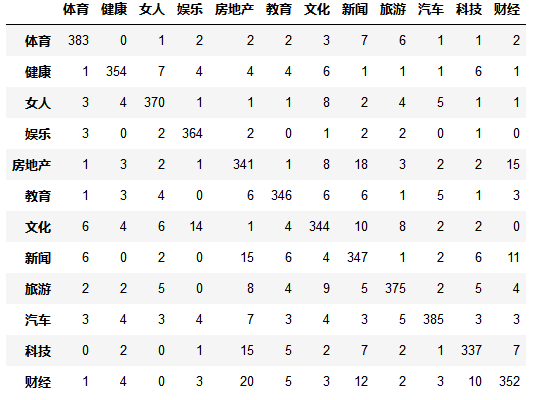
绘制混淆矩阵:
from sklearn.model_selection import train_test_split

from sklearn.linear_model import LogisticRegressionCV

from sklearn.metrics import confusion_matrix

import pandas as pd

train_X, test_X, train_y, test_y = train_test_split(X, y, test_size=0.2)

logistic_model = LogisticRegressionCV(multi_class='multinomial', solver='lbfgs')

logistic_model.fit(train_X, train_y)

predict_y = logistic_model.predict(test_X)

pd.DataFrame(confusion_matrix(test_y, predict_y),columns=labelEncoder.classes_, index=labelEncoder.classes_)
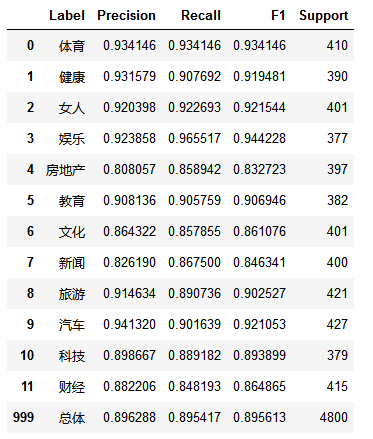
绘制precision、recall、f1-score、support报告表:
import numpy as np

from sklearn.metrics import precision_recall_fscore_support

def eval_model(y_true, y_pred, labels):

    #计算每个分类的Precision, Recall, f1, support

    p, r, f1, s = precision_recall_fscore_support( y_true, y_pred)

    #计算总体的平均Precision, Recall, f1, support

    tot_p = np.average(p, weights=s)

    tot_r = np.average(r, weights=s)

    tot_f1 = np.average(f1, weights=s)

    tot_s = np.sum(s)

    res1 = pd.DataFrame({

        u'Label': labels,

        u'Precision' : p,

        u'Recall' : r,

        u'F1' : f1,

        u'Support' : s

    })

    res2 = pd.DataFrame({

        u'Label' : ['总体'],

        u'Precision' : [tot_p],

        u'Recall': [tot_r],

        u'F1' : [tot_f1],

        u'Support' : [tot_s]

    })

    res2.index = [999]

    res = pd.concat( [res1, res2])

    return res[ ['Label', 'Precision', 'Recall', 'F1', 'Support'] ]

predict_y = logistic_model.predict(test_X)

eval_model(test_y, predict_y, labelEncoder.classes_)
5)模型测试
import pandas as pd

test_df = pd.read_csv('sohu_test.txt', sep='\t', header=None)

test_X = tfidfVectorizer.transform(test_df[1])

test_y = labelEncoder.transform(test_df[0])

predict_y = logistic_model.predict(test_X)

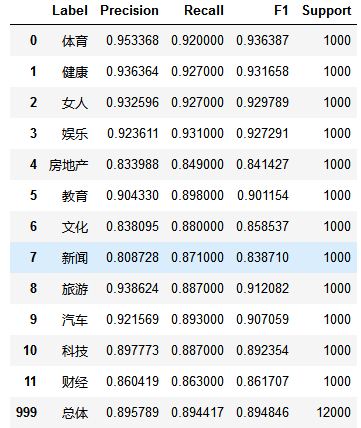
eval_model(test_y, predict_y, labelEncoder.classes_)
6)总结
训练集数据共有24000条,测试集数据共有12000条。经过交叉验证,模型平均得分为0.8711
模型评估时,使用LogisticRegressionCV模型,得分提高了3%,为0.9076
最后在测试集上的f1-score指标为0.8990,总体来说这个分类模型较优秀,能够投入实际应用
7)致谢
本文参考简书:https://www.jianshu.com/p/96b983784dae
感谢作者的详细过程,再次感谢!
8)流程图
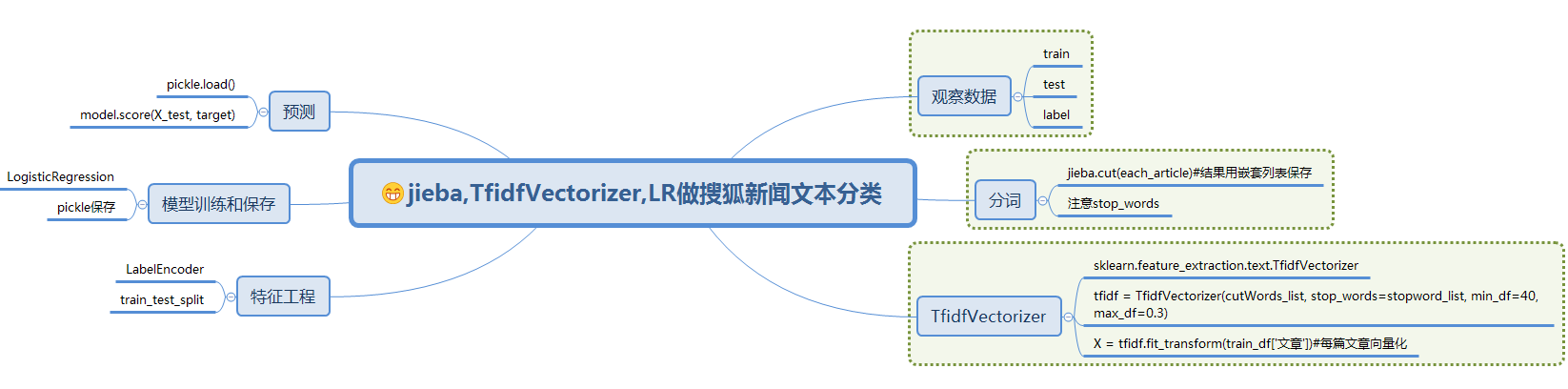
基于jieba,TfidfVectorizer,LogisticRegression进行搜狐新闻文本分类的更多相关文章
- 利用jieba,word2vec,LR进行搜狐新闻文本分类
一.简介 1)jieba 中文叫做结巴,是一款中文分词工具,https://github.com/fxsjy/jieba 2)word2vec 单词向量化工具,https://radimrehurek ...
- sohu_news搜狐新闻类型分类
数据获取 数据是从搜狐新闻开放的新闻xml数据,经过一系列的处理之后,生成的一个excel文件 该xml文件的处理有单独的处理过程,就是用pandas处理,该过程在此省略 import numpy a ...
- 使用百度NLP接口对搜狐新闻做分类
一.简介 本文主要是要利用百度提供的NLP接口对搜狐的新闻做分类,百度对NLP接口有提供免费的额度可以拿来练习,主要是利用了NLP里面有个文章分类的功能,可以顺便测试看看百度NLP分类做的准不准.详细 ...
- 【NLP】3000篇搜狐新闻语料数据预处理器的python实现
3000篇搜狐新闻语料数据预处理器的python实现 白宁超 2017年5月5日17:20:04 摘要: 关于自然语言处理模型训练亦或是数据挖掘.文本处理等等,均离不开数据清洗,数据预处理的工作.这里 ...
- 利用朴素贝叶斯分类算法对搜狐新闻进行分类(python)
数据来源 https://www.sogou.com/labs/resource/cs.php介绍:来自搜狐新闻2012年6月—7月期间国内,国际,体育,社会,娱乐等18个频道的新闻数据,提供URL ...
- 搜狗输入法弹出搜狐新闻的解决办法(sohunews.exe)
狗输入法弹出搜狐新闻的解决办法(sohunews.exe) 1.找到搜狗输入法的安装目录(一般是C:\program files\sougou input\版本号\)2.右键点击sohunews.ex ...
- 利用搜狐新闻语料库训练100维的word2vec——使用python中的gensim模块
关于word2vec的原理知识参考文章https://www.cnblogs.com/Micang/p/10235783.html 语料数据来自搜狐新闻2012年6月—7月期间国内,国际,体育,社会, ...
- 搜狐新闻APP是如何使用HUAWEI DevEco IDE快速集成HUAWEI HiAI Engine
6月12日,搜狐新闻APP最新版本在华为应用市场正式上线啦! 那么,这一版本的搜狐新闻APP有什么亮点呢? 先抛个图,来直接感受下—— 模糊图片,瞬间清晰! 效果杠杠的吧. 而藏在这项神操作背后的 ...
- 世界更清晰,搜狐新闻客户端集成HUAWEI HiAI 亮相荣耀Play发布会!
6月6日,搭载有“很吓人”技术的荣耀Play正式发布,来自各个领域的大咖纷纷为新机搭载的惊艳技术站台打call,其中,搜狐公司董事局主席兼首席执行官张朝阳揭秘:华为和搜狐新闻客户端在硬件AI方面做 ...
随机推荐
- Qt QTimer
QTimer类提供了重复和单次触发信号的定时器. QTimer类为定时器提供了一个高级别的编程接口.很容易使用:首先,创建一个QTimer,连接timeout()信号到适当的槽函数,并调用start( ...
- 了解AutoCAD对象层次结构 —— 1 ——应用程序
想象这样一个场景:当您开始一天的工作,坐到电脑前面,用鼠标双击桌面上的AutoCAD Civil 3D图标,这时一个AutoCAD Civil 3D应用程序将运行起来.打开Windows任务管理器,我 ...
- memcached安装报错 error while loading shared libraries: libevent-2.0.so.5: cannot open shared object file: No such file or directory解决
我是从其他服务器scp来的memcached(~~~整个文件夹的那种,windows用多了的后遗症) 在准备运行 ./memcached -d -u root -l localhost -m 800 ...
- Codeforces Round #507 Div. 1
D:类似于noip2018d1t3,子树内的链应该贪心的尽量合并而不是拆开.则设f[i]为i子树内满足选的链尽量多的情况下根所在的链的最长长度即可.于是可以线性对某个k求得答案. 注意到长度为k的链不 ...
- 51Nod 1344 走格子
参考自:https://www.cnblogs.com/ECJTUACM-873284962/p/6445381.html 1344 走格子 基准时间限制:1 秒 空间限制:131072 KB 分值: ...
- Python中xlrd模块解析
xlrd 导入模块 import xlrd 2.打开指定的excel文件,返回一个data对象 data = xlrd.open_workbook(file) ...
- P1508 Likecloud-吃、吃、吃
数字金字塔3条路 f[i][j]=max(max(f[i-1][j],f[i-1][j-1]),f[i-1][j+1])+a[i][j]; #include<bits/stdc++.h> ...
- POJ 3322 Bloxorz(算竞进阶习题)
bfs 标准广搜题,主要是把每一步可能的坐标都先预处理出来,会好写很多 每个状态对应三个限制条件,x坐标.y坐标.lie=0表示直立在(x,y),lie=1表示横着躺,左半边在(x,y),lie=2表 ...
- atcoder NIKKEI Programming Contest 2019 E - Weights on Vertices and Edges
题目链接:Weights on Vertices and Edges 题目大意:有一个\(n\)个点\(m\)条边的无向图,点有点权,边有边权,问至少删去多少条边使得对于剩下的每一条边,它所在的联通块 ...
- 【AGC002E】Candy Piles 博弈论
题目大意 有\(n\)堆糖果,第\(i\)堆有\(a_i\)个. 两个人轮流决策,决策分为两种: 1.选择糖果数最多的一堆糖果,并把这堆糖全吃了. 2.在每堆非空的糖果堆里拿一颗糖吃掉. 吃掉最后一颗 ...