
vue基础3
1.watch
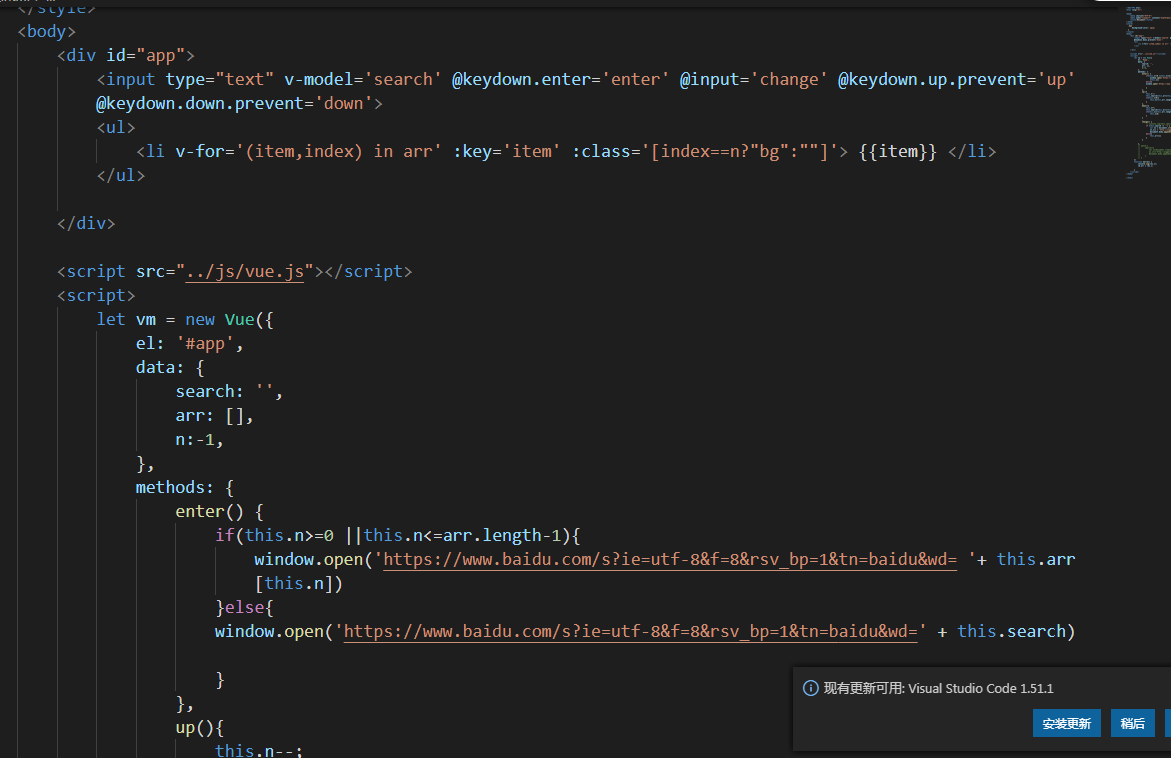
案例:百度搜索框
注释的是用watch实现的
然后这个我用的是oninput事件


a.深浅监听
浅监听

深监听(不建议使用)

2.过滤器
全局: Vue.fliter('过滤器名字',回调函数) 回调函数中做的是业务逻辑
局部:在vue实例中通过filters配置项来配置 filters:{ 过滤器名称(){ 业务逻辑} }

过滤时间

3.计算属性
1.通过计算得出来的,所以就没有初始值
computed
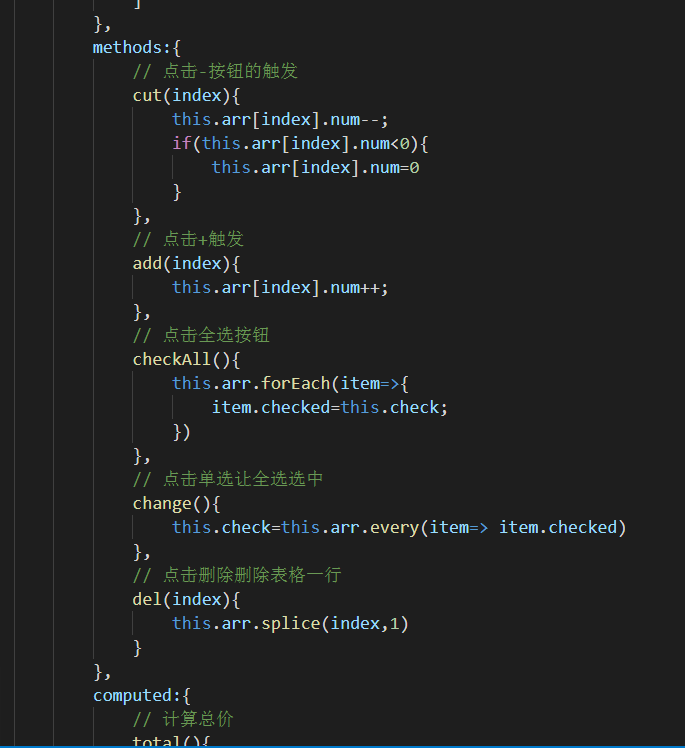
4.购物车案例



vue-day03
1.watch
案例:百度搜索框
接口:百度:http://suggestion.baidu.com/su?cb=callback&wd=123
1.深浅监听
watch:{
//浅监听
msg(newVal,oldVal){
console.log(newVal,oldVal)
},
//深监听
json:{
//这个名字不能更改
handler(a){
console.log(a)
},
//主要通过deep属性
deep:true
},
注意:不建议使用深监听,通常转换为浅监听方式
}
2.百度案例
a.跨域的解决 jsonp
b.通过监听用户输入,发送请求,渲染页面
<!DOCTYPE html>
<html lang='en'>
<head>
<meta charset='UTF-8'>
<meta name='viewport' content='width=device-width, initial-scale=1.0'>
<title>Document</title>
<style>
.select{
background-color: red;
}
</style>
</head>
<body>
<div id='app'>
<input type="text" v-model='search' @keydown.up.prevent='up' @keydown.down = 'down' @keydown.enter = 'enter'>
<ul>
<li v-for='(item,index) in arr' :key='item' :class='[index==n?"select":""]'>{{item}}</li>
</ul>
</div>
</body>
<script src='./vue.js'></script>
<script>
let vm = new Vue({
el: '#app',
data: {
search:'',
arr:[],//请求回来的数据
n:-1,//自己定义的标识
},
methods: {
down(){
console.log(111)
this.n++;
if(this.n>this.arr.length-1){
this.n = 0
}
},
up(){
this.n--;
if(this.n<0){
this.n=this.arr.length-1
}
},
enter(){
// https://www.baidu.com/s?wd=123
//在下拉列表的范围内点击跳转到对应的搜索页面
if(this.n>=0&&this.n<=this.arr.length-1){
window.open('https://www.baidu.com/s?wd='+this.arr[this.n])
}else{
window.open('https://www.baidu.com/s?wd='+this.search)
}
}
},
watch: {
search(){
if(this.search==''){
return
}
// 发送数据请求 jsonp方式
var os = document.createElement('script');
os.src = 'http://suggestion.baidu.com/su?cb=aa&wd='+this.search;
document.body.appendChild(os)
}
},
})
function aa(res){
console.log(res)
// 找到与vm中data的关系,并且赋值
vm.arr = res.s
}
</script>
</html>
2.过滤器
全局: Vue.fliter('过滤器名字',回调函数) 回调函数中做的是业务逻辑
局部:在vue实例中通过filters配置项来配置 filters:{ 过滤器名称(){ 业务逻辑} }
案例:
1.电话号码过滤
<div id='app'>
<!-- | 管道符  -->
{{tel | filterTel}}
</div>
Vue.filter('filterTel',(tel)=>{
    return tel.slice(0,3)+'****'+tel.slice(7)
})
2.过滤价格
 <div id='app'>
        <!-- | 管道符  -->
        {{price | filterPrice}}
    </div>
Vue.filter('filterPrice',(price)=>{
return price.toFixed(2)
})
3.过滤时间
<div id='app'>
        <div>当前时间{{ time | filterTime}}</div>
    </div>
Vue.filter('filterTime',(time)=>{
    // padStart   首位补零方法  padEnd  末尾补零
    let date = new Date(time)
    console.log(date)
    // 年
    let year = date.getFullYear()
    // 月
    let month = ((date.getMonth()+1)+'').padStart(2,'0')
    // 日
    let day = (date.getDate()+'').padStart(2,'0')
    // 时
    let hours = (date.getHours()+'').padStart(2,'0')
    // 分
    let minutes = (date.getMinutes()+'').padStart(2,'0')
    // 秒
    let seconds = (date.getSeconds()+'').padStart(2,'0')
    return `${year}-${month}-${day} ${hours}:${minutes}:${seconds}`
})
3.计算属性
1.通过计算得出来的,所以就没有初始值
computed
4.购物车案例
流程:
1.先画静态页面 利用bs
 <div id='app' class="container">
    <h2>购物车</h2>
    <table class="table table-bordered table-hover">
      <tr>
        <th>
          <input type="checkbox" v-model='allChecked' @change='checkAll'>全选
        </th>
        <th>商品名称</th>
        <th>商品单价</th>
        <th>商品数量</th>
        <th>小计</th>
        <th>操作</th>
      </tr>
      <tr v-for='(item,index) in list' :key='item.id'>
        <td>
          <input type="checkbox" v-model='item.checked' @change='changeOne(index)'>
        </td>
        <td>{{item.name}}</td>
        <td>{{item.price}}</td>
        <td>
          <button type="button" class="btn btn-primary" @click= 'cut(index)'>-</button>
          <span>{{item.num}}</span>
          <button type="button" class="btn btn-danger" @click= 'add(index)'>+</button>
        </td>
        <td>小计:{{item.price*item.num}}</td>
        <td><button type="button" class="btn btn-primary" @click = 'del(index)'>删除</button></td>
      </tr>
      <tr>
        <td colspan="6">总价:{{total}}</td>
      </tr>
    </table>
  </div>
2.实现点击添加,点击减少数量,点击删除功能
 let vm = new Vue({
       el:'#app',
       data:{
         allChecked:false,
          list:[
            {
              id:1,
              name:'手机',
              price:1999.9,
              num:1,
              checked:false
            },
            {
              id:2,
              name:'电脑',
              price:4999.9,
              num:1,
              checked:true
            },
            {
              id:3,
              name:'平板',
              price:2999.9,
              num:1,
              checked:false
            },
            {
              id:4,
              name:'相机',
              price:999,
              num:1,
              checked:false
            },
          ]
       },
       methods: {
          // 添加
          add(index){
            this.list[index].num++
          },
          cut(index){
            this.list[index].num--
            if( this.list[index].num<0){
              this.list[index].num=0
            }
          },
          del(index){
            this.list.splice(index,1)
          },
          // 全选
          checkAll(){
            this.list.forEach(item=>{
              item.checked = this.allChecked
            })
          },
          //改变一个的状态
          changeOne(index){
                this.allChecked = this.list.every(item=>item.checked)
          }
       },
       })
3.判断选中状态完成总价的计算
<tr>
    <td colspan="6">总价:{{total}}</td>
</tr>
computed: {
          total(){
            var sum=0;
            this.list.forEach(item=>{
              if(item.checked){
                sum+=item.price*item.num
              }

            })
            return sum
          }
       },
bootstrap
作业:
淘宝搜索:https://suggest.taobao.com/sug?code=utf-8&q=s&callback=jsonp299
vue基础3的更多相关文章
- 从壹开始前后端分离 [ Vue2.0+.NET Core2.1] 十八║Vue基础: 指令(下)+计算属性+watch
回顾 今天来晚辣,给公司做了一个小项目,一个瀑布流+动态视频控制的DEMO,有需要的可以联系我,公司的项目就不对外展示了(一个后端程序员真的要干前端了哈哈哈). 书接上文,昨天正式的开始了Vue的代码 ...
- 从壹开始前后端分离 [ Vue2.0+.NET Core2.1] 十九║Vue基础: 样式动态绑定+生命周期
回顾 哈喽大家好,前后端分离系列文章又开始了,今天周一,还是感谢大家花时间来观看我写的博客,周末呢,没有写文章,但是也没有闲着,主要是研究了下遗留问题,看过之前文章的应该知道,之前的在AOP使用Red ...
- 从壹开始前后端分离 [ Vue2.0+.NET Core2.1] 二十║Vue基础终篇:传值+组件+项目说明
缘起 新的一天又开始啦,大家也应该看到我的标题了,是滴,Vue基础基本就到这里了,咱们回头看看这一路,如果你都看了,并且都会写了,那么现在你就可以自己写一个Demo了,如果再了解一点路由,ajax请求 ...
- python 全栈开发,Day89(sorted面试题,Pycharm配置支持vue语法,Vue基础语法,小清单练习)
一.sorted面试题 面试题: [11, 33, 4, 2, 11, 4, 9, 2] 去重并保持原来的顺序 答案1: list1 = [11, 33, 4, 2, 11, 4, 9, 2] ret ...
- Vue 基础精讲
Vue 基础精讲 Vue 官方文档:https://cn.vuejs.org/v2/guide/ VUE 实例 每个组件都是一个 vue 的实例. 一个 vue 项目是由实例组成的. vue 实例上有 ...
- Vue基础以及指令
Vue 基础篇一 一.Vue框架介绍 之前大家学过HTML,CSS,JS,JQuery,Bootstrap,现在我们要学一个新的框架Vue~ Vue是一个构建数据驱动的web界面的渐进式框架. 目 ...
- 2-5 vue基础语法
一.vue基础语法 语法: {{msg}} html赋值: v-html="" 绑定属性: v-bind:id="" 使用表达式: {{ok? "ye ...
- Vue 1-- ES6 快速入门、vue的基本语法、vue应用示例,vue基础语法
一.ES6快速入门 let和const let ES6新增了let命令,用于声明变量.其用法类似var,但是声明的变量只在let命令所在的代码块内有效. { let x = 10; var y = 2 ...
- vue基础知识之vue-resource/axios
Vue基础知识之vue-resource和axios(三) vue-resource Vue.js是数据驱动的,这使得我们并不需要直接操作DOM,如果我们不需要使用jQuery的DOM选择器,就没 ...
- Vue基础及脚手架环境搭建
From:http://www.jianshu.com/p/dc5057e7ad0d 一.vue基础 “Vue2.0”跟俺一起全面入坑 01 “Vue2.0”跟俺一起全面入坑 02 “Vue2.0”跟 ...
随机推荐
- manim边做边学--通用三维坐标系
ThreeDAxes是Manim中用于创建三维坐标系的类. 在数学.物理和工程等领域,三维坐标系的绘制是非常重要的. ThreeDAxes使得用户能够在动画中直观地展示三维空间中的对象和关系,从而提高 ...
- Flask常用插件
Flask特点: 1.小而精的代表 2.基于Werkzeug工具箱编写的轻量级web开发框架,它主要面向需求简单,项目周期短的Web小应用 3.灵活,核心思想是Flask只完成基本的功能,别的功能都是 ...
- Nuxt.js 应用中的 prepare:types 事件钩子详解
title: Nuxt.js 应用中的 prepare:types 事件钩子详解 date: 2024/11/8 updated: 2024/11/8 author: cmdragon excerpt ...
- 通过wget命令扒站仿站
在Linux下,通过一个命令就可以把整个站相关的文件全部下载下来. wget -r -p -k -np [网址] 参数说明: -r : 递归下载 -p : 下载所有用于显示 HTML 页面的图片之类的 ...
- 干货分享:通用加解密函数(crypto),Air780E篇
一.加解密概述 加解密算法是保证数据安全的基础技术,无论是在数据传输.存储,还是用户身份验证中,都起着至关重要的作用.随着互联网的发展和信息安全威胁的增加,了解并掌握常用的加解密算法已经成为开发者和安 ...
- token、cookie、session的区别
token是验证用户身份的令牌,通常是用于接口的身份验证,一般获取之后放在请求头中 cookie和session的区别: cookie是服务器发送到客户端然后存储在客户端的,可以用来保持用户的登录信息 ...
- delphi12 Android Edit SDK安装
安装 delphi 12.1 后,编译 FMX Android 程序失败! 查找原因,SDK配置全是叹号! 之前用过SDK Manager.exe,直接打开即可以选择下载,但现在发现没有了,查找资料如 ...
- 2023NOIP A层联测9 T3 天竺葵
2023NOIP A层联测9 T3 天竺葵 题面及数据范围 Ps:连接为accoderOJ. 看题大概是一个最长上升子序列的带权版本,于是想到 dp. 设 \(dp[i][j]\) 为到第 \(i\) ...
- excel/xlsx 空值判断NaN
从numpy导入nan类型,以此判断NaN类型
- kubernetesApi官方文档
kubernetes API官方文档在github上经常打不开,于是就放在博客了,以下内容均复制于github All URIs are relative to http://localhost Me ...