
IDEA项目搭建四——使用Mybatis实现Dao层
一、引入mybatis及mysql的jar包
可以从阿里云上面查找版本,db操作放在dao层所以打开该层的pom.xml文件,找到<dependencies>节点增加两个引入
<dependency>

    <groupId>org.mybatis</groupId>

    <artifactId>mybatis</artifactId>

    <version>3.4.5</version>

</dependency>

<dependency>

    <groupId>mysql</groupId>

    <artifactId>mysql-connector-java</artifactId>

    <version>5.1.45</version>

</dependency>
保存后系统会自动下载对应版本的jar包,我们开始编码
二、配置mybatis(手动创建)

1.在dao层的src/main下创建和java文件夹同级目录的resources文件夹,它默认会变换类型,如果不变则手动调整一下
2.在resources文件夹下创建mysql.properties文件
填入mysql数据库连接信息
jdbc.driver=com.mysql.jdbc.Driver
#数据库连接允许中文需要指明编码方式
jdbc.url=jdbc:mysql://10.11.12.237:3306/tyh_test?useUnicode=true&characterEncoding=utf8
jdbc.username=root
jdbc.password=root
3.在resources文件夹下创建mybatis_cfg.xml文件
填入mybatis配置信息
<?xml version="1.0" encoding="UTF-8"?>

<!DOCTYPE configuration PUBLIC "-//mybatis.org//DTD Config 3.0//EN" "http://mybatis.org/dtd/mybatis-3-config.dtd">

<configuration>

    <!-- 引入配置文件 -->

    <properties resource="mysql.properties"></properties>

    <!-- 为Java实体设置类别名 -->

    <typeAliases>

        <!-- 设置方式1,一个一个配置 type中放置的是类的全路径,alias中放置的是 类别名

        <typeAlias type="com.tyh.entity.UserEntity" alias="UserEntity"/> -->

        <!-- 设置方式2,自动扫描,将Java类的类名作为类的 类别名 -->

        <package name="com.tyh.entity"/>

    </typeAliases>

    <!-- 配置mybatis运行环境 -->

    <environments default="dev">

        <environment id="dev">

            <!-- 代表使用JDBC的提交和回滚来管理事务 -->

            <transactionManager type="JDBC"/>

            <!-- mybatis提供了3种数据源类型,分别是:POOLED,UNPOOLED,JNDI -->

            <!-- POOLED 表示支持JDBC数据源连接池 -->

            <!-- UNPOOLED 表示不支持数据源连接池 -->

            <!-- JNDI 表示支持外部数据源连接池 -->

            <dataSource type="POOLED">

                <!-- ${jdbc.driver}代表配置文件中的某一项的key -->

                <property name="driver" value="${jdbc.driver}"/>

                <property name="url" value="${jdbc.url}"/>

                <property name="username" value="${jdbc.username}"/>

                <property name="password" value="${jdbc.password}"/>

            </dataSource>

        </environment>

    </environments>

    <!-- 为mybatis的映射文件mapper.xml设置路径 -->

    <mappers>

        <!-- 映射方式1,一个一个设置

        <mapper resource="com.tyh.dao.mapper.UserMapper.xml"/> -->

        <!-- 映射方式2,自动扫描包内的Mapper接口与配置文件 -->

        <package name="com/tyh/dao/mapper"/>

    </mappers>

</configuration>
4.在src/main/java下创建各自的包,我这里是com.tyh.dao.mapper,在mapper文件夹下创建UserMapper的接口文件,用于编写DB操作函数
public interface UserMapper {

    /**

     * 添加用户

     * @param entity 实体

     * @return 添加id

     * @throws Exception

     */

    int add(UserEntity entity) throws Exception;

    int delete(int id) throws Exception;

    int update(UserEntity entity) throws Exception;

    UserEntity get(int id) throws Exception;

    List<UserEntity> list() throws Exception;

}
5.同样在mapper文件夹下创建UserMapper.xml文件,用于编写与接口函数对应的SQL脚本,此处切记节点属性不要写错,否则会报错
<?xml version="1.0" encoding="UTF-8"?>

<!DOCTYPE mapper PUBLIC "-//mybatis.org/DTD Mapper 3.0" "http://mybatis.org/dtd/mybatis-3-mapper.dtd">

<!--

cache 配置给定命名空间的缓存

cache-ref 从其他命名空间引用缓存配置

resultType 返回值类型

resultMap 描述如何从数据库结果集中装载你的对象

parameterType 参数类型

parameterMap 已过时

sql 可重用的SQL语句块

insert 插入语句

update 更新语句

delete 删除语句

select 查询语句

-->

<!-- 指明当前xml对应的Mapper -->

<mapper namespace="com.tyh.dao.mapper.UserMapper">

    <!-- 自定义返回结果集 如果实体属性名与列名一致则不需要此部分,若不一致则需要 -->

    <!--<resultMap id="userMap" type="UserBean">-->

    <!--<id property="id" column="id" javaType="java.lang.Integer"></id>-->

    <!--<result property="username" column="username" javaType="java.lang.String"></result>-->

    <!--<result property="password" column="password" javaType="java.lang.String"></result>-->

    <!--<result property="account" column="account" javaType="java.lang.Double"></result>-->

    <!--</resultMap>-->

    <!-- 各种标签中的id属性与mapper接口中的方法名一一对应,id属性必须唯一不能重复使用,parameterType属性指明查询时使用的参数类型,resultType属性指明查询返回的结果集类型 -->

    <!-- #{}中的内容,为占位符,当参数为某个Entity时,表示放置该Entity对象的属性值  -->

    <!-- useGeneratedKeys:(仅对insert有用)这会告诉MyBatis使用JDBC的getGeneratedKeys方法来取出由数据(比如:像 MySQL 和 SQLServer 这样的数据库管理系统的自动递增字段)内部生成的主键。默认值: false。 -->

    <!-- keyProperty:(仅对 insert有用)标记一个属性, MyBatis 会通过 getGeneratedKeys或者通过 insert 语句的 selectKey 子元素设置它的值。默认:不设置。 -->

    <insert id="add" useGeneratedKeys="true" keyProperty="id">

        insert into user (username, password, age) values (#{userName},#{password},#{age});

    </insert>

    <delete id="delete" parameterType="int">

        delete from user where id=#{id}

    </delete>

    <update id="update" >

        update user set username=#{username}, password=#{password}, age=#{age} where id=#{id};

    </update>

    <!-- select节点必须有resultType属性如果不是自定义结果集就可以直接写实体包名[要含包名的完整类名] -->

    <select id="get" resultType="com.tyh.entity.UserEntity">

        select * from user where id=#{id};

    </select>

    <select id="list" resultType="com.tyh.entity.UserEntity">

        select * from user;

    </select>

</mapper>
6.我们在文件夹内添加的xml及properties文件默认编译不会被复制过去,所以运行时会提示找不到文件,在配置中指明要一起打包文件即可
我这个项目有parent模块,所以在父模块中添加配置,子模块会自动继承,如果没有父模块则单独在demo-dao层的pom.xml文件添加也可
<!-- build节点普遍已经存在了,在其下增加resources等节点 -->

<build>

    <!-- 打包文件内容配置 -->

    <resources>

      <!-- 将src/main/java下的**/*.xml任意目录下的xml文件打包到对应的文件目录中 -->

      <resource>

        <directory>src/main/java</directory>

        <includes>

          <include>**/*.xml</include>

        </includes>

      </resource>

      <!-- 将src/main/resources下的**/*.*任意目录下的任意文件打包到对应的文件目录中 -->

      <resource>

        <directory>src/main/resources</directory>

        <includes>

          <include>**/*.*</include>

        </includes>

      </resource>

    </resources>

</build>
7.基础已经准备好了,下面创建数据库Mybatis操作对象,在com.tyh.dao下创建DBTools数据库工具类
public class DBTools {

    public static SqlSessionFactory sessionFactory;

    static {

        try {

            //使用MyBatis提供的Resources类加载mybatis的配置文件

            Reader reader = Resources.getResourceAsReader("mybatis_cfg.xml");

            //构建sqlSession的工厂

            sessionFactory = new SqlSessionFactoryBuilder().build(reader);

        } catch (Exception e) {

            e.printStackTrace();

        }

    }

    //创建能执行映射文件中sql的sqlSession

    public static SqlSession getSqlSession(){

        return sessionFactory.openSession();

    }

}
8.编写dao操作层,用于调用底层实现函数
public class UserDao {

    private SqlSession sqlSession;

    private UserMapper mapper;

    public UserDao() {

        sqlSession = DBTools.getSqlSession();

        mapper = sqlSession.getMapper(UserMapper.class);

    }

    public int add(UserEntity entity) throws Exception {

        //调用数据库操作函数后需要commit才会提交

        int result = mapper.add(entity);

        sqlSession.commit();

        return result;

    }

    public int delete(int id) throws Exception {

        int result = mapper.delete(id);

        sqlSession.commit();

        return result;

    }

    public int update(UserEntity entity) throws Exception {

        int result = mapper.update(entity);

        sqlSession.commit();

        return result;

    }

    public UserEntity get(int id) throws Exception {

        UserEntity result = mapper.get(id);

        sqlSession.commit();

        return result;

    }

    public List<UserEntity> list() throws Exception {

        List<UserEntity> result = mapper.list();

        sqlSession.commit();

        return result;

    }

}
至此Dao层的DB操作已经完成,自己编写service和web调用即可,以下是我项目的结构。
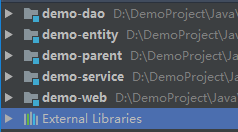
注:数据库创建时也需要指明utf8格式编码,否则会出现中文乱码问题
create database test charset utf8;
IDEA项目搭建四——使用Mybatis实现Dao层的更多相关文章
- 基于Mybatis的Dao层的开发
基于Mybatis的Dao层开发 SqlSessionFactoryBuilder用于创建SqlSessionFacoty,SqlSessionFacoty一旦创建完成就不需要SqlSessionFa ...
- MyBatis开发Dao层的两种方式(原始Dao层开发)
本文将介绍使用框架mybatis开发原始Dao层来对一个对数据库进行增删改查的案例. Mapper动态代理开发Dao层请阅读我的下一篇博客:MyBatis开发Dao层的两种方式(Mapper动态代理方 ...
- MyBatis开发Dao层的两种方式(Mapper动态代理方式)
MyBatis开发原始Dao层请阅读我的上一篇博客:MyBatis开发Dao层的两种方式(原始Dao层开发) 接上一篇博客继续介绍MyBatis开发Dao层的第二种方式:Mapper动态代理方式 Ma ...
- 基于Mybatis的Dao层开发
转自:https://www.cnblogs.com/rodge-run/p/6528398.html 基于Mybatis的Dao层开发 SqlSessionFactoryBuilder用于创建 Sq ...
- Mybatis的dao层实现 接口代理方式实现规范+plugins-PageHelper
Mybatis的dao层实现 接口代理方式实现规范 Mapper接口实现时的相关规范: Mapper接口开发只需要程序员编写Mapper接口而不用具体实现其代码(相当于我们写的Imp实现类) Mapp ...
- Mybatis的Dao层实现原理
1.Mybatis的Dao层实现 1.1 传统开发方式 1.1.1编写UserDao接口 public interface UserDao { List<User> findAll() t ...
- Mybatis中dao层实现
在上一个笔记中继续: 因为要基于dao层,那么我们只需要又一个dao的接口,和一个mapper的文件就可以测试了. 但是基于dao层的时候需要规范: Mapper.xml文件中的namespace与m ...
- MyBatis的Dao层注入SqlSession
有点坑爹,以前没用过Mybatis,最近才用,而且一直用Mybatis推荐的接口映射的方式,但是今天有人告诉我接口方式用得少,大多还是采用从配置文件里面读sql的方式,当然接口也是类似的,都是利用ma ...
- (五)mybatis开发dao层
目录 SqlSession 是线程不安全的 原始 dao 开发方法 Mapper 代理方法 关于代理对象 SqlSession 是线程不安全的 SqlSession 是 线程不安全 的: 对于它,我们 ...
随机推荐
- 初印象至Vue路由
初印象系列为快速了解一门技术的内容,后续会推出本人应用这门技术时发现的一些认识. Vue路由和传统路由的区别: Vue路由主要是用来实现单页面应用内各个组件之间的切换,同样支持传递参数等功能.而传统路 ...
- 李航统计学习方法——算法2k近邻法
2.4.1 构造kd树 给定一个二维空间数据集,T={(2,3),(5,4),(9,6)(4,7),(8,1),(7,2)} ,构造的kd树见下图 2.4.2 kd树最近邻搜索算法 三.实现算法 下面 ...
- oracle RAC srvctl命令关闭节点实例的时候 不能正常执行
场景描述: [oracle@oracle01 admin]$ srvctl stop database -d oradb1 PRCD- : The resource for database ORAD ...
- Oracle数据库中NARCHAR转换成NUMBER类型
1.修改后的代码: public void addDirectorActorKeyword(long idStart, long idEnd) { SeriesMgr seriesMgr = new ...
- Java reflect 反射学习笔记
1. class 类的使用 万事万物皆对象 (基本数据类型, 静态成员不是面向对象), 所以我们创建的每一个类都是对象, 即类本身是java.lang.Class类的实例对象, 但是这些对象不需要 n ...
- Ajax(javascript)案例
一.注册案例(Get方式) 1.前台 <%@ page language="java" import="java.util.*" pageEncoding ...
- Mysql的select in会自动过滤重复的数据
默认使用 SELECT 语句: 当加上in范围后,结果如下图: in范围内的数据,如果有重复的,只会选择第一个数据. 所以如果不是直接使用SQL语句来查询,而是在代码中来查询时,记得使用 distin ...
- C++ 各种继承
博客园首页博问闪存新随笔联系订阅 管理随笔- 文章- 评论- C++继承:公有,私有,保护 公有继承(public).私有继承(private).保护继承(protected)是常用的三种继承方式. ...
- 基于Hadoop2.6.5(HA)的HBase2.0.5配置
1.配置 在CentOS7Three上配置,注意:一定要安装bin包,不能安装src包 /usr/local/hbase/hbase-2.0.5/conf 编辑hbase-env.sh,替换成如下配置 ...
- SpringMVC之使用Servlet原生API作为参数
SpringMVC的handler接收如下的ServletAPI类型的参数: • HttpServletRequest • HttpServletResponse • HttpSession • ja ...