
springboot+cloud 学习(一)高可用服务注册中心(Eureka)
先说说Eureka
服务注册中心高可用
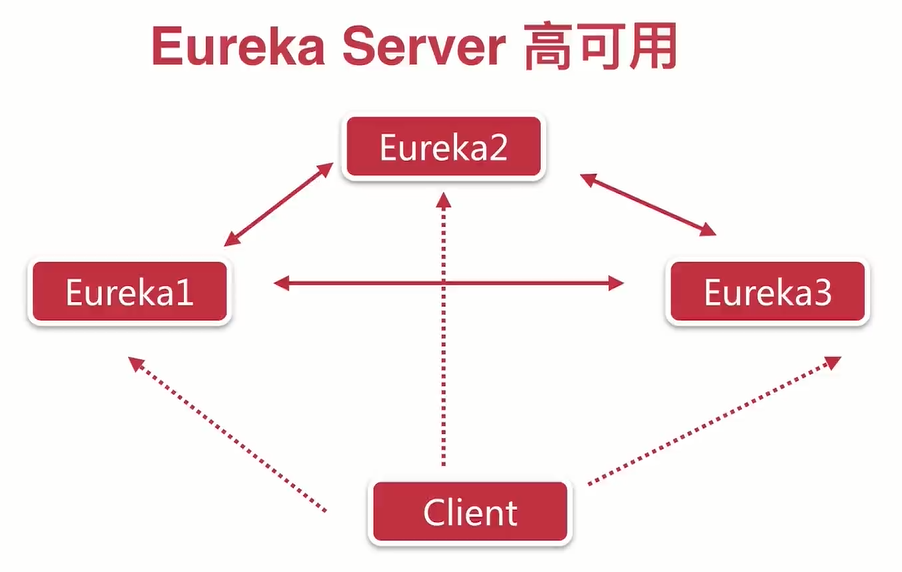
简单点说就是启用多个Eureka Server(一般2个就可以了,我这里用了3个),然后让3个Server 互相注册。
创建服务注册中心

创建一个普通的Spring Boot工程
首先我们需要创建一个普通的Spring Boot工程,命名为eureka-server。
添加Eureka依赖
工程创建成功之后,向pom.xml文件中添加eureka-server的依赖(这里有个javaJDK的坑,1.8版本以上的会有报错,需要额外添加依赖),添加完依赖之后,pom.xml文件如下所示:
<project xmlns="http://maven.apache.org/POM/4.0.0"

    xmlns:xsi="http://www.w3.org/2001/XMLSchema-instance"

    xsi:schemaLocation="http://maven.apache.org/POM/4.0.0 http://maven.apache.org/xsd/maven-4.0.0.xsd">

    <modelVersion>4.0.</modelVersion>

    <groupId>eureka-server</groupId>

    <artifactId>eureka-server</artifactId>

    <version>0.0.-SNAPSHOT</version>

    <!-- 必须要引入 springboot parent ,帮我们实现了很多jar包的依赖管理 -->

    <parent>

        <groupId>org.springframework.boot</groupId>

        <artifactId>spring-boot-starter-parent</artifactId>

        <version>2.0..RELEASE</version>

        <relativePath /> <!-- lookup parent from repository -->

    </parent>

    <dependencyManagement>

        <dependencies>

            <!-- https://mvnrepository.com/artifact/org.springframework.cloud/spring-cloud-dependencies -->

            <dependency>

                <groupId>org.springframework.cloud</groupId>

                <artifactId>spring-cloud-dependencies</artifactId>

                <version>Finchley.RELEASE</version>

                <type>pom</type>

                <scope>import</scope>

            </dependency>

        </dependencies>

    </dependencyManagement>

        <dependencies>

        <dependency>

            <groupId>org.springframework.boot</groupId>

            <artifactId>spring-boot-starter-test</artifactId>

            <scope>test</scope>

        </dependency>

        <dependency>

            <groupId>org.springframework.cloud</groupId>

            <artifactId>spring-cloud-starter-netflix-eureka-server</artifactId>

        </dependency>
<!-- 用于安全校验 -->
<dependency>
<groupId>org.springframework.boot</groupId>
<artifactId>spring-boot-starter-security</artifactId>
</dependency>
        <!-- JDK 版本1.8以上的需要额外添加依赖 -->

        <dependency>

            <groupId>javax.xml.bind</groupId>

            <artifactId>jaxb-api</artifactId>

        </dependency>

        <dependency>

            <groupId>com.sun.xml.bind</groupId>

            <artifactId>jaxb-impl</artifactId>

            <version>2.3.</version>

        </dependency>

        <dependency>

            <groupId>org.glassfish.jaxb</groupId>

            <artifactId>jaxb-runtime</artifactId>

            <version>2.3.</version>

        </dependency>

        <dependency>

            <groupId>javax.activation</groupId>

            <artifactId>activation</artifactId>

            <version>1.1.</version>

        </dependency>

    </dependencies>

    <build>

        <plugins>

            <plugin>

                <groupId>org.springframework.boot</groupId>

                <artifactId>spring-boot-maven-plugin</artifactId>

            </plugin>

        </plugins>

    </build>

</project>
启动一个服务注册中心
启动一个服务注册中心的方式很简单,就是在Spring Boot的入口类上添加一个@EnableEurekaServer注解,如下:
@EnableEurekaServer

@SpringBootApplication

public class Application {

    public static void main(String[] args) {

        SpringApplication.run(Application.class, args);

    }

}
配置服务注册中心
在Spring Boot的配置文件application.yml中(如果3个Eureka Server的端口分别是8761、8762、8763,以8761为例,这里有个坑,开始yml配置里,
serviceUrl没有用驼峰式的,服务一直注册不上去),另外这里配置的hostname,记得改系统的host文件,配置对应的ip地址,server 端yml写法如下:
spring:

  application:

    name: eureka-server2

  #安全登入用户设置

  security:

    user:

      name: skyworth

      password: skyworth2

server:

  port:

eureka:

  instance:

    hostname: eureka-server2

  client:

    #表示是否将自己注册到Eureka Server

    register-with-eureka: false

    #表示是否从Eureka Server获取注册信息

    fetch-registry: false

    serviceUrl:

      #设置与Eureka Server交互的地址,查询服务和注册服务都需要依赖这个地址

      defaultZone: http://skyworth:skyworth1@eureka-server:8761/eureka/,http://skyworth:skyworth3@eureka-server3:8763/eureka/
到这里 Server 端就差不多了,下面是Cline端,Cline端的依赖基本是一样的,主要区别在启动类和配置文件的区别
client端yml配置如下:
spring:

  application:

    name: eureka-client

server:

  port:

eureka:

  instance:

    hostname: eureka-client

  client:

    serviceUrl:

      defaultZone: http://skyworth:skyworth1@eureka-server:8761/eureka/,http://skyworth:skyworth2@eureka-server2:8762/eureka/,http://skyworth:skyworth3@eureka-server3:8763/eureka/
client端启动类:
@SpringBootApplication

@EnableDiscoveryClient

public class Application {

    public static void main(String[] args) {

        SpringApplication.run(Application.class, args);

    }

}
测试
项目启动后 查看eureka-server: http://localhost:8761/,http://localhost:8762/,http://localhost:8763/,发现服务已经注册进去。
另外提一下,为了安全,client端可以增加至多个,并增加用户名,密码的登入验证。
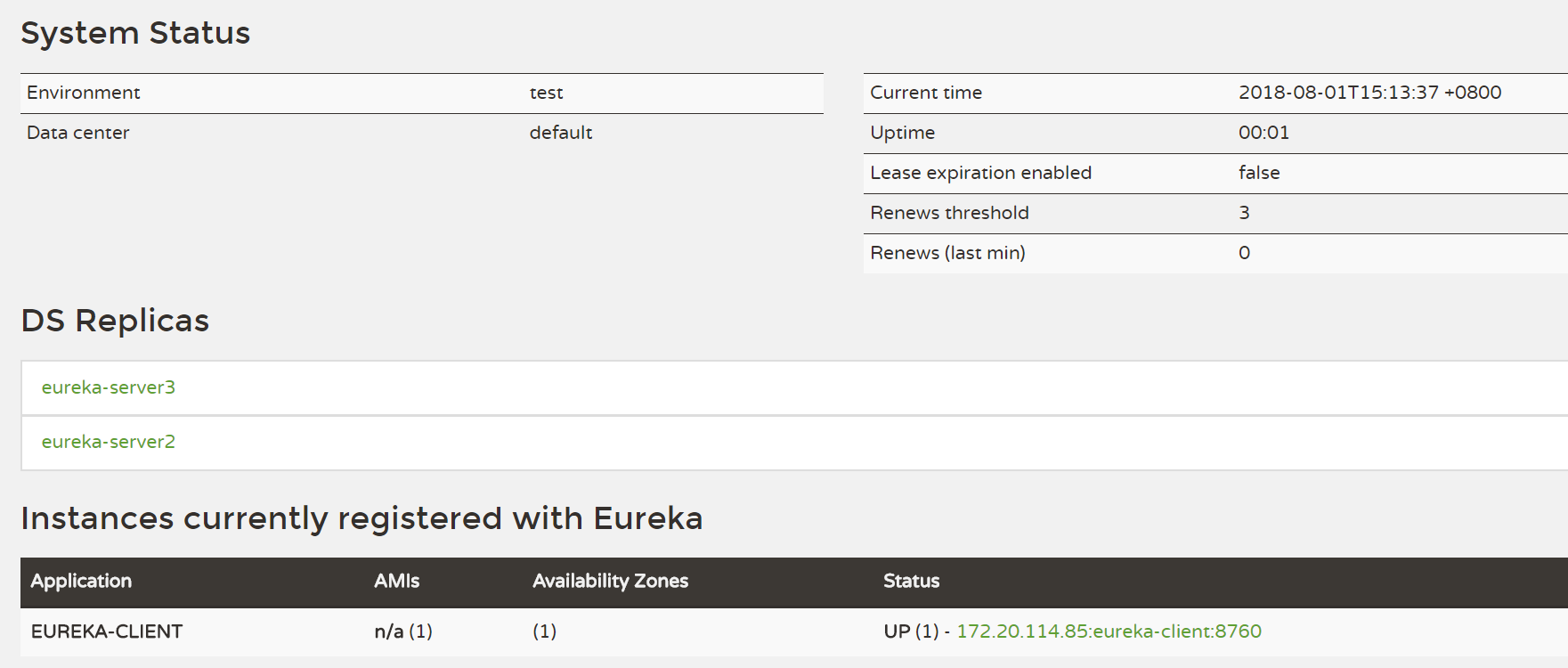
注:当增加用户密码的登入模式后,可能会出现服务注册不进去的情况,解决方案,在eurka服务中添加一个安全认证类
/**

 *

 */

package com.skyworth.config;

import org.springframework.context.annotation.Configuration;

import org.springframework.security.config.annotation.web.builders.HttpSecurity;

import org.springframework.security.config.annotation.web.configuration.EnableWebSecurity;

import org.springframework.security.config.annotation.web.configuration.WebSecurityConfigurerAdapter;

import org.springframework.security.config.http.SessionCreationPolicy;

/**

* Copyright: Copyright (c) 2018 skyworth

*

* @ClassName: WebSecurityConfig.java

* @Description: 该类的功能描述

*

* @version: v1.0.0

* @author: Administrator

* @date: 2018年8月1日 下午4:14:12

*

* Modification History:

* Date         Author          Version            Description

*---------------------------------------------------------*

* 2018年8月1日     Administrator           v1.0.0               修改原因

*/

@Configuration

@EnableWebSecurity

public class WebSecurityConfig extends WebSecurityConfigurerAdapter {

    /**

     * 高版本的丢弃了

     *

     * security:

     *   basic:

     *    enabled: true

     *

     * 配置,应该使用以下方式开启

     *

     * @param http

     * @throws Exception

     */

    @Override

    protected void configure(HttpSecurity http) throws Exception {

        // Configure HttpSecurity as needed (e.g. enable http basic).

        http.sessionManagement().sessionCreationPolicy(SessionCreationPolicy.NEVER);

        http.csrf().disable();

        //注意:为了可以使用 http://${user}:${password}@${host}:${port}/eureka/ 这种方式登录,所以必须是httpBasic,

        // 如果是form方式,不能使用url格式登录

        http.authorizeRequests().anyRequest().authenticated().and().httpBasic();

    }

}
springboot+cloud 学习(一)高可用服务注册中心(Eureka)的更多相关文章
- 搭建高可用服务注册中心-Spring Cloud学习第一天(非原创)
文章大纲 一.Spring Cloud基础知识介绍二.创建单一的服务注册中心三.创建一个服务提供者四.搭建高可用服务注册中心五.项目源码与参考资料下载六.参考文章 一.Spring Cloud基础 ...
- 使用Spring Cloud搭建高可用服务注册中心
我们需要的,不仅仅是一个服务注册中心而已,而是一个高可用服务注册中心. 上篇博客[使用Spring Cloud搭建服务注册中心]中我们介绍了如何使用Spring Cloud搭建一个服务注册中心,但是搭 ...
- 使用SpringCloud搭建高可用服务注册中心
我们需要的,不仅仅是一个服务注册中心而已,而是一个高可用服务注册中心. 上篇博客中我们介绍了如何使用Spring Cloud搭建一个服务注册中心,但是搭建好的服务注册中心是一个单节点的服务注册中心,这 ...
- SpringCloud学习成长之 十 高可用服务注册中心
文章 第一篇: 服务的注册与发现(Eureka) 介绍了服务注册与发现,其中服务注册中心Eureka Server,是一个实例,当成千上万个服务向它注册的时候,它的负载是非常高的,这在生产环境上是不太 ...
- SpringCloud学习系列之一 ----- 搭建一个高可用的注册中心(Eureka)
前言 本篇主要介绍的是SpringCloud相关知识.微服务架构以及搭建一个高可用的服务注册与发现的服务模块(Eureka). SpringCloud介绍 Spring Cloud是在Spring B ...
- 服务注册发现Eureka之二:高可用服务注册中心
前言 在Spring Cloud系列文章的开始,我们就介绍了服务注册与发现,其中,主要演示了如何构建和启动服务注册中心Eureka Server,以及如何将服务注册到Eureka Server中,但是 ...
- spring cloud 入门系列三:使用Eureka 搭建高可用服务注册中心
在上一篇中分享了如何使用Eureka 进行服务治理,里面搭建的服务注册中心是单体的, 但是在实际的应用中,分布式系统为了防止单体服务宕机带来严重后果,一般都会采用服务器集群的形式,服务注册中心也是一样 ...
- Spring Cloud Eureka 4 (高可用服务注册中心)
在微服务这样的分布式环境中,我们需要充分考虑发生故障的情况,所以在生产环境中必须考虑对各个组件进行高可用部署,对于服务注册中心也是一样. Eureka Server 的高可用实际上就是讲自己作为服务向 ...
- 高可用服务注册中心(Eureka-Cluster)
在实际生产中,我们需要高可用的集群方案,本章就是基于SpringBoot1.5.4 Cloud(Dalston.SR2) 的高可用Eureka Cluster,以及生产中需要注意的事项… - Eure ...
随机推荐
- 两个jsp文件运行后弹出对话框 下载文件问题
这个问题是两个jsp字符编码不一致的问题 如图所示 划线部分是要特别注意的地方 出错往往是这里 有时是“;”后面有无空格 如果login.jsp有 那么loginCheck.jsp也必须要有而且是同样 ...
- zoj2607
题意:如左图,给定A,B,C,D的面积分别为大于等于a,b,c,d,求最小的面积 思路:因为a,b肯定有一个是满的(不然还可压缩到更小),同理,ac,bd,cd都只有一个是满的,所以有可能是对角满的, ...
- android TextView 设置部分文字背景色和文字颜色
通过SpannableStringBuilder来实现,它就像html里边的元素改变指定文字的文字颜色或背景色 public class MainActivity extends Activity { ...
- Hive ORC + SNAPPY
Hive orc 格式 + snappy 压缩是比较常用的存储加压缩格式. 今天处理下面的场景时,解决了一些问题,记录下来: flume消费kafka的数据实时写入hdfs,通过创建分区表,t + 1 ...
- J - Oil Skimming 二分图的最大匹配
Description Thanks to a certain "green" resources company, there is a new profitable indus ...
- unigui的ServerModule常用属性设置
unigui的ServerModule常用属性设置 1)压缩设置 compression是压缩数据用的.默认启用压缩,且压缩级别是最大的. 2)UNIGUI运行时库设置 UNIGUI需要4个运行时库, ...
- Android-Kotlin-单例模式
先看一个案例,非单例模式的案例: 描述Dog对象: package cn.kotlin.kotlin_oop08 class Dog(var name:String, var color:String ...
- 未能加载文件或程序集,PublicKeyToken=“**********”,或它的某一个依赖项。强名称验证失败。
就是这种错误.这种错误怎么办? 以下步骤: (以上图dll为例) 1.看项目的Debug文件夹下是否有以下三个文件 2.看项目的.csproj文件下引用的报错dll的publickeytoken和版本 ...
- HttpClient的帮助类
/// <summary> /// http请求类 /// </summary> public class HttpHelper { private HttpClient _h ...
- WCF接口实例介绍
Windows Communication Foundation(WCF)是由微软开发的一系列支持数据通信的应用程序框架,可以翻译为Windows 通讯开发平台. WCF整合了原有的windows通讯 ...