
Spring Boot学习笔记:JavaMailSender发送邮件
项目中经常会有这样的需求,用户注册成功,需要给用户发送一封邮件。邮件需要有一定格式和样式。本次例子中用freemarker做样式,其他的模版引擎类似。
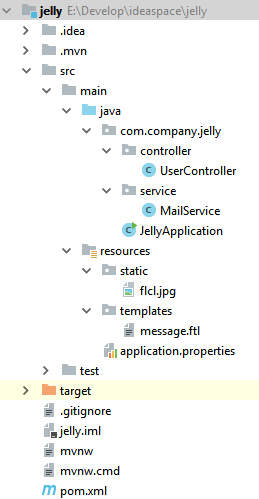
首先Spring Boot项目,项目结构如下
在pom.xml文件中添加依赖
        <dependency>

            <groupId>org.springframework.boot</groupId>

            <artifactId>spring-boot-starter-mail</artifactId>

        </dependency>

        <dependency>

            <groupId>org.springframework.boot</groupId>

            <artifactId>spring-boot-starter-freemarker</artifactId>

        </dependency>
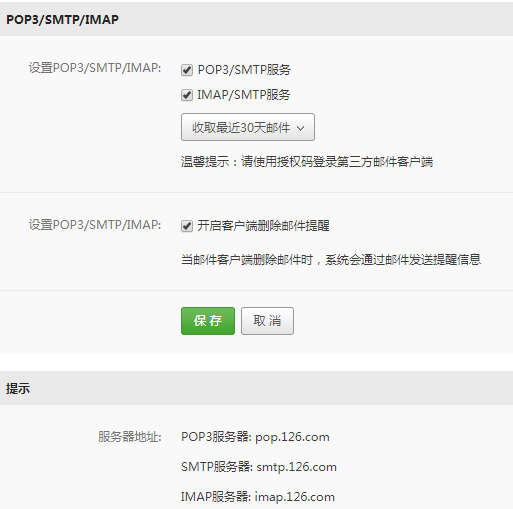
配置发件人信息,发件人邮箱需要开通POP3/SMTP服务,如下图(我是采用126邮箱):
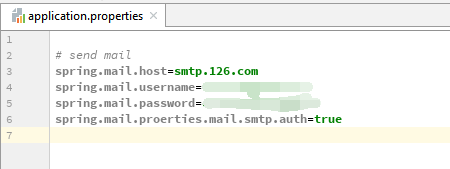
然后在application.properties中添加配置文件:
然后在service层中添加MailService类,代码如下
import freemarker.core.ParseException;

import freemarker.template.MalformedTemplateNameException;

import freemarker.template.Template;

import freemarker.template.TemplateException;

import freemarker.template.TemplateNotFoundException;

import org.slf4j.Logger;

import org.slf4j.LoggerFactory;

import org.springframework.beans.factory.annotation.Autowired;

import org.springframework.beans.factory.annotation.Value;

import org.springframework.mail.SimpleMailMessage;

import org.springframework.mail.javamail.JavaMailSender;

import org.springframework.mail.javamail.MimeMessageHelper;

import org.springframework.stereotype.Service;

import org.springframework.ui.freemarker.FreeMarkerTemplateUtils;

import org.springframework.util.ResourceUtils;

import org.springframework.web.servlet.view.freemarker.FreeMarkerConfig;

import javax.mail.MessagingException;

import javax.mail.internet.MimeMessage;

import java.io.File;

import java.io.IOException;

import java.util.HashMap;

import java.util.Map;

@Service

public class MailService {

    private final static Logger logger = LoggerFactory.getLogger(MailService.class);

    @Value("${spring.mail.username}")

    private String from;

    @Autowired

    private JavaMailSender mailSender;

    @Autowired

    private FreeMarkerConfig freeMarkerConfig;

    // send simple email

    public String sendSimple(String to, String title, String content) {

        SimpleMailMessage message = new SimpleMailMessage();

        message.setFrom(from);

        message.setTo(to);

        message.setSubject(title);

        message.setText(content);

        mailSender.send(message);

        logger.info("{} send email to {}", from, to);

        return "SUCESS";

    }

    // send template mail

    public String sendTemplateMail(String to, String title) {

        MimeMessage mimeMessage = mailSender.createMimeMessage();

        MimeMessageHelper helper;

        try {

            helper = new MimeMessageHelper(mimeMessage, true);

            helper.setFrom(from);

            helper.setTo(to);

            helper.setSubject(title);

            Map<String, Object> model = new HashMap<>();

            model.put("params", from);

            Template template = freeMarkerConfig.getConfiguration().getTemplate("message.ftl");

            String text = FreeMarkerTemplateUtils.processTemplateIntoString(template, model);

            helper.setText(text, true);

            mailSender.send(mimeMessage);

        } catch (MessagingException e) {

            e.printStackTrace();

        } catch (MalformedTemplateNameException e) {

            e.printStackTrace();

        } catch (ParseException e) {

            e.printStackTrace();

        } catch (TemplateNotFoundException e) {

            e.printStackTrace();

        } catch (IOException e) {

            e.printStackTrace();

        } catch (TemplateException e) {

            e.printStackTrace();

        }

        return "SUCEESS";

    }

    // send template mail with attachment

    public String sendAttactmentMail(String to, String title){

        MimeMessage mimeMessage = mailSender.createMimeMessage();

        MimeMessageHelper helper;

        try {

            helper = new MimeMessageHelper(mimeMessage, true);

            helper.setFrom(from);

            helper.setTo(to);

            helper.setSubject(title);

            // add template

            Map<String, Object> model = new HashMap<>();

            model.put("params", from);

            Template template = freeMarkerConfig.getConfiguration().getTemplate("message.ftl");

            String text = FreeMarkerTemplateUtils.processTemplateIntoString(template, model);

            helper.setText(text, true);

            // add attachment

            File file = ResourceUtils.getFile("classpath:static/flcl.jpg");

            helper.addAttachment(file.getName(), file);

            mailSender.send(mimeMessage);

        } catch (MessagingException e) {

            e.printStackTrace();

        } catch (MalformedTemplateNameException e) {

            e.printStackTrace();

        } catch (ParseException e) {

            e.printStackTrace();

        } catch (TemplateNotFoundException e) {

            e.printStackTrace();

        } catch (IOException e) {

            e.printStackTrace();

        } catch (TemplateException e) {

            e.printStackTrace();

        }

        return "SUCCESS";

    }

}
这个service中写了三个方法,三个方法的作用分别对应于:发送简单邮件、发送模版邮件、发送带附件的模版邮件
核心方法是 mailSender.send(message) ,message对象根据发送的邮件类型不同而不同,主要有MimeMessage MimeMessageHelper
发送带附件的模板邮件方式是三者中最复杂,首先创建邮件对象MimeMessage ,然后通过MimeMessage对象创建MimeMessageHelper(此对象的作用:向MimeMessage对象中填充数据的助手),通过向MimeMessageHelper对象中添加一些属性,例如发件人、收件人、邮件主题、模版、附件。其中freemarker模板文件xxx.ftl放在resources文件夹下中template(通过FreemakrerConfig获取xxx.ftl的Template对象,然后转换为String),其中附件flcl.jpg放在resources文件夹中的static中(通过ResourceUtils获取文件对象File)。属性添加完成后,就可以发送了。
然后在controller或者其他service层中调用该方法就可以了。
补充:
message.ftl文件内容如下
<!DOCTYPE html>

<html lang="en">

<head>

    <meta charset="UTF-8">

    <title>Hello</title>

</head>

<body>

<h1>Send email</h1>

<div>this email come from ${params}</div>

</body>

</html>
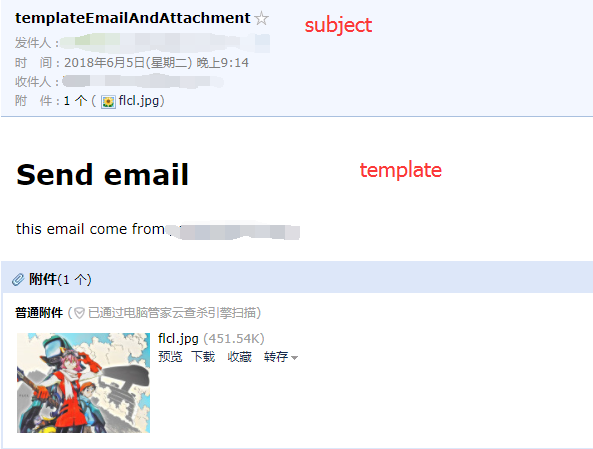
发送成功后,可在收件箱中收到邮件
Spring Boot学习笔记:JavaMailSender发送邮件的更多相关文章
- Spring Boot学习笔记2——基本使用之最佳实践[z]
前言 在上一篇文章Spring Boot 学习笔记1——初体验之3分钟启动你的Web应用已经对Spring Boot的基本体系与基本使用进行了学习,本文主要目的是更加进一步的来说明对于Spring B ...
- Spring Boot中使用JavaMailSender发送邮件
相信使用过Spring的众多开发者都知道Spring提供了非常好用的JavaMailSender接口实现邮件发送.在Spring Boot的Starter模块中也为此提供了自动化配置.下面通过实例看看 ...
- Spring Boot 学习笔记(六) 整合 RESTful 参数传递
Spring Boot 学习笔记 源码地址 Spring Boot 学习笔记(一) hello world Spring Boot 学习笔记(二) 整合 log4j2 Spring Boot 学习笔记 ...
- Spring Boot 学习笔记1——初体验之3分钟启动你的Web应用[z]
前言 早在去年就简单的使用了一下Spring Boot,当时就被其便捷的功能所震惊.但是那是也没有深入的研究,随着其在业界被应用的越来越广泛,因此决定好好地深入学习一下,将自己的学习心得在此记录,本文 ...
- Spring Boot 学习笔记1---初体验之3分钟启动你的Web应用
前言 早在去年就简单的使用了一下Spring Boot,当时就被其便捷的功能所震惊.但是那是也没有深入的研究,随着其在业界被应用的越来越广泛,因此决定好好地深入学习一下,将自己的学习心得在此记录,本文 ...
- Spring Boot 学习笔记--整合Thymeleaf
1.新建Spring Boot项目 添加spring-boot-starter-thymeleaf依赖 <dependency> <groupId>org.springfram ...
- 我的第一个spring boot程序(spring boot 学习笔记之二)
第一个spring boot程序 写在前面:鉴于spring注解以及springMVC的配置有大量细节和知识点,在学习理解之后,我们将直接进入spring boot的学习,在后续学习中用到注解及其他相 ...
- Java框架spring Boot学习笔记(六):Spring Boot事务管理
SpringBoot和Java框架spring 学习笔记(十九):事务管理(注解管理)所讲的类似,使用@Transactional注解便可以轻松实现事务管理.
- Spring Boot学习笔记---Spring Boot 基础及使用idea搭建项目
最近一段时间一直在学习Spring Boot,刚进的一家公司也正好有用到这个技术.虽然一直在学习,但是还没有好好的总结,今天周末先简单总结一下基础知识,等有时间再慢慢学习总结吧. Spring Boo ...
随机推荐
- MAT eclipse内存分析工具
启动的时候提示: Failed to load the JNIshared library 解决办法: 查看配置文件:MemoryAnalyzer.ini --launcher.librarypl ...
- python学习day9 字符编码和文件处理
1.字符编码 x='上' #unicode的二进制--------->编码-------->gbk格式的二进制 res=x.encode('gbk') #bytes 字节类型 print( ...
- H5前端框架推荐合集 (转)
Ionic ionic 吧开发流程都帮你做好了,已经不再是单纯的UI框架,而是开发框架了,非常适合快速开发.基于angular2,丰富的UI组件,大大改进的编程模型, Semantic UI 中文官网 ...
- java面试技巧
简历 1.HR看简历,都是看技术关键词.可以多看招聘要求,简历上要多写些关键词.比如io,集合,多线程,并发,spring,mysql,分布式等等. 2.可以准备多份简历,根据不同的jd发送不同的简历 ...
- SpringBoot配置logback
1.在SpringBoot中已经集成了logback.在pom.xml中加入以下spring-boot-starter依赖,使用默认版本即可: <dependency> <group ...
- phpstorm添加站点
1.在界面上快捷键 ctrl+alt+s 或打开File->settings 2.找到Deployment 设置完后确定即可使用.
- 设置input标签的placeholder的样式
设置input样式代码: input::-webkit-input-placeholder{ /*WebKit browsers*/ color: red; } input::-moz-input-p ...
- 第二章 向量(e)起泡排序
- python爬虫相关基础概念
什么是爬虫 爬虫就是通过编写程序模拟浏览器上网,然后让其去互联网上抓取数据的过程. 哪些语言可以实现爬虫 1.php:可以实现爬虫.但是php在实现爬虫中支持多线程和多进程方面做得不好. 2.java ...
- DMZ原理与应用
DMZ是英文“demilitarized zone”的缩写,中文名称为“隔离区”,“非军事化区”.它是为了解决安装防火墙后外部网络不能访问内部网络服务器的问题,而设立的一个非安全系统与安全系统之间的缓 ...