
为什么使用Reazor
原因:类似于前边写的模板页,自己写了。还需要用replace来替换成自己想要的变量。。
常见的模板引擎:Razor、Nvelocity、Vtemplate。 Razor有VS自动提示,而且有助于学习asp.net mvc。(Nvelocity、Vtemplate自行学习)
1.Nvelocity。Vemplate 语法在C#中没有自动提示。但是用着非常方便的
2.借助于开源的RazorEngine,我们可以在非asp.net mvc项目中使用Razor引擎,甚至在控制台、WinForm项目中都可以使用Razor(自己开发代码生成器)
3.在非mvc项目中创建Razor文件(cshtml ,可以利用自动提示)的方法,新建一个html,改名为cshtml。(需要重新打开,才有智能提示)
4.Razor中@后面跟表达式表示在这个位置输出表达式的值,模板中Model为传递给模板的对象。
5.@{}中为C#代码,C#代码还可以和html代码混排
6.由于不是在MVC项目中,所以无法使用@Html.DropDownList、@Url.Encode()等。
RazorEngine(c#语言写的)是微软做的一个开源的模板引擎,不是简单的在asp.net MVC中用,其他地方也是可以使用的。
自己写个cshtml 步骤:
1。项目名字–右键—添加—新建–Razor.cshtml会有自动提示的。(推荐这种用法)
<!DOCTYPE html>

<html xmlns="http://www.w3.org/1999/xhtml">

<head>

<meta http-equiv="Content-Type" content="text/html; charset=utf-8"/>

    <title></title>

</head>

<body>

      <ul>

    @{

        for (int i = 0; i < 10; i++)

        {

            <li>@i</li>;

        }

     }

       </ul>

</body>

</html>
2。添加对RazorEngine的引用(1.放到项目的lib文件夹中,2.右键–引用–添加引用–浏览—打开该项目的lib文件,选择RazorEngine.dll文件即可!)
3。添加一般处理程序Razor1.ashx
using RazorEngine;

using System;

using System.Collections.Generic;

using System.IO;

using System.Linq;

using System.Web;

namespace Web2

{

    /// <summary>

    /// Razor 的摘要说明

    /// </summary>

    public class Razor1 : IHttpHandler

    {

        public void ProcessRequest(HttpContext context)

        {

            context.Response.ContentType = "text/html";//1。修改为html文本类型

            //2.获取模板页的路径

            string fullPath = context.Server.MapPath("~/Razor.cshtml");

            //3.读取出模板页中的内容

            string cshtml = File.ReadAllText(fullPath);

            //4.使用Razo的Parse方法转化为html文本信息

            string html = Razor.Parse(cshtml);

            //5.输出到浏览器端

            context.Response.Write(html);

        }

        public bool IsReusable

        {

            get

            {

                return false;

            }

        }

    }

}
修改Razor也可以读取“类”中数据,“数据库中的字段”
using RazorEngine;

using System;

using System.Collections.Generic;

using System.IO;

using System.Linq;

using System.Web;

namespace Web2

{

    /// <summary>

    /// Razor 的摘要说明

    /// </summary>

    public class Razor1 : IHttpHandler

    {

        public void ProcessRequest(HttpContext context)

        {

            context.Response.ContentType = "text/html";//1。修改为html文本类型

            //2.获取模板页的路径

            string fullPath = context.Server.MapPath("~/Razor.cshtml");

            //3.读取出模板页中的内容

            string cshtml = File.ReadAllText(fullPath);

            /*

            //4.使用Razo的Parse方法转化为html文本信息

            string html = Razor.Parse(cshtml);

             */

            //拓展:怎么将变量传递到模板页cshtml中呢?

            //使用Razor的第二个方法

            //假设从数据库中读取的变量 name, age

            /*

            int age = 9;

            string name = "rupeng";

            //使用匿名类

            //var model = new { Age=age,Name=name };

            //string html = Razor.Parse(cshtml, model);

            //简化写

            string html = Razor.Parse(cshtml, new { Age=age,Name=name});

            */

            Dog dog = new Dog();

            dog.Id = 18;

            dog.Name = "哮天犬";

            string html = Razor.Parse(cshtml,dog);

            //5.输出到浏览器端

            context.Response.Write(html);

        }

        public bool IsReusable

        {

            get

            {

                return false;

            }

        }

    }

    public class Dog

    {

        public int Id{ get; set; }

        public string Name { get; set; }

    }

}
效果
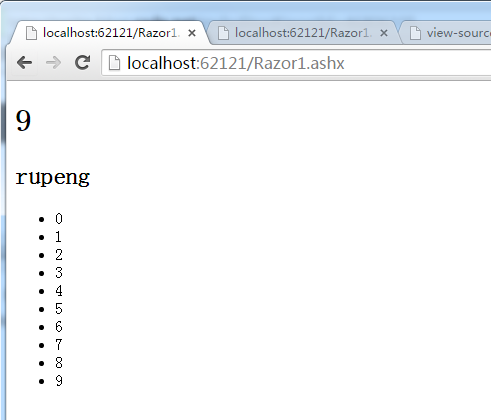
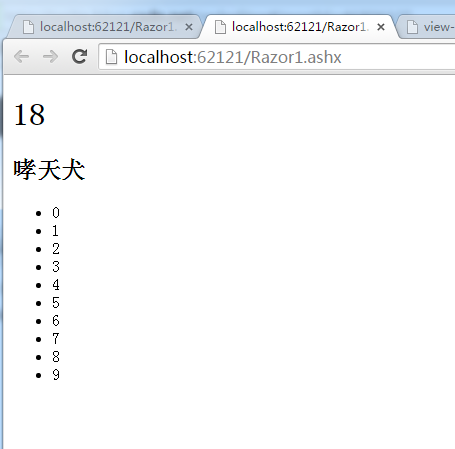
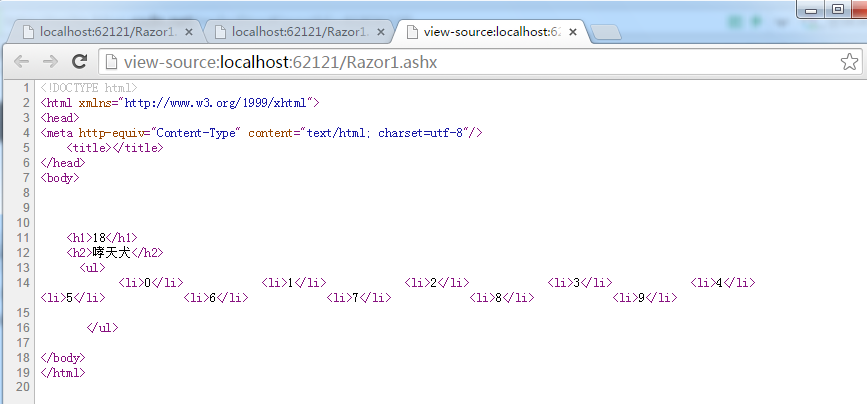
为什么使用Reazor的更多相关文章
随机推荐
- C++17尝鲜:变长 using 声明
using 声明 先来看 using 声明在类中的应用: 代码1 #include <iostream> using namespace std; struct A { void f(in ...
- avalon2学习教程01
经过难苦奋战,avalon2终于面世了.这花了大半年时间,其中1.6还胎死腹中.长达半年没有产出,我都担心自己会被裁掉…… avalon2许多API与1.4.×保持一致,当然也添加了一些1.5的功能, ...
- 6.面向对象 -类.md
目录 1. static: 2. 类在内存中,每一个类在创建在栈内存中,当创建一个对象的时候,将非类变量再堆内存中创建,而类变量是不会因为创建对象而在堆中重新创建 3. 对象.引用和指针: 4. 类名 ...
- python第三步骤(pygame)
1:先安装homebrew(类似于yum /apt-get为什么需要它呢,因为pip安装的时候需要很多的包的依赖,sdl什么的), 2:pip 安装pygame 我讨厌的环境变量问题 然后 通过的是 ...
- 做好Unity4.x开发项目规划
1. 是否要用lua 2. (对于需操作的游戏)客户端游戏如何做战斗验证 下面列举小坑吧.不建议都绕开,毕竟没有那么多时间做前期调研的. 对应版本Unity4.x 1. 客户端程序层面 总的来说C#超 ...
- 头像修改功能 包含ios旋转图片 但是旋转后没遮罩, 正常图片可以显示遮罩 宽高不规则图片没做控制 遮罩框可以拖动
https://blog.csdn.net/wk767113154/article/details/77989544 参考资料 <template> <div id="p ...
- shell 脚本传参
在 shell 中我们会见到 $0.$1.$2这样的符号,这是什么意思呢? 简单来说 $0 就是你写的shell脚本本身的名字,$1 是你给你写的shell脚本传的第一个参数,$2 是你给你写的sh ...
- yii 缓存的使用 以及使用需要开启php的apc扩展
public function behaviors() { return [ [ 'class' => 'yii\filters\PageCache', 'only' => ['index ...
- Realtime Rendering 6
[Realtime Rendering 6] 1.Lighting computations occur in two phases: 1)light phase. used to compute t ...
- 早上STO单紧急寻源处理
truncate table SAP_SO_STO1_STO2; truncate table SAP_STO1_STO2; INSERT INTO STG.SAP_SO_STO1_STO2(VBEL ...