
【nodejs】文件上传demo实现

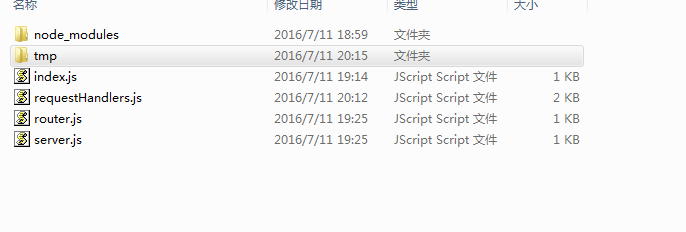
文件结构:
index.js
var server = require('./server.js');

var router = require('./router.js');

var requestHandlers = require("./requestHandlers");

var handle = {}

handle["/"] = requestHandlers.start;

handle["/start"] = requestHandlers.start;

handle["/upload"] = requestHandlers.upload;

handle["/show"] = requestHandlers.show;

server.start(router.route,handle);
server.js
var http = require("http");

var url = require("url");

function start(route,handle){

    function onRequest(request,response){

        var postData = "";

        var pathname = url.parse(request.url).pathname;

        // request.setEncoding("utf8");

  //       request.addListener("data", function(postDataChunk) {

  //             postData += postDataChunk;

  //             console.log("Received POST data chunk '"+

  //             postDataChunk + "'.");

  //           });

  //       request.addListener("end", function() {

  //             route(pathname,handle, response, postData);

  //       });

          route(pathname,handle, response, request);

    }

    http.createServer(onRequest).listen(8888);

}

exports.start=start;
router.js
function route(pathname,handle,response,request) {

    var handler = handle[pathname];

    console.log(handler);

    if(typeof handler == "function"){

        handler(response,request);

    }else{

        console.log("No request handler found for " + pathname);

        response.writeHead(404, {"Content-Type": "text/plain"});

        response.write("404 Not found");

        response.end();

    }

}

exports.route=route;
requestHandlers.js
var querystring = require("querystring"),

    fs = require("fs"),

    formidable = require("formidable");

function start(response,request) {

     console.log("Request handler 'start' was called.");

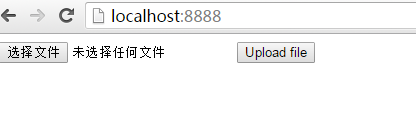
   var body = '<html>'+

    '<head>'+

    '<meta http-equiv="Content-Type" '+

    'content="text/html; charset=UTF-8" />'+

    '</head>'+

    '<body>'+

    '<form action="/upload" enctype="multipart/form-data" '+

    'method="post">'+

    '<input type="file" name="upload">'+

    '<input type="submit" value="Upload file" />'+

    '</form>'+

    '</body>'+

    '</html>';

    response.writeHead(200, {"Content-Type": "text/html"});

    response.write(body);

    response.end();

}

function upload(response,request) {

    console.log("Request handler 'upload' was called.");

    // response.writeHead(200, {"Content-Type": "text/plain"});

    // response.write("You've sent: " + postData);

    // response.end();

    var form = new formidable.IncomingForm();

    form.uploadDir='tmp';

    console.log("about to parse");

    form.parse(request, function(error, fields, files) {

        console.log("parsing done");

        fs.renameSync(files.upload.path, "./tmp/test.png");

        response.writeHead(200, {"Content-Type": "text/html"});

        response.write("received image:<br/>");

        response.write("<img src='/show' />");

        response.end();

    });

}

function show(response, request) {

  console.log("Request handler 'show' was called.");

  fs.readFile("./tmp/test.png", "binary", function(error, file) {

    if(error) {

      response.writeHead(500, {"Content-Type": "text/plain"});

      response.write(error + "\n");

      response.end();

    } else {

      response.writeHead(200, {"Content-Type": "image/png"});

      response.write(file, "binary");

      response.end();

    }

  });

}

exports.start = start;

exports.upload = upload;

exports.show = show;
本文中代码参考自http://www.nodebeginner.org/index-zh-cn.html#javascript-and-nodejs
【nodejs】文件上传demo实现的更多相关文章
- WebSite 文件上传Demo
知识点: 1 <!--上传文件时: 1.必须使用Post方式来提交数据 2.必须设置表单的enctype属性 3.必须在表单中包含文件域.input t ...
- shutil模块和几种文件上传Demo
一.shutil模块 1.介绍 shutil模块是对os中文件操作的补充.--移动 复制 打包 压缩 解压 2.基本使用 1. shutil.copyfileobj(文件1, 文件2, 长度) 将文件 ...
- 基于tornado的文件上传demo
这里,web框架是tornado的4.0版本,文件上传组件,是用的bootstrap-fileinput. 这个小demo,是给合作伙伴提供的,模拟APP上摄像头拍照,上传给后台服务进行图像识别用,识 ...
- Spring文件上传Demo
package com.smbea.controller; import java.io.File; import java.io.FileOutputStream; import java.io.I ...
- nodejs 文件上传服务端实现
前段时间在做个人项目的时候,用到了nodejs服务端上传文件,现在回头把这个小结一下,作为记录. 本人上传文件时是基于express的multiparty,当然也可以使用connect-multipa ...
- java文件上传Demo
说到文件上传我们要做到: 1.引入两个包:commons-fileupload-1.2.1.jar和commons-io-1.3.2.jar 2.将form改为上传文件模式:enctype=" ...
- springMVC+uploadify3.1 文件上传 demo
uploadify3.1 api 可参考:(点击打开链接) 需要springmvc的jar包 1.upload.jsp(主要代码) <script type="text/javascr ...
- nodejs文件上传报错总结
语法: fs.rename(oldPath,newPath,callback) 今天在使用formidable模块做图片上传处理的时候,fs.rename方法的报了一个这样的错:cross-devic ...
- 文件上传demo
前端代码: <form action="upload.php" enctype="multipart/form-data" method="po ...
- nodejs文件上传组件multer使用
多图上传,发送端: var express = require('express') var rp = require('request-promise') var fs = require(&quo ...
随机推荐
- MySQL在线大表DDL操作
在线大表DDL操作的方法: 1.主从架构轮询修改 需要注意: a.主库会话级别的记录binglog的参数关闭 b.500\502错误异常捕捉 c.检查备库的second behind master是否 ...
- C#-VS异常处理
VS异常处理 常规 try 可能会产生异常的代码,当一行产生异常,这行下面的代码不执行,转到catch开始执行 catch(system.Exception e) e.message ...
- 20145232 韩文浩 《Java程序设计》第5周学习总结
教材学习内容总结 处理异常 教材中使用一个简单的程序,用户连续输入整数最后输入0结束后显示输入数的平均值. 但有时,用户会没有按常规出牌输入不正确的信息,例如"30"输成" ...
- Qt_技巧_将Qt动态链接生成的exe与dll打包方法
刚开始接触Qt,发现mac平台直接release编译一下就能够直接生成.app文件,并且可以直接运行..app位于工程文件内. 同样发方法在Windows直接运行exe却出现缺失dll情况. 讲过网上 ...
- 第十四个目标 (fzu)
http://acm.fzu.edu.cn/contest/problem.php?cid=151&sortid=8 Problem Description 目暮警官.妃英里.阿笠博士等人接连 ...
- python迭代器实例
1. 迭代器 迭代器是访问集合元素的一种方式.迭代器对象从集合的第一个元素开始访问,知道所有的元素被访问完结束.迭代器只能往前不会后退,不过这也没什么,因为人们很少在迭代途中往后退. 1.1 使用迭代 ...
- 有关VS报错Files的值XXX
从网上下载了一个实例来学习,但是运行的时候报错:Files的值(后面跟一堆符号,看不懂), 环境:安装了易赛通加密软件(估计可能跟这个加密软件有关系了) 解决方案:找到程序根目录的obj/Debug/ ...
- !!! no internal routing support, rebuild with pcre support !!!
sudo apt-get install libpcre3 libpcre3-dev sudo pip install uwsgi -I --no-cache-dir
- cefsharp
快速上手 js和C#互相调用. C#调用js比较容易.JS调用C#代码,现有两种方法.老方法的缺点是只支持单页,如果切换页面,原有创建的变量就失效了.新方法没有这些问题. 老方法: Cefsharp ...
- WPF实战案例-MVVM模式下在Xaml中弹出窗体
相信很多学习和开发wpf项目的同学都了解过mvvm模式,同样,在mvvm模式下会有一个不可忽视的问题,就是怎么在xaml中弹出窗体,而不破坏MVVM本身的结构. 关于弹出窗体的方式还是很多的,本文先讲 ...