
ASP.NET 之 EntityFramework实体框架搭建
前段时间接触了EntityFramework,对ORM框架也是有了初步的认识,现在对其进行一点小总结。
一、ORM简介
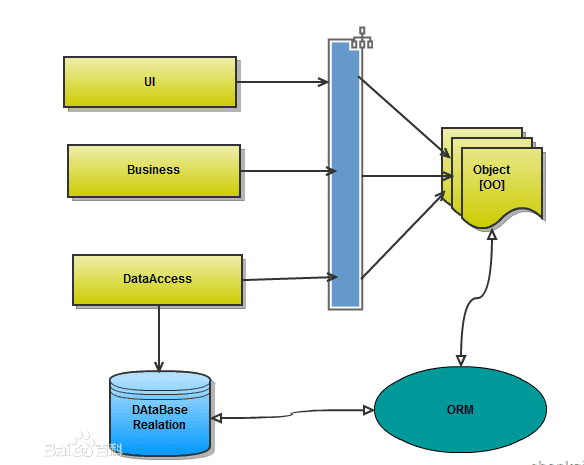
对象关系映射(Object Relational Mapping,简称ORM)模式是一种为了解决面向对象与关系数据库存在的互不匹配的现象的技术。简单的说,ORM是通过使用描述对象和数据库之间映射的元数据,将程序中的对象自动持久化到关系数据库中。是不是还是不懂?那我们把ORM拆开来说:
O 创建简单的实体对象,也就是数据Model
R 关系数据库中数据表
M 把实体对象与关系数据库具体数据表关联起来,产生相应的SQL操作
在对象中主要利用 特性 来标识主外键、字段长度、默认值等。
二、EntityFramework的安装
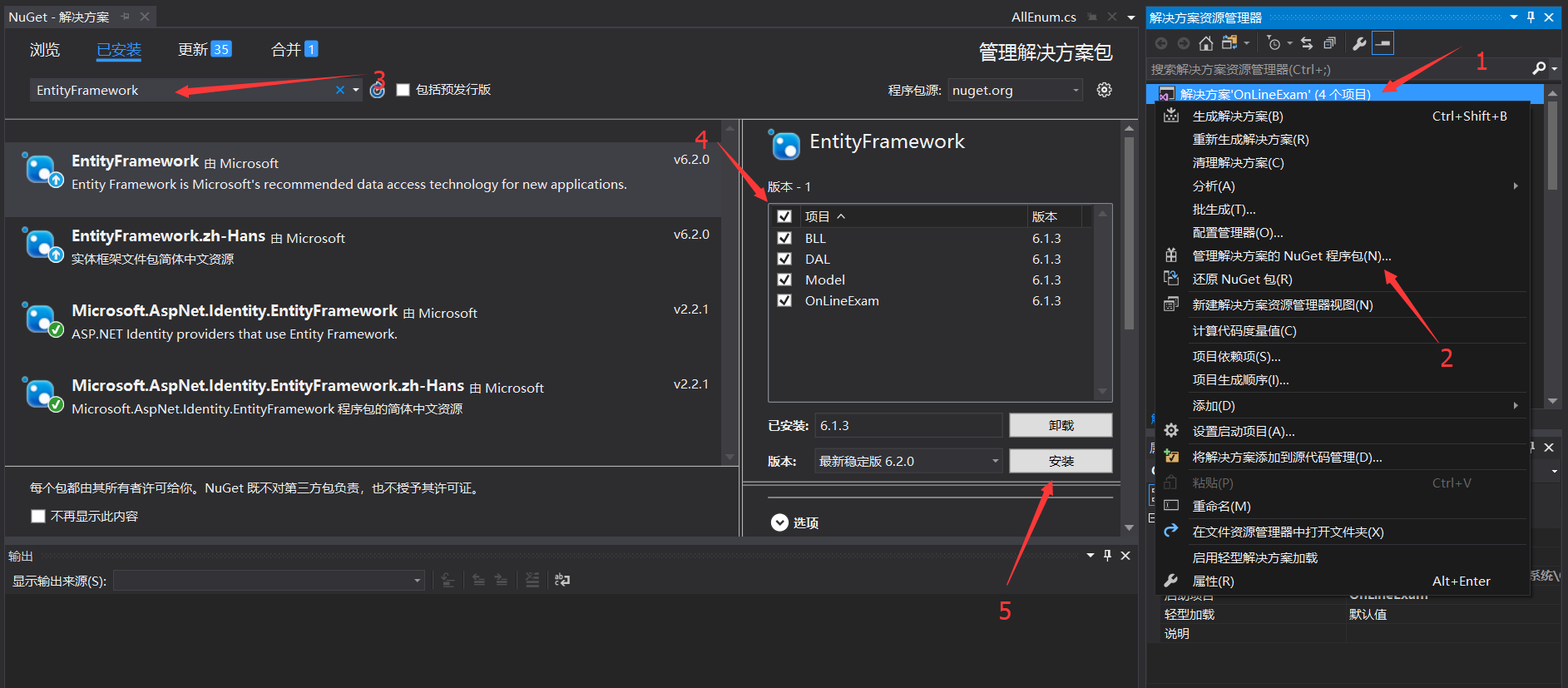
- 在解决方案处单击右键
- 管理解决方案的NuGet程序包
- 在搜索框中搜索EntityFramework
- 勾选要安装的项目
- 安装EF
三、EntityFramework的简单配置
- 对Web.config中的连接数据库的字符串进行配置
  <connectionStrings>

    <add name="DefaultConnection" connectionString="server=.;database=OnLineExamDB;uid=sa;pwd=123456;" providerName="System.Data.SqlClient" />

  </connectionStrings>
server=.;代表为本地、OnLineExamDB为我连接的数据库的名称、uid跟pwd是连接数据库的用户密码
- 配置Model层、主键要用[Key]进行标识并引用命名空间System.ComponentModel.DataAnnotations;
using System;

using System.Collections.Generic;

using System.ComponentModel.DataAnnotations;

using System.Linq;

using System.Text;

using System.Threading.Tasks;

namespace Model

{

    public class Class

    {

        [Key]

        //主键要加上[Key],并引用命名空间System.ComponentModel.DataAnnotations;

        public int ClassID { get; set; }

        /// <summary>

        /// 班级名称

        /// </summary>

        public string ClassName { get; set; }

    }

}
在DAL数据层创建DBFactory并继承DbContext,配置Model实体与表的关系
using System;

using System.Collections.Generic;

using System.Linq;

using System.Text;

using System.Threading.Tasks;

using System.Data.Entity;

using Model;

namespace DAL

{

    public class DBFactory : DbContext

    {

        public DBFactory() : base("DefaultConnection")

        {

        }

        protected override void OnModelCreating(DbModelBuilder modelBuilder)

        {

            //配置Model实体与表的关系

            modelBuilder.Entity<Class>().ToTable("Class");

            modelBuilder.Entity<Student>().ToTable("Student");

            base.OnModelCreating(modelBuilder);

        }

        // 班级数据工厂

        public DbSet<Class> ClassFactory { get; set; }

        // 学生数据工厂

        public DbSet<Student> StudentFactory { get; set; }

    }

}
- 在BLL业务层中创建StudentService,查询数据库数据
FirstOrDefault为返回序列中的第一个元素,如果没有该元素就返回默认值。
namespace BLL

{

    public class StudentService

    {

        DBFactory dbFactory = new DBFactory();

        public Student GetStudent()

        {

            return dbFactory.StudentFactory.FirstOrDefault();

        }

    }

}
在Controller中配置
using System;

using System.Collections.Generic;

using System.Linq;

using System.Web;

using System.Web.Mvc;

using BLL;

using Model;

using OnLineExam.Models;

using System.Web.Security;

namespace OnLineExam.Controllers

{

    public class UserInfoController : Controller

    {

        StudentService StudentService = new StudentService();

        public ActionResult Index()

        {

            //获取学生Model

            var student = StudentService.GetStudent();

            //存入ViewData用于获取

            ViewData["Student"] = student;

            return View();

        }

    }

}- 添加视图
@using Model;

@{

    var student = ViewData["Student"] as Student;

    Layout = null;

}

<!DOCTYPE html>

<html>

<head>

    <meta name="viewport" content="width=device-width" />

    <title>Index</title>

</head>

<body>

    <div>

        学生名称:@student.StudentName

    </div>

    <div>

        学生编号:@student.StudentNumber

    </div>

</body>

</html>
结果显示:
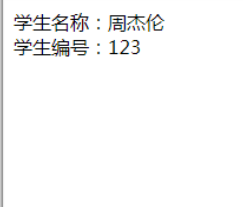
这样一个使用EntityFramework的ORM框架就成功实现了。
ASP.NET 之 EntityFramework实体框架搭建的更多相关文章
- 用实体框架搭建MVC程序框架(全部)
第一步:1.新建项目 2.新建domain类库 3.新建Data类库 4.为上面的1.2.3添加实体框架nuget包.(可以右键管理nuget包来查找entityframework,当然也可以通过程序 ...
- 《Entity Framework 6 Recipes》中文翻译系列 (20) -----第四章 ASP.NET MVC中使用实体框架之在MVC中构建一个CRUD示例
翻译的初衷以及为什么选择<Entity Framework 6 Recipes>来学习,请看本系列开篇 第四章 ASP.NET MVC中使用实体框架 ASP.NET是一个免费的Web框架 ...
- .NET实体框架EF之CodeFirst
ADO.NET Entity Framework 以 Entity Data Model (EDM) 为主,将数据逻辑层切分为三块,分别为 Conceptual Schema, Mapping Sch ...
- [c#]asp.net开发微信公众平台(2)多层架构框架搭建和入口实现
上篇已经设计出比较完善的数据库了,这篇开始进入代码. 首先把上篇设计的数据库脚本在数据库中执行下,生成数据库,然后在VS中建立项目,为了方便理解和查看,我设计的都是很直白的类名和文件名,没有命名空间 ...
- asp.net mvc 简单项目框架的搭建过程(一)对Bll层和Dal层进行充分解耦
学习asp.net 已经有近三个月的时间了,在asp.net mvc上花的时间最多,但个人真是有些菜,不得不说,asp.net mvc的水真的还是蛮深的.目前在公司实习,也见过公司几个项目的代码了.对 ...
- 从实体框架核心开始:构建一个ASP。NET Core应用程序与Web API和代码优先开发
下载StudentApplication.Web.zip - 599.5 KB 下载StudentApplication.API.zip - 11.5 KB 介绍 在上一篇文章中,我们了解了实体框架的 ...
- 《Entity Framework 6 Recipes》中文翻译系列 (21) -----第四章 ASP.NET MVC中使用实体框架之在页面中创建查询和使用ASP.NET URL路由过虑
翻译的初衷以及为什么选择<Entity Framework 6 Recipes>来学习,请看本系列开篇 4.2. 构建一个搜索查询 搜索数据是几乎所有应用的一个基本功能.它一般是动态的,因 ...
- 实体框架高级应用之动态过滤 EntityFramework DynamicFilters
实体框架高级应用之动态过滤 EntityFramework DynamicFilters 我们开门见山,直奔主题. 一.EntityFramework DynamicFilters 是什么,它能做什么 ...
- MVC之实体框架(数据持久化框架)EntityFrameWork(EF)
EF - EntityFrameWork 中文名:实体框架(数据持久化框架) 1.使用EF查询(Linq to EF) 1.1使用标准查询运算符来查询 OumindBlogEntities db = ...
随机推荐
- ASP.NET MVC一次删除多笔记录 V2.0
前一段时间Insus.NET有写一篇<ASP.NET MVC一次删除多笔记录>http://www.cnblogs.com/insus/p/6241186.html 可以前往去看看. 觉得 ...
- 背水一战 Windows 10 (56) - 控件(集合类): ListViewBase - 基础知识, 拖动项
[源码下载] 背水一战 Windows 10 (56) - 控件(集合类): ListViewBase - 基础知识, 拖动项 作者:webabcd 介绍背水一战 Windows 10 之 控件(集合 ...
- Spring Cloud实践之服务注册与发现Eureka
一.简述: 服务提供者producer与服务消费者consumer都注册到eureka server,然后服务consumer在其应用内直接调用producer的服务名来调用服务,而不是像之前一样调用 ...
- sublime text syntaxdef
http://sublimetext.info/docs/en/extensibility/syntaxdefs.html
- nyoj 1274信道安全 第九届河南省赛(SPFA)
信道安全 时间限制:1000 ms | 内存限制:65535 KB 难度:2 描述 Alpha 机构有自己的一套网络系统进行信息传送.情报员 A 位于节点 1,他准备将一份情报 发送给位于节点 ...
- 利用koa实现mongodb数据库的增删改查
概述 使用koa免不了要操纵数据库,现阶段流行的数据库是mongoDB,所以我研究了一下koa里面mongoDB数据库的增删改查,记录下来,供以后开发时参考,相信对其他人也有用. 源代码请看:我的gi ...
- Nginx安装使用及与tomcat实现负载均衡
1. 背景 基于nginx强大的功能,实现一种负载均衡,或是不停机更新程序等.nginx相比大家基本上都知道是什么来头了,具体的文章大家可以去搜索相关文章学习阅读,或是可以查看Nginx中文文档和Ng ...
- 微信端支付宝支付,iframe改造,解决微信中无法使用支付宝付款和弹出“长按地址在浏览器中打开”
微信对支付宝的链接屏蔽了, https://mapi.alipay.com/gateway.do?_input_charset=utf-8¬ify_url=http%3A%2F%2Fzh ...
- odoo 默认显示字段
@api.multi def generate_customs_declaration(self): # if len(self.mapped('cus_goods_list_ids')) != 1: ...
- Docker 镜像安装 GitLab 中文社区版
docker run \ --detach \ --publish : \ --publish : \ --name gitlab \ --restart unless-stopped \ --vol ...