
【sping揭秘】8、容器内部事件发布(一)
容器内部事件发布
Spring的applicationContext容器提供的容器内事件发布功能,是通过java提供的自定义事件实现的
事件类型:eventObject 类继承
事件监听:eventListener 接口实现
定义事件类型
package event;

import java.util.EventObject;

/**

 *

 * Title: MethodExecutionEvent.java

 * Description: 定义一个自定义的事件对象

 * @author xiaof

 * @date 2018年3月28日

 * @version 1.0

 *

 */

public class MethodExecutionEvent extends EventObject {

    /**

     *

     */

    private static final long serialVersionUID = -2324856893034735293L;

    private String methodName;

    /**

     * 构造函数是,继承的类实现的

     * @param source

     */

    public MethodExecutionEvent(Object source) {

        super(source);

    }

    public MethodExecutionEvent(Object source, String methodName) {

        super(source);

        this.methodName = methodName;

    }

    public String getMethodName() {

        return methodName;

    }

    public void setMethodName(String methodName) {

        this.methodName = methodName;

    }

}
创建自定义事件类的监听接口
package event;

import java.util.EventListener;

public interface MethodExecutionEventListener extends EventListener {

    /**

     * 处理方法开始执行的时候发布的methodexecutionevent事件

     * @param evt

     */

    void onMethodBegin(MethodExecutionEvent evt);

    /**

     * 处理方法开结束执行的时候发布的methodexecutionevent事件

     * @param evt

     */

    void onMethodEnd(MethodExecutionEvent evt);

}
发布事件
package event;

import java.util.ArrayList;

import java.util.List;

/**

 *

 * Title: MethodExeuctionEventPublisher.java

 * Description: 事件发布

 * @author xiaof

 * @date 2018年3月28日

 * @version 1.0

 *

 */

public class MethodExeuctionEventPublisher {

    private List<MethodExecutionEventListener> listeners = new ArrayList<MethodExecutionEventListener>();

    public void methodToMonitor() {

        MethodExecutionEvent event2Publish = new MethodExecutionEvent(this, "methodToMonitor");

        this.publishEvent(MethodExecutionStatus.BEGIN, event2Publish);

        //实际其他方法逻辑

        this.publishEvent(MethodExecutionStatus.END, event2Publish);

    }

    protected void publishEvent(MethodExecutionStatus status, MethodExecutionEvent methodExecutionEvent) {

        List<MethodExecutionEventListener> copyListeners = new ArrayList<MethodExecutionEventListener>(listeners);

        //循环发布

        for(MethodExecutionEventListener listener : copyListeners) {

            if(MethodExecutionStatus.BEGIN.equals(status)) {

                listener.onMethodBegin(methodExecutionEvent);

            } else {

                listener.onMethodEnd(methodExecutionEvent);

            }

        }

    }

    public void addMethodExecutionListener(MethodExecutionEventListener listener) {

        this.listeners.add(listener);

    }

    public void removeListener(MethodExecutionEventListener listener) {

        if(this.listeners.contains(listener)) {

            this.listeners.remove(listener);

        }

    }

    public void removeAllListeners() {

        this.listeners.clear();

    }

    public static void main(String[] args) {

        MethodExeuctionEventPublisher eventPublisher = new MethodExeuctionEventPublisher();

        eventPublisher.addMethodExecutionListener(new SimpleMethodExecutionEventListener());

        eventPublisher.methodToMonitor();

    }

}
那么spring的容器内事件的发布类结构是什么样的呢?
Spring的事件类型分一下三种
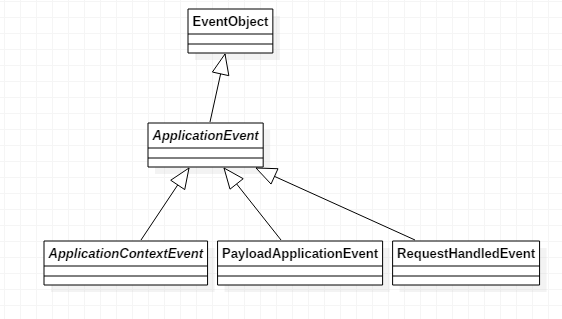
我们主要使用一下几个
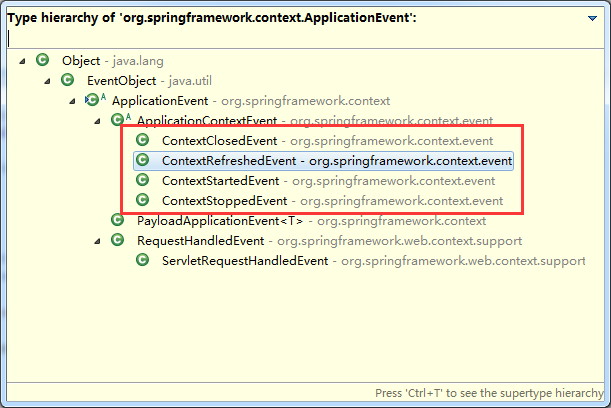
在spring容器中,这四个重上到下,分别是:
容器关闭的时候发布的事件类型
容器在初始化的时候或者刷新的时候发布
当使用 ConfigurableApplicationContext 接口中的 start() 方法启动 ApplicationContext 时,该事件被发布
当使用 ConfigurableApplicationContext 接口中的 stop() 方法停止 ApplicationContext 时,发布这个事件。你可以在接受到这个事件后做必要的清理的工作。
RequestHandledEvent web请求处理后发布的事件
spring监听事件
application在启动的时候,会自动识别并加载eventlistner类型bean定义。
一旦容器内有事件发布,将通知这些注册到容器的eventlistener
ApplicationListener
Spring发布事件
ApplicationEventPublisher 接口 实现对象 ApplicationContext 也是一个事件发布对象
这里做一个小测试:
package cn.cutter.start.event;

import org.springframework.context.ApplicationListener;

import org.springframework.context.event.ContextStartedEvent;

import org.springframework.stereotype.Component;

@Component

public class MyStartEventHandler implements ApplicationListener<ContextStartedEvent> {

    @Override

    public void onApplicationEvent(ContextStartedEvent event) {

        System.out.println("cutter_point 启动application容器");

    }

}
package cn.cutter.start.event;

import org.springframework.context.ApplicationListener;

import org.springframework.context.event.ContextStoppedEvent;

import org.springframework.stereotype.Component;

@Component

public class MyStopEventHandler implements ApplicationListener<ContextStoppedEvent> {

    @Override

    public void onApplicationEvent(ContextStoppedEvent event) {

        System.out.println("cutter_point 停止application容器");

    }

}
package cn.cutter.start.event;

import org.springframework.context.ApplicationListener;

import org.springframework.context.event.ContextStoppedEvent;

import org.springframework.stereotype.Component;

@Component

public class MyStopEventHandler2 implements ApplicationListener<ContextStoppedEvent> {

    @Override

    public void onApplicationEvent(ContextStoppedEvent event) {

        // TODO Auto-generated method stub

        System.out.println("cutter_point 停止application容器 222");

    }

}
package cn.cutter.start.resourceloader;

import org.springframework.context.ResourceLoaderAware;

import org.springframework.core.io.ResourceLoader;

public class FooBar implements ResourceLoaderAware {

    //资源加载器

    private ResourceLoader resourceLoader;

    public void foo(String location) {

        //这里有没有很熟悉

//        ResourceDemo.class.getResource(location).getClass()

        System.out.println(this.getResourceLoader().getResource(location).getClass());

    }

    @Override

    public void setResourceLoader(ResourceLoader resourceLoader) {

        //这里进行resourceloader的注入

        this.resourceLoader = resourceLoader;

    }

    public ResourceLoader getResourceLoader() {

        return resourceLoader;

    }

    public void sayFoo() {

        System.out.println("hi foo!");

    }

}
<?xml version="1.0" encoding="UTF-8"?>

<beans xmlns="http://www.springframework.org/schema/beans"

    xmlns:xsi="http://www.w3.org/2001/XMLSchema-instance" xmlns:context="http://www.springframework.org/schema/context"

    xsi:schemaLocation="http://www.springframework.org/schema/beans

        http://www.springframework.org/schema/beans/spring-beans-4.3.xsd

        http://www.springframework.org/schema/context

        http://www.springframework.org/schema/context/spring-context-4.3.xsd">

    <context:component-scan base-package="cn.cutter"  />

    <!-- 国际化配置 -->

    <bean id="messageSource" class="org.springframework.context.support.ResourceBundleMessageSource">

        <property name="basenames">

            <list>

                <value>i18/users</value>

                <value>i18/errormsg</value>

            </list>

        </property>

    </bean>

    <bean id="ttmRateService" class="cn.cutter.simplefx.service.impl.MockTTMRateServiceImpl"></bean>

    <bean id="fooBar" class="cn.cutter.start.resourceloader.FooBar" />

    <bean id="fooBar2" class="cn.cutter.start.resourceloader.FooBar2" />

    <bean id="resourceDemo" class="cn.cutter.start.resourceloader.ResourceDemo">

        <property name="resource">

            <value>classpath:applicationContext-bean.xml</value>

        </property>

    </bean>

    <!-- <bean id="myObject" class="cn.cutter.start.bean.MyObject"></bean> -->

    <!-- <alias name="FXNewsProvider" alias="provideralias"/> -->

    <!-- <bean id="test4key2" ></bean>

    <bean id="" class="..." lazy-init="true">

        <constructor-arg>

            <ref bean=""  parent=""/>

        </constructor-arg>

        <property name="test1">

            <value>ttttt1</value>

            <idref bean="ttttt1"/>

        </property>

        <property name="test2">

            <list>

                <value>test2value</value>

                <ref bean="test2222"/>

                <idref bean="test22222"/>

                <bean class="..."></bean>

            </list>

        </property>

        <property name="test3">

            <set>

                <value>test2value</value>

                <ref bean="test2222"/>

                <idref bean="test22222"/>

                <bean class="..."></bean>

            </set>

        </property>

        <property name="test4">

            <map>

                <entry key="test4key1">

                    <value>something</value>

                </entry>

                <entry key-ref="test5key2">

                    <list>

                        <value>test2value</value>

                        <ref bean="test2222"/>

                        <idref bean="test22222"/>

                        <bean class="..."></bean>

                    </list>

                </entry>

            </map>

        </property>

    </bean> -->

</beans>
启动测试案例
@Test

    public void testEvent() {

        //这里出发start事件和stop事件,就是使用ConfigurableApplicationContext的start和stop事件

        ConfigurableApplicationContext cac = (ConfigurableApplicationContext) before();

        cac.start();

        FooBar fooBar = (FooBar) cac.getBean("fooBar");

        fooBar.sayFoo();

        cac.stop();

    }
运行截图

【sping揭秘】8、容器内部事件发布(一)的更多相关文章
- 【sping揭秘】9、容器内部事件发布(二)
写在前面---------------------------------- 命运多舛,痴迷淡然 不知下一步该往哪里走,现在应该是我的迷茫期... 加油,快点走出去!!! 聪明的网友们,你们有没有迷茫 ...
- 深入理解Spring的容器内事件发布监听机制
目录 1. 什么是事件监听机制 2. JDK中对事件监听机制的支持 2.1 基于JDK实现对任务执行结果的监听 3.Spring容器对事件监听机制的支持 3.1 基于Spring实现对任务执行结果的监 ...
- 【spring源码学习】spring的事件发布监听机制源码解析
[一]相关源代码类 (1)spring的事件发布监听机制的核心管理类:org.springframework.context.event.SimpleApplicationEventMulticast ...
- 从spring源码汲取营养:模仿spring事件发布机制,解耦业务代码
前言 最近在项目中做了一项优化,对业务代码进行解耦.我们部门做的是警用系统,通俗的说,可理解为110报警.一条警情,会先后经过接警员.处警调度员.一线警员,警情是需要记录每一步的日志,是要可追溯的,比 ...
- Spring事件发布与监听机制
我是陈皮,一个在互联网 Coding 的 ITer,微信搜索「陈皮的JavaLib」第一时间阅读最新文章,回复[资料],即可获得我精心整理的技术资料,电子书籍,一线大厂面试资料和优秀简历模板. 目录 ...
- Nacos源码分析-事件发布机制
温馨提示: 本文内容基于个人学习Nacos 2.0.1版本代码总结而来,因个人理解差异,不保证完全正确.如有理解错误之处欢迎各位拍砖指正,相互学习:转载请注明出处. Nacos的服务注册.服务变更等功 ...
- Spring 源码(8)Spring BeanPostProcessor的注册、国际化及事件发布机制
上一篇文章https://www.cnblogs.com/redwinter/p/16198942.html介绍了Spring的注解的解析过程以及Spring Boot自动装配的原理,大概回顾下:Sp ...
- Spring之事件发布系统
springboot应用,启动spring容器大致有如下几个过程: 容器开始启动 初始化环境变量 初始化上下文 加载上下文 完成 对应的Spring应用的启动器的监听器可以监听以上的过程,接口如下: ...
- spring 自定义事件发布及监听(简单实例)
前言: Spring的AppilcaitionContext能够发布事件和注册相对应的事件监听器,因此,它有一套完整的事件发布和监听机制. 流程分析: 在一个完整的事件体系中,除了事件和监听器以外,还 ...
随机推荐
- 2018.11.01 NOIP训练 木棒分组(搜索+剪枝)
传送门 测试搜索的时候状态定义错了233. 我们把木棒从大到小排序. 然后保证每一组搜到的木棒出现的长度是从大到小递减的. 直接定义现在搜的木棒从什么位置开始,当前这一组的总长度,之前几组的总长度. ...
- Tomcat架构解析(二)-----Connector、Tomcat启动过程以及Server的创建过程
Connector用于跟客户端建立连接,获取客户端的Socket,交由Container处理.需要解决的问题有监听.协议以及处理器映射等等. 一.Connector设计 Connector要实现的 ...
- latex字体
强调 方式:声明:\em 或者 命令\emph,后者是latex2e的命令 区别:声明与命令的作用范围不同:\em改变当前字体直到被其他相应的声明取消(也可以是\em本身),或者当前的环境结束为止,当 ...
- telegraph.conf配置
原文:http://www.cnblogs.com/smail-bao/p/7002361.html 1.操作系统基础监控指标配置标准 基础监控使用通用的全局配置文件telegraf.conf,以下只 ...
- linux source命令的用法
source命令用法:source FileName作用:在当前bash环境下读取并执行FileName中的命令.(如把ls写入a.txt,然后source a.txt 就会执行ls命令,列出目录)注 ...
- matlab2016b和c# .net4.0混合编程
参考:https://www.cnblogs.com/eniac12/p/4390845.html 主要想用c#写软件界面,利用matlab绘图,或者用里面的遗传算法. 我的环境是:Win10 64位 ...
- canvas制作表盘
<!DOCTYPE html> <html> <head> <meta charset="utf-8" /> <title&g ...
- HP 集群软件 - 不能接收节点的设备查询信息:软件引起的连接失败
问题 # cmcheckconf -v -C /etc/cmcluster/cmclconfig.ascii Begin cluster verification... Checking clust ...
- Lua 常用遍历
b = {} , do b[i] = i end -- method one for i, v in pairs(b) do print (i, v) end -- method two for i, ...
- 【repost】Javascript操作DOM常用API总结
Javascript操作DOM常用API总结 文本整理了javascript操作DOM的一些常用的api,根据其作用整理成为创建,修改,查询等多种类型的api,主要用于复习基础知识,加深对原生js的认 ...