
ssh 认证
ssh 秘钥认证流程
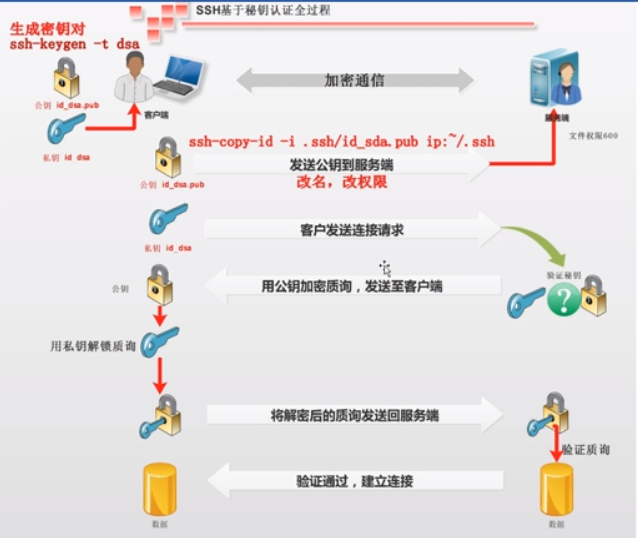
ssh配置认证
基于口令(密码)的安全验证
[root@m01 ~]# ssh 10.0.0.41 hostname

root@10.0.0.41's password:

backup

[root@m01 ~]# ssh 10.0.0.41 whoami

root@10.0.0.41's password:

root

[root@m01 ~]# ssh lewen@10.0.0.41 whoami

lewen@10.0.0.41's password:

lewen
基于秘钥的认证
1.生成钥匙和锁头
[root@m01 ~]# hostname

m01

[root@m01 ~]# ssh-keygen -t dsa

Generating public/private dsa key pair.

Enter file in which to save the key (/root/.ssh/id_dsa):

Enter passphrase (empty for no passphrase):            # 给秘钥加密码

Enter same passphrase again:

Your identification has been saved in /root/.ssh/id_dsa.

Your public key has been saved in /root/.ssh/id_dsa.pub.

The key fingerprint is:

::1b:e1:9f:0a:ab::a0:fc:::2d:bc::dd root@m01

The key's randomart image is:

+--[ DSA ]----+

| |

| . + . |

| = + E |

| . + . o |

| o . S |

| ..o = . |

| .o.... o |

| .o..o.. |

| .+o.. |

+-----------------+
2.把锁头发送到目标机器
发送到 backup
[root@m01 ~]# ssh-copy-id -i /root/.ssh/id_dsa.pub root@172.16.1.41
The authenticity of host '172.16.1.41 (172.16.1.41)' can't be established.
RSA key fingerprint is ac:0f:aa:d2:5b:ff:cf:ac:f0:::a6:be::b9:f9.
Are you sure you want to continue connecting (yes/no)? y
Please type 'yes' or 'no': yes
Warning: Permanently added '172.16.1.41' (RSA) to the list of known hosts.
root@172.16.1.41's password:
Now try logging into the machine, with "ssh 'root@172.16.1.41'", and check in:
.ssh/authorized_keys
to make sure we haven't added extra keys that you weren't expecting.
[root@m01 ~]# ssh 10.0.0.41 hostname
backup
#nfs01
[root@m01 ~]# ssh-copy-id -i /root/.ssh/id_dsa.pub root@172.16.1.31
The authenticity of host '172.16.1.31 (172.16.1.31)' can't be established.
RSA key fingerprint is ac:0f:aa:d2:5b:ff:cf:ac:f0:::a6:be::b9:f9.
Are you sure you want to continue connecting (yes/no)? yes
Warning: Permanently added '172.16.1.31' (RSA) to the list of known hosts.
root@172.16.1.31's password:
Now try logging into the machine, with "ssh 'root@172.16.1.31'", and check in:
.ssh/authorized_keys
to make sure we haven't added extra keys that you weren't expecting.
[root@m01 ~]# ssh 172.16.1.31 hostname
nfs01
3.免密发送
sshpass 软件

yum install sshpass -y

#sshpass 给ssh类提供密码

[root@m01 ~]# sshpass -p123456 ssh 172.16.1.41 hostname

backup

sshpass -p123456 ssh -o StrictHostKeyChecking=no 172.16.1.41 hostname

backup
非交互式创建 钥匙锁头
[root@m01 ~]# ssh-keygen -t dsa -P '' -f ~/.ssh/id_dsa
非交互式 分发公钥
不用输入密码将公钥发送到目的机器
[root@m01 ~]# sshpass -p123456 ssh-copy-id -i /root/.ssh/id_dsa.pub "-o StrictHostKeyChecking=no root@172.16.1.41"
Now try logging into the machine, with "ssh '-o StrictHostKeyChecking=no root@172.16.1.41'",
and check in:
.ssh/authorized_keys
to make sure we haven't added extra keys that you weren't expecting.
[root@m01 ~]# sshpass -p123456 ssh-copy-id -i /root/.ssh/id_dsa.pub "-o StrictHostKeyChecking=no root@172.16.1.31"
Now try logging into the machine, with "ssh '-o StrictHostKeyChecking=no root@172.16.1.31'",
and check in:
.ssh/authorized_keys
to make sure we haven't added extra keys that you weren't expecting.
[root@m01 ~]# ssh 172.16.1.41 hostname
backup
[root@m01 ~]# ssh 172.16.1.31 hostname
nfs01
Usage: /usr/bin/ssh-copy-id [-h|-?|-f|-n] [-i [identity_file]] [-p port] [[-o <ssh -o options>] ...] [user@]hostname

    -f: force mode -- copy keys without trying to check if they are already installed

    -n: dry run    -- no keys are actually copied
ssh 认证的更多相关文章
- ssh 认证指定端口
[root@database2 ~]# cat ssh.sh if [ ! $# -eq 2 ] ;then echo "请输入用户密码以空格分开" exit else ssh-k ...
- 批量的单向的ssh 认证
<pre name="code" class="python">if [ ! $# -eq 2 ] ;then echo "请输入用户密码 ...
- debian下使用gitosis+gitweb搭建SSH认证的git服务器
搭建完成Git服务器后,需要使用两台机器进行测试,一台机器作为服务器端server,一台服务器作为客户端client.整个系统,需要三个计算机账户,这里假设server端的账户名为git,client ...
- github添加ssh认证
总概:在使用git的时候,和目标仓库建立关系有两种方式https,ssh.一般用的是https认证(这样简单方便),但有个缺点,pull,push等操作需要频繁输入用户验证.虽然可以把用户验证账号密码 ...
- Linux学习笔记总结--ssh认证登录
原理简介 SSH证书认证登录的基础是一对唯一匹配密钥: 私钥(private key)和公钥(public key).公钥用于对数据进行加密,而且只能用于加密.而私钥只能对使用所匹配的公钥,所加密过的 ...
- git ssh认证
一般新手用git时,使用HTTPS都需要输入用户名和密码,这是一个很低效的开发过程.(虽然有时可以让开发人员减少push的次数).github提供了几种连接方式,其中以https:开头的代表https ...
- 华为SSH认证配置
[设备型号]华为switch-S5700s ————1: [SW1] rsa/dsa local-key-pair create #创建本地密钥对 The key name will be: SW1_ ...
- Jenkins - SSH认证方式拉取Git代码
1.本地生成密钥 [root@root ~] ssh-keygen -t rsa Generating public/private rsa key pair. Enter file in which ...
- [Linux] 一次SSH认证失败引发的关于通过日志查错误的思考
一.缘由: 早上在用SSH公钥认证打通所有的机器,有一台机器在完成一些列操作后密钥登陆失败,其他机器一切正常. 错误如下:Public-key authentication with the serv ...
随机推荐
- width多少,超过了用....表示
maxWidth:'140px',whiteSpace:'nowrap',overflow:'hidden',textOverflow:'ellipsis'
- python脚本删除文件与目录的命令
1. 删除文件的命令 import os os.remove(file) os.unlink(file) 2.删除目录的命令 import shutil shutil.rmtree(directory ...
- AngularJS——第6章 作用域
第6章 作用域 在AngularJS中使用过滤器格式化展示数据,在"{{}}"中使用"|"来调用过滤器,使用":"传递参数. 6.1 内置过 ...
- 自动化运维工具 SaltStack 搭建
原文地址:https://www.ibm.com/developerworks/cn/opensource/os-devops-saltstack-in-cloud/index.html#N10072 ...
- jqPaginator分页(每次只取一页数据)
应用技术点:jqPaginator.template7.bootstrap.css 参考网址: jqPaginator:http://jqpaginator.keenwon.com/#a3 templ ...
- git diff 分支1 分支2 --stat命令没有将所有的不同显示出来
昨天遇到使用git diff 分支1 分支2 --stat命令时打印的文件修改列表,并不全,导致找了一下午的问题没有找到...特此记录,显示不全的原因我还没有找到,特此记录.
- js阻止a标签默认事件的几种方法
方法/步骤 疑问 打开编辑器,新建html并加入a标签,如图所示,小编想点击a标签时执行pop函数同时禁止a标签的默认的href跳转,该如何阻止呢? 方法一 要阻止a标签跳转,可以改变href ...
- Linux驱动之内核加载模块过程分析
Linux内核支持动态的加载模块运行:比如insmod first_drv.ko,这样就可以将模块加载到内核所在空间供应用程序调用.现在简单描述下insmod first_drv.ko的过程 1.in ...
- [转]C#中HttpClient使用注意:预热与长连接
最近在测试一个第三方API,准备集成在我们的网站应用中.API的调用使用的是.NET中的HttpClient,由于这个API会在关键业务中用到,对调用API的整体响应速度有严格要求,所以对HttpCl ...
- do_something方法解析
/** * 运行任务 * @param $interval * @return bool */ static public function do_something($interval) { //是 ...