
更改Ubuntu默认python版本的两种方法python-> Anaconda
你可以按照以下方法使用 ls 命令来查看你的系统中都有那些 Python 的二进制文件可供使用。
|
1
2
|
$ ls /usr/bin/python*/usr/bin/python /usr/bin/python2 /usr/bin/python2.7 /usr/bin/python3 /usr/bin/python3.4 /usr/bin/python3.4m /usr/bin/python3m |
执行如下命令查看默认的 Python 版本信息:
|
1
2
|
$ python --versionPython 2.7.8 |
1、基于用户修改 Python 版本:
想要为某个特定用户修改 Python 版本,只需要在其 home 目录下创建一个 alias(别名) 即可。打开该用户的 ~/.bashrc文件,添加新的别名信息来修改默认使用的 Python 版本。
|
1
|
alias python='/usr/bin/python3.4' |
一旦完成以上操作,重新登录或者重新加载 .bashrc 文件,使操作生效。
|
1
|
$ . ~/.bashrc |
检查当前的 Python 版本。
|
1
2
|
$ python --versionPython 3.4.2 |
2、 在系统级修改 Python 版本【/etc/alternatives/】
我们可以使用 update-alternatives 来为整个系统更改 Python 版本。以 root 身份登录,首先罗列出所有可用的 python 替代版本信息:
|
1
2
|
# update-alternatives --list pythonupdate-alternatives: error: no alternatives for python |
如果出现以上所示的错误信息,则表示 Python 的替代版本尚未被 update-alternatives 命令识别。想解决这个问题,我们需要更新一下替代列表,将 python2.7 和 python3.4 放入其中。
|
1
2
3
4
|
# update-alternatives --install /usr/bin/python python /usr/bin/python2.7 1update-alternatives: using /usr/bin/python2.7 to provide /usr/bin/python (python) in auto mode# update-alternatives --install /usr/bin/python python /usr/bin/python3.4 2update-alternatives: using /usr/bin/python3.4 to provide /usr/bin/python (python) in auto mode |
--install 选项使用了多个参数用于创建符号链接。最后一个参数指定了此选项的优先级,如果我们没有手动来设置替代选项,那么具有最高优先级的选项就会被选中。这个例子中,我们为 /usr/bin/python3.4 设置的优先级为2,所以update-alternatives 命令会自动将它设置为默认 Python 版本。
|
1
2
|
# python --versionPython 3.4.2 |
接下来,我们再次列出可用的 Python 替代版本。
|
1
2
3
|
# update-alternatives --list python/usr/bin/python2.7/usr/bin/python3.4 |
现在开始,我们就可以使用下方的命令随时在列出的 Python 替代版本中任意切换了。
|
1
|
# update-alternatives --config python |
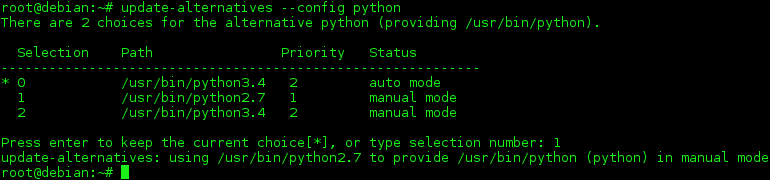
|
1
2
|
# python --versionPython 2.7.8 |
3、移除替代版本
一旦我们的系统中不再存在某个 Python 的替代版本时,我们可以将其从 update-alternatives 列表中删除掉。例如,我们可以将列表中的 python2.7 版本移除掉。
|
1
2
3
4
|
# update-alternatives --remove python /usr/bin/python2.7update-alternatives: removing manually selected alternative - switching python to auto modeupdate-alternatives: using /usr/bin/python3.4 to provide /usr/bin/python (python) in auto mode |
方法2、移除软连接
|
1
2
3
|
rm -rf /data/logsln -s /temp/logs /data/logs |

解决软连接ln报错-bash: /usr/local/bin/mysql: Too many levels of symbolic links
总结
以上就是这篇文章的全部内容了,希望本文的内容对大家的学习或者工作能带来一定的帮助,如果有疑问大家可以留言交流。
更改Ubuntu默认python版本的两种方法python-> Anaconda的更多相关文章
- Git恢复之前版本的两种方法reset、revert
实战 回退 1.删除之前的提交 git reset --hard id 推送到远程 git push -f [git log中确实删除了,但是拿到可以恢复] 2.不删除之前的提交 git revert ...
- 实现LRU的两种方法---python实现
这也是豆瓣2016年的一道笔试题... 参考:http://www.3lian.com/edu/2015/06-25/224322.html LRU(least recently used)就不做过多 ...
- ubuntu查看mysql版本的几种方法
ubuntu查看mysql版本的几种方法 mysql 1:在终端下:mysql -V(大写) //代码 $ mysql -V mysql Ver 14.14 Distrib 5.5.46, for d ...
- ubuntu 安装JAVA jdk的两种方法:
ubuntu 安装jdk 的两种方式: 1:通过ppa(源) 方式安装. 2:通过官网下载安装包安装. 这里推荐第1种,因为可以通过 apt-get upgrade 方式方便获得jdk的升级 使用pp ...
- Git恢复之前版本的两种方法reset、revert(图文详解)
一.问题描述在利用github实现多人合作程序开发的过程中,我们有时会出现错误提交的情况,此时我们希望能撤销提交操作,让程序回到提交前的样子,本文总结了两种解决方法:回退(reset).反做(reve ...
- Git恢复之前版本的两种方法reset、revert(图文详解)(转)
一.问题描述在利用github实现多人合作程序开发的过程中,我们有时会出现错误提交的情况,此时我们希望能撤销提交操作,让程序回到提交前的样子,本文总结了两种解决方法:回退(reset).反做(reve ...
- python 开启进程两种方法 multiprocessing模块 介绍
一 multiprocessing模块介绍 python中的多线程无法利用多核优势,如果想要充分地使用多核CPU的资源(os.cpu\_count\(\)查看),在python中大部分情况需要使用多进 ...
- Windows下创建Python虚拟环境的两种方法:
在实际的项目开发中,我们会根据自己的需求去下载各种相应的框架库,但是每个项目可能使用的库不一样,或者版本不一样等等等.为了避免这些因素对我们的项目造成一些不必要的影响,我们可能需要来回的切换或者装卸等 ...
- 安装python包的两种方法
1.在 anaconda 环境中安装包 selenium conda install selenium 2.python 下安装包 selenium pip install selenium 3.测试 ...
随机推荐
- TZOJ 4621 Grammar(STL模拟)
描述 Our strings only contain letters(maybe the string contains nothing). Now we define the production ...
- MySQL-查缺补漏
MySQL show create table tablename #查看表设计代码数据 show create table tablename/G #同上 desc tablename # 查看表数 ...
- scrapy的调试和环境安装技巧
1,先在settings中把ROBOTSTXT_OBEY = False 在主目录下面新建main文件 __autor__ = 'zhouli' __date__ = '2018/11/3 22:39 ...
- java web获取客户端外网ip和所在区域
@参考文章1.@参考文章2.@参考文章3.@参考文章4,@之前同事的项目 controller @Controller @RequestMapping("/home") publi ...
- Java 微服务框架选型 Dubbo 和 Spring Cloud
微服务(Microservices)是一种架构风格,一个大型复杂软件应用由一个或多个微服务组成.系统中的各个微服务可被独立部署,各个微服务之间是松耦合的.每个微服务仅关注于完成一件任务并很好地完成该任 ...
- Django 改变xadmin后台英文为中文
1.标题 setting.py文件: LANGUAGE_CODE = 'en-us' TIME_ZONE = 'UTC' 修改: LANGUAGE_CODE = 'zh-Hans' TIME_ZONE ...
- Specified key was too long; max key length is 767 bytes
MySQL) )); Database changed ERROR (): Specified bytes drop table if exists test; ) primary key)chars ...
- excel数据复制到html表格<textarea>中
方案一 多行文本框接收到复制的excel值后,在文本框的chage事件中,将excel内容分割到二维数组中,然后填充到html的表格的input或textarea中. 数据格式: 单元格复制后的数据格 ...
- Oracle_PL/SQL(6) 触发器(序列、视图)
序列1.创建序列create sequence seq_alog start with 1 increment by 1 maxvalue 999999999999999999999999999 mi ...
- DOM-动态操作心得
这个知识点都是之前看过的,就当是复习了 一.创建元素的三种方法 第一种: document.write() 识别标签 但会覆盖之前内容 第二种: 用元素自身的innerHTML方法 不识别标签 但 ...