
ajax参数传递与后台接收
@
ajax参数传递与后台接收
Servlet中读取http参数的方法
- Enumeration getParameterNames() 返回一个 String 对象的枚举,包含在该请求中包含的参数的名称
- String getParameter(String name) 以字符串形式返回请求参数的值,或者如果参数不存在则返回 null。
- String getQueryString() 返回包含在路径后的请求 URL 中的查询字符串。
- String[] getParameterValues(String name) 返回一个字符串对象的数组,包含所有给定的请求参数的值,如果参数不存在则返回 null。
- ServletInputStream getInputStream() 使用 ServletInputStream,以二进制数据形式检索请求的主体。
ajax默认contentType为application/x-www-form-urlencoded
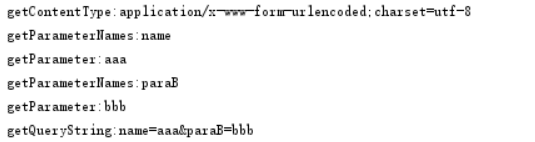
使用默认contentType,参数追加到url后传递
$.ajax({
url: "http://localhost:8082/boot/request/parameter?name=aaa¶B=bbb",
contentType: "application/x-www-form-urlencoded;charset=utf-8",
success: function(json){
console.log(json);
}
});
//请求中包含的参数的名称

Enumeration<String> parameterNames = request.getParameterNames();

while (parameterNames.hasMoreElements()) {

    String s = parameterNames.nextElement();

    System.out.println("getParameterNames:" + s);

    String paraA = request.getParameter(s);

    System.out.println("getParameter:" + paraA);

}

// 返回包含在路径后的请求 URL 中的查询字符串

String queryString = request.getQueryString();

System.out.println("getQueryString:" + queryString);
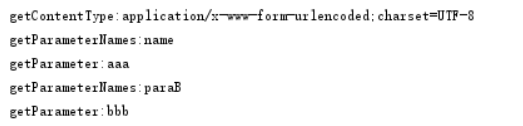
使用默认contentType,参数放到data中传递
$.ajax({

    url: "http://localhost:8082/boot/request/parameter",

    contentType: "application/x-www-form-urlencoded;charset=utf-8",

    data: {name: "aaa", paraB:"bbb"},

    success: function(json){

        console.log(json);

    }

});
//请求中包含的参数的名称

Enumeration<String> parameterNames = request.getParameterNames();

while (parameterNames.hasMoreElements()) {

    String s = parameterNames.nextElement();

    System.out.println("getParameterNames:" + s);

    String paraA = request.getParameter(s);

    System.out.println("getParameter:" + paraA);

}
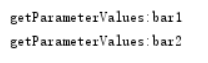
使用默认contentType,data中传递数组
$.ajax({

    url: "http://localhost:8082/boot/request/parameter",

    type: "post",

    contentType: "application/x-www-form-urlencoded;charset=utf-8",

    data: {foo: ["bar1", "bar2"]},

    success: function (json) {

        console.log(json);

    }

});
// 返回一个字符串对象的数组

String[] parameterValues = request.getParameterValues("foo[]");

if (parameterValues != null) {

    for (String parameterValue : parameterValues) {

        System.out.println("getParameterValues:" + parameterValue);

    }

}
使用contentType为application/json,在data中传递复杂参数
$.ajax({

    url: "http://localhost:8082/boot/request/parameter",

    type: "post",

    contentType: "application/json;charset=utf-8",

    data: JSON.stringify({name: "aaa", foo: ["bar1", "bar2"]}),

    success: function (json) {

        console.log(json);

    }

});
// 以二进制数据形式检索请求的主体

ServletInputStream inputStream = request.getInputStream();

BufferedReader br = new BufferedReader(new InputStreamReader(inputStream));

String line = "";

StringBuilder sb = new StringBuilder();

while ((line = br.readLine()) != null) {

    sb.append(line);

}

System.out.println("getInputStream:" + sb);

使用contentType为application/json,在data中传递复杂参数,并使用springmvc接收
$.ajax({

    url: "http://localhost:8082/boot/request2/requestBody",

    type: "post",

    contentType: "application/json;charset=utf-8",

    data: JSON.stringify({id: 111, name: "aaa", foo: ["bar1", "bar2"]}),

    success: function (json) {

        console.log(json);

    }

});
@RequestMapping(value = "/requestBody")

public void RequestBody(@RequestBody User user) throws IOException {

    System.out.println(user.toString());

}

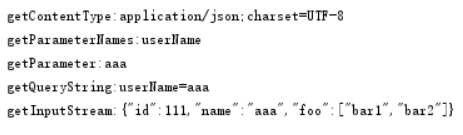
url追加参数与data中放json同时使用
$.ajax({

    // url: "http://localhost:8082/boot/request/parameter?userName=aaa",

    url: "http://localhost:8082/boot/request2/parm?userName=aaa",

    type: "post",

    contentType: "application/json;charset=utf-8",

    data: JSON.stringify({id: 111, name: "aaa", foo: ["bar1", "bar2"]}),

    async:false,

    success: function (json) {

        console.log(json);

    }

});
//请求中包含的参数的名称

Enumeration<String> parameterNames = request.getParameterNames();

while (parameterNames.hasMoreElements()) {

    String s = parameterNames.nextElement();

    System.out.println("getParameterNames:" + s);

    String paraA = request.getParameter(s);

    System.out.println("getParameter:" + paraA);

}

// 以二进制数据形式检索请求的主体

ServletInputStream inputStream = request.getInputStream();

BufferedReader br = new BufferedReader(new InputStreamReader(inputStream));

String line = "";

StringBuilder sb = new StringBuilder();

while ((line = br.readLine()) != null) {

    sb.append(line);

}

System.out.println("getInputStream:" + sb);
@RequestMapping(value = "/parm")

public void parm(@RequestParam String userName, @RequestBody User user) throws IOException {

    System.out.println("userName:" + userName);

    System.out.println(user.toString());

}

参考文章:
https://www.w3cschool.cn/servlet/servlet-client-request.html
https://blog.csdn.net/qq_34129814/article/details/72604347
ajax参数传递与后台接收的更多相关文章
- ajax传递数组后台接收不到值的问题
背景: JQGrid需要进行批量删除操作传给后台的是数组,结果后台接收不到值. 后台语言:java 原因: ajax传递参数时,traditional 默认为false,JQuery会深度序列化参数对 ...
- ajax 发送json 后台接收 遍历保存进数据库
前台怎么拿参数的我就不管了我也不会 反正用这个ajax没错 ajax 代码 一定要写明http请求类型 { contentType:"application/x-www-form-ur ...
- 原生ajax提交php后台接收不到问题
var xmlHttp; if (window.ActiveXObject) { xmlHttp = new ActiveXObject("Microsoft.XMLHTTP"); ...
- 【JS】中ajax的URL中包含中文,后台接收乱码
[问题]ajax提交get请求,url中参数包含中文,后台接收到显示乱码. [解决方案]前台: function getSiteInfoByName(siteName){ var res; $.aja ...
- Ajax前台返回JSON数据后再Controller中直接转换成类型使用,后台接收json转成实体的方法
之前写过一篇记录文章,写的是将一个比较复杂的数据结构在前台组合起来后传递到后台. 当时并不太了解@RequestBody,也并没有使用js提供的JSON.stringify()方法 所有都是自己写的, ...
- ajax 传递数组类型参数后台接收不到的问题
在做排序功能的时候需要将一个数组的数据传递到后台,(当时怎么没用json,如果用json就没有那么多的事情了),数据提交采用ajax! 先看代码 js: submitbtn: function () ...
- SpringMVC后台接收list类型的数据的实现方式
一.背景 最近在做一些东西的时候,遇到一个需要Springmvc后台接收list类型数据的需求,几经辗转才完美解决了这个问题,今天记下来方便以后使用,也分享给需要的小伙伴们~ 二.实现方式 1.实现方 ...
- angular的$http.post()提交数据到Java后台接收不到参数值问题的解决方法
本文地址:http://www.cnblogs.com/jying/p/6733408.html 转载请注明出处: 写此文的背景:在工作学习使用angular的$http.post()提交数据时, ...
- ASP.NET前台table通过Ajax获取绑定后台查询的json数据
上一篇<ASP.NET前台html页面AJAX提交数据后台ashx页面接收数据>写了前台提交数据后台保存到数据库,数据处理以后用户肯定要查询.接下来就写一个前台table通过ajax J ...
随机推荐
- Java开发笔记(八十五)通过字符流读写文件
前面介绍了文件的信息获取.管理操作,以及目录下的文件遍历,那么文件内部数据又是怎样读写的呢?这正是本文所要阐述的内容.File工具固然强大,但它并不能直接读写文件,而要借助于其它工具方能开展读写操作. ...
- CSS3制作上下跳动动画箭头效果
动画效果如下: 代码如下: 1 <!DOCTYPE html> 2 <html> 3 <head> 4 <meta charset="utf-8&q ...
- 解决gitbook报错问题
这个问题困扰了我 很久,网友给出了很多解决方案,我都亲测不靠谱. 以下解决方法亲测靠谱: OS:Win7 Gitbook版本: 3.2.3 Nodejs: V8.9.1 步骤: 1. 编辑文件 C:\ ...
- vue学习之vuex
1 首先还是安装 npm install vuex --save. 2 在src这种创建目录为store 创建 index.js (getters.js ,actions.js ,mutation ...
- Dotspatial 要素重叠分析
private void toolStripButton30_Click(object sender, EventArgs e) { //面状重叠分析 if (mapMain.Layers.Count ...
- JS中如何进行对象的深拷贝
在JS中,一般的=号传递的都是对象/数组的引用,并没有真正地拷贝一个对象,那如何进行对象的深度拷贝呢?如果你对此也有疑问,这篇文章或许能够帮助到你 一.对象引用.浅层拷贝与深层拷贝的区别 js的对象引 ...
- Python3 小技巧
完全个人总接 每个文件头部都可以加入这个,或者放到用单独一个文件,再import *.其实都一样,只需要一行false=False;true=True;none=null=None;hid=lambd ...
- eslint 代码缩进 报错及解决
一.背景 使用vue在VScode中正常写的代码,报了一堆的错误,仔细检查,发现都是缩进要么多了要么少了,总之是代码不规范的的报错. 二.原因 百度查了发现代码规范默认缩进2个空格,而VScode默认 ...
- SHA1withRSA加签名和验签名
利用私钥加签名: //contentForSign为需加标签的字符串 public String signWhithsha1withrsa(string contentForSign) { strin ...
- 周一02.3运行python程序的两种方式
一.运行python程序的两种方式 方法一:交互式: 优点:输入一行代码立刻返回结果 缺点:无法永久保存代码 方法二: ...