
SpringBoot2.0之八 多数据源配置
在开发的过程中我们可能都会遇到对接公司其他系统等需求,对于外部的系统可以采用接口对接的方式,对于一个公司开发的两个系统,并且知道相关数据库结构的情况下,就可以考虑使用多数据源来解决这个问题。SpringBoot为我们提供了相对简单的实现。
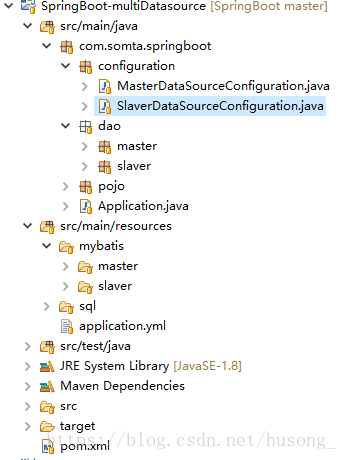
一、建立如下结构的maven项目
二、添加相关数据库配置信息
server:
port: 8080
spring:
datasource:
master:
driver-class-name: com.mysql.jdbc.Driver
url: jdbc:mysql://127.0.0.1:3306/test?useUnicode=true&characterEncoding=utf-8&useSSL=false
username: root
password: 123456
slaver:
driver-class-name: com.mysql.jdbc.Driver
url: jdbc:mysql://127.0.0.1:3306/dev?useUnicode=true&characterEncoding=utf-8&useSSL=false
username: root
password: 123456
三、主库和从库的相关配置
1、主库数据源配置
@Configuration
@MapperScan(basePackages = "com.somta.springboot.dao.master", sqlSessionTemplateRef = "masterSqlSessionTemplate")
public class MasterDataSourceConfiguration {
@Value("${spring.datasource.master.driver-class-name}")
private String driverClassName;
@Value("${spring.datasource.master.url}")
private String url;
@Value("${spring.datasource.master.username}")
private String username;
@Value("${spring.datasource.master.password}")
private String password;
@Bean(name = "masterDataSource")
@Primary
public DataSource dataSource() {
DruidDataSource dataSource = new DruidDataSource();
dataSource.setDriverClassName(this.driverClassName);
dataSource.setUrl(this.url);
dataSource.setUsername(this.username);
dataSource.setPassword(this.password);
return dataSource;
}
@Bean(name = "masterSqlSessionFactory")
@Primary
public SqlSessionFactory sqlSessionFactory(@Qualifier("masterDataSource") DataSource dataSource) throws Exception {
SqlSessionFactoryBean bean = new SqlSessionFactoryBean();
bean.setDataSource(dataSource);
bean.setMapperLocations(new PathMatchingResourcePatternResolver().getResources("classpath*:mybatis/master/**/Mysql_*Mapper.xml"));
return bean.getObject();
}
@Bean(name = "masterTransactionManager")
@Primary
public DataSourceTransactionManager transactionManager(@Qualifier("masterDataSource") DataSource dataSource) {
return new DataSourceTransactionManager(dataSource);
}
@Bean(name = "masterSqlSessionTemplate")
@Primary
public SqlSessionTemplate sqlSessionTemplate(@Qualifier("masterSqlSessionFactory") SqlSessionFactory sqlSessionFactory) throws Exception {
return new SqlSessionTemplate(sqlSessionFactory);
}
}
2、从库的数据源配置信息
@Configuration
@MapperScan(basePackages = "com.somta.springboot.dao.slaver", sqlSessionTemplateRef = "slaverSqlSessionTemplate")
public class SlaverDataSourceConfiguration {
@Value("${spring.datasource.slaver.driver-class-name}")
private String driverClassName;
@Value("${spring.datasource.slaver.url}")
private String url;
@Value("${spring.datasource.slaver.username}")
private String username;
@Value("${spring.datasource.slaver.password}")
private String password;
@Bean(name = "slaverDataSource")
public DataSource dataSource() {
DruidDataSource dataSource = new DruidDataSource();
dataSource.setDriverClassName(this.driverClassName);
dataSource.setUrl(this.url);
dataSource.setUsername(this.username);
dataSource.setPassword(this.password);
return dataSource;
}
@Bean(name = "slaverSqlSessionFactory")
public SqlSessionFactory sqlSessionFactory(@Qualifier("slaverDataSource") DataSource dataSource) throws Exception {
SqlSessionFactoryBean bean = new SqlSessionFactoryBean();
bean.setDataSource(dataSource);
bean.setMapperLocations(new PathMatchingResourcePatternResolver().getResources("classpath*:mybatis/slaver/**/Mysql_*Mapper.xml"));
return bean.getObject();
}
@Bean(name = "slaverTransactionManager")
public DataSourceTransactionManager transactionManager(@Qualifier("slaverDataSource") DataSource dataSource) {
return new DataSourceTransactionManager(dataSource);
}
@Bean(name = "slaverSqlSessionTemplate")
public SqlSessionTemplate sqlSessionTemplate(@Qualifier("slaverSqlSessionFactory") SqlSessionFactory sqlSessionFactory) throws Exception {
return new SqlSessionTemplate(sqlSessionFactory);
}
}
注意在配置数据源的信息时,一定要通过@Primary配置一个主库,对于数据库配置部分与普通的数据源配置没有差异,新建一个DataSource,在创建一个SqlSessionTemplate,最后创建一个SqlSessionTemplate,分别以此注入即可,@MapperScan注解的扫描路径要分别对于相应的dao层
四、编写dao层和xml
public interface UserMasterDao {
int addUser(User user);
int deleteUserById(Long id);
int updateUserById(User user);
User queryUserById(Long id);
List<User> queryUserList();
}
<?xml version="1.0" encoding="UTF-8"?>
<!DOCTYPE mapper
PUBLIC "-//mybatis.org//DTD Mapper 3.0//EN"
"http://mybatis.org/dtd/mybatis-3-mapper.dtd">
<mapper namespace="com.somta.springboot.dao.master.UserMasterDao" >
<!-- Result Map-->
<resultMap id="BaseResultMap" type="com.somta.springboot.pojo.User" >
<result column="id" property="id"/>
<result column="name" property="name"/>
<result column="age" property="age"/>
</resultMap>
<!-- th_role_user table all fields -->
<sql id="Base_Column_List" >
id, name, age
</sql>
<insert id="addUser" parameterType="com.somta.springboot.pojo.User" >
insert into t_user (id, name, age)
values (#{id},#{name},#{age});
</insert>
<delete id="deleteUserById" parameterType="java.lang.Long">
delete from t_user where id=#{id}
</delete>
<update id="updateUserById" parameterType="com.somta.springboot.pojo.User" >
update t_user set
<trim suffixOverrides="," >
<if test="id != null and id != ''">
id=#{id},
</if>
<if test="name != null and name != ''">
name=#{name},
</if>
<if test="age != null and age != ''">
age=#{age},
</if>
</trim> where id=#{id}
</update>
<select id="queryUserById" resultMap="BaseResultMap" parameterType="java.lang.Long">
select <include refid="Base_Column_List" />
from t_user where id = #{id}
</select>
<select id="queryUserList" resultMap="BaseResultMap">
select <include refid="Base_Column_List" />
from t_user
</select>
</mapper>
五、编写测试类进行测试
@RunWith(SpringJUnit4ClassRunner.class)
@SpringBootTest(classes = Application.class)
public class MultiDatasourceTest {
@Autowired
private UserMasterDao masterUserDao;
@Autowired
private UserSlaverDao slaverUserDao;
/**
* 查询用户
* @throws Exception
*/
@Test
public void testQueryUser() throws Exception {
User masterUser = masterUserDao.queryUserById(1L);
System.out.println("masterUser==>"+masterUser.getName());
User slaverUser = slaverUserDao.queryUserById(1L);
System.out.println("slaverUser==>"+slaverUser.getName());
}
}
当在控制台看到如下所示输出就代表我们的配置已经成功了

Git代码地址:https://gitee.com/Somta/SpringBoot/tree/master/SpringBoot-multiDatasource
原文地址:http://somta.com.cn/#/blog/view/05ef234aa6744aa4bc039869e2cfaffe
---------------------
作者:明天的地平线
来源:CSDN
原文:https://blog.csdn.net/husong_/article/details/80103497
版权声明:本文为博主原创文章,转载请附上博文链接!
SpringBoot2.0之八 多数据源配置的更多相关文章
- springboot2.0+mybatis多数据源集成
最近在学springboot,把学的记录下来.主要有springboot2.0+mybatis多数据源集成,logback日志集成,springboot单元测试. 一.代码结构如下 二.pom.xml ...
- springboot2.0动态多数据源切换
摘要:springboot1.x到springboot2.0配置变化有一点变化,网上关于springboot2.0配置多数据源的资料也比较少,为了让大家配置多数据源从springboot1.x升级到s ...
- springboot学习入门简易版九---springboot2.0整合多数据源mybatis mysql8+(22)
一个项目中配置多个数据源(链接不同库jdbc),无限大,具体多少根据内存大小 项目中多数据源如何划分:分包名(业务)或注解方式.分包名方式类似多个不同的jar,同业务需求放一个包中. 分包方式配置多数 ...
- springboot2.0和Druid整合配置数据源
1. idea使用spring 初始化工具初始化springboot项目(要选中web) 下一步,下一步 2. 在pom.xml中,引入Druid连接池依赖: <dependency> & ...
- SpringBoot2.0之六 多环境配置
开发过程中面对不同的环境,例如数据库.redis服务器等的不同,可能会面临一直需要修改配置的麻烦中,在以前的项目中,曾通过Tomcat的配置来实现,有的项目甚至需要手动修改相关配置,这种方式费时费力, ...
- springboot2.0 redis EnableCaching的配置和使用
一.前言 关于EnableCaching最简单使用,个人感觉只需提供一个CacheManager的一个实例就好了.springboot为我们提供了cache相关的自动配置.引入cache模块,如下. ...
- IntelliJ IDEA 2017版 spring-boot2.0.4的yml配置使用
一.必须配置字端两个 server: port: 8080 servlet: context-path: /demo 二.两种mvc转换springboot,一种是注解,一种就是.yml或proper ...
- IntellJ IDEA2017 springboot2.0.2中读取配置
IDEA 路径 src\main\resources\application.properties 配置文件名称为 application.properties 默认的位置在classpath根目录下 ...
- springboot2.0最精简的配置yml
https://blog.csdn.net/yu_hongrun/article/details/81708762
随机推荐
- ETCD相关介绍--整体概念及原理方面
etcd作为一个受到ZooKeeper与doozer启发而催生的项目,除了拥有与之类似的功能外,更专注于以下四点. 简单:基于HTTP+JSON的API让你用curl就可以轻松使用. 安全:可选SSL ...
- 『个人の笔记』百度ife
✄--------------------------------------------task1分割线--------------------------------------------✄ 百 ...
- Android TagFlowLayout完全解析 一款针对Tag的布局
转载请标明出处: http://blog.csdn.net/lmj623565791/article/details/48393217: 本文出自:[张鸿洋的博客] 一.概述 本文之前,先提一下关于上 ...
- HTML5 CSS3 专题 : 拖放 (Drag and Drop)
转载请标明出处:http://blog.csdn.net/lmj623565791/article/details/31413767 本来准备写一个支持多图片拖拽上传的例子,但是为了更好的理解,先介绍 ...
- procotol.go 源码阅读
) return } bufferOver = buffer[i:] return } //整形转换成字节 // func IntToBytes(n int) ...
- 复仇者联盟3热映,我用python爬取影评告诉你它都在讲什么
Python(发音:英[?pa?θ?n],美[?pa?θɑ:n]),是一种面向对象.直译式电脑编程语言,也是一种功能强大的通用型语言,已经具有近二十年的发展历史,成熟且稳定.它包含了一组完善而且容易理 ...
- 【爆料】-《伯明翰大学学院毕业证书》UCB一模一样原件
☞伯明翰大学学院毕业证书[微/Q:865121257◆WeChat:CC6669834]UC毕业证书/联系人Alice[查看点击百度快照查看][留信网学历认证&博士&硕士&海归 ...
- 我的mfc基础知识点
最近由于作业的缘故,结交了mfc这个新朋友,虽然他对我还很是陌生,相信日久定能生情!现在记录一些学习的笔记,备忘. MFC提供了不同类型的设备描述表的类(绘图类):CDC.CPaintDC.CClie ...
- 华为云(ECS)-linux服务器中-Ubuntu图形界面安装-解决root登录受限-VNCviwer/Teamviwer远程访问教程
安装ubuntu-desktop .更新软件库 apt-get update .升级软件 apt-get upgrade .安装桌面 apt-get install ubuntu-desktop 解决 ...
- PHP过滤数组中的空值
php对数组的操作已经很完善了,提供给我们很多内置函数用以操作数组,其实可以用array_filter函数对PHP数组中的控制进行过滤 array_filter() 函数用回调函数过滤数组中的值.该函 ...