
计算器(Ext)
<html>

	<head>

		<title>计算器</title>

		<meta charset="UTF-8">

		<link

			href="ext-6.2.1/build/classic/theme-neptune-touch/resources/theme-neptune-touch-all.css"

			rel="stylesheet" type="text/css" />

		<link

			href="ext-6.2.1/build/examples/kitchensink/neptune-touch-en/resources/KitchenSink-all.css"

			rel="stylesheet" type="text/css" />

		<script src="ext-6.2.1/build/ext-all.js" type="text/javascript"></script>

		<script src="ext-6.2.1/build/classic/locale/locale-zh_CN.js"

									type="text/javascript"></script>

		<script src="ext-6.2.1/build/packages/charts/classic/charts.js"></script>

	</head>

	<style type="text/css">

		table{

			margin:20px 0 0 20px;

			font-size:20px ;

			//line-height:40px;

			border:1px solid #000;

			//padding:3px;

		}

		th{

			text-align:center;

		}

		#Calculator{border:1px solid #000;}

		#result{width:156px;}

		.cal{

			width:40px;

			height:40px;

			text-align:center;

		}

		.number{

			width:40px;

			height:40px;

			text-align:center;

		}

		.op{

			width:40px;

			height:40px;

			text-align:center;

		}

		.sign{

			width:40px;

			height:40px;

			text-align:center;

		}

		.cmd{

			width:80px;

			height:40px;

			text-align:center;

		}

	</style>

	<body>

		<table cellpadding="1" border="0">

			<tr style="border:1px solid #000;background:#2159C2;color:#fff">

					<th colspan="4">计算器</th>

			</tr>

			<tr>

				<td colspan="4" align="center">

					<input id="result" readonly="true" style="text-align:right;" type="text" value="0"/>

				</td>

			</tr>

			<tr>

				<td colspan="2"> <input class="cmd" type="button" value="="/></td>

				<td colspan="2"> <input class="cmd" type="button" value="C"/></td>

			</tr>

			<tr>

				<td ><input class="number" type="button" value="7"/></td>

				<td ><input class="number" type="button" value="8"/></td>

				<td ><input class="number" type="button" value="9"/></td>

				<td ><input class="op" type="button" value="+"/></td>

			</tr>

			<tr>

				<td ><input class="number" type="button" value="4"/></td>

				<td ><input class="number" type="button" value="5"/></td>

				<td ><input class="number" type="button" value="6"/></td>

				<td ><input class="op" type="button" value="-"/></td>

			</tr>

			<tr>

				<td ><input class="number" type="button" value="1"/></td>

				<td ><input class="number" type="button" value="2"/></td>

				<td ><input class="number" type="button" value="3"/></td>

				<td ><input class="op" type="button" value="*"/></td>

			</tr>

			<tr>

				<td ><input class="number" type="button" value="0"/></td>

				<td ><input class="sign" type="button" value="-/+"/></td>

				<td ><input class="sign" type="button" value="."/></td>

				<td ><input class="op" type="button" value="/"/></td>

			</tr>

		</table>

			<script type="text/javascript">

		var cal=function(){

			switch(op){

				case "-":

					first=parseFloat(first)-parseFloat(second);

					break;

				case "*":

					first=parseFloat(first)*parseFloat(second);

					break;

				case "/":

					second=parseFloat(second)

					if(second!=0)

						first=parseFloat(first)/second

					break;

				default :

					first=parseFloat(first)+parseFloat(second);

					break;

			}

			op="";

			if(arguments.length>0)op=arguments[0];

			second="";

			//first="";

			result.value=first;

		}

		 first="";

		 second="";

		op="";

		result=Ext.getDom("result");

		//console.log(result)

		Ext.addBehaviors({

			"input.number@click":function(e,el){

				if(Ext.isEmpty(op)){

					if(!(el.value==0 && first==0)){

						first=first+el.value;

						console.log(first)

						result.value=first;

						console.log(result.value)

					}

				}else{

					if(!(el.value==0 && second==0)){

						second=second+el.value;

						result.value=second;

					}

				}

			},

			"input.cmd@click":function(e,el){

				if(el.value=="C"){

					if(Ext.isEmpty(op)){

						first="";

						result.value=first

					}else{

						second="";

						result.value=second

					}

					result.value="0"

				}else{

					cal();

				}

			},

			"input.sign@click":function(e,el){

				if(el.value=="."){

					if(Ext.isEmpty(op)){

						if(first.toString().indexOf(".")==-1){

							first=first+".";

							result.value=first;

						}

					}else{

						if(second.toString().indexOf(".")==-1){

							second=second+".";

							result.value=second;

						}

					}

				}else{

						if(Ext.isEmpty(op)){

							first=first*-1;

							result.value=first;

						}else{

							second=second*-1;

							result.value=second;

						}

					}

			},

			"input.op@click":function(e,el){

				if(Ext.isEmpty(op) || Ext.isEmpty(second)){

					op=el.value;

					result.value="0";

				}else{

					cal(el.value);

				}

			}

		})

	</script>

	</body>

</html>
需要导入(Ext 所需的包)
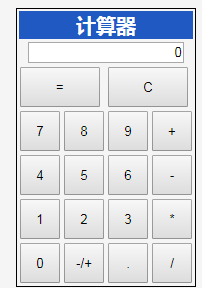
效果图
计算器(Ext)的更多相关文章
- Ext实现简单计算器
以下是本人原创,如若转载和使用请注明转载地址.本博客信息切勿用于商业,可以个人使用,若喜欢我的博客,请关注我,谢谢!少帅的博客 使用Ext实现简单计算器,网页版实现 1.页面部分calculator. ...
- java实现可有括号的android计算器
写了一个android版的计算器,可以计算带括号的表达式,不过前提是:正确的表达式才行 小缺陷是没有做表达式括号的控制,现在还没有想到好的控制方式 package javaAdvanced; impo ...
- [转载]ExtJs4 笔记(3) Ext.Ajax 对ajax的支持
作者:李盼(Lipan)出处:[Lipan] (http://www.cnblogs.com/lipan/) 本篇主要介绍一下ExtJs常用的几个对JS语法的扩展支持,包括Ajax封装,函数事 ...
- EXT ajax简单实例
转载:http://www.cnblogs.com/xiepeixing/archive/2012/10/24/2736751.html EXT ajax request是ext中对于ajax请求的实 ...
- ExtJs4 笔记(3) Ext.Ajax 对ajax的支持
本篇主要介绍一下ExtJs常用的几个对JS语法的扩展支持,包括Ajax封装,函数事件操作封装,还有扩展的常用函数等.Ajax服务端交互式操作是提交到.NET MVC.后续服务端交互都采用这一方式实现. ...
- Ext JS 6学习文档-第3章-基础组件
Ext JS 6学习文档-第3章-基础组件 基础组件 在本章中,你将学习到一些 Ext JS 基础组件的使用.同时我们会结合所学创建一个小项目.这一章我们将学习以下知识点: 熟悉基本的组件 – 按钮, ...
- 12. Ext.Ajax 对ajax的支持
转自:http://www.cnblogs.com/lipan/archive/2011/12/09/2272793.html 本篇主要介绍一下ExtJs常用的几个对JS语法的扩展支持,包括Ajax封 ...
- 1.C#WinForm基础制作简单计算器
利用c#语言编写简单计算器: 核心知识点: MessageBox.Show(Convert.ToString(comboBox1.SelectedIndex));//下拉序号 MessageBox.S ...
- 自己动手写计算器v1.1
这个改动主要是使用工厂模式替代了简单工厂模式,这样做的好处是如果以后我们要扩充其他运算时,就不用总是去修改工厂类, 这是可以采取工厂模式,主要是将原来简单工厂类的逻辑判断分离出来,将它作为一个借口,与 ...
随机推荐
- 优雅的处理Redis访问超时
很长一段时间以来,一直在项目中使用Redis作为辅助存储,确切来说是利用Redis的内存存储,而不是将其作为缓存.比如常见的利用Set集合来判断某个数值是否存在,或者将来自不同请求的数据放在Redis ...
- Nginx 显示502 Bad Gateway错误
今天系统发布到测试环境,有一个用户登录后显示502 Bad Gateway错误,其他的用户都登录成功.但是在开发机链接测试数据库,使用该账号登录成功. 初步猜测是Nginx的问题,查看nginx的错 ...
- Nginx是如何处理Request的?
nginx是如何匹配过来的请求,然后做处理的呢?这个匹配的过程可以分为两步: 1.选择server 2.选择location 选择server 仅仅匹配server name 加入Nginx的配 ...
- Java眼中的XML--------文件读取
XML 的初次邂逅 初次邂逅XML 如何进行XML文件解析前的准备工作 在Java程序中如何获取xml文件的内容 在Java程序中读取xml文件的过程也成为----解析xml文件 解析的目的:获取节 ...
- hihocoder-1079题解(线段树+离散化)
一.题目链接 http://hihocoder.com/problemset/problem/1079 二.题意 给定一个长度为L的区间,给你n个子区间,没一个区间涂成一种颜色,问最后这个区间内有几种 ...
- CTF---Web入门第十六题 天下武功唯快不破
天下武功唯快不破分值:10 来源: 北邮天枢战队 难度:易 参与人数:10787人 Get Flag:2264人 答题人数:3373人 解题通过率:67% 看看响应头 格式:CTF{ } 解题链接: ...
- poj1830:开关问题
链接:http://poj.org/problem?id=1830 某天“佐理慧学姐”突然来问了我这道题. 诶,窝只会线性基,但是好像搞不了方案数啊…… 啃题解吧. woc!线性代数哦,就是那种我不会 ...
- hihoCoder #1015 : KMP算法【KMP裸题,板子】
#1015 : KMP算法 时间限制:1000ms 单点时限:1000ms 内存限制:256MB 描述 小Hi和小Ho是一对好朋友,出生在信息化社会的他们对编程产生了莫大的兴趣,他们约定好互相帮助,在 ...
- 几道数位DP
因为这几天写的几道数位DP大多都太水..而且也确实没什么好讲所以就扔到一起了. [hdu4772]Good Numbers 要求统计区间内 各位数之和能被10整除 的数的个数. 练手,f[i][j][ ...
- NYoj_171聪明的kk
聪明的kk 时间限制:1000 ms | 内存限制:65535 KB 难度:3 描述 聪明的"KK" 非洲某国展馆的设计灵感源于富有传奇色彩的沙漠中陡然起伏的沙丘,体现出本国不 ...