
eclipse升级Android SDK Tool版本到25.2.5后运行项目报错Unable to build: the file dx.jar was not loaded from the SDK folder
概述
由于最近通过SDK-Manager更新了build-tools,当要用到dx.jar这个包时,自动调用最新版本Android SDK build-tools中dx.jar,但是运行android项目时Console却提示:

解决方案
解决办法就是:确保dx.jar这个文件在build-tools\lib和选择的Andriod SDK Tools版本一致就可以。
我用的 Android SDk build-tools 最新版本是 28.0.3,安装的Andriod SDK Tools版本是25.2.5,两个版本要一致,所以我用Android SDk build-tools 25.0.3版本的dx.jar文件覆盖最新版本28.0.3中的dx.jar文件,然后重启Eclipse就可以了。
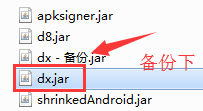
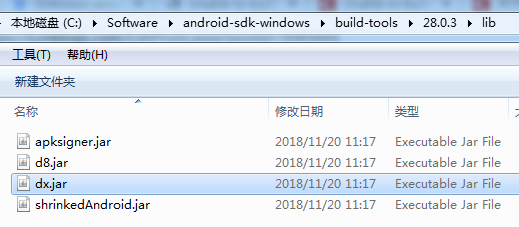
备注:dx.jar文件所在目录:{sdk安装目录}\build-tools\{版本号}\lib
比如:
参考资料
Unable to build: the file dx.jar was not loaded from the SDK folder
Unable to build: the file dx.jar was not loaded from the SDK folder!
关于解决Eclipse报错显示Unable to build: the file dx.jar was not loaded from the SDK folder
eclipse升级Android SDK Tool版本到25.2.5后运行项目报错Unable to build: the file dx.jar was not loaded from the SDK folder的更多相关文章
- Unable to build: the file dx.jar was not loaded from the SDK folder
eclipse 运行 android 时失败了,提示 Unable to build: the file dx.jar was not loaded from the SDK folder! 解决办法 ...
- Unknown error: Unable to build: the file dx.jar was not loaded from the SDK folder!
Eclipse 编译没问题,但是运行就出现这个报错:Unknown error: Unable to build: the file dx.jar was not loaded from the SD ...
- [转]Unable to build: the file dx.jar was not loaded from the SDK folder!
本文转自:http://www.developerbits.com/tag/unable-to-build-the-file-dx-jar-was-not-loaded-from-the-sdk-fo ...
- 升级adt插件后,eclipse突然出现Unable to build: the file dx.jar was not loaded from the SDK folder 错误
旧版的SDK管理器里面最高只能安装Android 3.2 API,需要更新SDK管理器版本后才能安装Android 4.0.Android 4.1,方法如下: http://blog.csdn.net ...
- Android开发导出apk报错:Unable to build: the file dx.jar was not loaded from the SDK folder
问题背景 此问题一般出现在,同时使用了Eclipse和Android Studio,eclipse是不会去下载最新的Android的相关tools,但是studio有时候会自动更新最新的build-t ...
- 解决Unknown error: Unable to build: the file dx.jar was not loaded from the SDK folder!
解决Unknown error: to the dx.jar the SDK folder!最近渐渐迁移到Android Studio来了,更新过Android SDK Manager里的东西后,打开 ...
- Android Studio运行项目报错:Error:null value in entry: annotationProcessorOutputFolder=null的解决方案
一般是在Android studio异常退出(比如强制关机)后,重新打开后运行项目出现该问题. 解决方案 删除项目根目录的.gradle文件夹,然后Clean Project —— Rebulid ...
- 创建好Android Application Project 后运行就报错。
如图: 这个问题有可能是有可能是没导入Android support库,简单了解一下: google提供了Android Support Library package 系列的包来保证来高版本sdk开 ...
- eclipse导入web项目报错 Cannot find the class file for javax.servlet.ServletContext.
当eclipse中新导入的Java Project的时候,往往会碰到各种各样的问题,下面是个典型的问题: Cannot find the class file for javax.servlet.Se ...
随机推荐
- ATM机
ATM 要求 示例代码: https://github.com/triaquae/py_training/tree/master/sample_code/day5-atm
- spring boot 搭建web项目常见五种返回形式
在web项目中一般常见的五种返回形式: 返回页面,使用模板引擎,spring boot推荐使用thymeleaf,类似的还有freemarker等. 返回字符串(json),一般用于完全的前后端分离开 ...
- scoring_criteria.go
package types // 评分规则通用接口 type ScoringCriteria interface { // 给一个文档评分,文档排序时先用第一个分值比较,如果 // 分 ...
- Java - Instrumentation
使用JRebel启动工程时加上VM参数时有一个参数是"-javaagent:D:\jrebel_5.6.0\jrebel.jar". javaagent是什么? java -hel ...
- CopyOnWriteArraySet简介
基于CopyOnWriteArrayList实现,线程安全无需集合. add调用的是CopyOnWriteArraylist的addIfAbsent方法. CopyOnWriteArraySet每次a ...
- MFC中List box的用法
首先在头文件中创建对象,CSGrid m_proViewList;//创建表头#pragma region 建立grid表的标题 m_proViewList.AppendColumn(_T(" ...
- [Usaco2007 Open]Fliptile 翻格子游戏 状压dp
n,m<=15,直接搞肯定不行,考虑一行一行来, 每一行的状态只与三行有关,所以从第一行开始枚举,每一次让下面一行填上他上面那行的坑 最后一行必须要同时满足他自己和他上面那行,否则舍去 #inc ...
- Docker系列之swarm集群搭建
学习Docker很久了,今天分享一下Docker的swarm集群的搭建过程很简单 首先第一步是 每台机器上面都要安装docker 本人使用的是centos7操作系统,使用3太虚拟机,3太虚拟机必须网络 ...
- ES6语法的学习与实践
ES6是JavaScript语言的新一代标准,是ECMAScript的第六个版本,加入了很多新的功能和语法,在很多框架,如在使用Vue,React等框架的项目中一般都采用ES6语法来编写的,下面对经常 ...
- Java8新特性之二:方法引用
上一节介绍了Java8新特性中的Lambda表达式,本小节继续讲解Java8的新特性之二:方法引用.方法引用其实也离不开Lambda表达式. 1.方法引用的使用场景 我们用Lambda表达式来实现匿名 ...