
eclipse升级Android SDK Tool版本到25.2.5后运行项目报错Unable to build: the file dx.jar was not loaded from the SDK folder
概述
由于最近通过SDK-Manager更新了build-tools,当要用到dx.jar这个包时,自动调用最新版本Android SDK build-tools中dx.jar,但是运行android项目时Console却提示:

解决方案
解决办法就是:确保dx.jar这个文件在build-tools\lib和选择的Andriod SDK Tools版本一致就可以。
我用的 Android SDk build-tools 最新版本是 28.0.3,安装的Andriod SDK Tools版本是25.2.5,两个版本要一致,所以我用Android SDk build-tools 25.0.3版本的dx.jar文件覆盖最新版本28.0.3中的dx.jar文件,然后重启Eclipse就可以了。
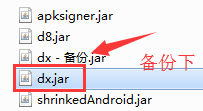
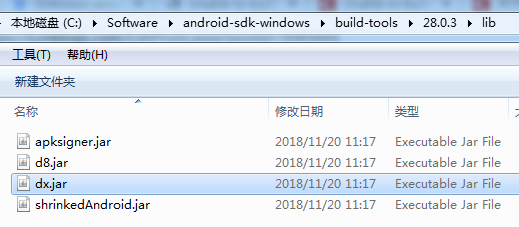
备注:dx.jar文件所在目录:{sdk安装目录}\build-tools\{版本号}\lib
比如:
参考资料
Unable to build: the file dx.jar was not loaded from the SDK folder
Unable to build: the file dx.jar was not loaded from the SDK folder!
关于解决Eclipse报错显示Unable to build: the file dx.jar was not loaded from the SDK folder
eclipse升级Android SDK Tool版本到25.2.5后运行项目报错Unable to build: the file dx.jar was not loaded from the SDK folder的更多相关文章
- Unable to build: the file dx.jar was not loaded from the SDK folder
eclipse 运行 android 时失败了,提示 Unable to build: the file dx.jar was not loaded from the SDK folder! 解决办法 ...
- Unknown error: Unable to build: the file dx.jar was not loaded from the SDK folder!
Eclipse 编译没问题,但是运行就出现这个报错:Unknown error: Unable to build: the file dx.jar was not loaded from the SD ...
- [转]Unable to build: the file dx.jar was not loaded from the SDK folder!
本文转自:http://www.developerbits.com/tag/unable-to-build-the-file-dx-jar-was-not-loaded-from-the-sdk-fo ...
- 升级adt插件后,eclipse突然出现Unable to build: the file dx.jar was not loaded from the SDK folder 错误
旧版的SDK管理器里面最高只能安装Android 3.2 API,需要更新SDK管理器版本后才能安装Android 4.0.Android 4.1,方法如下: http://blog.csdn.net ...
- Android开发导出apk报错:Unable to build: the file dx.jar was not loaded from the SDK folder
问题背景 此问题一般出现在,同时使用了Eclipse和Android Studio,eclipse是不会去下载最新的Android的相关tools,但是studio有时候会自动更新最新的build-t ...
- 解决Unknown error: Unable to build: the file dx.jar was not loaded from the SDK folder!
解决Unknown error: to the dx.jar the SDK folder!最近渐渐迁移到Android Studio来了,更新过Android SDK Manager里的东西后,打开 ...
- Android Studio运行项目报错:Error:null value in entry: annotationProcessorOutputFolder=null的解决方案
一般是在Android studio异常退出(比如强制关机)后,重新打开后运行项目出现该问题. 解决方案 删除项目根目录的.gradle文件夹,然后Clean Project —— Rebulid ...
- 创建好Android Application Project 后运行就报错。
如图: 这个问题有可能是有可能是没导入Android support库,简单了解一下: google提供了Android Support Library package 系列的包来保证来高版本sdk开 ...
- eclipse导入web项目报错 Cannot find the class file for javax.servlet.ServletContext.
当eclipse中新导入的Java Project的时候,往往会碰到各种各样的问题,下面是个典型的问题: Cannot find the class file for javax.servlet.Se ...
随机推荐
- nsqlookupd.go
) } l.Lock() l.httpListener = httpListener l.Unlock() httpServer := newHTTPServe ...
- 在当前图纸中创建一个表格, AcDbTable 类
Table 例子学习笔记在这个例子中,ARX向我们展示了ACDBTABLE类的一些基本操作方法,ACDBTABLE类是ACAD2005及其以后的产品,应该是说ACDBDATATABLE的升级产品,Ac ...
- BZOJ_2001_[BeiJing2006]狼抓兔子_最小割转对偶图
BZOJ_2001_[BeiJing2006]狼抓兔子 题意:http://www.lydsy.com/JudgeOnline/problem.php?id=1001 分析:思路同NOI2010海拔. ...
- BZOJ_2809_[Apio2012]dispatching_可并堆
BZOJ_2809_[Apio2012]dispatching_可并堆 Description 在一个忍者的帮派里,一些忍者们被选中派遣给顾客,然后依据自己的工作获取报偿.在这个帮派里,有一名忍者被称 ...
- 你可能忽略的js类型转换
前言 相信刚开始了解js的时候,都会遇到 2 == '2',但 1+2 == 1+'2'为false的情况.这时候应该会是一脸懵逼的状态,不得不感慨js弱类型的灵活让人发指,隐式类型转换就是这么猝不及 ...
- 不使用SpringBoot如何将原生Feign集成到Spring中来简化http调用
在微服务架构中,如果使用得是SpringCloud,那么只需要集成SpringFeign就可以了,SpringFeign可以很友好的帮我们进行服务请求,对象解析等工作. 然而SpingCloud是依赖 ...
- Redis in .NET Core 入门:(2) String
第1篇:https://www.cnblogs.com/cgzl/p/10294175.html‘ 本文简单介绍一下Redis的常用数据类型String. 基本上都是文档上的内容,所以比较无聊.... ...
- Python爬虫入门教程 62-100 30岁了,想找点文献提高自己,还被反爬了,Python搞起,反爬第2篇
学术搜索 学习理论的知识少不了去检索文献,好多文献为你的实操提供了合理的支撑,我所在的大学内网默认是有知网账户的,非常NICE 今天要完成的网站是 http://ac.scmor.com/ Googl ...
- 游戏服务器h2engine架构优化和跨平台设计
H2engine的GitHub星星不知不觉已经破百了,也没有特意推广过,但是慢慢的关注的人越来越多.因为事情多,好久没有写东西了,前一段时间有了一些想法,把h2engine又更新了一下,感觉h2eng ...
- vscode restclient 插件
使用步骤: 1.vscode 安装restclient 扩展 2.创建 .http 或 .rest 文件 ,编写相应内容 同一个文件内 可以通过 ### 分割多个请求 可以通过 @hostname ...