
从壹开始前后端分离【 .NET Core2.0 +Vue2.0 】框架之十 || AOP面向切面编程浅解析:简单日志记录 + 服务切面缓存
本文3.0版本文章
代码已上传Github+Gitee,文末有地址
课前注意:
关于拦截器
1、保证你写的autofac程序集批量依赖注入是有效的,且能正常运行;
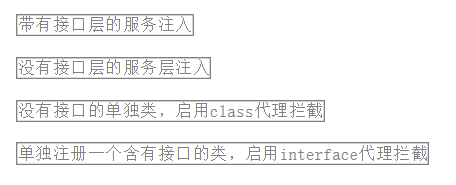
2、拦截器有一定的要求,注意被拦截的对象是单纯的类(EnableClassInterceptors),还是有接口代理模式(EnableInterfaceInterceptors),不同的方案,对应不同的方法;
3、如果被拦截的对象是单纯的类,而没有接口,除了用对应的拦截方案(上边第2点)外,还要保证拦截的方法是虚方法(代理核心就是重写);
4、代理类只要打断点能进去就代表成功;多个案例,查看我项目中的Demo:
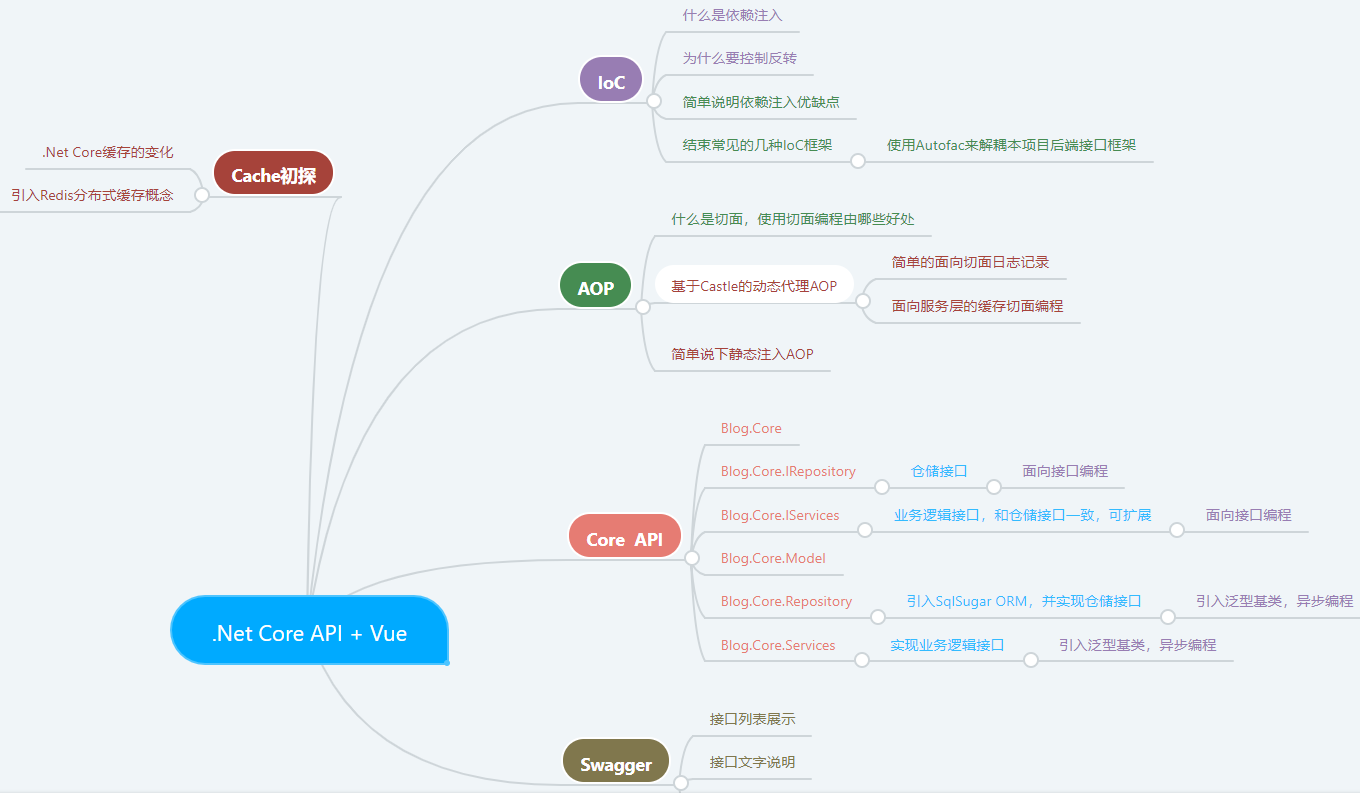
零、今天完成的深红色部分
一、AOP 之 实现日志记录(服务层)
1、定义服务接口与实现类
首先这里使用到了 BlogArticle 的实体类(这里我保留了sqlsugar的特性,没需要的可以手动删除):
    public class BlogArticle

    {

        /// <summary>

        /// 主键

        /// </summary>

        /// 这里之所以没用RootEntity,是想保持和之前的数据库一致,主键是bID,不是Id

        [SugarColumn(IsNullable = false, IsPrimaryKey = true, IsIdentity = true)]

        public int bID { get; set; }

        /// <summary>

        /// 创建人

        /// </summary>

        [SugarColumn(Length = , IsNullable = true)]

        public string bsubmitter { get; set; }

        /// <summary>

        /// 标题blog

        /// </summary>

        [SugarColumn(Length = , IsNullable = true)]

        public string btitle { get; set; }

        /// <summary>

        /// 类别

        /// </summary>

        [SugarColumn(Length = int.MaxValue, IsNullable = true)]

        public string bcategory { get; set; }

        /// <summary>

        /// 内容

        /// </summary>

        [SugarColumn(IsNullable = true, ColumnDataType = "text")]

        public string bcontent { get; set; }

        /// <summary>

        /// 访问量

        /// </summary>

        public int btraffic { get; set; }

        /// <summary>

        /// 评论数量

        /// </summary>

        public int bcommentNum { get; set; }

        /// <summary>

        /// 修改时间

        /// </summary>

        public DateTime bUpdateTime { get; set; }

        /// <summary>

        /// 创建时间

        /// </summary>

        public System.DateTime bCreateTime { get; set; }

        /// <summary>

        /// 备注

        /// </summary>

        [SugarColumn(Length = int.MaxValue, IsNullable = true)]

        public string bRemark { get; set; }

        /// <summary>

        /// 逻辑删除

        /// </summary>

        [SugarColumn(IsNullable = true)]

        public bool? IsDeleted { get; set; }

    }
   public interface IBlogArticleServices :IBaseServices<BlogArticle>

    {

        Task<List<BlogArticle>> getBlogs();

    }

   public class BlogArticleServices : BaseServices<BlogArticle>, IBlogArticleServices

    {

        IBlogArticleRepository dal;

        public BlogArticleServices(IBlogArticleRepository dal)

        {

            this.dal = dal;

            base.baseDal = dal;

        }

        /// <summary>

        /// 获取博客列表

        /// </summary>

        /// <param name="id"></param>

        /// <returns></returns>

        public async Task<List<BlogArticle>> getBlogs()

        {

            var bloglist = await dal.Query(a => a.bID > , a => a.bID);

            return bloglist;

        }

    }
2、在API层中添加对该接口引用
(注意RESTful接口路径命名规范,我这么写只是为了测试)
      /// <summary>

        /// 获取博客列表

        /// </summary>

        /// <returns></returns>

        [HttpGet]

        [Route("GetBlogs")]

        public async Task<List<BlogArticle>> GetBlogs()

        {

            return await blogArticleServices.getBlogs();

        }
3、添加AOP拦截器
在Blog.Core新建文件夹AOP,并添加拦截器BlogLogAOP,并设计其中用到的日志记录Logger方法或者类
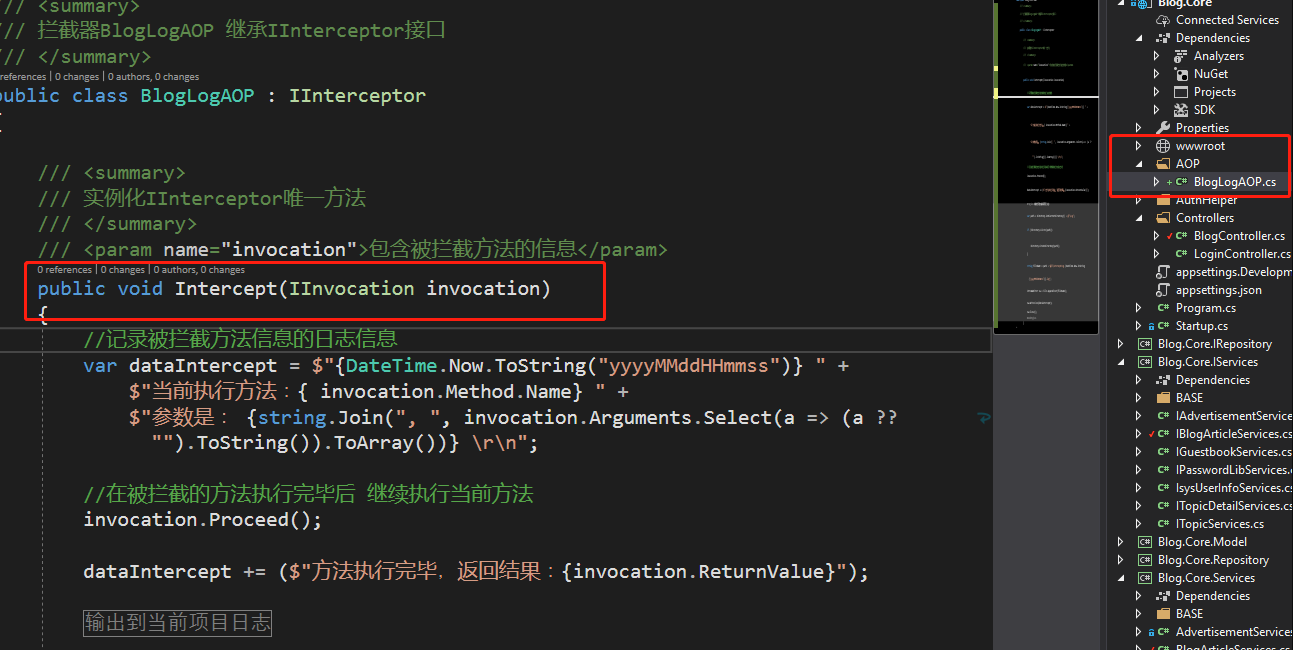
关键的一些知识点,注释中已经说明了,主要是有以下:
1、继承接口IInterceptor
2、实例化接口IINterceptor的唯一方法Intercept
3、void Proceed();表示执行当前的方法和object ReturnValue { get; set; }执行后调用,object[] Arguments参数对象
4、中间的代码是新建一个类,还是单写,就很随意了。
  /// <summary>

    /// 拦截器BlogLogAOP 继承IInterceptor接口

    /// </summary>

    public class BlogLogAOP : IInterceptor

    {

        /// <summary>

        /// 实例化IInterceptor唯一方法

        /// </summary>

        /// <param name="invocation">包含被拦截方法的信息</param>

        public void Intercept(IInvocation invocation)

        {

            //记录被拦截方法信息的日志信息

            var dataIntercept = $"{DateTime.Now.ToString("yyyyMMddHHmmss")} " +

                $"当前执行方法:{ invocation.Method.Name} " +

                $"参数是: {string.Join(", ", invocation.Arguments.Select(a => (a ?? "").ToString()).ToArray())} \r\n";

            //在被拦截的方法执行完毕后 继续执行当前方法

            invocation.Proceed();

            dataIntercept += ($"被拦截方法执行完毕,返回结果:{invocation.ReturnValue}");

            #region 输出到当前项目日志

            var path = Directory.GetCurrentDirectory() + @"\Log";

            if (!Directory.Exists(path))

            {

                Directory.CreateDirectory(path);

            }

            string fileName = path + $@"\InterceptLog-{DateTime.Now.ToString("yyyyMMddHHmmss")}.log";

            StreamWriter sw = File.AppendText(fileName);

            sw.WriteLine(dataIntercept);

            sw.Close();

            #endregion

        }

    }
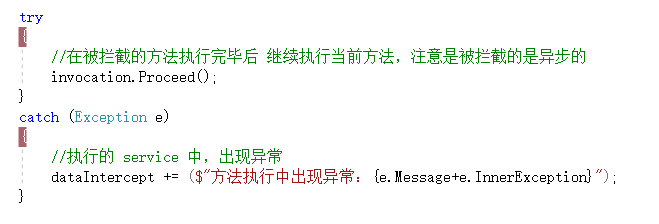
提示:这里展示了如何在项目中使用AOP实现对 service 层进行日志记录,如果你想实现异常信息记录的话,很简单,
注意,下边方法仅仅是针对同步的策略,如果你的service是异步的,这里获取不到,正确的写法,在文章底部的 GitHub 代码里,你可以查看我的源码。
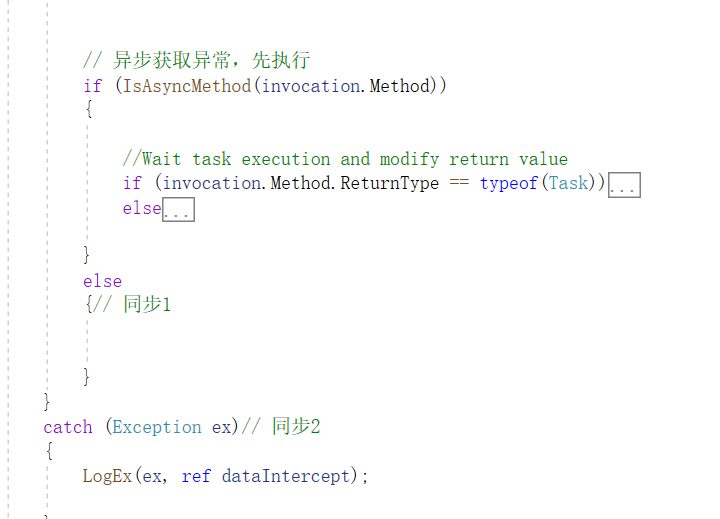
/// <summary>

/// 实例化IInterceptor唯一方法

/// </summary>

/// <param name="invocation">包含被拦截方法的信息</param>

public void Intercept(IInvocation invocation)

{

    //记录被拦截方法信息的日志信息

    var dataIntercept = "" +

        $"【当前执行方法】:{ invocation.Method.Name} \r\n" +

        $"【携带的参数有】: {string.Join(", ", invocation.Arguments.Select(a => (a ?? "").ToString()).ToArray())} \r\n";

    try

    {

        MiniProfiler.Current.Step($"执行Service方法:{invocation.Method.Name}() -> ");

        //在被拦截的方法执行完毕后 继续执行当前方法,注意是被拦截的是异步的

        invocation.Proceed();

        // 异步获取异常,先执行

        if (IsAsyncMethod(invocation.Method))

        {

            //Wait task execution and modify return value

            if (invocation.Method.ReturnType == typeof(Task))

            {

                invocation.ReturnValue = InternalAsyncHelper.AwaitTaskWithPostActionAndFinally(

                    (Task)invocation.ReturnValue,

                    async () => await TestActionAsync(invocation),

                    ex =>

                    {

                        LogEx(ex, ref dataIntercept);

                    });

            }

            else //Task<TResult>

            {

                invocation.ReturnValue = InternalAsyncHelper.CallAwaitTaskWithPostActionAndFinallyAndGetResult(

                 invocation.Method.ReturnType.GenericTypeArguments[],

                 invocation.ReturnValue,

                 async () => await TestActionAsync(invocation),

                 ex =>

                 {

                     LogEx(ex, ref dataIntercept);

                 });

            }

        }

        else

        {// 同步1

        }

    }

    catch (Exception ex)// 同步2

    {

        LogEx(ex, ref dataIntercept);

    }

    dataIntercept += ($"【执行完成结果】:{invocation.ReturnValue}");

    Parallel.For(, , e =>

    {

        LogLock.OutSql2Log("AOPLog", new string[] { dataIntercept });

    });

    _hubContext.Clients.All.SendAsync("ReceiveUpdate", LogLock.GetLogData()).Wait();

}
4、添加到Autofac容器中,实现注入
        builder.RegisterType<BlogLogAOP>();//可以直接替换其他拦截器!一定要把拦截器进行注册

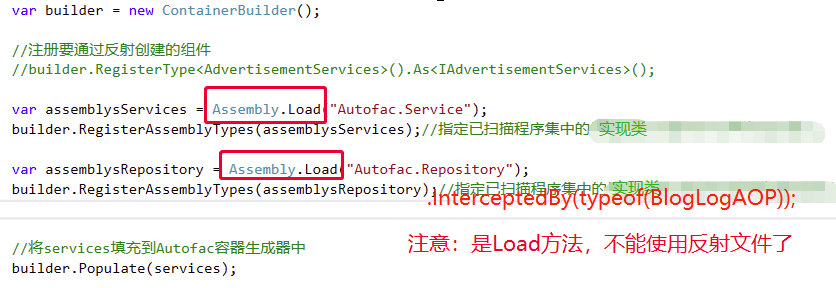
            var assemblysServices = Assembly.Load("Blog.Core.Services");

            //builder.RegisterAssemblyTypes(assemblysServices).AsImplementedInterfaces();//指定已扫描程序集中的类型注册为提供所有其实现的接口。

            builder.RegisterAssemblyTypes(assemblysServices)

                      .AsImplementedInterfaces()

                      .InstancePerLifetimeScope()

                      .EnableInterfaceInterceptors()//引用Autofac.Extras.DynamicProxy;

                      .InterceptedBy(typeof(BlogLogAOP));//可以直接替换拦截器
注意其中的两个方法.EnableInterfaceInterceptors()//对目标类型启用接口拦截。拦截器将被确定,通过在类或接口上截取属性, 或添加 InterceptedBy ().InterceptedBy(typeof(BlogLogAOP));//允许将拦截器服务的列表分配给注册。说人话就是,将拦截器添加到要注入容器的接口或者类之上。
5、运行项目,查看效果
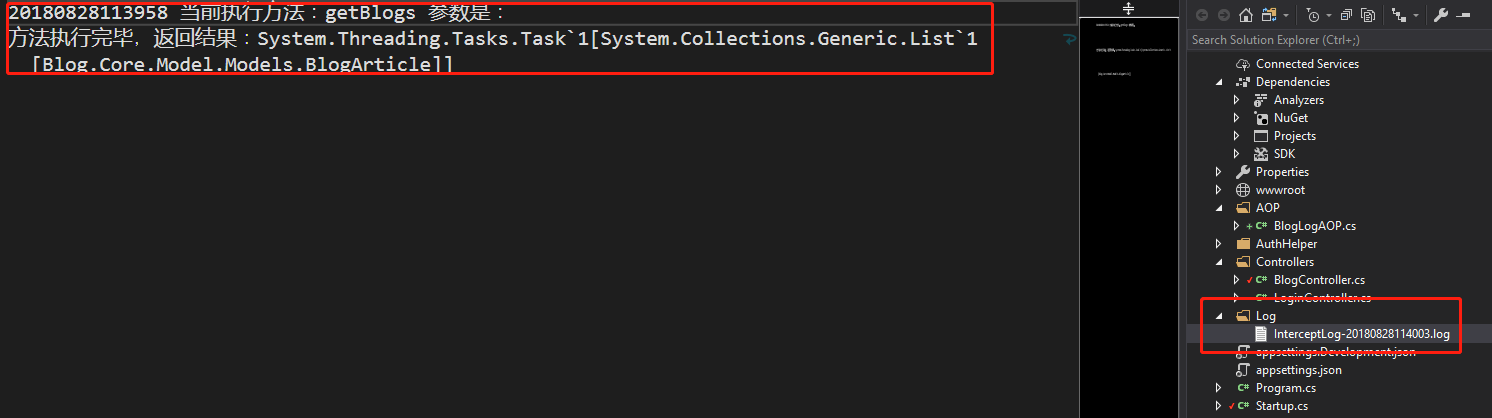
这里,面向服务层的日志记录就完成了,大家感觉是不是很平时的不一样?
二、AOP 之 实现接口数据的缓存功能
1、定义 Memory 缓存类和接口
   /// <summary>

    /// 简单的缓存接口,只有查询和添加,以后会进行扩展

    /// </summary>

    public interface ICaching

    {

        object Get(string cacheKey);

        void Set(string cacheKey, object cacheValue);

    }

   /// <summary>

    /// 实例化缓存接口ICaching

    /// </summary>

    public class MemoryCaching : ICaching

    {

        //引用Microsoft.Extensions.Caching.Memory;这个和.net 还是不一样,没有了Httpruntime了

        private IMemoryCache _cache;

        //还是通过构造函数的方法,获取

        public MemoryCaching(IMemoryCache cache)

        {

            _cache = cache;

        }

        public object Get(string cacheKey)

        {

            return _cache.Get(cacheKey);

        }

        public void Set(string cacheKey, object cacheValue)

        {

            _cache.Set(cacheKey, cacheValue, TimeSpan.FromSeconds());

        }

    }
2、定义一个缓存拦截器
   /// <summary>

    /// 面向切面的缓存使用

    /// </summary>

    public class BlogCacheAOP : IInterceptor

    {

        //通过注入的方式,把缓存操作接口通过构造函数注入

        private ICaching _cache;

        public BlogCacheAOP(ICaching cache)

        {

            _cache = cache;

        }

        //Intercept方法是拦截的关键所在,也是IInterceptor接口中的唯一定义

        public void Intercept(IInvocation invocation)

        {

            //获取自定义缓存键

            var cacheKey = CustomCacheKey(invocation);

            //根据key获取相应的缓存值

            var cacheValue = _cache.Get(cacheKey);

            if (cacheValue != null)

            {

                //将当前获取到的缓存值,赋值给当前执行方法

                invocation.ReturnValue = cacheValue;

                return;

            }

            //去执行当前的方法

            invocation.Proceed();

            //存入缓存

            if (!string.IsNullOrWhiteSpace(cacheKey))

            {

                _cache.Set(cacheKey, invocation.ReturnValue);

            }

        }

        //自定义缓存键

        private string CustomCacheKey(IInvocation invocation)

        {

            var typeName = invocation.TargetType.Name;

            var methodName = invocation.Method.Name;

            var methodArguments = invocation.Arguments.Select(GetArgumentValue).Take().ToList();//获取参数列表,我最多需要三个即可

            string key = $"{typeName}:{methodName}:";

            foreach (var param in methodArguments)

            {

                key += $"{param}:";

            }

            return key.TrimEnd(':');

        }

        //object 转 string

        private string GetArgumentValue(object arg)

        {
        // PS:这里仅仅是很简单的数据类型,如果参数是表达式/类等,比较复杂的,请看我的在线代码吧,封装的比较多,当然也可以自己封装。

            if (arg is int || arg is long || arg is string)

                return arg.ToString();

            if (arg is DateTime)

                return ((DateTime)arg).ToString("yyyyMMddHHmmss");

            return "";

        }

    }
注释的很清楚,基本都是情况
3、注入缓存拦截器
注意:
//将 TService 中指定的类型的范围服务添加到实现
services.AddScoped<ICaching, MemoryCaching>();//记得把缓存注入!!!

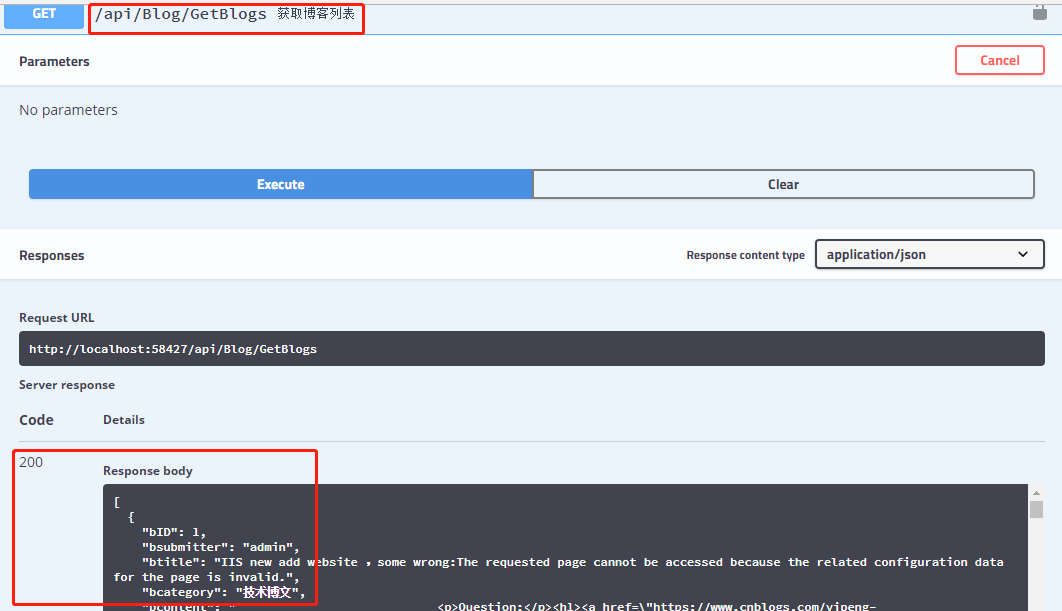
4、运行,查看效果

5、多个AOP执行顺序问题
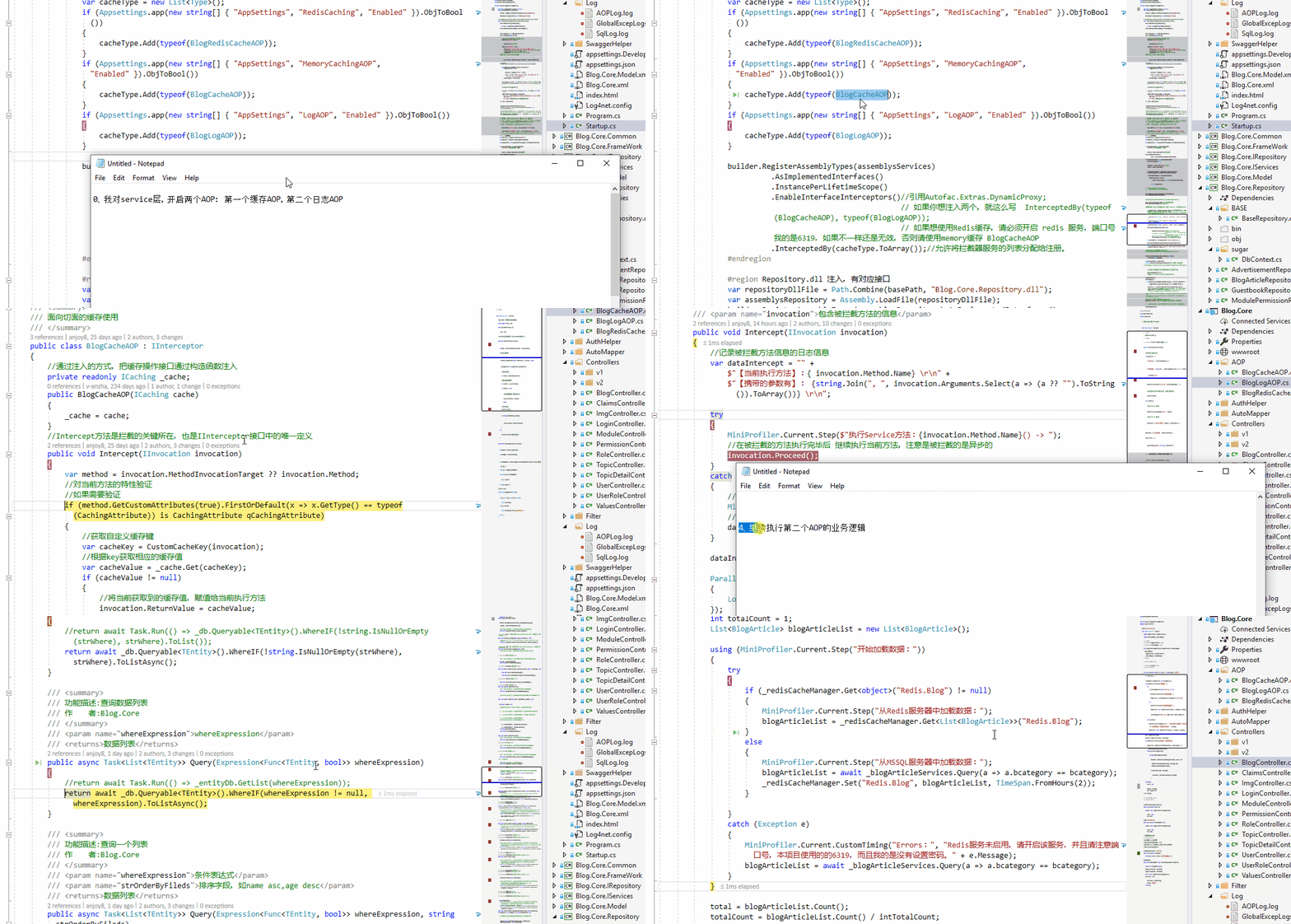
在我最新的 Github 项目中,我定义了三个 AOP :除了上边两个 LogAOP和 CacheAOP 以外,还有一个 RedisCacheAOP,并且通过开关的形式在项目中配置是否启用:

那具体的执行顺序是什么呢,这里说下,就是从上至下的顺序,或者可以理解成挖金矿的形式,执行完上层的,然后紧接着来下一个AOP,最后想要回家,就再一个一个跳出去,在往上层走的时候,矿肯定就执行完了,就不用再操作了,直接出去,就像 break 一样,可以参考这个动图:
6、无接口如何实现AOP
上边我们讨论了很多,但是都是接口框架的,
比如:Service.dll 和与之对应的 IService.dll,Repository.dll和与之对应的 IRepository.dll,我们可以直接在对应的层注入的时候,匹配上 AOP 信息,但是如果我们没有使用接口怎么办?
这里大家可以安装下边的实验下:
Autofac它只对接口方法 或者 虚virtual方法或者重写方法override才能起拦截作用。
如果没有接口
案例是这样的:
如果我们的项目是这样的,没有接口,会怎么办:
    // 服务层类

   public class StudentService

    {

        StudentRepository _studentRepository;

        public StudentService(StudentRepository studentRepository)

        {

            _studentRepository = studentRepository;

        }

        public string Hello()

        {

            return _studentRepository.Hello();

        }

    }

    // 仓储层类

     public class StudentRepository

    {

        public StudentRepository()

        {

        }

        public string Hello()

        {

            return "hello world!!!";

        }

    }

    // controller 接口调用

    StudentService _studentService;

    public ValuesController(StudentService studentService)

    {

        _studentService = studentService;

    }
如果是没有接口的单独实体类
    public class Love

    {

        // 一定要是虚方法

        public virtual string SayLoveU()

        {

            return "I ♥ U";

        }

    }

//---------------------------

//只能注入该类中的虚方法

builder.RegisterAssemblyTypes(Assembly.GetAssembly(typeof(Love)))

    .EnableClassInterceptors()

    .InterceptedBy(typeof(BlogLogAOP));
三、还有其他的一些问题需要考虑
配合Attribute就可以只拦截相应的方法了。因为拦截器里面是根据Attribute进行相应判断的!!builder.RegisterAssemblyTypes(assembly).Where(type => typeof(IQCaching).IsAssignableFrom(type) && !type.GetTypeInfo().IsAbstract) .AsImplementedInterfaces().InstancePerLifetimeScope().EnableInterfaceInterceptors().InterceptedBy(typeof(QCachingInterceptor));
基于Net的IL语言层级进行注入,性能损耗可以忽略不计,Net使用最多的Aop框架PostSharp(好像收费了;)采用的即是这种方式。
大家可以参考这个博文:https://www.cnblogs.com/mushroom/p/3932698.html
四、结语
今天的讲解就到了这里了,通过这两个小栗子,大家应该能对面向切面编程有一些朦胧的感觉了吧,感兴趣的可以深入的研究,也欢迎一起讨论,刚刚在缓存中,我说到了缓存接口,就引入了下次的讲解内容,Redis的高性能缓存框架,内存存储的数据结构服务器,可用作数据库,高速缓存和消息队列代理。下次再见咯~
1、网友好资料
五、Github && Gitee
从壹开始前后端分离【 .NET Core2.0 +Vue2.0 】框架之十 || AOP面向切面编程浅解析:简单日志记录 + 服务切面缓存的更多相关文章
- Z从壹开始前后端分离【 .NET Core2.0/3.0 +Vue2.0 】框架之十 || AOP面向切面编程浅解析:简单日志记录 + 服务切面缓存
本文梯子 本文3.0版本文章 代码已上传Github+Gitee,文末有地址 大神反馈: 零.今天完成的深红色部分 一.AOP 之 实现日志记录(服务层) 1.定义服务接口与实现类 2.在API层中添 ...
- 从壹开始前后端分离【 .NET Core2.0 +Vue2.0 】框架之十一 || AOP自定义筛选,Redis入门 11.1
代码已上传Github+Gitee,文末有地址 书说上文<从壹开始前后端分离[ .NET Core2.0 Api + Vue 2.0 + AOP + 分布式]框架之十 || AOP面向切面编程浅 ...
- 从壹开始前后端分离【 .NET Core2.0 +Vue2.0 】框架之七 || API项目整体搭建 6.2 轻量级ORM
更新 1.在使用的时候,特别是更新数据的时候,如果不知道哪里有问题,可以查看数据库 和 实体类 的字段,是否大小写一致,比如 name 和 Name 2.在使用Sqlsugar 的 CodeFirst ...
- 从壹开始前后端分离【 .NET Core2.0 +Vue2.0 】框架之十二 || 三种跨域方式比较,DTOs(数据传输对象)初探
更新反馈 1.博友@落幕残情童鞋说到了,Nginx反向代理实现跨域,因为我目前还没有使用到,给忽略了,这次记录下,为下次补充.此坑已填 2.提示:跨域的姊妹篇——<三十三║ ⅖ 种方法实现完美跨 ...
- 从壹开始前后端分离 [ Vue2.0+.NET Core2.1] 十五 ║Vue基础:JS面向对象&字面量& this字
缘起 书接上文<从壹开始前后端分离 [ Vue2.0+.NET Core2.1] 十四 ║ VUE 计划书 & 我的前后端开发简史>,昨天咱们说到了以我的经历说明的web开发经历的 ...
- 从壹开始前后端分离 [ Vue2.0+.NET Core2.1] 十六 ║Vue基础:ES6初体验 & 模块化编程
缘起 昨天说到了<从壹开始前后端分离 [ Vue2.0+.NET Core2.1] 十五 ║ Vue前篇:JS对象&字面量&this>,通过总体来看,好像大家对这一块不是很 ...
- 从壹开始前后端分离 [ Vue2.0+.NET Core2.1] 十八║Vue基础: 指令(下)+计算属性+watch
回顾 今天来晚辣,给公司做了一个小项目,一个瀑布流+动态视频控制的DEMO,有需要的可以联系我,公司的项目就不对外展示了(一个后端程序员真的要干前端了哈哈哈). 书接上文,昨天正式的开始了Vue的代码 ...
- 从壹开始前后端分离 [ Vue2.0+.NET Core2.1] 二十三║Vue实战:Vuex 其实很简单
前言 哈喽大家周五好,马上又是一个周末了,下周就是中秋了,下下周就是国庆啦,这里先祝福大家一个比一个假日嗨皮啦~~转眼我们的专题已经写了第 23 篇了,好几次都坚持不下去想要中断,不过每当看到群里的交 ...
- Z从壹开始前后端分离【 .NET Core2.2/3.0 +Vue2.0 】框架之七 || API项目整体搭建 6.2 轻量级ORM
本文梯子 本文3.0版本文章 前言 零.今天完成的蓝色部分 0.创建实体模型与数据库 1.实体模型 2.创建数据库 一.在 IRepository 层设计接口 二.在 Repository 层实现相应 ...
随机推荐
- JS中的常量
javascript中没有常量,可以通过创建只能取值不能赋值的私有变量来模仿常量. 创建取值器: var Class = function(){ var NUM = 5; // 在运行时NUM值 ...
- 9.app后端选择什么服务器
对于很多刚入行的朋友来说,不清楚应该选择什么样的服务器提供商,是选择传统的IDC, 租用服务器租用机柜,还是选择现在很火的云服务器呢?在本文中,通过对比传统的IDC和云服务,简单阐述一下服务器的选择. ...
- 十九. 想快速开发app,需要找外包吗?
健生干货分享:第19篇 摘要:最近和两位准备开发app的创业者聊天,他们之前没有移动互联网的相关经验,有的是想法和资金.他们在纠结:想快速开发app,需要找外包吗? 最近和两位想开发app的创业者聊天 ...
- css布局-双飞翼布局
<div class="header">Header</div> <div class="bd"> <div clas ...
- redis list命令操作
1.将值追加到列表 RPUSH key value [value ...]summary: Append one or multiple values to a listsince: 1.0.0 12 ...
- 借助HTML中的特殊符号在markdown中打印出来
转自:https://blog.csdn.net/html5_/article/details/21639475 HTML中的特殊符号 原创 2014年03月20日 18:35:23 标签: HTML ...
- 如何解决-win7系统打开截图工具显示“截图工具当前未在计算机上运行”
打开win7系统自带截图工具,显示"截图工具当前未在计算机上运行.请重新启动计算机,然后重试", 解决方法 1.首先在C盘中搜索tpcps.dll: 2.将数据最大那个tpcp ...
- compact_op.go
package clientv3 import ( pb "github.com/coreos/etcd/etcdserver/etcdserverpb" ) // Com ...
- 【莫比乌斯反演】BZOJ2820 YY的GCD
Description 求有多少对(x,y)的gcd为素数,x<=n,y<=m.n,m<=1e7,T<=1e4. Solution 因为题目要求gcd为素数的,那么我们就只考虑 ...
- ZOJ_2314_Reactor Cooling_有上下界可行流模板
ZOJ_2314_Reactor Cooling_有上下界可行流模板 The terrorist group leaded by a well known international terroris ...