
jQuery 的插件 dataTables
---恢复内容开始---
jQuery 的插件 dataTables 是一个优秀的表格插件,提供了针对表格的排序、浏览器分页、服务器分页、筛选、格式化等功能。dataTables 的网站上也提供了大量的演示和详细的文档进行说明,为了方便学习使用,这里一步一步进行说明。
首先,需要到 dataTables 的网站 http://www.datatables.net/ 下载这个脚本库,
然后,在网页中先加入 jQuery 的引用,然后,加入 dataTables 的引用。
引入CSS文件和JS文件
--------------------------------------------------------------------------
<style type="text/css" title="currentStyle">
@import "DataTables-1.8.1/media/css/demo_page.css";
@import "DataTables-1.8.1/media/css/demo_table.css";
@import "DataTables-1.8.1/media/css/demo_table_jui.css";
</style>
<script type="text/javascript" language="javascript" src="DataTables-1.8.1/media/js/jquery.js"></script>
<script type="text/javascript" language="javascript" src="DataTables-1.8.1/media/js/jquery.dataTables.js"></script>
--------------------------------------------------------------------------
-----------最简单的方式:
$(document).ready(function() {
$("#example").dataTable();
});
----------也可以自己定义各属性:
<script type="text/javascript" language="javascript">
$(document).ready(function() {
$("#example").dataTable({
// "bPaginate": true, //开关,是否显示分页器
// "bInfo": true, //开关,是否显示表格的一些信息
// "bFilter": true, //开关,是否启用客户端过滤器
// "sDom": "<>lfrtip<>",
// "bAutoWith": false,
// "bDeferRender": false,
// "bJQueryUI": false, //开关,是否启用JQueryUI风格
// "bLengthChange": true, //开关,是否显示每页大小的下拉框
// "bProcessing": true,
// "bScrollInfinite": false,
// "sScrollY": "800px", //是否开启垂直滚动,以及指定滚动区域大小,可设值:'disabled','2000px'
// "bSort": true, //开关,是否启用各列具有按列排序的功能
// "bSortClasses": true,
// "bStateSave": false, //开关,是否打开客户端状态记录功能。这个数据是记录在cookies中的,
打开了这个记录后,即使刷新一次页面,或重新打开浏览器,之前的状态都是保存下来的-
------当值为true时aoColumnDefs不能隐藏列
// "sScrollX": "50%", //是否开启水平滚动,以及指定滚动区域大小,可设值:'disabled','2000%'
// "aaSorting": [[0, "asc"]],
// "aoColumnDefs": [{ "bVisible": false, "aTargets": [0]}]//隐藏列
// "sDom": '<"H"if>t<"F"if>',
"bAutoWidth": false, //自适应宽度
"aaSorting": [[1, "asc"]],
"sPaginationType": "full_numbers",
"oLanguage": {
"sProcessing": "正在加载中......",
"sLengthMenu": "每页显示 _MENU_ 条记录",
"sZeroRecords": "对不起,查询不到相关数据!",
"sEmptyTable": "表中无数据存在!",
"sInfo": "当前显示 _START_ 到 _END_ 条,共 _TOTAL_ 条记录",
"sInfoFiltered": "数据表中共为 _MAX_ 条记录",
"sSearch": "搜索",
"oPaginate": {
"sFirst": "首页",
"sPrevious": "上一页",
"sNext": "下一页",
"sLast": "末页"
}
} //多语言配置
});
});
</script>
----------------页面:
对于 dataTables 来说,表格必须通过 thead 和 tbody 进行说明,如下所示,
<table cellpadding="0" cellspacing="0" border="0" class="display" id="example"> |
<thead> |
<tr> |
<th> |
Rendering |
</th> |
<th> |
Browser |
</th> |
<th> |
Platform(s) |
</th> |
<th> |
Engine |
</th> |
<th> |
CSS |
</th> |
</tr> |
</thead> |
<tbody> |
<tr class="odd> |
<td> |
Trident |
</td> |
<td> |
Internet |
</td> |
<td> |
Win |
</td> |
<td class="center"> |
4 |
</td> |
<td class="center"> |
X |
</td> |
</tr> |
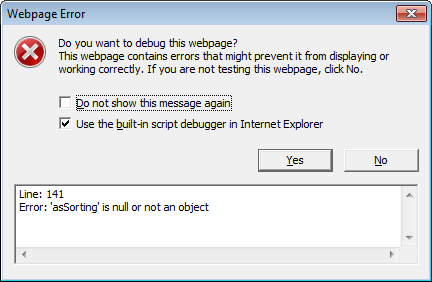
如果没有 thead 将会报错。
最为简单的使用方式,就是零配置的方式。
/* |
* |
*/ |
$(document).ready(function(){ |
$('#example').dataTable(); |
});
以下是在进行dataTable绑定处理时候可以附加的参数:
| 属性名称 | 取值范围 | 解释 |
| bAutoWidth | true or false, default true | 是否自动计算表格各列宽度 |
| bDeferRender | true or false, default false | 用于渲染的一个参数 |
| bFilter | true or false, default true | 开关,是否启用客户端过滤功能 |
| bInfo | true or false, default true | 开关,是否显示表格的一些信息 |
| bJQueryUI | true or false, default false | 是否使用jquery ui themeroller的风格 |
| bLengthChange | true or false, default true | 开关,是否显示一个每页长度的选择条(需要分页器支持) |
| bPaginate | true or false, default true | 开关,是否显示(使用)分页器 |
| bProcessing | true or false, defualt false | 开关,以指定当正在处理数据的时候,是否显示“正在处理”这个提示信息 |
| bScrollInfinite | true or false, default false | 开关,以指定是否无限滚动(与sScrollY配合使用),在大数据量的时候很有用。当这个标志为true的时候,分页器就默认关闭 |
| bSort | true or false, default true | 开关,是否让各列具有按列排序功能 |
| bSortClasses | true or false, default true | 开关,指定当当前列在排序时,是否增加classes 'sorting_1', 'sorting_2' and 'sorting_3',打开后,在处理大数据时,性能有所损失 |
| bStateSave | true or false, default false | 开关,是否打开客户端状态记录功能。这个数据是记录在cookies中的,打开了这个记录后,即使刷新一次页面,或重新打开浏览器,之前的状态都是保存下来的 |
| sScrollX | 'disabled' or '100%' 类似的字符串 | 是否开启水平滚动,以及指定滚动区域大小 |
| sScrollY | 'disabled' or '200px' 类似的字符串 | 是否开启垂直滚动,以及指定滚动区域大小 |
| -- | -- | -- |
| 选项 | ||
| aaSorting | array array[int,string], 如[], [[0,'asc'], [0,'desc']] | 指定按多列数据排序的依据 |
| aaSortingFixed | 同上 | 同上。唯一不同点是不能被用户的自定义配置冲突 |
| aLengthMenu | default [10, 25, 50, 100],可以为一维数组,也可为二维数组,比如:[[10, 25, 50, -1], [10, 25, 50, "All"]] | 这个为选择每页的条目数,当使用一个二维数组时,二维层面只能有两个元素,第一个为显示每页条目数的选项,第二个是关于这些选项的解释 |
| aoSearchCols | default null, 类似:[null, {"sSearch": "My filter"}, null,{"sSearch": "^[0-9]", "bEscapeRegex": false}] | 给每个列单独定义其初始化搜索列表特性(这一块还没搞懂) |
| asStripClasses | default ['odd', 'even'], 比如['strip1', 'strip2', 'strip3'] | 指定要被应用到各行的class风格,会自动循环 |
| bDestroy | true or false, default false | 用于当要在同一个元素上执行新的dataTable绑定时,将之前的那个数据对象清除掉,换以新的对象设置 |
| bRetrieve | true or false, default false | 用于指明当执行dataTable绑定时,是否返回DataTable对象 |
| bScrollCollapse | true or false, default false | 指定适当的时候缩起滚动视图 |
| bSortCellsTop | true or false, default false | (未知的东东) |
| iCookieDuration | 整数,默认7200,单位为秒 | 指定用于存储客户端信息到cookie中的时间长度,超过这个时间后,自动过期 |
| iDeferLoading | 整数,默认为null | 延迟加载,它的参数为要加载条目的数目,通常与bServerSide,sAjaxSource等配合使用 |
| iDisplayLength | 整数,默认为10 | 用于指定一屏显示的条数,需开启分页器 |
| iDisplayStart | 整数,默认为0 | 用于指定从哪一条数据开始显示到表格中去 |
| iScrollLoadGap | 整数,默认为100 | 用于指定当DataTable设置为滚动时,最多可以一屏显示多少条数据 |
| oSearch | 默认{ "sSearch": "", "bRegex": false, "bSmart": true } | 又是初始时指定搜索参数相关的,有点复杂,没搞懂目前 |
| sAjaxDataProp | 字符串,default 'aaData' | 指定当从服务端获取表格数据时,数据项使用的名字 |
| sAjaxSource | URL字符串,default null | 指定要从哪个URL获取数据 |
| sCookiePrefix | 字符串,default 'SpryMedia_DataTables_' | 当打开状态存储特性后,用于指定存储在cookies中的字符串的前缀名字 |
| sDom | default lfrtip (when bJQueryUI is false) or <"H"lfr>t<"F"ip> (when bJQueryUI is true) | 这是用于定义DataTable布局的一个强大的属性,另开专门文档来补充说明吧 |
| sPaginationType | 'full_numbers' or 'two_button', default 'two_button' | 用于指定分页器风格 |
| sScrollXInner | string default 'disabled' | 又是水平滚动相关的,没搞懂啥意思 |
DataTable支持如下回调函数
| 回调函数名称 | 参数 | 返回值 | 默认 | 功能 |
| fnCookieCallback | 1.string: Name of the cookie defined by DataTables 2.object: Data to be stored in the cookie 3.string: Cookie expires string 4.string: Path of the cookie to set |
string: cookie formatted string (which should be encoded by using encodeURIComponent()) | null | 当每次cookies改变时,会触发这个函数调用 |
| fnDrawCallback | 无 | 无 | 无 | 在每次table被draw完后调用,至于做什么就看着办吧 |
| fnFooterCallback | 1.node : "TR" element for the footer 2.array array strings : Full table data (as derived from the original HTML) 3.int : Index for the current display starting point in the display array< 4.int : Index for the current display ending point in the display array 5.array int : Index array to translate the visual position to the full data array |
无 | 无 | 用于在每次重画的时候修改表格的脚部 |
| fnFormatNumber | 1.int : number to be formatted | String : formatted string for DataTables to show the number | 有默认的 | 用于在大数字上,自动加入一些逗号,分隔开 |
| fnHeaderCallback | 1.node : "TR" element for the header 2.array array strings : Full table data (as derived from the original HTML) 3.int : Index for the current display starting point in the display array 4.int : Index for the current display ending point in the display array 5.array int : Index array to translate the visual position to the full data array |
无 | 无 | 用于在每次draw发生时,修改table的header |
| fnInfoCallback | 1.object: DataTables settings object 2.int: Starting position in data for the draw 3.int: End position in data for the draw 4.int: Total number of rows in the table (regardless of filtering) 5.int: Total number of rows in the data set, after filtering 6.string: The string that DataTables has formatted using it's own rules |
string: The string to be displayed in the information element. | 无 | 用于传达table信息 |
| fnInitComplete | 1.object:oSettings - DataTables settings object | 无 | 无 | 表格初始化完成后调用 |
| fnPreDrawCallback | 1.object:oSettings - DataTables settings object | Boolean | 无 | 用于在开始绘制之前调用,返回false的话,会阻止draw事件发生;返回其它值,draw可以顺利执行 |
| fnRowCallback | 1.node : "TR" element for the current row 2.array strings : Raw data array for this row (as derived from the original HTML) 3.int : The display index for the current table draw 4.int : The index of the data in the full list of rows (after filtering) |
node : "TR" element for the current row | 无 | 当创建了行,但还未绘制到屏幕上的时候调用,通常用于改变行的class风格 |
| fnServerData | 1.string: HTTP source to obtain the data from (i.e. sAjaxSource) 2.array objects: A key/value pair object containing the data to send to the server 3.function: Function to be called on completion of the data get process that will draw the data on the page. |
void | $.getJSON | 用于替换默认发到服务端的请求操作 |
| fnStateLoadCallback | 1.object:oSettings - DataTables settings object 2.object:oData - Object containing information retrieved from the state saving cookie which should be restored. For the exact properties please refer to the DataTables code. |
Boolean - false if the state should not be loaded, true otherwise | 无 | 在cookies中的数据被加载前执行,可以方便地修改这些数据 |
| fnStateSaveCallback | 1.object:oSettings - DataTables settings object 2.String:sValue - a JSON string (without the final closing brace) which should be stored in the state saving cookie. |
String - the full string that should be used to save the state | 无 | 在状态数据被存储到cookies前执行,可以方便地做一些预操作 |
表格的效果
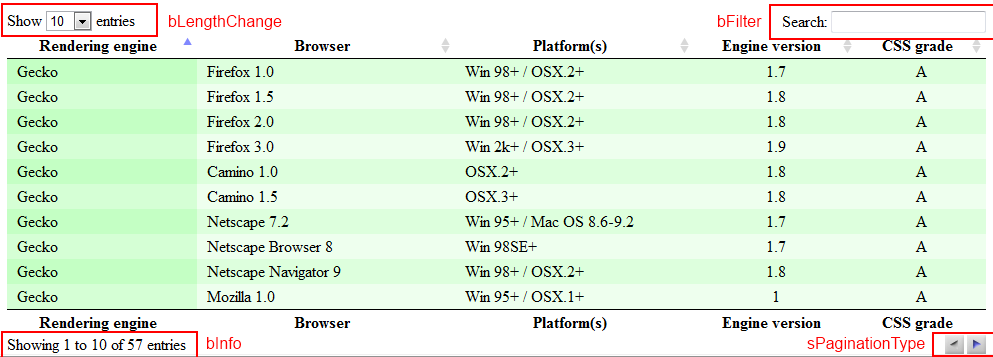
注意,红框表示了四个默认的设置效果,分别用来选择每页的行数,表格的过滤器,表格的信息和换页。
此时,使用了几个默认的参数设置。在 dataTables 中,参数名称的前缀用来说明参数的数据类型,很明显,b 表示布尔类型,i 表示整数类型,s 表示字符串类型。
- bPaginate: 是否分页,默认为 true,分页
- iDisplayLength : 每页的行数,每页默认数量:10
- sPaginationType: 分页样式,支持两种内置方式,two_button 和 full_numbers, 默认使用 two_button。
- bLengthChange : 是否允许用户通过一个下拉列表来选择分页后每页的行数。行数为 10,25,50,100。这个设置需要 bPaginate 支持。默认为 true。
- bFilter: 启用或禁止数据过滤,默认为 true。 注意,如果使用过滤功能,但是希望关闭默认的过滤输入框,应使用 sDom
- bInfo: 允许或者禁止表信息的显示,默认为 true,显示信息。
我们也可以通过传递一个初始化参数对象来改变这些设置。例如,下面的例子将每页的行数设置为 20 行。
$(function () |
$("#example").dataTable( |
{ |
iDisplayLength: |
} |
); |
});
原文转载:http://blog.csdn.net/cdefg198/article/details/7182341
---恢复内容结束---
jQuery 的插件 dataTables 是一个优秀的表格插件,提供了针对表格的排序、浏览器分页、服务器分页、筛选、格式化等功能。dataTables 的网站上也提供了大量的演示和详细的文档进行说明,为了方便学习使用,这里一步一步进行说明。
首先,需要到 dataTables 的网站 http://www.datatables.net/ 下载这个脚本库,
然后,在网页中先加入 jQuery 的引用,然后,加入 dataTables 的引用。
引入CSS文件和JS文件
--------------------------------------------------------------------------
<style type="text/css" title="currentStyle">
@import "DataTables-1.8.1/media/css/demo_page.css";
@import "DataTables-1.8.1/media/css/demo_table.css";
@import "DataTables-1.8.1/media/css/demo_table_jui.css";
</style>
<script type="text/javascript" language="javascript" src="DataTables-1.8.1/media/js/jquery.js"></script>
<script type="text/javascript" language="javascript" src="DataTables-1.8.1/media/js/jquery.dataTables.js"></script>
--------------------------------------------------------------------------
-----------最简单的方式:
$(document).ready(function() {
$("#example").dataTable();
});
----------也可以自己定义各属性:
<script type="text/javascript" language="javascript">
$(document).ready(function() {
$("#example").dataTable({
// "bPaginate": true, //开关,是否显示分页器
// "bInfo": true, //开关,是否显示表格的一些信息
// "bFilter": true, //开关,是否启用客户端过滤器
// "sDom": "<>lfrtip<>",
// "bAutoWith": false,
// "bDeferRender": false,
// "bJQueryUI": false, //开关,是否启用JQueryUI风格
// "bLengthChange": true, //开关,是否显示每页大小的下拉框
// "bProcessing": true,
// "bScrollInfinite": false,
// "sScrollY": "800px", //是否开启垂直滚动,以及指定滚动区域大小,可设值:'disabled','2000px'
// "bSort": true, //开关,是否启用各列具有按列排序的功能
// "bSortClasses": true,
// "bStateSave": false, //开关,是否打开客户端状态记录功能。这个数据是记录在cookies中的,
打开了这个记录后,即使刷新一次页面,或重新打开浏览器,之前的状态都是保存下来的-
------当值为true时aoColumnDefs不能隐藏列
// "sScrollX": "50%", //是否开启水平滚动,以及指定滚动区域大小,可设值:'disabled','2000%'
// "aaSorting": [[0, "asc"]],
// "aoColumnDefs": [{ "bVisible": false, "aTargets": [0]}]//隐藏列
// "sDom": '<"H"if>t<"F"if>',
"bAutoWidth": false, //自适应宽度
"aaSorting": [[1, "asc"]],
"sPaginationType": "full_numbers",
"oLanguage": {
"sProcessing": "正在加载中......",
"sLengthMenu": "每页显示 _MENU_ 条记录",
"sZeroRecords": "对不起,查询不到相关数据!",
"sEmptyTable": "表中无数据存在!",
"sInfo": "当前显示 _START_ 到 _END_ 条,共 _TOTAL_ 条记录",
"sInfoFiltered": "数据表中共为 _MAX_ 条记录",
"sSearch": "搜索",
"oPaginate": {
"sFirst": "首页",
"sPrevious": "上一页",
"sNext": "下一页",
"sLast": "末页"
}
} //多语言配置
});
});
</script>
----------------页面:
对于 dataTables 来说,表格必须通过 thead 和 tbody 进行说明,如下所示,
<table cellpadding="0" cellspacing="0" border="0" class="display" id="example"> |
<thead> |
<tr> |
<th> |
Rendering |
</th> |
<th> |
Browser |
</th> |
<th> |
Platform(s) |
</th> |
<th> |
Engine |
</th> |
<th> |
CSS |
</th> |
</tr> |
</thead> |
<tbody> |
<tr class="odd> |
<td> |
Trident |
</td> |
<td> |
Internet |
</td> |
<td> |
Win |
</td> |
<td class="center"> |
4 |
</td> |
<td class="center"> |
X |
</td> |
</tr> |
如果没有 thead 将会报错。
最为简单的使用方式,就是零配置的方式。
/* |
* |
*/ |
$(document).ready(function(){ |
$('#example').dataTable(); |
});
以下是在进行dataTable绑定处理时候可以附加的参数:
| 属性名称 | 取值范围 | 解释 |
| bAutoWidth | true or false, default true | 是否自动计算表格各列宽度 |
| bDeferRender | true or false, default false | 用于渲染的一个参数 |
| bFilter | true or false, default true | 开关,是否启用客户端过滤功能 |
| bInfo | true or false, default true | 开关,是否显示表格的一些信息 |
| bJQueryUI | true or false, default false | 是否使用jquery ui themeroller的风格 |
| bLengthChange | true or false, default true | 开关,是否显示一个每页长度的选择条(需要分页器支持) |
| bPaginate | true or false, default true | 开关,是否显示(使用)分页器 |
| bProcessing | true or false, defualt false | 开关,以指定当正在处理数据的时候,是否显示“正在处理”这个提示信息 |
| bScrollInfinite | true or false, default false | 开关,以指定是否无限滚动(与sScrollY配合使用),在大数据量的时候很有用。当这个标志为true的时候,分页器就默认关闭 |
| bSort | true or false, default true | 开关,是否让各列具有按列排序功能 |
| bSortClasses | true or false, default true | 开关,指定当当前列在排序时,是否增加classes 'sorting_1', 'sorting_2' and 'sorting_3',打开后,在处理大数据时,性能有所损失 |
| bStateSave | true or false, default false | 开关,是否打开客户端状态记录功能。这个数据是记录在cookies中的,打开了这个记录后,即使刷新一次页面,或重新打开浏览器,之前的状态都是保存下来的 |
| sScrollX | 'disabled' or '100%' 类似的字符串 | 是否开启水平滚动,以及指定滚动区域大小 |
| sScrollY | 'disabled' or '200px' 类似的字符串 | 是否开启垂直滚动,以及指定滚动区域大小 |
| -- | -- | -- |
| 选项 | ||
| aaSorting | array array[int,string], 如[], [[0,'asc'], [0,'desc']] | 指定按多列数据排序的依据 |
| aaSortingFixed | 同上 | 同上。唯一不同点是不能被用户的自定义配置冲突 |
| aLengthMenu | default [10, 25, 50, 100],可以为一维数组,也可为二维数组,比如:[[10, 25, 50, -1], [10, 25, 50, "All"]] | 这个为选择每页的条目数,当使用一个二维数组时,二维层面只能有两个元素,第一个为显示每页条目数的选项,第二个是关于这些选项的解释 |
| aoSearchCols | default null, 类似:[null, {"sSearch": "My filter"}, null,{"sSearch": "^[0-9]", "bEscapeRegex": false}] | 给每个列单独定义其初始化搜索列表特性(这一块还没搞懂) |
| asStripClasses | default ['odd', 'even'], 比如['strip1', 'strip2', 'strip3'] | 指定要被应用到各行的class风格,会自动循环 |
| bDestroy | true or false, default false | 用于当要在同一个元素上执行新的dataTable绑定时,将之前的那个数据对象清除掉,换以新的对象设置 |
| bRetrieve | true or false, default false | 用于指明当执行dataTable绑定时,是否返回DataTable对象 |
| bScrollCollapse | true or false, default false | 指定适当的时候缩起滚动视图 |
| bSortCellsTop | true or false, default false | (未知的东东) |
| iCookieDuration | 整数,默认7200,单位为秒 | 指定用于存储客户端信息到cookie中的时间长度,超过这个时间后,自动过期 |
| iDeferLoading | 整数,默认为null | 延迟加载,它的参数为要加载条目的数目,通常与bServerSide,sAjaxSource等配合使用 |
| iDisplayLength | 整数,默认为10 | 用于指定一屏显示的条数,需开启分页器 |
| iDisplayStart | 整数,默认为0 | 用于指定从哪一条数据开始显示到表格中去 |
| iScrollLoadGap | 整数,默认为100 | 用于指定当DataTable设置为滚动时,最多可以一屏显示多少条数据 |
| oSearch | 默认{ "sSearch": "", "bRegex": false, "bSmart": true } | 又是初始时指定搜索参数相关的,有点复杂,没搞懂目前 |
| sAjaxDataProp | 字符串,default 'aaData' | 指定当从服务端获取表格数据时,数据项使用的名字 |
| sAjaxSource | URL字符串,default null | 指定要从哪个URL获取数据 |
| sCookiePrefix | 字符串,default 'SpryMedia_DataTables_' | 当打开状态存储特性后,用于指定存储在cookies中的字符串的前缀名字 |
| sDom | default lfrtip (when bJQueryUI is false) or <"H"lfr>t<"F"ip> (when bJQueryUI is true) | 这是用于定义DataTable布局的一个强大的属性,另开专门文档来补充说明吧 |
| sPaginationType | 'full_numbers' or 'two_button', default 'two_button' | 用于指定分页器风格 |
| sScrollXInner | string default 'disabled' | 又是水平滚动相关的,没搞懂啥意思 |
DataTable支持如下回调函数
| 回调函数名称 | 参数 | 返回值 | 默认 | 功能 |
| fnCookieCallback | 1.string: Name of the cookie defined by DataTables 2.object: Data to be stored in the cookie 3.string: Cookie expires string 4.string: Path of the cookie to set |
string: cookie formatted string (which should be encoded by using encodeURIComponent()) | null | 当每次cookies改变时,会触发这个函数调用 |
| fnDrawCallback | 无 | 无 | 无 | 在每次table被draw完后调用,至于做什么就看着办吧 |
| fnFooterCallback | 1.node : "TR" element for the footer 2.array array strings : Full table data (as derived from the original HTML) 3.int : Index for the current display starting point in the display array< 4.int : Index for the current display ending point in the display array 5.array int : Index array to translate the visual position to the full data array |
无 | 无 | 用于在每次重画的时候修改表格的脚部 |
| fnFormatNumber | 1.int : number to be formatted | String : formatted string for DataTables to show the number | 有默认的 | 用于在大数字上,自动加入一些逗号,分隔开 |
| fnHeaderCallback | 1.node : "TR" element for the header 2.array array strings : Full table data (as derived from the original HTML) 3.int : Index for the current display starting point in the display array 4.int : Index for the current display ending point in the display array 5.array int : Index array to translate the visual position to the full data array |
无 | 无 | 用于在每次draw发生时,修改table的header |
| fnInfoCallback | 1.object: DataTables settings object 2.int: Starting position in data for the draw 3.int: End position in data for the draw 4.int: Total number of rows in the table (regardless of filtering) 5.int: Total number of rows in the data set, after filtering 6.string: The string that DataTables has formatted using it's own rules |
string: The string to be displayed in the information element. | 无 | 用于传达table信息 |
| fnInitComplete | 1.object:oSettings - DataTables settings object | 无 | 无 | 表格初始化完成后调用 |
| fnPreDrawCallback | 1.object:oSettings - DataTables settings object | Boolean | 无 | 用于在开始绘制之前调用,返回false的话,会阻止draw事件发生;返回其它值,draw可以顺利执行 |
| fnRowCallback | 1.node : "TR" element for the current row 2.array strings : Raw data array for this row (as derived from the original HTML) 3.int : The display index for the current table draw 4.int : The index of the data in the full list of rows (after filtering) |
node : "TR" element for the current row | 无 | 当创建了行,但还未绘制到屏幕上的时候调用,通常用于改变行的class风格 |
| fnServerData | 1.string: HTTP source to obtain the data from (i.e. sAjaxSource) 2.array objects: A key/value pair object containing the data to send to the server 3.function: Function to be called on completion of the data get process that will draw the data on the page. |
void | $.getJSON | 用于替换默认发到服务端的请求操作 |
| fnStateLoadCallback | 1.object:oSettings - DataTables settings object 2.object:oData - Object containing information retrieved from the state saving cookie which should be restored. For the exact properties please refer to the DataTables code. |
Boolean - false if the state should not be loaded, true otherwise | 无 | 在cookies中的数据被加载前执行,可以方便地修改这些数据 |
| fnStateSaveCallback | 1.object:oSettings - DataTables settings object 2.String:sValue - a JSON string (without the final closing brace) which should be stored in the state saving cookie. |
String - the full string that should be used to save the state | 无 | 在状态数据被存储到cookies前执行,可以方便地做一些预操作 |
表格的效果
注意,红框表示了四个默认的设置效果,分别用来选择每页的行数,表格的过滤器,表格的信息和换页。
此时,使用了几个默认的参数设置。在 dataTables 中,参数名称的前缀用来说明参数的数据类型,很明显,b 表示布尔类型,i 表示整数类型,s 表示字符串类型。
- bPaginate: 是否分页,默认为 true,分页
- iDisplayLength : 每页的行数,每页默认数量:10
- sPaginationType: 分页样式,支持两种内置方式,two_button 和 full_numbers, 默认使用 two_button。
- bLengthChange : 是否允许用户通过一个下拉列表来选择分页后每页的行数。行数为 10,25,50,100。这个设置需要 bPaginate 支持。默认为 true。
- bFilter: 启用或禁止数据过滤,默认为 true。 注意,如果使用过滤功能,但是希望关闭默认的过滤输入框,应使用 sDom
- bInfo: 允许或者禁止表信息的显示,默认为 true,显示信息。
我们也可以通过传递一个初始化参数对象来改变这些设置。例如,下面的例子将每页的行数设置为 20 行。
$(function () |
$("#example").dataTable( |
{ |
iDisplayLength: |
} |
); |
});
原文转载:http://blog.csdn.net/cdefg198/article/details/7182341
jQuery 的插件 dataTables的更多相关文章
- 一款比较强大的jquery表格插件Datatables
Datatables是一款jquery表格插件.它是一个高度灵活的工具,可以将任何HTML表格添加高级的交互功能. 链接:http://www.datatables.club/ 本人无聊时发现的一款用 ...
- jquery表格插件Datatables使用、快速上手
Datatables使用 一.简介 官网:https://datatables.net/ 中文官网:http://datatables.club/ Datatables是一款jquery表格插件.它是 ...
- JQuery表格插件DataTables 当前页合计功能
公司项目表格插件使用的是DataTables,最近添加表合计功能,发现百度统一都是如图类型的代码,不知道是配置问题还是怎么了,在我的页面下根本不能用 var addd=0; $(document).r ...
- Datatables快速入门开发--一款好用的JQuery表格插件
博主是一个java后端程序员小白,前端技术会用但不精通,做后台的一些功能经常要涉及表格的展示,分页,搜索,排序等等一系列功能,在经历了一段时间的原始手段,开始接触并使用Datatables,一个jqu ...
- 基于JQuery可拖动列表格插件DataTables的踩坑记
前言 最近项目中在使用能够拖动列调整列位置顺序的表格插件---DataTables,这也是目前我找到的唯一一种存在有这种功能的插件. 在查找使用方法的过程中发现可用案例并不多,且大多言语不详.本文将全 ...
- 推荐几款jQuery表格插件
平时项目中,会碰到很多表格元素,这里推荐几款jQuery表格插件. Stackable.js 通常在小屏幕上,表格的表形形式不大好,因为用户会缩放平移,或者就是表格太小,导致数据不可见.Stackab ...
- 分享在MVC3.0中使用jQuery DataTable 插件
前不久在网络上看见一个很不错的jQuery的DataTable表格插件.后来发现在MVC中使用该插件的文章并不多.本文将介绍在MVC3.0如何使用该插件.在介绍该插件之前先简单介绍一下,推荐该插件的原 ...
- Angular TypeScript开发环境集成jQuery扩展插件
集成步骤: 1.安装jquery极其扩展插件库ts定义文件 npm install jquery --save npm install --save-dev @types/jquery npm ins ...
- JQuery表格插件
http://www.datatables.club/example/#styling Datatables快速入门开发--一款好用的JQuery表格插件 博主是一个java后端程序员,前端技术会 ...
随机推荐
- java中动态代理
一.在java中怎样实现动态代理 1.我们要有一个接口,还要有一个接口的实现类,而这个实现类呢就是我们要代理的对象 接口: package org.dynamicproxy.test; public ...
- 嗯,记录一些eclipse的快捷键
alt+/:自动补全 ctrl+/:注释 // 再按一下取消注释 ctrl+shift+\:区块注释 /* */ ctrl+shift+\:取消区块注释 ctrl+shift+f:格式化代码 ctrl ...
- 从零开始学android开发-setBackgroundDrawable与setBackgroundResource的区别
setBackgroundDrawable和setBackgroundResource的区别很多网友不知道View类提供的setBackgroundDrawable和setBackgroundReso ...
- Mouse_event 鼠标点击
//这样就是左键单击 mouse_event( MOUSEEVENTF_LEFTDOWN, 0, 0, 0, 0 );// 按下mouse_event( MOUSEEVENTF_LEFTUP, 0, ...
- HoloGraphLibrary
https://github.com/Androguide/HoloGraphLibrary HoloGraphLibrary-master.zip
- Android-L-Samples
https://github.com/s3xy4ngyc/Android-L-Samples
- Particle designer 粒子工具中属性对应功能的简单介绍
粒子配置 Max Particles 粒子的数量 一般而言,我们的目标是用最少的粒子创造出所需的效果.单个粒子的大小对游戏运行效率也有很大的影响——单个粒子越小,性能越高. Lifespan 生命周 ...
- C语言--enum,typedef enum 枚举类型详解
原文:http://z515256164.blog.163.com/blog/static/32443029201192182854300/ 有改动 C语言详解 - 枚举类型 注:以下全部代码的执行环 ...
- /proc/sys/net/ipv4/下各项的意义
/proc/sys/net/ipv4/icmp_timeexceed_rate这个在traceroute时导致著名的“Solaris middle star”.这个文件控制发送ICMP Tim ...
- 信号量和PV操作写出Bakery算法的同步程序
面包店烹制面包及蛋糕,由n个销售员卖出.当有顾客进店购买面包或蛋糕时,应先在取号机上取号,然后等待叫号,若有销售员空闲时便叫下一号,试用信号量和PV操作写出Bakery算法的同步程序. 设计要求 1) ...