
关于location.href几种用法的区别
常见的几种开发形式:
self.location.href;

window.location.href;

this.location.href;

location.href;

parent.location.href;

top.location.href;
经常见到的大概有以上几种形式.
通过实际的例子讲解以上的几种形式有什么具体的区别:
总共是4个具体的HTML页面:
a.html
<!DOCTYPE HTML PUBLIC "-//W3C//DTD HTML 4.0 Transitional//EN">

<html>

<head>

<title>这是a.html页面</title>

<meta http-equiv="content-type" content="text/html; charset=gb2312">

</head>

<body>

<form id="form1" action="">

<div><strong>这是a.html页面<strong>

<iframe src="b.html" width="500px" height="300px"></iframe> </strong></strong></div>

</form>

</body>

</html>
b.html
<!DOCTYPE HTML PUBLIC "-//W3C//DTD HTML 4.0 Transitional//EN">

<html>

<head>

<title>这是b.html</title>

<meta http-equiv="content-type" content="text/html; charset=gb2312">

</head>

<body>

<span>这是b.html</span><span id="span1"></span><br />

<iframe src="c.html" width="500px" height="300px"></iframe>

</body>

</html>
c.html
<!DOCTYPE HTML PUBLIC "-//W3C//DTD HTML 4.0 Transitional//EN">

<html>

<head>

<title>这是c.html</title>

<meta http-equiv="content-type" content="text/html; charset=gb2312">

</head>

<body>

<span><strong>这是c.html:<strong></span><span id="span1"></span><br />

<iframe src="d.html" width="500px" height="300px"></iframe>

</body>

</html>
d.html
<!DOCTYPE HTML PUBLIC "-//W3C//DTD HTML 4.0 Transitional//EN">

<html>

<head>

<title>这是d.html</title>

<meta http-equiv="content-type" content="text/html; charset=gb2312">

<script type="text/javascript">

    function jump(){

        *********

    }

</script>

</head>

<body>

<span>这是d.html:</span><span id="span1"></span><br />

<input type='button' onclick='jump();' value='跳转'>

<iframe src="d.html" width="500px" height="300px"></iframe>

</body>

</html>
打开a.html对应的截图如下:
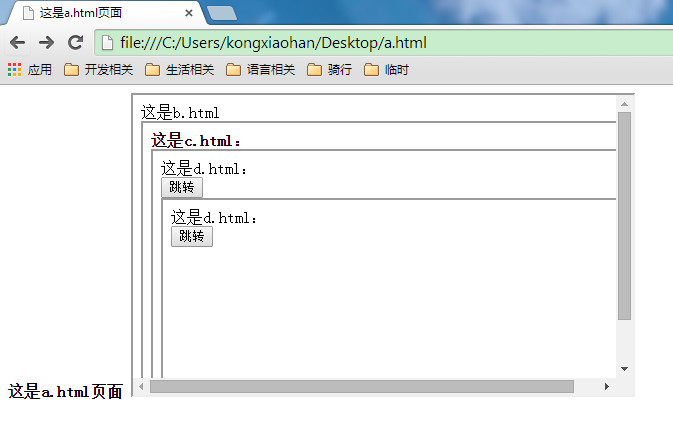
下面再d.html中写入对应的js代码,看各种跳转是什么样的效果:
    function jump(){

        //经测试:window.location.href与location.href,self.location.href,location.href都是本页面跳转

        //作用一样

        window.location.href="http://www.baidu.com";

        //location.href="http://www.baidu.com";

        //self.location.href="http://www.baidu.com";

        //his.location.href="http://www.baidu.com";

        //location.href="http://www.baidu.com";

    }
再次运行a.html,点击那个"跳转" 按钮,运行结果贴图二如下:
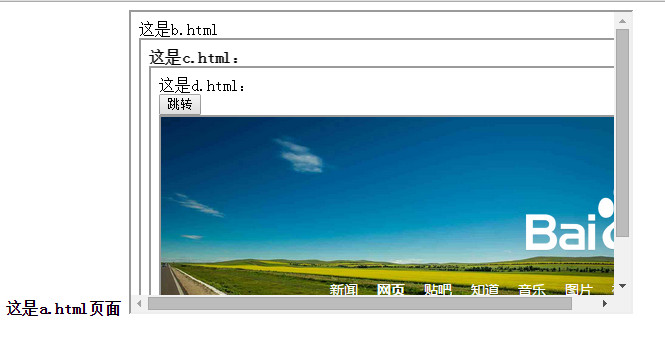

对比图一和图二的变化,你会发现d.html部分已经跳转到了百度的首页,而其它地方没有发生变化。这也就解释了"本页跳转"是什么意思。
好,再来修改d.html里面的js部分为:
    function jump(){

      parent.location.href='http://www.baidu.com';

    }
显示效果如下:
你会发现a.html中嵌套的c.html部分已经跳转到了百度首页。
分析:我点击的是a.html中嵌套的d.html部分的跳转按钮,结果是a.html中嵌套的c.html部分跳转到了百度首页,这就解释了"parent.location.href是上一层页面跳转"的意思。
再次修改d.html里面的js部分为:
    function jump(){

        top.location.href='http://www.baidu.com';

    }
显示效果如下:

分析:我点击的是a.html中嵌套的d.html部分的跳转按钮,结果是a.html中跳转到了百度首页,这就解释了"top.location.href是最外层的页面跳转"的意思。
总结:
看完上面的讲解之后,在来看看下面的定义你就会非常明白了:
"top.location.href"是最外层的页面跳转
"window.location.href"、"location.href"是本页面跳转
"parent.location.href"是上一层页面跳转.
关于location.href几种用法的区别的更多相关文章
- Html A标签中 href 和 onclick用法、区别、优先级别
原文:Html A标签中 href 和 onclick用法.区别.优先级别 如果不设置 href属性在IE6下面会不响应hover.双击后会选中标签的父容器而非这个一a标签(IE下都存在这一问题). ...
- location和location.href跳转url的区别
使用 location = url 跳转,如果本地之前已经载入过该页面并有缓存,那么会直接读取本地的缓存,缓存机制是由本地浏览器设置决定的.状态码为: 200 OK (from cache) . ...
- window.location.href 与 window.loaction.replace区别
window.location.href和window.location.replace的区别 1.window.location.href=“url”:改变url地址: 2.window.locat ...
- window.location.href和document.location.href、document.URL的区别
1.document表示的是一个文档对象,window表示的是一个窗口对象,一个窗口下可以有多个文档对象. 所以一个窗口下只有一个window.location.href,但是可能有多个documen ...
- location.replace()和location.href=进行跳转的区别
location.href 通常被用来跳转到指定页面地址;location.replace 方法则可以实现用新的文档替换当前文档;location.replace 方法不会在 history 对象中生 ...
- 【转】Java中super和this的几种用法与区别
1. 子类的构造函数如果要引用super的话,必须把super放在函数的首位. class Base { Base() { System.out.println("Base&qu ...
- A标签中 href 和 onclick用法、区别、优先级别
(内容摘自:https://blog.csdn.net/chenchunlin526/article/details/77346049) Html A标签中 href 和 onclick 同时使用的问 ...
- window.location.href和window.open的几种用法和区别
使用js的同学一定知道js的location.href的作用是什么,但是在js中关于location.href的用法究竟有哪几种,究竟有哪些区别,估计很多人都不知道了. 一.location.href ...
- js实现网页防止被iframe框架嵌套及几种location.href的区别
首先我们了解一下几种location.href的区别简单的说:几种location.href的区别js实现网页被iframe框架功能,感兴趣的朋友可以了解下 首先我们了解一下:window.locat ...
随机推荐
- BestCoder Round #68 (div.2) tree(hdu 5606)
tree Time Limit: 2000/1000 MS (Java/Others) Memory Limit: 65536/65536 K (Java/Others)Total Submis ...
- [iOS微博项目 - 2.0] - OAuth授权3步
A.概念 OAUTH协议为用户资源的授权提供了一个安全的.开放而又简易的标准.与以往的授权方式不同之处是OAUTH的授权不会使第三方触及到用户的帐号信息(如用户名与密码),即第三方无需使用用 ...
- HDU 5835 Danganronpa (水题)
题意:给定 n 个礼物有数量,一种是特殊的,一种是不特殊的,要分给一些人,每人一个特殊的一个不特殊,但是不特殊的不能相邻的,问最多能分给多少人. 析:是一个比较简单的题目,我们只要求差值就好,先算第一 ...
- Nginx NLB 及Redis学习
负载均衡: ARR: 微软的应用级别的负载均衡方案 NLB:服务器级别的负载均衡方案 Nginx:反向代理 达到负载均衡. Redis:用作缓存(Redis 主从配置和参数详解 http://www. ...
- mysql 内外链接
外联结:分为外左联结和外右联结. 左联结A.B表的意思就是将表A中的全部记录和表B中联结的字段与表A的联结字段符合联结条件的那些记录形成的记录集的联结,这里注意的是最后出来的记录集会包括表A的全部记录 ...
- cocos2d-x 获取系统时间
转自:http://blog.csdn.net/jinjian2009/article/details/9449585 之前使用过cocos2d-x获取系统时间,毫秒级的 long getCurren ...
- Win7激活后添加grub引导Linux最简单方法
因为Win7(Vista同理)的激活方式是通过grub摸你OEM的Slic信息,所以主引导分区MBR被这个grub占用,以此才能激活WIn7.但是如果想同时安装Linux在别的分区,就会产生问题:gr ...
- Eclipse10大快捷键组合
一个Eclipse骨灰级开发者总结了他认为最有用但又不太为人所知的快捷键组合.通过这些组合可以更加容易的浏览源代码,使得整体的开发效率和质量得到提升. Ctrl+Shift+C 快速单行注释 也适用于 ...
- 瑞丽的SQL-基于窗体的排名计算
在SQL Server中,窗体被定义为用户指定的一组行. 之所以要提出窗体这个概念,由于这种基于窗体或分区的又一次计算在实际工作应用范围比較广泛.比如.假设我们要对每一个班级中的学生按成绩进行排序,在 ...
- 贪心算法(2)-Kruskal最小生成树
什么是最小生成树? 生成树是相对图来说的,一个图的生成树是一个树并把图的所有顶点连接在一起.一个图可以有许多不同的生成树.一个有 n 个结点的连通图的生成树是原图的极小连通子图,且包含原图中的所有 n ...