
[AngularJS] ui-router: named views
The ui-router library for AngularJS provides the ability to name views within your application. This is useful for dividing up your application into sections, and changing the content of a section based on the current state.
We use named view to build a simple webpage with 'header','sidebar','content' and 'footer'.
/**

 * Created by Answer1215 on 12/17/2014.

 */

angular.module('app', ['ui.router'])

    .config(function($stateProvider, $urlRouterProvider) {

        $stateProvider

            .state('app', {

                url: '/',

                views: {

                    'header': {

                        templateUrl: 'app/common/header.tpl.html'

                    },

                    'sidebar': {

                        templateUrl: 'app/common/sidebar.tpl.html'

                    },

                    'content': {

                        templateUrl: 'app/common/content.tpl.html'

                    },

                    'footer': {

                        templateUrl: 'app/common/footer.tpl.html'

                    }

                }

            });

        $urlRouterProvider.otherwise('/');

    });
<div class="container">

    <!-- Header -->

    <div ui-view="header" class="row"></div>

    <div class="row">

        <!-- Sidebar/Nav -->

        <div ui-view="sidebar" class="col-xs-3"></div>

        <!-- Content -->

        <div ui-view="content" class="col-xs-9"></div>

    </div>

    <!-- Footer -->

    <div ui-view="footer" class="row"></div>

</div>
Result:
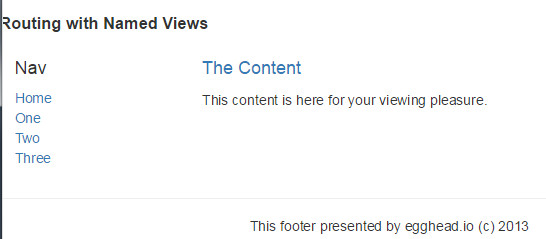
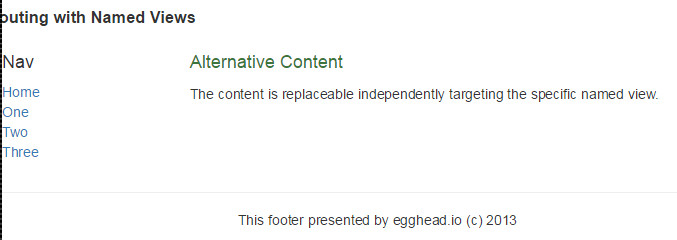
Now when we click 'One', 'Two' and 'Three', we also want to replace the content accordingly.
alt-one.js:
/**

 * Created by Answer1215 on 12/17/2014.

 */

angular.module('app.alt-one', ['ui.router'])

    .config(function($stateProvider, $urlRouterProvider) {

        $stateProvider

            .state('app.alt-one', {

                url: 'alt-one',

                views: {

                    // '@': replace the content

                    // if there is just @ without other stuff, it will looking for the parent 'app' root

                    'content@': {

                        templateUrl: 'app/alt-one/alt-one.content.tpl.html'

                    }

                }

            })

    })
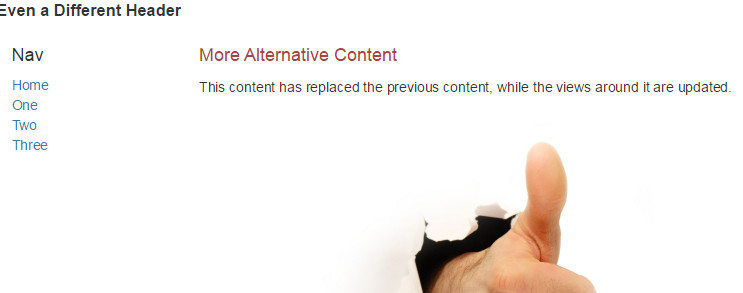
alt-two.js: we replace the content and header both at the same time.
/**

 * Created by Answer1215 on 12/17/2014.

 */

angular.module('app.alt-two', ['ui.router'])

    .config(function($stateProvider, $urlRouterProvider) {

                $stateProvider

                    .state('app.alt-two', {

                        url: 'alt-two',

                        views: {

                            'content@': {

                                templateUrl: 'app/alt-two/alt-two.content.tpl.html'

                            },

                            'header@': {

                                templateUrl: 'app/alt-two/alt-two.header.tpl.html'

                            }

                        }

                    })

            })
alt-three.js:
/**

 * Created by Answer1215 on 12/17/2014.

 */

angular.module('app.alt-three', [

    'ui.router'

])

    .config(function($stateProvider) {

        $stateProvider

            .state('app.alt-three', {

                url: 'alt-three',

                views: {

                    'content@': {

                        templateUrl: 'app/alt-three/alt-three.content.tpl.html'

                    },

                    'header@': {

                        templateUrl: 'app/alt-three/alt-three.header.tpl.html'

                    },

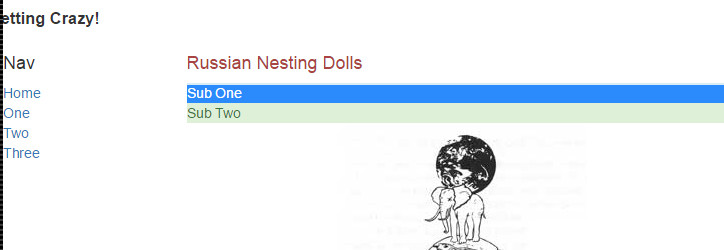
                    // find the 'alt-three' directory to replace the name view == "one"

                    'one@app.alt-three': {

                        template: '<div class="alert-info">Sub One</div>'

                    },

                    // find the 'alt-three' directory to replace the name view == "two"

                    'two@app.alt-three': {

                        template: '<div class="alert-success">Sub Two</div>'

                    }

                }

            }

        )

    })

;
Read More: https://egghead.io/lessons/angularjs-ui-router-named-views
[AngularJS] ui-router: named views的更多相关文章
- angularJS ui router 多视图单独刷新问题
场景:视图层级如下 view1 --view11 --view111 需求:view11的一个动作过后,单独刷新view12 解决方式:修改层级设计 view1 --view11 --view111 ...
- [转]AngularJS+UI Router(1) 多步表单
本文转自:https://www.zybuluo.com/dreamapplehappy/note/54448 多步表单的实现 在线demo演示地址https://rawgit.com/dream ...
- Angularjs ui router,路由嵌套 父controller执行问题
解决方式来源:https://stackoverflow.com/questions/25316591/angularjs-ui-router-state-reload-child-state-onl ...
- AngularJS 使用 UI Router 实现表单向导
Today we will be using AngularJS and the great UI Router and the Angular ngAnimate module to create ...
- [Angular-Scaled web] 4. Using ui-router's named views
In the previous post, we use $stateProvider deriect to root url and using MainCtrl, categories.tmpl. ...
- [转]AngularJS 使用 UI Router 实现表单向导
本文转自:http://www.oschina.net/translate/angularjs-multi-step-form-using-ui-router 今天我们将使用AngularJs和伟大的 ...
- angularjs ngRoute和ui.router对比
ngRoute模块是angularjs自带的路由模块,ui.router是一个第三方路由模块,接下来将对两者进行一个对比: ng-router(angular-router.js) ng-view n ...
- 【原创】ui.router源码解析
Angular系列文章之angular路由 路由(route),几乎所有的MVC(VM)框架都应该具有的特性,因为它是前端构建单页面应用(SPA)必不可少的组成部分. 那么,对于angular而言,它 ...
- ngRoute 与ui.router区别
angular路由 路由 (route) ,几乎所有的 MVC(VM) 框架都应该具有的特性,因为它是前端构建单页面应用 (SPA) 必不可少的组成部分. 那么,对于 angular 而言,它自然也有 ...
随机推荐
- MyBatis association的两种形式——MyBatis学习笔记之四
一.嵌套的resultMap 这 种方法本质上就是上篇博文介绍的方法,只是把教师实体映射从association元素中提取出来,用一个resultMap元素表示.然后 association元素再引用 ...
- webdriver(python)学习笔记二
自己开始一个脚本开始学习: # coding = utf-8 from selenium import webdriver browser = webdriver.Firefox() browser. ...
- lightoj 1021 (数位DP)
题意:给你一个b进制的数,再给你一个十进制数k,你可以重新排列b进制数的每一位得到其他b进制数,问你这些数中有多少可以整除k? 思路:数位dp. #include <cstdio> #in ...
- hdu1792 水题
最近转到vim上来了,用vim编写代码,用gcc编译,用gdb调试.这是用vim做的第一道题,纪念下.题目很水,就不说了. /* * Author : ben */ #include <cstd ...
- 使用DDMS测试安卓手机APP的性能(android)
安装/配置: 通过另外一个工具也可以测试手机客户端APP的性能,这就是android开发包中的DDMS工具(Dalvik Debug Monitor Service),先来说一下android开发包的 ...
- linux下配置双网卡及RAC规划——1
使用背景: 操作系统:centos 虚拟机:virtualbox RAC系统中需要双网卡,一个为公共的网络环境,一个为私有的网络环境,从而需要搭建双网络. 在菜单FILE中选择preferences, ...
- 从lighttpd学到的代码技巧
平时写开脚本,很多时候我们都可以不怎样注意效率,但是看c代码的时候,你会发现,才意思自己真的是一个coder啦 1,单位转换 (根据传入的数返回相应的kb,mb,gb等等) 可能我们直觉来想就会这样做 ...
- BootStrap入门教程 (四) :JQuery类库插件(模态窗口,滚动监控,标签效果,提示效果,“泡芙”效果,警告区域,折叠效果,旋转木马,输入提示)
上讲回顾:Bootstrap组件丰富同时具有良好可扩展性,能够很好地应用在生产环境.这些组件包括按钮(Button),导航(Navigation),缩略图( thumbnails),提醒(Alert) ...
- Hadoop 删除节点步骤
1.在hadoop1.1.1/conf 下新建文件 nn-excluded-list 并写入要删除的节点名称或者IP 一个节点 一行 如: mos5200app cmpaknwom rac7 2.分发 ...
- UVa 307 - Sticks
Sticks [题目链接]:http://uva.onlinejudge.org/index.php?option=com_onlinejudge&Itemid=8&category ...