
LINQ to PostgreSQL Tutorial
原文 LINQ to PostgreSQL Tutorial
This tutorial guides you through the process of creating a simple application powered by LinqConnect technology. In less than 5 minutes you will have a ready-to-use data access layer for your business objects.
In this walkthrough:
- Introducing the LinqConnect (LINQ to PostgreSQL) Technology
- Requirements
- Preparing the Project
- Generating Model from Database
- Querying Data
- Inserting New Data
- Updating Data
- Deleting Data
- Additional Information
Introducing the LinqConnect (LINQ to PostgreSQL) Technology
LinqConnect (formerly known as LINQ to PostgreSQL) is the fast and lightweight ORM solution, which is closely compatible to Microsoft LINQ to SQL and contains its own advanced features, such as complex type support, advanced data fetching options, configurable compiled query caching, and others.
LINQ stands for Language-Integrated Query, which means that data retrieval is no longer a separate language. The LINQ engine allows .NET applications to connect to databases without bothering much about columns and rows. The data you receive is automatically formed as objects ready to use by your business logic.
LINQ to Relational Data may be thought of as an object-relational mapping (ORM) tool. The type-safe LINQ queries get compiled into MSIL on the fly, and the query clauses are translated into SQL and sent to PostgreSQL server for execution. This makes your data access layer safer, faster, and greatly more convenient to design.
Requirements
In order to connect to PostgreSQL server you need the server itself running, dotConnect for PostgreSQL installed and IDE running. LinqConnect requires .NET Framework 3.5, Visual Studio 2008, and PostgreSQL server 8.0 or higher. Note that LinqConnect feature is only available in Professional Edition of dotConnect for PostgreSQL.
In this tutorial it is assumed that you already have the database objects created. You have to execute a script from the following file installed by default to
\Program Files\Devart\dotConnect\PostgreSQL\Samples\crm_demo.sql
Preparing the Project
Create a new console application in Visual Studio. It could be any other project type as well, but for simplicity's sake we'll use console project throughout the tutorial. The rest of the tutorial assumes that the name of the project isConsoleApplication1. If you project is named otherwise, you will have to substitute this name with the actual one in Solution Explorer.
Generating Model from Database
- Add Devart LinqConnect Model to the project. To do this, right-click on the project node in Solution Explorer, point to Add, click New Item.... In the Add New Item dialog select Data category, choose Devart LinqConnect Model template, and click Add. This automatically launches Create New Model wizard, which creates a new empty model or generates it from database.
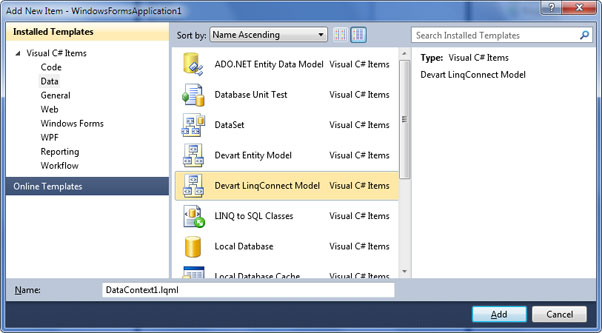
- Click Next on the welcome screen.
- Fill in connection settings and click Next.
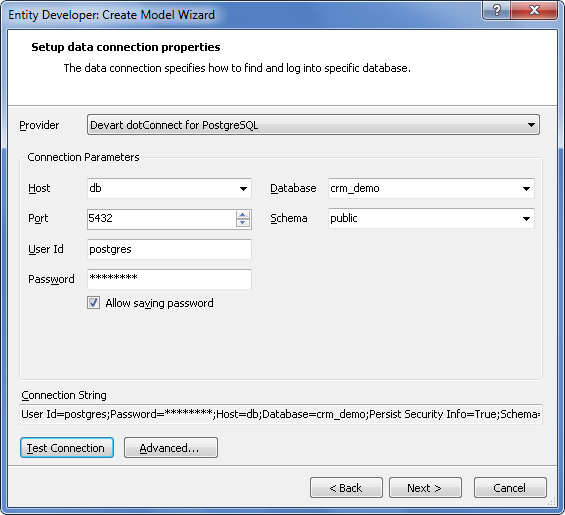
- Choose database objects that will be used in the model. These are all objects from the crm_demo script, including auxiliary tables. Click Next.
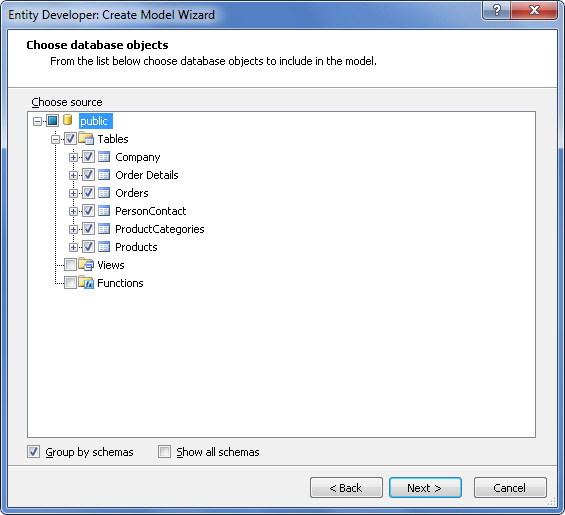
- On the next screen you can adjust naming rules for entities and their members. For the CRM Demo database no rules are required, so just click Next.
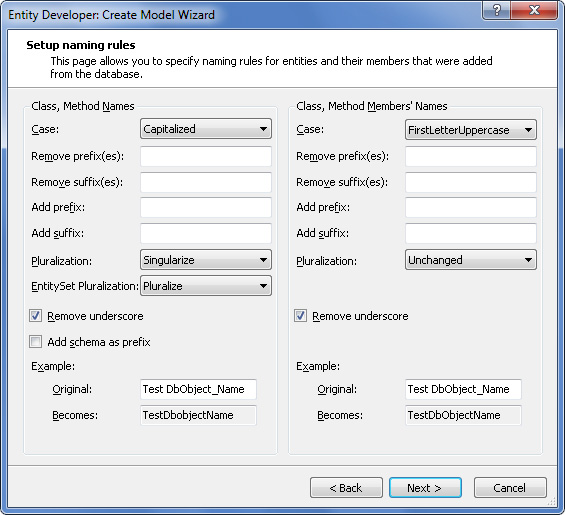
- Input CrmDemoContext as namespace, and CrmDemoDataContext as the name of DataContext descendant. This will be the name of the main data access class. Click Next.
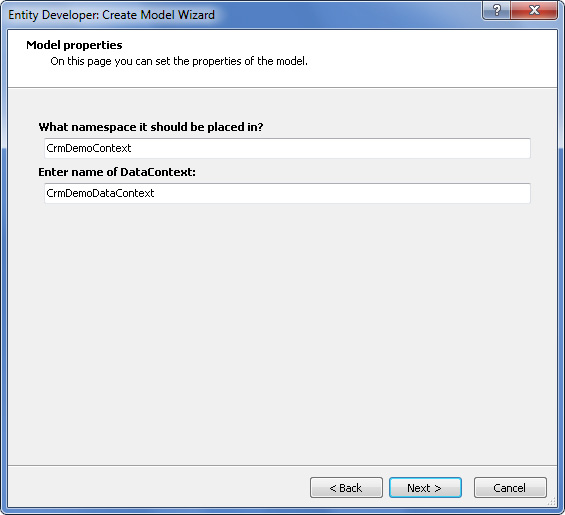
- Press Finish. The model will be generated and opened in Entity Developer.
- In the main menu, click File | Save. This updates the generated CrmDemoDataContext model code in Visual Studio.
The model you've just generated is ready to use.
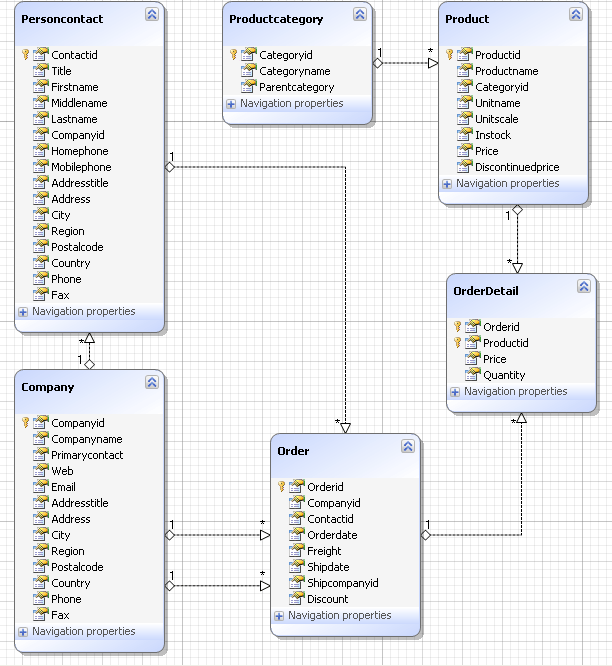
Entity Developer creates classes for all selected tables that represent entities. It also creates a descendant ofDevart.Data.Linq.DataContext class, which controls the connection to the database, and the whole data flow. This class includes properties and methods named after your database objects. You will use these members to retrieve and modify data in the context. The generated code is contained in the file DataContext1.Designer.cs (DataContext1.Designer.vb). You may write your own partial classes and methods for it in the file DataContext1.cs (DataContext1.vb).
Querying Data
All LINQ to PostgreSQL operations are executed through the DataContext descendant, which is namedCrmDemoDataContext in this tutorial. To retrieve data you have to first create an instance of the context, then prepare a query with LinqConnect, and then access the object returned by the query, which may be a collection of objects or a single object.
Let's read all the data from the table Company, sort it by CompanyID, and output some columns. Add the following block of code to the method Main:
C#
CrmDemoDataContext context = new CrmDemoDataContext();var query = from it in context.Companies orderby it.CompanyID select it;foreach (Company comp in query) Console.WriteLine("{0} | {1} | {2}", comp.CompanyID, comp.CompanyName, comp.Country);Console.ReadLine(); |
Visual Basic
Dim context As CrmDemoDataContext = New CrmDemoDataContextDim query = From it In context.companies _ Order By it.CompanyID _ Select itDim comp As companyFor Each comp In query Console.WriteLine("{0} | {1} | {2}", comp.CompanyID, comp.CompanyName, comp.Country)NextConsole.ReadLine() |
As simple as that. You prepare a query and then iterate through it as you would do with a usual collection of objects. The database interaction is performed by LinqConnect in the background. Now let's see who is who in this code sample.
- CrmDemoDataContext is the name of the class that knows all about your model and does everything to retrieve and modify related data in the database. All LinqConnect operations are performed within this class's properties and methods. This class is designed to be lightweight and not expensive to create, thus it is recommended to create a new DataContext instance for any 'unit of work' and dispose it after this unit is completed.
- query, it are arbitrary variable names in the LINQ to SQL statement. The former is used as the collection of data objects, the latter is used to reference single entities in a collection and exists inside the statement only.
- context.Companies refers to a public property of CrmDemoDataContext class. This property represents the collection of all companies in the context.
- Company (in the foreach statement) is the name of an autogenerated class. This class maps to the Companytable in the database and is named after it.
Here is the project's output in the console:
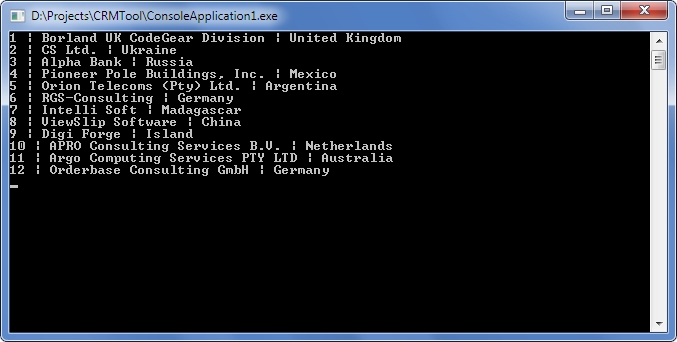
Note that the LINQ query code just describes the query. It does not execute it. This approach is known as deferred execution.
Now let's query data from two tables united with a foreign key. Replace the old code with this:
C#
CrmDemoDataContext context = new CrmDemoDataContext();var query = from it in context.Companies orderby it.CompanyID select it;foreach (Company comp in query) { if (comp.PersonContacts.Count > 0) { Console.WriteLine("{0} | {1} | {2}", comp.CompanyName, comp.PersonContacts[0].FirstName, comp.PersonContacts[0].LastName); }}Console.ReadLine(); |
Visual Basic
Dim context As CrmDemoDataContext = New CrmDemoDataContextDim query = From it In context.companies _ Order By it.CompanyID _ Select itDim comp As companyFor Each comp In query If comp.personcontacts.Count > 0 Then Console.WriteLine("{0} | {1} | {2}", _ comp.CompanyName, comp.personcontacts(0).FirstName, _ comp.personcontacts(0).LastName) End IfNextConsole.ReadLine() |
As you can see, the LINQ query statement was not changed at all. The data about the contact persons was retrieved from the database automatically when you accessed the corresponding property of the company object. This is one of the great things about LINQ: you do not have to worry about dependencies when writing queries.
Inserting New Data
What earlier was adding rows to tables, now is just adding new objects to context collections. When you are ready to send the changes to the database, call SubmitChanges() method of the context. Before doing this, you must first set all properties that do not support null (Nothing) values. The SubmitChanges() method generates and executes commands that perform the equivalent INSERT, UPDATE, or DELETE statements against the data source.
Let's add a new product and a new category to the database. Replace the old code with this:
C#
CrmDemoDataContext context = new CrmDemoDataContext();// Create a new categoryProductCategory newCategory = new ProductCategory();newCategory.CategoryID = 1000;newCategory.CategoryName = "New category";// Create a new productProduct newProduct = new Product();newProduct.ProductID = 2000;newProduct.ProductName = "New product";newProduct.Price = 20;// Associate the new product with the new categorynewProduct.ProductCategory = newCategory;context.Products.InsertOnSubmit(newProduct);// Send the changes to the database.// Until you do it, the changes are cached on the client side.context.SubmitChanges();// Request the new product from the databasevar query = from it in context.Products where it.ProductID == 2000 select it;// Since we query for a single object instead of a collection, we can use the method First()Product product = query.First();Console.WriteLine("{0} | {1} | {2}", product.ProductCategory.CategoryName, product.ProductName, product.Price);Console.ReadLine(); |
Visual Basic
Dim context As CrmDemoDataContext = New CrmDemoDataContext' Create a new categoryDim newCategory As productcategory = New productcategory()newCategory.CategoryID = 1000newCategory.CategoryName = "New category"' Create a new productDim newProduct As product = New product()newProduct.ProductID = 2000newProduct.ProductName = "New product"newProduct.Price = 20' Associate the new product with the new categorynewProduct.productcategory = newCategorycontext.products.InsertOnSubmit(newProduct)' Send the changes to the database.' Until you do it, the changes are cached on the client side.context.SubmitChanges()' Request the new product from the databaseDim query = From it In context.products _ Where it.ProductID = 2000 _ Select it' Since we query for a single object instead of a collection, we can use the method First()Dim product As product = query.First()Console.WriteLine("{0} | {1} | {2}", _ product.productcategory.CategoryName, product.ProductName, product.Price)Console.ReadLine() |
The InsertOnSubmit() method is created for every collection in the context. This method stores in the database information about all linked objects. As shown in the example, it is only necessary to call InsertOnSubmit() once to submit both product and category objects.
Note that after you have added the new product and category by submitting the changes, you cannot execute this solution again as is. To execute the solution again, change the IDs of the objects to be added.
Updating Data
Entity instances are modified as usual. The only thing to remember is that you have to invoke the SubmitChanges() method to send the data to the database.
Append the following block to the existing code and launch the project:
C#
product.ProductName = "Edited product";product.Price = 15;context.SubmitChanges(); |
Visual Basic
product.ProductName = "Edited product"product.Price = 15context.SubmitChanges() |
Deleting Data
To extract an instance from a context use the DeleteOnSubmit method of the corresponding collection. The object is removed from the collection of its type, but not destroyed. To delete the object's data from the database invoke the SubmitChanges() method.
You can do this with a block of code like the following:
C#
context.products.DeleteOnSubmit(newProduct);context.productcategories.DeleteOnSubmit(newCategory);context.SubmitChanges(); |
Visual Basic
context.products.DeleteOnSubmit(newProduct)context.productcategories.DeleteOnSubmit(newCategory)context.SubmitChanges() |
Deletion of objects is affected by attributes in the model. When DeleteRule parameter is Cascade, dependent objects are deleted automatically. When this parameter is SetNull, dependent objects are not deleted, but the relation is nullified. When no rule is specified, the order of deletion sequence is important.
Additional Information
Now that you can perform the basic data manipulation with LinqConnect, you can move on to some advanced topics. dotConnect for PostgreSQL includes a help section dedicated to the LinqConnect technology. You can access it online at https://www.devart.com/linqconnect/docs/.
LinqConnect is developed closely to the Microsoft's implementation of LINQ to SQL, so you might find some useful information in MSDN:
For hands-on experience use samples shipped with dotConnect for PostgreSQL. You can access the samples from the Start menu.
To understand deeper the works of LinqConnect engine you can watch the generated SQL statements in dbMonitoror using the DataContext.Log property.
LINQ to PostgreSQL Tutorial的更多相关文章
- PostgreSQL相关的软件,库,工具和资源集合
PostgreSQL相关的软件,库,工具和资源集合. 备份 wal-e - Simple Continuous Archiving for Postgres to S3, Azure, or Swif ...
- DBLinq (MySQL exactly) Linq To MySql(转)
Linq to SQL很好用,可惜只支持Microsoft SQL Server 和Microsoft SQL Server Compact Edition,目前比较成熟的免费解决方法是DBLinq( ...
- PostgreSQL 数据类型
数值类型 数值类型由两个字节,4字节和8字节的整数,4字节和8字节的浮点数和可选精度的小数.下表列出了可用的类型. www.yiibai.com Name Storage Size Descripti ...
- 学习笔记之PostgreSQL / pgAdmin / Psycopg / PostGIS
PostgreSQL: The world's most advanced open source database https://www.postgresql.org/ POSTGRESQL: T ...
- pg 资料大全1
https://github.com/ty4z2008/Qix/blob/master/pg.md?from=timeline&isappinstalled=0 PostgreSQL(数据库) ...
- ASP.NET Core 入门教程 8、ASP.NET Core + Entity Framework Core 数据访问入门
一.前言 1.本教程主要内容 ASP.NET Core MVC 集成 EF Core 介绍&操作步骤 ASP.NET Core MVC 使用 EF Core + Linq to Entity ...
- C-Language Functions
转自:https://www.postgresql.org/docs/9.6/xfunc-c.html 可以作为学习基于c编写pg extension 的资料 36.9. C-Language Fun ...
- Known BREAKING CHANGES from NH3.3.3.GA to 4.0.0
Build 4.0.0.Alpha1 ============================= ** Known BREAKING CHANGES from NH3.3.3.GA to 4.0. ...
- ASP.NET Core 入门笔记9,ASP.NET Core + Entity Framework Core 数据访问入门
一.前言 1.本教程主要内容 ASP.NET Core MVC 集成 EF Core 介绍&操作步骤 ASP.NET Core MVC 使用 EF Core + Linq to Entity ...
随机推荐
- dorado listener属性
每一个控件都有一个listener属性,可以用来定位一个服务定位表达式,通过这个表达式, 它最终可以映射为spring里面一个javaBean的一个java方法 例如设置DynaView1.view. ...
- AE实现矢量图层标注属性
添加引用ESRI.ArcGIS.Carto 1.获取图层 IGeoFeatureLayer pFtrLayer = m_pLayer as IGeoFeatureLayer; 2.初始化标注属性集合 ...
- Windows下bmp文件格式
6.1 BMP文件格式 6.1.1 简介 位图文件(Bitmap-File,BMP)格式是Windows采用的图像文件存储格式,在Windows环境下运行的所有图像处理软件都支持这种格式.Window ...
- L007-oldboy-mysql-dba-lesson07
L007-oldboy-mysql-dba-lesson07 [root@web01 ~]# mysqldump -uroot -ptestpassword -A >/root/mysql_ba ...
- putty 实现不用输入用户名密码直接登陆
多谢谢Eric的教程 ,下面是我的简化版,原版为Eric所写 远程登陆Linux服务器有两大著名软件,一个是商业软件securecrt,一个是开源软件putty. 两者的安全性能都很高,发展了多年,值 ...
- ngx_cdecl
ngx_cdecl 作为跨平台用,现在理解有限,以后补充 _cdecl 是C Declaration的缩写(declaration,声明),表示C语言默认的函数调用方法:所有参数从右到左依次入栈,这些 ...
- jQueryr .on方法解析
.On() 其实.bind(), .live(), .delegate()都是通过.on()来实现的,.unbind(), .die(), .undelegate(),也是一样的都是通过.off()来 ...
- 从 Typecho 自定义字段的调用代码看去
千呼万唤,Typecho 的"自定义字段"功能终于在 0.9 中出来了.然而,多数人还蒙在这样一个鼓里--该怎么在模板调用已经设置好的自定义字段呢?让我们从这里开始说下去: Typ ...
- Django Admin后台使用tinymc 富文本编辑器
1.CDN地址 <script src="//cdn.tinymce.com/4/tinymce.min.js"></script> 2.修改base.ht ...
- PAT Ranking (排名)
PAT Ranking (排名) Programming Ability Test (PAT) is organized by the College of Computer Science and ...