
MyBatis-Spring 执行SQL语句的流程
1. 从SqlSessionDaoSupport开始
通常我们使用MyBatis会让自己的DAO继承SqlSessionDaoSupport,那么SqlSessionDaoSupport是如何运作的呢,下面是SqlSessionDaoSupport的源代码

/*

 *    Copyright 2010 The myBatis Team

 *

 *    Licensed under the Apache License, Version 2.0 (the "License");

 *    you may not use this file except in compliance with the License.

 *    You may obtain a copy of the License at

 *

 *       http://www.apache.org/licenses/LICENSE-2.0

 *

 *    Unless required by applicable law or agreed to in writing, software

 *    distributed under the License is distributed on an "AS IS" BASIS,

 *    WITHOUT WARRANTIES OR CONDITIONS OF ANY KIND, either express or implied.

 *    See the License for the specific language governing permissions and

 *    limitations under the License.

 */

package org.mybatis.spring.support;

import org.apache.ibatis.session.SqlSession;

import org.apache.ibatis.session.SqlSessionFactory;

import org.mybatis.spring.SqlSessionTemplate;

import org.springframework.beans.factory.annotation.Autowired;

import org.springframework.dao.support.DaoSupport;

import org.springframework.util.Assert;

/**

 * Convenient super class for MyBatis SqlSession data access objects.

 * It gives you access to the template which can then be used to execute SQL methods.

 * <p>

 * This class needs a SqlSessionTemplate or a SqlSessionFactory.

 * If both are set the SqlSessionFactory will be ignored.

 *

 * @see #setSqlSessionFactory

 * @see #setSqlSessionTemplate

 * @see SqlSessionTemplate

 * @version $Id: SqlSessionDaoSupport.java 3266 2010-11-22 06:56:51Z simone.tripodi $

 */

public abstract class SqlSessionDaoSupport extends DaoSupport {

    // 这个SqlSession就是我们平时用来执行SQL和事务的一次会话

    private SqlSession sqlSession;

    private boolean externalSqlSession;

    // 可以看到以下两个Autowired的set方法,实际上他们的功能都是设置sqlSession的实例

    // 区别在于一个是通过传入sqlSessionFactory然后包装成SqlSessionTemplate

    // 另一个直接传入SqlSessionTemplate赋值给sqlSession

    @Autowired(required = false)

    public final void setSqlSessionFactory(SqlSessionFactory sqlSessionFactory) {

        if (!this.externalSqlSession) {

            this.sqlSession = new SqlSessionTemplate(sqlSessionFactory);

        }

    }

    @Autowired(required = false)

    public final void setSqlSessionTemplate(SqlSessionTemplate sqlSessionTemplate) {

        this.sqlSession = sqlSessionTemplate;

        this.externalSqlSession = true;

    }

    /**

     * Users should use this method to get a SqlSession to call its statement methods

     * This is SqlSession is managed by spring. Users should not commit/rollback/close it

     * because it will be automatically done.

     *

     * @return Spring managed thread safe SqlSession

     */

    public final SqlSession getSqlSession() {

        return this.sqlSession;

    }

    /**

     * {@inheritDoc}

     */

    protected void checkDaoConfig() {

        Assert.notNull(this.sqlSession, "Property 'sqlSessionFactory' or 'sqlSessionTemplate' are required");

    }

}
2.SqlSessionDaoSupport中的SqlSession产生
先提一提既然我们是用dao去继承这个SqlSessionDaoSupport,观察我们的dao的配置
    <bean id="userDao" class="dao.UserDao">

        <!--<property name="sqlSessionFactory" ref="sqlSessionFactory" />-->

        <property name="sqlSessionTemplate" ref="sqlSession" />

    </bean>

    <bean id="sqlSession" class="org.mybatis.spring.SqlSessionTemplate" >

        <!-- 第一个参数是 sqlSessionFactory -->

        <constructor-arg index="0" ref="sqlSessionFactory"/>

        <!-- 第二个参数是 ExecutorType -->

        <constructor-arg index="1" ref="BATCH"/>

    </bean>

    <bean id="sqlSessionFactory" class="org.mybatis.spring.SqlSessionFactoryBean">

        <!-- 指定数据源 -->

        <property name="dataSource" ref="dataSource" />

        <!-- 指定MyBatis配置文件 -->

        <property name="configLocation" value="classpath:mybatis-config.xml" />

        <!-- 导入Mapper -->

        <property name="mapperLocations" value="classpath*:mappers/*.xml" />

    </bean>

    <!-- datasource -->

    <bean id="dataSource" class="org.apache.commons.dbcp.BasicDataSource">

        <property name="driverClassName" value="com.mysql.jdbc.Driver" />

        <property name="url" value="jdbc:mysql://127.0.0.1:3306/mybatistest?characterEncoding=utf8" />

        <property name="username" value="root" />

        <property name="password" value="root" />

    </bean>
观察我们的dao的配置可以发现我们可以配置sqlSessionFactory和sqlSessionTemplate,实际上我们配置 sqlSessionTemplate的话就是能多配置一个ExecutorType参数(这个参数在MyBatis的Settings参数里也可以找 到,叫做defaultExecutorType,参数配置详细介绍见 http://mybatis.github.io/mybatis-3/configuration.html),这个参数的选项有三个:
SIMPLE: 普通SQL执行器,不会使用预解析和批量处理
REUSE: 重用prepared statement
BATCH: 不但重用prepared statement,而且能执行批量处理,如
public void insertUsers(User[] users) {

   for (User user : users) {

     sqlSession.insert("org.mybatis.spring.sample.mapper.UserMapper.insertUser", user);

   }

 }
3. 分析sqlSessionTemplate的构造
查看sqlSessionTemplate的源代码,关键部分如下
    /**

     * Constructs a Spring managed {@link SqlSession} with the given

     * {@link SqlSessionFactory} and {@link ExecutorType}.

     * A custom {@link SQLExceptionTranslator} can be provided as an

     * argument so any {@link PersistenceException} thrown by MyBatis

     * can be custom translated to a {@link RuntimeException}

     * The {@link SQLExceptionTranslator} can also be null and thus no

     * exception translation will be done and MyBatis exceptions will be

     * thrown

     *

     * @param sqlSessionFactory

     * @param executorType

     * @param exceptionTranslator

     */

    public SqlSessionTemplate(SqlSessionFactory sqlSessionFactory, ExecutorType executorType,

            PersistenceExceptionTranslator exceptionTranslator) {

        Assert.notNull(sqlSessionFactory, "Property 'sqlSessionFactory' is required");

        Assert.notNull(executorType, "Property 'executorType' is required");

        this.sqlSessionFactory = sqlSessionFactory;

        this.executorType = executorType;

        this.exceptionTranslator = exceptionTranslator;

        this.sqlSessionProxy = (SqlSession) Proxy.newProxyInstance(

                SqlSessionFactory.class.getClassLoader(),

                new Class[] { SqlSession.class },

                new SqlSessionInterceptor());

    }
它的功能如下
1) 设置sqlSessionFactory,查看上面的xml的配置,就知道sqlSessionFactory这个东西其实就是用来指定 datasource,读取mybatis配置(environment,settings种种),还有读取mybatis的各个sql语句的 mapper的东西
2) 设置executor type,上面已经介绍过了
3) 设置exception translator,这个东西是用来将jdbc的异常转换成spring的sql异常的东西(因为jdbc的异常很单一,无法详细的表达出错时错误到底 是什么,所以spring自己写了一套更好理解的异常,这是题外话),这个东西保持默认就可以了,所以我们在配置sqlSessionTemplate的 bean的时候并没有配置这个参数,如果没有配置,则构造方法会使用一个默认的(这是一个重载方法,另外还有一个构造方法是不需要设置这个参数的,那个构 造方法调用了这个构造方法,其中execeptionTranslator就是传了一个默认的进来)
4) 对SqlSessionInteceptor()设置了一个代理,从这个动态代理的构造函数参数我们就能看出来这个东西是一个SqlSession
其中,这个SqlSessionInterceptor是SqlSessionTemplate一个内部类,他返回了一个SqlSession关键代码如下
            final SqlSession sqlSession = SqlSessionUtils.getSqlSession(

                    SqlSessionTemplate.this.sqlSessionFactory,

                    SqlSessionTemplate.this.executorType);
很简单,其实就是用sqlSessionFactory和executorType生成了一个sqlSession
接下来进入一段七弯八拐的调用,过程如下
SqlSessionUtils.getSqlSession() -> SessionFactory.openSession(executorType, conn) -> DefaultSessionFactory.openSession(ExecutorType execType) ->Configuration.newExecutor(tx, execType, autoCommit) -> return new DefaultSqlSession(configuration, executor)
其中的关键部分是newExecutor(),这玩意就是生成SQL语句执行器的地方,生成的代码如下:
  public Executor newExecutor(Transaction transaction, ExecutorType executorType, boolean autoCommit) {

    executorType = executorType == null ? defaultExecutorType : executorType;

    executorType = executorType == null ? ExecutorType.SIMPLE : executorType;

    Executor executor;

    // 这里就是根据ExecutorType创建Executor的地方

    if (ExecutorType.BATCH == executorType) {

      executor = new BatchExecutor(this, transaction);

    } else if (ExecutorType.REUSE == executorType) {

      executor = new ReuseExecutor(this, transaction);

    } else {

      executor = new SimpleExecutor(this, transaction);

    }

    // 这句就是判断setting里的cacheEnabled参数的地方

    // 所以设置了cacheEnabled参数后就会被包装成缓存Executor

    if (cacheEnabled) {

      executor = new CachingExecutor(executor, autoCommit);

    }

    executor = (Executor) interceptorChain.pluginAll(executor);

    return executor;

  }
主要做的事情就是 1) 根据executorType生成合适的executor 2) 更具cacheEnabled参数包装executor

至此, SqlSessionTemplate中的sqlSessionProxy的executor终于生成出来,以后我们使用dao中的session来执行sql相关的操作用的就都是这个SqlSessionTemplate中的sqlSessionProxy

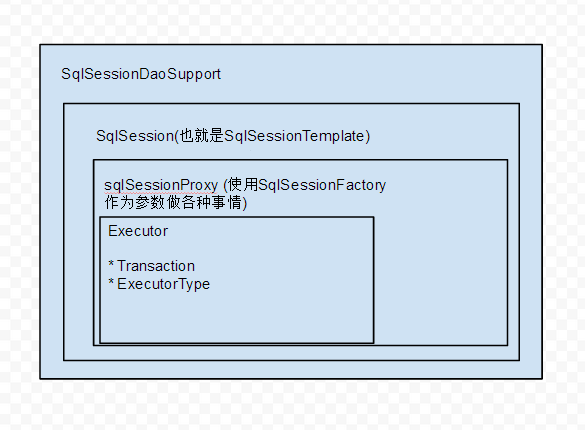
最后,画个图总结一下


也就是说,我们其实使用的是SqlSessionTemplate在做各种数据库操作,这个东西读取了我们的datasource和mybatisconfig,用它的Executor去执行我们Mapper里的sql语句来获取查询结果
MyBatis-Spring 执行SQL语句的流程的更多相关文章
- MyBatis直接执行sql语句mapper
<select id="queryBySql" resultType="HashMap"> <![CDATA[ ${sql} ]]> & ...
- 在mybatis执行SQL语句之前进行拦击处理
转载自:http://blog.csdn.net/hfmbook/article/details/41985853 比较适用于在分页时候进行拦截.对分页的SQL语句通过封装处理,处理成不同的分页sql ...
- 在mybatis中写sql语句的一些体会
本文会使用一个案例,就mybatis的一些基础语法进行讲解.案例中使用到的数据库表和对象如下: article表:这个表存放的是文章的基础信息 -- ------------------------- ...
- Mybatis如何执行Select语句,你真的知道吗?
持续原创输出,点击上方蓝字关注我吧 作者:不才陈某 博客:https://chenjiabing666.github.io 前言 本篇文章是Myabtis源码分析的第三篇,前两篇分别介绍了Mybati ...
- 10.1(java学习笔记)JDBC基本操作(连接,执行SQL语句,获取结果集)
一.JDBC JDBC的全称是java database connection java数据库连接. 在java中需要对数据库进行一系列的操作,这时就需要使用JDBC. sun公司制定了关于数据库操作 ...
- 4.5 .net core下直接执行SQL语句并生成DataTable
.net core可以执行SQL语句,但是只能生成强类型的返回结果.例如var blogs = context.Blogs.FromSql("SELECT * FROM dbo.Blogs& ...
- [转]在EntityFramework6中执行SQL语句
本文转自:http://www.cnblogs.com/wujingtao/p/5412329.html 在上一节中我介绍了如何使用EF6对数据库实现CRDU以及事务,我们没有写一句SQL就完成了所有 ...
- 在EntityFramework6中执行SQL语句
在EntityFramework6中执行SQL语句 在上一节中我介绍了如何使用EF6对数据库实现CRDU以及事务,我们没有写一句SQL就完成了所有操作.这一节我来介绍一下如何使用在EF6中执行SQL语 ...
- 详解Java的MyBatis框架中SQL语句映射部分的编写
这篇文章主要介绍了Java的MyBatis框架中SQL语句映射部分的编写,文中分为resultMap和增删查改实现两个部分来讲解,需要的朋友可以参考下 1.resultMap SQL 映射XML 文件 ...
随机推荐
- css笔记——区分css3中的transform transition animation
出处:http://blog.csdn.net/dyllove98/article/details/8957232 CSS3中和动画有关的属性有三个 transform. transition ...
- 《HTML5网页开发实例详解》连载(四)HTML5中的FileSystem接口
HTML 5除了提供用于获取文件信息的File对象外,还添加了FileSystem相关的应用接口.FileSystem对于不同的处理功能做了细致的分类,如用于文件读取和处理的FileReader和Fi ...
- 你需要知道的三个CSS技巧
各种浏览器之间的竞争的白热化意味着越来越多的人现在开始使用那些支持最新.最先进的W3C Web标准的设备,以一种更具交互性的方式来访问互联网.这意味着我们终于能够利用更强大更灵活的CSS来创造更简洁, ...
- 关于TCP的两个小练习_第一个博客~
先来一个本地的,客户端发送请求,服务端接收请求的简单代码 1 package com.TCP.java; 2 3 import java.io.IOException; 4 import java.i ...
- PHP MYSQL 数据库配置连接
//配置文件 Config.php // 默认使用数据库配置 ***************************************** $Config['ConnectTag'] = 'de ...
- C# 学习之旅(3) --- 会说话的简易计算器
using System; using System.Collections.Generic; using System.ComponentModel; using System.Data; usin ...
- 1027 Colors in Mars (20)
#include <stdio.h> #include <map> using namespace std; int main() { int R,G,B,i; map< ...
- FragmentActivity和Activity的具体区别在哪里
fragment是3.0以后的东西,为了在低版本中使用fragment就要用到android-support-v4.jar兼容包,而fragmentActivity就是这个兼容包里面的,它提供了操作f ...
- 转载 @html.ActionLink的几种参数格式
一 Html.ActionLink("linkText","actionName") 该重载的第一个参数是该链接要显示的文字,第二个参数是对应的控制器的方法, ...
- 深层次详解Exception
所有的异常类都继承自System.Exception类,当异常产生时,CLR将创建该异常类的实例对象,将从最底层依次寻找合适的异常类型,同时若存在catch语句时将会选择最合适的语句进行处理. cat ...