
spring 跨域 CORS (Cross Origin Resources Share) 跨域
Spring提供了三种方式跨域
1、CorsFilter 过滤器
2、<mvc:cors> Bean(全局,推荐使用)
3、@CrossOrigin注解
以上三种方式本质都是用来配置CorsConfiguration
1、CorsFilter 过滤器
首先创建一个自己的过滤器
这里我创建一个类,名字为MyCorsFilter
import org.springframework.web.cors.CorsConfiguration;

import org.springframework.web.cors.UrlBasedCorsConfigurationSource;

import org.springframework.web.filter.CorsFilter;

import java.util.Collections;

public class MyCorsFilter extends CorsFilter {

    public MyCorsFilter() {

        super(configurationSource());

    }

    private static UrlBasedCorsConfigurationSource configurationSource(){

        UrlBasedCorsConfigurationSource source=new UrlBasedCorsConfigurationSource();

        CorsConfiguration corsConfiguration=new CorsConfiguration();

                                                                   /*

                                                                    *允许跨域的地址

                                                                    *http://127.0.0.1:8848*/

        corsConfiguration.setAllowedOrigins(Collections.singletonList("http://127.0.0.1:8848"));

        corsConfiguration.setAllowCredentials(true);

        //允许跨域的路径

        source.registerCorsConfiguration("/tagc",corsConfiguration);

        return source;

    }

}
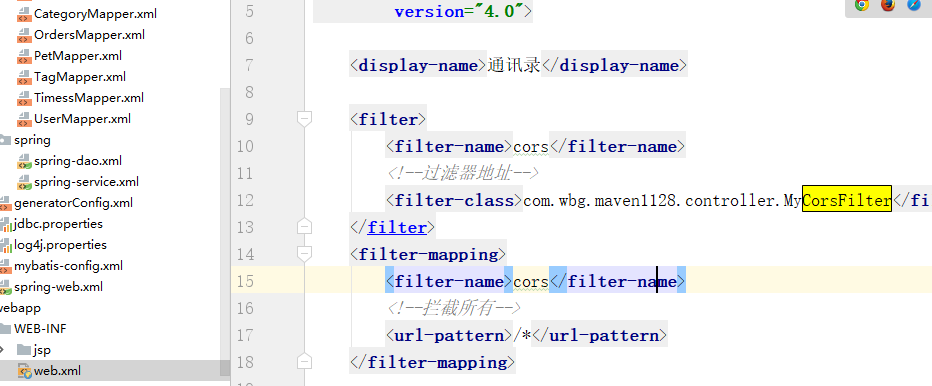
创建好后,进行在web.xml文件进行配置
<filter>

        <filter-name>cors</filter-name>

        <!--过滤器地址-->

        <filter-class>com.wbg.maven1128.controller.MyCorsFilter</filter-class>

    </filter>

    <filter-mapping>

        <filter-name>cors</filter-name>

        <!--拦截所有-->

        <url-pattern>/*</url-pattern>

    </filter-mapping>
2、<mvc:cors> Bean(全局,推荐使用)
在spring-web里面进行配置
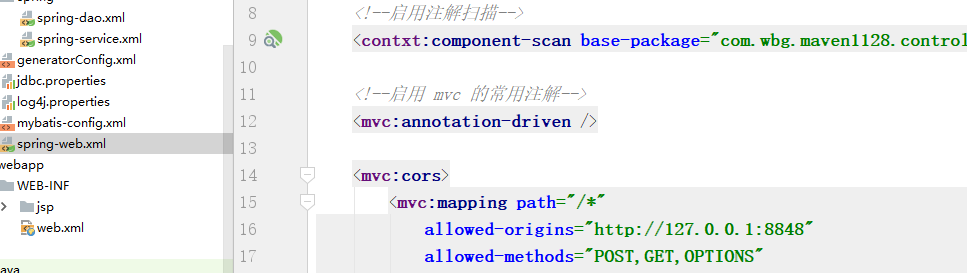
    <mvc:cors>

        <mvc:mapping path="/taga"

                     allowed-origins="http://127.0.0.1:8020"

                     allowed-methods="POST,GET, OPTIONS,DELETE,PUT"

                     allowed-headers="Content-Type,ContentType,Access-Control-Allow-Headers, Authorization, X-Requested-With"

                     allow-credentials="true"/>

    </mvc:cors>
3、@CrossOrigin注解
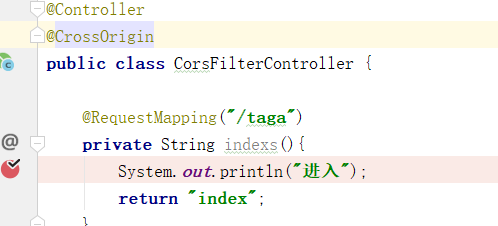
定义在类上,所有方法有效,@CrossOrigin不带参数就是默认
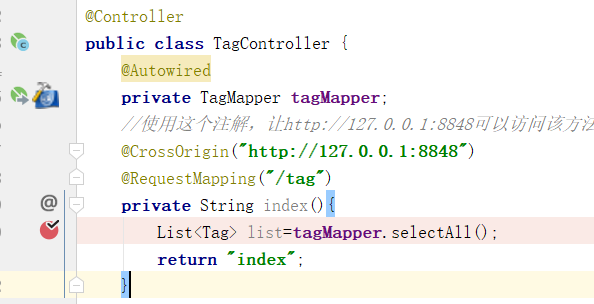
定义在方法上,该方法有效
测试页面
<!DOCTYPE html>

<html>

    <head>

        <meta charset="utf-8">

        <title></title>

    </head>

    <script src="http://code.jquery.com/jquery.js"></script>

    <body>

    <button onclick="aa() ">开始</button>

<script>

    function aa(){

        if(window.confirm("是否发送?")){

        fetch("http://localhost:8080/taga",{

            method:"get"

        }).then(function(res){

            resp.text().then(function(data){

                console.log(data);

            });

        })

        }

        else {

            fetch("http://localhost:8080/tagb",{

                method:"get"

            }).then(function(res){

                res.text().then(function(data){

                    console.log(data);

                })

            })

        }

    }

</script>

    </body>

</html>
跨域

spring 跨域 CORS (Cross Origin Resources Share) 跨域的更多相关文章
- CORS (Cross Origin Resources Share) 跨域
CORS 跨域 1 什么是跨域问题 基于安全考虑,浏览器会限制使用脚本发起任何跨域请求. 所谓的跨域请求,就是与当前页面的 http/ip/port 不一样的请求. 但在实际运用中,跨域获取数据的需求 ...
- Ajax本地跨域问题 Cross origin requests are only supported for HTTP
问题:打开本地html文件时,报错如下 Cross origin requests are only supported for protocol schemes: http, data,chrome ...
- 本地数据访问时出现跨域问题Cross origin requests are only supported for protocol schemes: ……
从桌面找到Chrome图标,右键属性,快捷方式,起始位置(安装路径) 注:在cmd中访问Program Files文件的方法 %ProgramFiles%=C:\Program Files %Prog ...
- Node.js 【CORS(cross origin resource sharing) on ExpressJS之笔记】
app.use(function(req, res, next) { res.header("Access-Control-Allow-Origin", "*" ...
- 跨域问题:Cross origin requests are only supported for protocol schemes: http...
跨域:Cross origin requests are only supported for protocol schemes: http, data, chrome, chrome-extensi ...
- Spring MVC配置CORS(解决跨域请求)
1. CORS 简介 同源策略(same origin policy)是浏览器安全的基石.在同源策略的限制下,非同源的网站之间不能发送 ajax 请求的. 为了解决这个问题,w3c 提出了跨源资源共享 ...
- Spring MVC学习总结(10)——Spring MVC使用Cors跨域
跨站 HTTP 请求(Cross-site HTTP request)是指发起请求的资源所在域不同于该请求所指向资源所在的域的 HTTP 请求.比如说,域名A(http://domaina.examp ...
- Spring Boot 通过CORS实现跨域
同源策略 很多人对跨域有一种误解,以为这是前端的事,和后端没关系,其实不是这样的,说到跨域,就不得不说说浏览器的同源策略. 同源策略是由 Netscape 提出的一个著名的安全策略,它是浏览器最核心也 ...
- spring boot:解决cors跨域问题的两种方法(spring boot 2.3.2)
一,什么是CORS? 1,CORS(跨域资源共享)(CORS,Cross-origin resource sharing), 它是一个 W3C 标准中浏览器技术的规范, 它允许浏览器向非同一个域的服务 ...
随机推荐
- (转)CentOS 7 sytemctl 自定义服务开机启动
CentOS 7 sytemctl 自定义服务开机启动 原文:http://blog.csdn.net/ithomer/article/details/51766319 CentOS 7继承了RHEL ...
- net.sf.json.JSONException: There is a cycle in the hierarchy! 转json死循环问题解决
解决上述问题遵照两个原则就可以: 1.页面不需要展示关联数据时 解决:将关联对象属性排除掉 2.页面需要展示关联数据时 解决:将关联对象改为立即加载,并且将关联对象中的属性排除
- 移动开发:Android官方提供的支持不同屏幕大小的全部方法
转载请注明出处:http://blog.csdn.net/sinyu890807/article/details/8830286 原文地址为:http://developer.android.com/ ...
- mongodb常用语句(集合操作)
mongodb常用语句(集合操作) 查看集合帮助 db.songs.help(); 查看集合总数据量 db.songs.count(); 查看表空间大小 db.songs.dataSize(); 查看 ...
- git代码管理工具-SourceTree 使用介绍
一.SourceTree 简单说明 SourceTree 是git 代码管理的可视化工具,可省去操作命令行的一个图形化工具,下载地址:https://www.sourcetreeapp.com/ 二. ...
- 数据降维(Dimensionality reduction)
数据降维(Dimensionality reduction) 应用范围 无监督学习 图片压缩(需要的时候在还原回来) 数据压缩 数据可视化 数据压缩(Data Compression) 将高维的数据转 ...
- Python项目中如何优雅的import
Python项目中如何优雅的import 前言 之前有一篇关于Python编码规范的随笔, 但是写的比较杂乱, 因为提到了import语句, 在篇文章中, 我专门来讲Python项目中如何更好的imp ...
- JavaScript资源分享
一. 资源教程: 综合类 前端知识体系 前端知识结构 Web前端开发大系概览 Web前端开发大系概览-中文版 Web Front-end Stack v2.2 En类资源汇总 免费的编程中文书籍索引 ...
- 深入理解JavaScript系列(30):设计模式之外观模式
介绍 外观模式(Facade)为子系统中的一组接口提供了一个一致的界面,此模块定义了一个高层接口,这个接口值得这一子系统更加容易使用. 正文 外观模式不仅简化类中的接口,而且对接口与调用者也进行了解耦 ...
- 图片的URL上传至阿里云OSS操作(微信小程序二维码返回的二进制上传到OSS)
当我们从网络中获取一个URL的图片我们要存储到本地或者是私有的云时,我们可以这样操作 把url中的图片文件下载到本地(或者上传到私有云中) public String uploadUrlToOss ...