
Spring(五)之Bean定义继承和依赖注入
一、Bean定义继承
bean定义可以包含许多配置信息,包括构造函数参数,属性值和特定于容器的信息,例如初始化方法,静态工厂方法名称等。
子bean定义从父定义继承配置数据。子定义可以根据需要覆盖某些值或添加其他值。
Spring Bean定义继承与Java类继承无关,但继承概念是相同的。您可以将父bean定义定义为模板,其他子bean可以从父bean继承所需的配置。
使用基于XML的配置元数据时,可以使用parent属性指定子bean定义,并将父bean指定为此属性的值。
演示示例:
(1)编写HelloWorld.java
package com.tutorialspoint;

public class HelloWorld {

       private String message1;

       private String message2;

       public void setMessage1(String message){

          this.message1 = message;

       }

       public void setMessage2(String message){

          this.message2 = message;

       }

       public void getMessage1(){

          System.out.println("World Message1 : " + message1);

       }

       public void getMessage2(){

          System.out.println("World Message2 : " + message2);

       }

}
(2)编写HelloIndea.java
package com.tutorialspoint;

public class HelloIndia {

   private String message1;

   private String message2;

   private String message3;

   public void setMessage1(String message){

      this.message1 = message;

   }

   public void setMessage2(String message){

      this.message2 = message;

   }

   public void setMessage3(String message){

      this.message3 = message;

   }

   public void getMessage1(){

      System.out.println("India Message1 : " + message1);

   }

   public void getMessage2(){

      System.out.println("India Message2 : " + message2);

   }

   public void getMessage3(){

      System.out.println("India Message3 : " + message3);

   }

}
(3)编写MainApp.java
package com.tutorialspoint;

import org.springframework.context.ApplicationContext;

import org.springframework.context.support.ClassPathXmlApplicationContext;

public class MainApp {

   public static void main(String[] args) {

      ApplicationContext context = new ClassPathXmlApplicationContext("Beans.xml");

      HelloWorld objA = (HelloWorld) context.getBean("helloWorld");

      objA.getMessage1();

      objA.getMessage2();

      HelloIndia objB = (HelloIndia) context.getBean("helloIndia");

      objB.getMessage1();

      objB.getMessage2();

      objB.getMessage3();

   }

}
(4)Beans.xml
<?xml version = "1.0" encoding = "UTF-8"?>

<beans xmlns = "http://www.springframework.org/schema/beans"

   xmlns:xsi = "http://www.w3.org/2001/XMLSchema-instance"

   xsi:schemaLocation = "http://www.springframework.org/schema/beans

   http://www.springframework.org/schema/beans/spring-beans-4.0.xsd">

     <bean id = "helloWorld" class = "com.tutorialspoint.HelloWorld">

      <property name = "message1" value = "Hello World!"/>

      <property name = "message2" value = "Hello Second World!"/>

       </bean>

   <bean id ="helloIndia" class = "com.tutorialspoint.HelloIndia" parent = "helloWorld">

      <property name = "message1" value = "Hello India!"/>

      <property name = "message3" value = "Namaste India!"/>

   </bean>

</beans>
(5)运行MainApp.java中的main方法

二、依赖注入
每个基于Java的应用程序都有一些对象可以协同工作,以呈现最终用户所看到的工作应用程序。在编写复杂的Java应用程序时,应用程序类应尽可能独立于其他Java类,以增加重用这些类的可能性,并在单元测试时独立于其他类测试它们。依赖注入(或称为布线)有助于将这些类粘合在一起,同时保持它们的独立性。
依赖注入常用两种形式:
1.set注入(比较常用)
2.构造函数注入
set注入示例:
(1)编写TextEditor.java
package com.tutorialspoint;

public class TextEditor {

   private SpellChecker spellChecker;

   // a setter method to inject the dependency.

   public void setSpellChecker(SpellChecker spellChecker) {

      System.out.println("Inside setSpellChecker." );

      this.spellChecker = spellChecker;

   }

   // a getter method to return spellChecker

   public SpellChecker getSpellChecker() {

      return spellChecker;

   }

   public void spellCheck() {

      spellChecker.checkSpelling();

   }

}
(2)编写SpellChecker.java
package com.tutorialspoint;

public class SpellChecker {

   public SpellChecker(){

      System.out.println("Inside SpellChecker constructor." );

   }

   public void checkSpelling(){

      System.out.println("Inside checkSpelling." );

   }

}
(3)编写Beans.xml
<?xml version = "1.0" encoding = "UTF-8"?>

<beans xmlns = "http://www.springframework.org/schema/beans"

   xmlns:xsi = "http://www.w3.org/2001/XMLSchema-instance"

   xsi:schemaLocation = "http://www.springframework.org/schema/beans

   http://www.springframework.org/schema/beans/spring-beans-4.0.xsd">

 <!-- Definition for textEditor bean using inner bean -->

   <bean id = "textEditor" class = "com.tutorialspoint.TextEditor">

      <property name = "spellChecker">

         <bean id = "spellChecker" class = "com.tutorialspoint.SpellChecker"/>

      </property>

   </bean>

</beans>
(4)编写MainApp.java
package com.tutorialspoint;

import org.springframework.context.ApplicationContext;

import org.springframework.context.support.ClassPathXmlApplicationContext;

public class MainApp {

   public static void main(String[] args) {

      ApplicationContext context = new ClassPathXmlApplicationContext("Beans.xml");

      TextEditor te = (TextEditor) context.getBean("textEditor");

      te.spellCheck();

   }

}
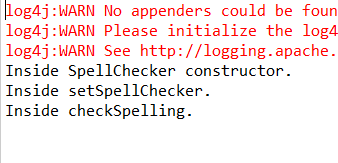
(5)运行MainApp.java中的main方法
2.注入集合
Spring提供四种集合注入方式:
(1)Set;(2)List;(3)Map;(4)Props;
演示示例如下:
(1)编写JavaCollection
package com.tutorialspoint;

import java.util.*;

public class JavaCollection {

   List addressList;

   Set  addressSet;

   Map  addressMap;

   Properties addressProp;

   // a setter method to set List

   public void setAddressList(List addressList) {

      this.addressList = addressList;

   }

   // prints and returns all the elements of the list.

   public List getAddressList() {

      System.out.println("List Elements :"  + addressList);

      return addressList;

   }

   // a setter method to set Set

   public void setAddressSet(Set addressSet) {

      this.addressSet = addressSet;

   }

   // prints and returns all the elements of the Set.

   public Set getAddressSet() {

      System.out.println("Set Elements :"  + addressSet);

      return addressSet;

   }

   // a setter method to set Map

   public void setAddressMap(Map addressMap) {

      this.addressMap = addressMap;

   }

   // prints and returns all the elements of the Map.

   public Map getAddressMap() {

      System.out.println("Map Elements :"  + addressMap);

      return addressMap;

   }

   // a setter method to set Property

   public void setAddressProp(Properties addressProp) {

      this.addressProp = addressProp;

   }

   // prints and returns all the elements of the Property.

   public Properties getAddressProp() {

      System.out.println("Property Elements :"  + addressProp);

      return addressProp;

   }

}
(2)编写Beans.xml
<?xml version = "1.0" encoding = "UTF-8"?>

<beans xmlns = "http://www.springframework.org/schema/beans"

   xmlns:xsi = "http://www.w3.org/2001/XMLSchema-instance"

   xsi:schemaLocation = "http://www.springframework.org/schema/beans

   http://www.springframework.org/schema/beans/spring-beans-4.0.xsd">

 <!-- Definition for javaCollection -->

   <bean id = "javaCollection" class = "com.tutorialspoint.JavaCollection">

      <!-- results in a setAddressList(java.util.List) call -->

      <property name = "addressList">

         <list>

            <value>INDIA</value>

            <value>Pakistan</value>

            <value>USA</value>

            <value>USA</value>

         </list>

      </property>

      <!-- results in a setAddressSet(java.util.Set) call -->

      <property name = "addressSet">

         <set>

            <value>INDIA</value>

            <value>Pakistan</value>

            <value>USA</value>

            <value>USA</value>

         </set>

      </property>

      <!-- results in a setAddressMap(java.util.Map) call -->

      <property name = "addressMap">

         <map>

            <entry key = "1" value = "INDIA"/>

            <entry key = "2" value = "Pakistan"/>

            <entry key = "3" value = "USA"/>

            <entry key = "4" value = "USA"/>

         </map>

      </property>

      <!-- results in a setAddressProp(java.util.Properties) call -->

      <property name = "addressProp">

         <props>

            <prop key = "one">INDIA</prop>

            <prop key = "one">INDIA</prop>

            <prop key = "two">Pakistan</prop>

            <prop key = "three">USA</prop>

            <prop key = "four">USA</prop>

         </props>

      </property>

   </bean>

</beans>
(3)编写MainApp.java
package com.tutorialspoint;

import org.springframework.context.ApplicationContext;

import org.springframework.context.support.ClassPathXmlApplicationContext;

public class MainApp {

       public static void main(String[] args) {

              ApplicationContext context = new ClassPathXmlApplicationContext("Beans.xml");

              JavaCollection jc=(JavaCollection)context.getBean("javaCollection");

              jc.getAddressList();

              jc.getAddressSet();

              jc.getAddressMap();

              jc.getAddressProp();

           }

}
(4)运行MainApp.java中的main方法
结果如下:

Spring(五)之Bean定义继承和依赖注入的更多相关文章
- spring学习五:Spring Bean 定义继承
Bean 定义继承 bean 定义可以包含很多的配置信息,包括构造函数的参数,属性值,容器的具体信息例如初始化方法,静态工厂方法名,等等. 子 bean 的定义继承父定义的配置数据.子定义可以根据需要 ...
- 品Spring:负责bean定义注册的两个“排头兵”
别看Spring现在玩的这么花,其实它的“筹码”就两个,“容器”和“bean定义”. 只有先把bean定义注册到容器里,后续的一切可能才有可能成为可能. 所以在进阶的路上如果要想走的顺畅些,彻底搞清楚 ...
- Spring IOC源代码具体解释之容器依赖注入
Spring IOC源代码具体解释之容器依赖注入 上一篇博客中介绍了IOC容器的初始化.通过源代码分析大致了解了IOC容器初始化的一些知识.先简单回想下上篇的内容 加载bean定义文件的过程.这个过程 ...
- Spring升级案例之IOC介绍和依赖注入
Spring升级案例之IOC介绍和依赖注入 一.IOC的概念和作用 1.什么是IOC 控制反转(Inversion of Control, IoC)是一种设计思想,在Java中就是将设计好的对象交给容 ...
- Spring-初识Spring框架-IOC控制反转(DI依赖注入)
---恢复内容开始--- IOC :控制反转 (DI:依赖注入)使用ioc模式开发 实体类必须有无参构造方法1.搭建Spring环境下载jarhttp://maven.springframework. ...
- 三大框架 之 Spring(IOC控制反转、DI依赖注入)
目录 常用词汇 left join与left outer join的区别 Struts2的标签库导入 Spring Spring概述 什么是Spring spring特点 下载 IOC 什么IOC 传 ...
- spring接口多实现类,该依赖注入哪一个?
一.问题的描述 在实际的系统应用开发中我经常会遇到这样的一类需求,相信大家在工作中也会经常遇到: 同一个系统在多个省份部署. 一个业务在北京是一种实现方式,是基于北京用户的需求. 同样的业务在上海是另 ...
- Spring详解(三)------DI依赖注入
上一篇博客我们主要讲解了IOC控制反转,也就是说IOC 让程序员不在关注怎么去创建对象,而是关注与对象创建之后的操作,把对象的创建.初始化.销毁等工作交给spring容器来做.那么创建对象的时候,有可 ...
- Java框架spring 学习笔记(五):Bean定义继承
子 bean 的定义继承父定义的配置数据.子定义可以根据需要重写一些值,或者添加其他值. 编写HelloWorld.java package com.example.spring; public cl ...
随机推荐
- Hbase配置指南
注意点 Hbase 需要zookeeper. Hbase 需要在各个节点的机器上配置. 集群中的启动顺序是Hadoop.zookeeper 和Hbase 搭建步骤 解压安装文件并配置环境变量. exp ...
- 使用jQuery获取Dribbble的内容
Introduction As a web developer, third party API integration is something you will have to face. Esp ...
- css中:not()选择器和jQuery中.not()方法
因为老是将这两个的not方法弄混,所以写一下备忘. css中:not()选择器用法 :not 伪类选择器可以筛选不符合表达式的元素,:not(selector) 其中的selector为css选择器 ...
- Grunt入门学习之(1) -- 环境安装
Grunt入门学习(1) - 环境安装 这周根据项目需要,在项目的基础上分模块开发了一个小的项目板块,但是在规范组织每个模块的代码和其依赖性时比较麻烦,需要一个项目板块的构建工具.各个模块都包括其对应 ...
- Android解析WindowManagerService(三)Window的删除过程
前言 在本系列文章中,我提到过:Window的操作分为两大部分,一部分是WindowManager处理部分,另一部分是WMS处理部分,Window的删除过程也不例外,本篇文章会介绍Window的删除过 ...
- python迭代器 生成器 三元运算 列表解析
1.迭代器 迭代器是访问集合元素的一种方式.迭代器对象从集合的第一个元素开始访问,直到所有的元素被访问完结束.迭代器只能往前不会后退,不过这也没什么,因为人们很少在迭代途中往后退.另外,迭代器的一大优 ...
- Selenium IDE录制脚本
一.当Selenium IDE中Format没有转换格式时,操作:Options—Options...—勾选Enable experimental features
- 【转】c++ http下载文件
#include <afx.h> #include <afxinet.h> #define RECVPACK_SIZE 2048 bool DownloadSaveFiles( ...
- Spring3实战第一章 Aop 切面 XML配置
刚看spring3实战书籍第一章 切面以前没有关注过 现在看到了 随手试验一下 AOP AOP(Aspect Oriented Programming),即面向切面编程,可以说是OOP(Objec ...
- linux 下的python的最佳打开方式, you know?
IPython install IPython是Python的交互式Shell,提供了代码自动补完,自动缩进,高亮显示,执行Shell命令等非常有用的特性.特别是它的代码补完功能,例如:在输入zlib ...