
shiro 和spring集合 实现登录时输入验证码并校验(七)
编写实现验证码的主体实现类:CaptchaCode
 import java.util.UUID;

 import javax.servlet.http.HttpServletRequest;

 import javax.servlet.http.HttpServletResponse;

 import org.apache.commons.lang3.StringUtils;

 import org.apache.shiro.cache.Cache;

 import org.apache.shiro.cache.CacheManager;

 import org.slf4j.Logger;

 import org.slf4j.LoggerFactory;

 import org.springframework.beans.factory.InitializingBean;

 import org.springframework.util.Assert;

 import com.itzixi.common.utils.CookieUtils;

 /**

  *

  * @Title: CaptchaCode.java

  * @Description: 验证码实现类

  * @date 2017年10月14日 下午12:11:53

  * @version V1.0

  */

 public class CaptchaCode implements InitializingBean {

     private final static Logger logger = LoggerFactory.getLogger(CaptchaCode.class);

     private static final String DEFAULT_COOKIE_NAME = "itzixi-captcha";

     private final static String DEFAULT_CHACHE_NAME = "itzixiCaptchaCache";

     private final static int DEFAULT_MAX_AGE = -1; // cookie超时默认为session会话状态

     private CacheManager cacheManager;

     private String cacheName;

     private String cookieName;

     private Cache<String, String> itzixiCaptchaCache;

     public CaptchaCode() {

         this.cacheName = DEFAULT_CHACHE_NAME;

         this.cookieName = DEFAULT_COOKIE_NAME;

     }

     public CaptchaCode(CacheManager cacheManager) {

         this();

         this.cacheManager = cacheManager;

     }

     public CacheManager getCacheManager() {

         return cacheManager;

     }

     public void setCacheManager(CacheManager cacheManager) {

         this.cacheManager = cacheManager;

     }

     public String getCacheName() {

         return cacheName;

     }

     public void setCacheName(String cacheName) {

         this.cacheName = cacheName;

     }

     public String getCookieName() {

         return cookieName;

     }

     public void setCookieName(String cookieName) {

         this.cookieName = cookieName;

     }

     @Override

     public void afterPropertiesSet() throws Exception {

         Assert.notNull(cacheManager, "cacheManager must not be null!");

         Assert.hasText(cacheName, "cacheName must not be empty!");

         Assert.hasText(cookieName, "cookieName must not be empty!");

         this.itzixiCaptchaCache = cacheManager.getCache(cacheName);

     }

     /**

      * 生成验证码

      */

     public void generate(HttpServletRequest request, HttpServletResponse response) {

         // 先检查cookie的uuid是否存在

         String cookieValue = CookieUtils.getCookieValue(request, cookieName);

         boolean hasCookie = true;

         if (StringUtils.isBlank(cookieValue)) {

             hasCookie = false;

             cookieValue = UUID.randomUUID().toString();

         }

         String captchaCode = CaptchaUtils.generateCode().toUpperCase();// 转成大写重要

         // 不存在cookie时设置cookie

         if (!hasCookie) {

             CookieUtils.setCookie(request, response, cookieName, cookieValue, DEFAULT_MAX_AGE);

         }

         // 生成验证码

         CaptchaUtils.generate(response, captchaCode);

         itzixiCaptchaCache.put(cookieValue, captchaCode);

     }

     /**

      * 仅能验证一次,验证后立即删除

      * @param request HttpServletRequest

      * @param response HttpServletResponse

      * @param userInputCaptcha 用户输入的验证码

      * @return 验证通过返回 true, 否则返回 false

      */

     public boolean validate(HttpServletRequest request, HttpServletResponse response, String userInputCaptcha) {

         if (logger.isDebugEnabled()) {

             logger.debug("validate captcha userInputCaptcha is " + userInputCaptcha);

         }

         String cookieValue = CookieUtils.getCookieValue(request, cookieName);

         if (StringUtils.isBlank(cookieValue)) {

             return false;

         }

         String captchaCode = itzixiCaptchaCache.get(cookieValue);

         if (StringUtils.isBlank(captchaCode)) {

             return false;

         }

         // 转成大写重要

         userInputCaptcha = userInputCaptcha.toUpperCase();

         boolean result = userInputCaptcha.equals(captchaCode);

         if (result) {

             itzixiCaptchaCache.remove(cookieValue);

             CookieUtils.deleteCookie(request, response, cookieName);

         }

         return result;

     }

 }
CaptchaUtils.java
 import java.awt.BasicStroke;

 import java.awt.Color;

 import java.awt.Font;

 import java.awt.Graphics2D;

 import java.awt.RenderingHints;

 import java.awt.geom.QuadCurve2D;

 import java.awt.image.BufferedImage;

 import java.util.Random;

 import javax.imageio.ImageIO;

 import javax.servlet.ServletOutputStream;

 import javax.servlet.http.HttpServletResponse;

 /**

  *

  * @Title: CaptchaUtils.java

  * @Description: 验证码工具类

  * @date 2017年10月14日 下午12:13:14

  * @version V1.0

  */

 class CaptchaUtils {

     // 默认的验证码大小

     private static final int WIDTH = 108, HEIGHT = 40, CODE_SIZE = 4;

     // 验证码随机字符数组

     protected static final char[] charArray = "3456789ABCDEFGHJKMNPQRSTUVWXY".toCharArray();

     // 验证码字体

     private static final Font[] RANDOM_FONT = new Font[] {

         new Font("nyala", Font.BOLD, 38),

         new Font("Arial", Font.BOLD, 32),

         new Font("Bell MT", Font.BOLD, 32),

         new Font("Credit valley", Font.BOLD, 34),

         new Font("Impact", Font.BOLD, 32),

         new Font(Font.MONOSPACED, Font.BOLD, 40)

     };

     /**

      * 生成验证码

      */

     static void generate(HttpServletResponse response, String vCode) {

         BufferedImage image = new BufferedImage(WIDTH, HEIGHT, BufferedImage.TYPE_INT_RGB);

         response.setHeader("Pragma","no-cache");

         response.setHeader("Cache-Control","no-cache");

         response.setDateHeader("Expires", 0);

         response.setContentType("image/jpeg");

         ServletOutputStream sos = null;

         try {

             drawGraphic(image, vCode);

             sos = response.getOutputStream();

             ImageIO.write(image, "JPEG", sos);

             sos.flush();

         } catch (Exception e) {

             throw new RuntimeException(e);

         } finally {

             IOUtils.closeQuietly(sos);

         }

     }

     // 生成随机类

     private static final Random RANDOM = new Random();

     /**

      * 生成验证码字符串

      * @return 验证码字符串

      */

     static String generateCode() {

         int count = CODE_SIZE;

         char[] buffer = new char[count];

         for (int i = 0; i < count; i++) {

             buffer[i] = charArray[RANDOM.nextInt(charArray.length)];

         }

         return new String(buffer);

     }

     private static void drawGraphic(BufferedImage image, String code){

         // 获取图形上下文

         Graphics2D g = image.createGraphics();

         g.setRenderingHint(RenderingHints.KEY_INTERPOLATION, RenderingHints.VALUE_INTERPOLATION_NEAREST_NEIGHBOR);

         // 图形抗锯齿

         g.setRenderingHint(RenderingHints.KEY_ANTIALIASING, RenderingHints.VALUE_ANTIALIAS_ON);

         // 字体抗锯齿

         g.setRenderingHint(RenderingHints.KEY_TEXT_ANTIALIASING, RenderingHints.VALUE_TEXT_ANTIALIAS_ON);

         // 设定背景色,淡色

         g.setColor(getRandColor(210, 250));

         g.fillRect(0, 0, WIDTH, HEIGHT);

         // 画小字符背景

         Color color = null;

         for(int i = 0; i < 20; i++){

             color = getRandColor(120, 200);

             g.setColor(color);

             String rand = String.valueOf(charArray[RANDOM.nextInt(charArray.length)]);

             g.drawString(rand, RANDOM.nextInt(WIDTH), RANDOM.nextInt(HEIGHT));

             color = null;

         }

         // 取随机产生的认证码(4位数字)

         char[] buffer = code.toCharArray();

         for (int i = 0; i < buffer.length; i++){

             char _code = buffer[i];

             //旋转度数 最好小于45度

             int degree = RANDOM.nextInt(28);

             if (i % 2 == 0) {

                 degree = degree * (-1);

             }

             //定义坐标

             int x = 22 * i, y = 21;

             //旋转区域

             g.rotate(Math.toRadians(degree), x, y);

             //设定字体颜色

             color = getRandColor(20, 130);

             g.setColor(color);

             //设定字体,每次随机

             g.setFont(RANDOM_FONT[RANDOM.nextInt(RANDOM_FONT.length)]);

             //将认证码显示到图象中

             g.drawString("" + _code, x + 8, y + 10);

             //旋转之后,必须旋转回来

             g.rotate(-Math.toRadians(degree), x, y);

         }

         //图片中间曲线,使用上面缓存的color

         g.setColor(color);

         //width是线宽,float型

         BasicStroke bs = new BasicStroke(3);

         g.setStroke(bs);

         //画出曲线

         QuadCurve2D.Double curve = new QuadCurve2D.Double(0d, RANDOM.nextInt(HEIGHT - 8) + 4, WIDTH / 2, HEIGHT / 2, WIDTH, RANDOM.nextInt(HEIGHT - 8) + 4);

         g.draw(curve);

         // 销毁图像

         g.dispose();

     }

     /**

      * 给定范围获得随机颜色

      */

     private static Color getRandColor(int fc, int bc) {

         if (fc > 255)

             fc = 255;

         if (bc > 255)

             bc = 255;

         int r = fc + RANDOM.nextInt(bc - fc);

         int g = fc + RANDOM.nextInt(bc - fc);

         int b = fc + RANDOM.nextInt(bc - fc);

         return new Color(r, g, b);

     }

 }
IOUtils.java
 import java.io.Closeable;

 import java.io.IOException;

 /**

  *

  * @Title: IOUtils.java

  * @Description: 流工具类,继承自Spring

  * @date 2017年10月14日 下午12:13:04

  * @version V1.0

  */

 public class IOUtils extends org.springframework.util.StreamUtils {

     /**

      * closeQuietly

      * @param closeable 自动关闭

      */

     public static void closeQuietly(Closeable closeable) {

         try {

             if (closeable != null) {

                 closeable.close();

             }

         } catch (IOException ioe) {

             // ignore

         }

     }

 }
2、增加Bean的配置文件 在spring配置文件中增加:并采用缓存redis实现验证码的缓存存储
 <!--此Bean 只是增加登录时的验证码处理,不是shiro必须的配置-->

     <bean class="com.itzixi.web.utils.CaptchaCode">

         <!--<property name="cacheManager" ref="shiroEhcacheManager"/>-->

         <property name="cacheManager" ref="shiroRedisCacheManager"></property>

         <!-- 复用半小时缓存 -->

         <property name="cacheName" value="cacheCaptcha"/>

     </bean>
3、增加前端代码实现:
  <div class="form-group">

             <label class="control-label visible-ie8 visible-ie9">密码</label>

             <div id="input-error">

                 <input class="form-control form-control-solid placeholder-no-fix form-group" type="text"

                        autocomplete="off" placeholder="验证码" name="captcha" required/>

                 <a>

                     <img id="captcha" alt="验证码" src="<%=request.getContextPath() %>/captcha.action"

                          data-src="<%=request.getContextPath() %>/captcha.action?time="

                          style="width:94.5px;height:35px;"/>

                 </a>

             </div>

         </div>
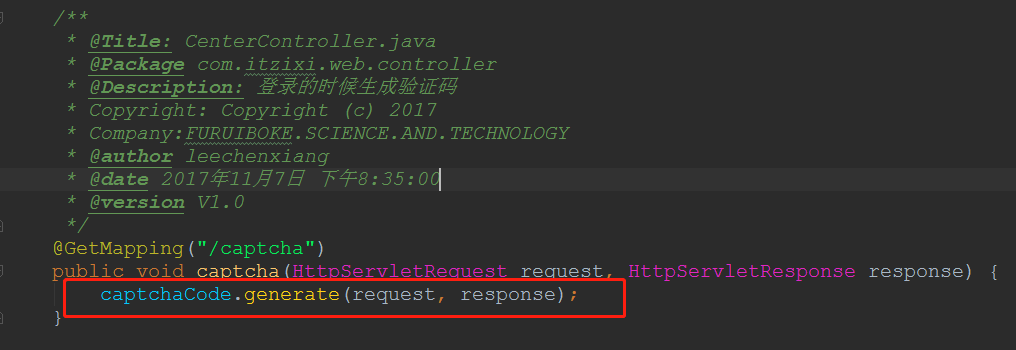
在Controller增加/captcha.action 服务地址方法,调用验证码生成类进行验证码生成并加入到缓存中去
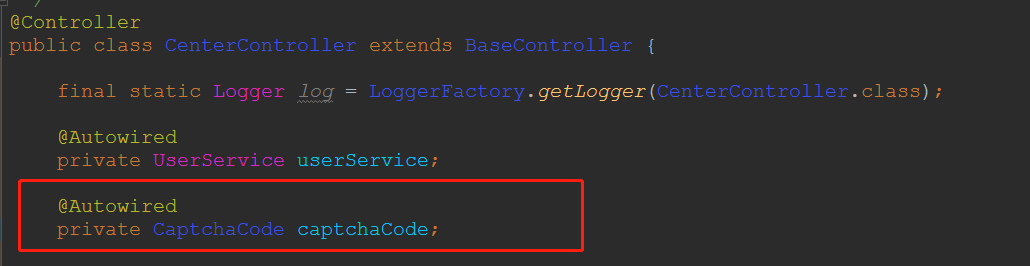
4、在Controller层增加代码实现 接收,验证动作,如:CenterController.doPostlogin(....)
  @RequestMapping(value = "/login", method = RequestMethod.POST)

     @ResponseBody

     public LeeJSONResult doPostlogin(String username, String password, String captcha,

                                      @RequestParam(value = "isRememberMe", defaultValue = "0") Integer isRememberMe,

                                      HttpServletRequest request, HttpServletResponse response) {

         if (StringUtils.isBlank(username)) {

             return LeeJSONResult.errorMsg("用户名不能为空");

         }

         if (StringUtils.isBlank(password)) {

             return LeeJSONResult.errorMsg("密码不能为空");

         }

         if (!captchaCode.validate(request, response, captcha)) {

             return LeeJSONResult.errorMsg("验证码错误, 请重新输入...");

         }

       return LeeJSONResult.ok();

   }
shiro 和spring集合 实现登录时输入验证码并校验(七)的更多相关文章
- Shiro和Spring 集合实现同一个账号只能一个人在线使用,其它人在使用进行剔除(八)
1.实现原理其实就是自定义过滤器,然后登录时,A登录系统后,B也登录了,这个时候获取此账号之前的session给删除,然后将新的session放入到缓存里面去,一个账户对应一个有序的集合 编写自定义过 ...
- shiro和Spring整合使用注解时没有执行realm的doGetAuthorizationInfo回调方法的解决(XML配置)
在使用Shiro框架进行项目整合时,使用注解在使用Shiro框架进行项目整合时,使用注解在使用Shiro框架进行项目整合时,使用注解@RequiresPermissions为方法提供是需要的权限,但是 ...
- shiro 集成spring 配置 学习记录(一)
首先当然是项目中需要增加shiro的架包依赖: <!-- shiro --> <dependency> <groupId>org.apache.shiro</ ...
- spring + shiro + cas 实现sso单点登录
sso-shiro-cas spring下使用shiro+cas配置单点登录,多个系统之间的访问,每次只需要登录一次,项目源码 系统模块说明 cas: 单点登录模块,这里直接拿的是cas的项目改了点样 ...
- 七、spring boot 1.5.4 集成shiro+cas,实现单点登录和权限控制
1.安装cas-server-3.5.2 官网:https://github.com/apereo/cas/releases/tag/v3.5.2 下载地址:cas-server-3.5.2-rele ...
- Spring Shiro配置第三方SSO客户端登录
经过实践的Shiro配置,利用 sSOInterceptor 进行sso登录拦截 配置 @Configuration public class ShiroConfiguration extends B ...
- Shiro:未登录时请求跳转问题
问题:前后端分离项目,在用Shiro做权限控制时,未登录状态发送的请求都会重定向,导致前端无法捕捉重定向后的消息.如何不重定向在原来的请求返回信息提示未登录,前端根据信息调到登录页? 首先,看一下Sh ...
- 去掉shiro登录时url里的JSESSIONID https://blog.csdn.net/aofavx/article/details/51701012
经过查找论坛和分析源码,确认了是在ShiroHttpServletResponse里加上的. 因此继承ShiroHttpServletResponse类,覆盖相应方法,再重写 ShiroFilterF ...
- Shiro 与spring 整合的及简单使用(转)
文章完全转载自: http://www.cnblogs.com/learnhow/p/5694876.html ,大家可以点击访问原文链接,个人仅作学习收藏 ! 本篇内容大多总结自张开涛的<跟 ...
随机推荐
- 新手学Appium_Python_Client
原文转自http://blog.sina.com.cn/s/blog_68f262210102v538.html 一,Appium_Python_Client的安装 推荐使用pip安装 pip ins ...
- 1013:Digital Roots
注意:大数要用字符串表示! sprintf:字符串格式化命令 主要功能:将格式化的数据写入某个字符串缓冲区 头文件:<stdio.h> 原型 int sprintf( char *buff ...
- 【idea】常用快捷键
快捷键盘含义 键组合 进入一个类的实现 alt+command+B 加get,set,构造函数,重写方法 command+N 全项目关键字查找 shift+command+F 查看一个类在哪儿被依赖 ...
- web本地存储(localStorage、sessionStorage)
web 本地存储 (localStorage.sessionStorage) 说明 对浏览器来说,使用 Web Storage 存储键值对比存储 Cookie 方式更直观,而且容量更大,它包含两种:l ...
- wpf 客户端【JDAgent桌面助手】开发详解-开篇
上周二 发表了一个帖子:wpf 客户端[JDAgent桌面助手]业余开发的终于完工了..晒晒截图... 没有想到不到一个周时间已经浏览量过8千,估计过几天就过万了..很开心啊.. 评论中好多网友问我要 ...
- Android - 传统蓝牙通信聊天
Android -传统蓝牙通信聊天 技术:java+Android4.4+jdk1.8 运行环境:Android4.4.Android7.0 概述 Android 传统蓝牙的使用,包括开关蓝牙.搜索设 ...
- 如何重启 Windows 10 子系统(WSL) ubuntu
如何重启 Windows 10 子系统(WSL) ubuntu WSL 子系统是基于 LxssManager 服务运行的. 只需要将 LxssManager 重启即可. 可以做成一个 bat 文件. ...
- vue2.0实现一个模态弹框,内容自定义(使用slot)
定义模态框:合理使用插槽 model.vue <!-- 模态弹窗 --> <template> <div class="self-modal" v-s ...
- 一些部署django用到的linux命令
mv untitled45/ /1601F/wang/ 将XXXX移动到XXX,也可以用于给XXX重新命名 zip -r -q -o hello.zip /1601F/3/untitled45 安静 ...
- 【BZOJ】1801 [Ahoi2009]chess 中国象棋(dp)
题目 传送门:QWQ 分析 发现我们关心的不是棋子的位置,我们只关心棋子数量就ok. 首先每行每列最多两个棋子.这是显然的. 然后我觉得本题最难的部分就是对行进行讨论,蒟蒻我一直被限制在了对格点讨论. ...