
jquery超炫的列表筛选插件
今天要为大家带来一款非常实用的jquery列表筛选插件,效果非常好。单击某项的时候动画筛选该项的列表。我们一起看下效果图:
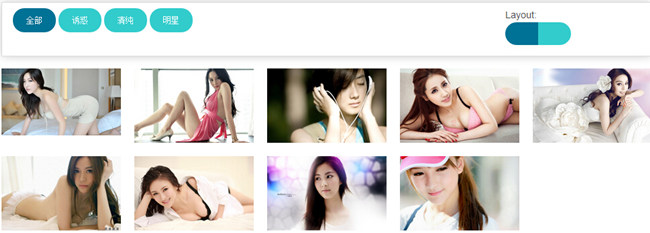
我们一起看下实现的代码:
html代码:
<div class="row">

        <div class="small-12 columns small-centered">

            <fieldset class="controls">

                <div class="row">

                    <!-- filter buttons -->

                    <div class="small-9 columns" id="controlsfilter">

                        <button class="filter tiny round active" data-filter="all">

                            全部</button>

                        <button class="filter tiny round" data-filter=".newyork">

                            诱惑</button>

                        <button class="filter tiny round" data-filter=".california">

                            清纯</button>

                        <button class="filter tiny round" data-filter=".texas">

                            明星</button>

                    </div>

                    <!-- layout buttons -->

                    <div class="small-3 columns" id="controlslayout">

                        <label>

                            Layout:</label>

                        <div class="controlslayout">

                            <input type="radio" class="grid" checked="checked" name="layout" id="grid"><label

                                id="labelgrid" for="grid"><i class="fa fa-th"></i></label><input type="radio" class="list"

                                    name="layout" id="list"><label id="labellist" for="list"><i class="fa fa-bars"></i></label></div>

                    </div>

                </div>

            </fieldset>

        </div>

    </div>

    <div class="row">

        <!-- container for images -->

        <div class="small-12 columns small-centered">

            <div class="container" id="Container">

                <ul class="small-block-grid-3 medium-block-grid-4 large-block-grid-5">

                    <li class="mix newyork" style="display: inline-block;">

                        <img border="0" src="imgs/a1.jpg"></li>

                    <li class="mix newyork" style="display: inline-block;">

                        <img border="0" src="imgs/a5.jpg"></li>

                    <li class="mix california" style="display: inline-block;">

                        <img border="0" src="imgs/b1.jpg"></li>

                    <li class="mix newyork" style="display: inline-block;">

                        <img border="0" src="imgs/a4.jpg"></li>

                    <li class="mix texas" style="display: inline-block;">

                        <img border="0" src="imgs/c1.jpg"></li>

                    <li class="mix newyork" style="display: inline-block;">

                        <img border="0" src="imgs/a2.jpg"></li>

                    <li class="mix newyork" style="display: inline-block;">

                        <img border="0" src="imgs/a3.jpg"></li>

                    <li class="mix california" style="display: inline-block;">

                        <img border="0" src="imgs/b2.jpg"></li>

                    <li class="mix california" style="display: inline-block;">

                        <img border="0" src="imgs/b3.jpg"></li>

                    <li class="gap"></li>

                    <li class="gap"></li>

                </ul>

            </div>

        </div>

    </div>
css代码:
    /** Controls **/

        .controls

        {

            padding: 0.5em 0.25em 0.5em 1em;

            -webkit-box-shadow: 0 0 20px rgba(0, 0, 0, .2);

            -goog-ms-box-shadow: 0 0 20px rgba(0, 0, 0, .2);

            box-shadow: 0 0 20px rgba(0, 0, 0, .2);

            -moz-border-radius:;

        }

        .filter, .controlslayout label

        {

            background: #33cccc;

        }

        button, .button

        {

            margin-bottom: 0.5em;

            outline: none;

        }

        .controls button.active, .controlslayout input[type="radio"]:checked + label

        {

            background: #007295;

        }

        #controlslayout input[type="radio"]

        {

            visibility: hidden;

            height:;

            width:;

        }

        #controlslayout input[type="radio"] + label

        {

            margin:;

        }

        .controlslayout

        {

            display: block;

        }

        #controlslayout .fa

        {

            font-size: 1.5em;

            color: #ffffff;

        }

        #labelgrid

        {

            border-radius: 1000px 0 0 1000px;

            padding-top: 0.5rem;

            padding-right: .75rem;

            padding-bottom: 0.3rem;

            padding-left: 1rem;

        }

        #labellist

        {

            border-radius: 0 1000px 1000px 0;

            padding-top: 0.5rem;

            padding-right: 1rem;

            padding-bottom: 0.3rem;

            padding-left: .75rem;

        }

        /** Container **/

        #Container .mix

        {

            display: none;

        }

        #Container .large-block-grid-5 > li:nth-of-type(5n+1), #Container .large-block-grid-5 > li:nth-of-type(1n)

        {

            clear: none;

        }
js代码:
 $('#Container').mixItUp();

        });

        $('input').on('click', function () {

            if ($(this).hasClass('grid')) {

                $('#Container ul').removeClass('small-block-grid-1').addClass('small-block-grid-3 medium-block-grid-4 large-block-grid-5');

            }

            else if ($(this).hasClass('list')) {

                $('#Container ul').removeClass('small-block-grid-3 medium-block-grid-4 large-block-grid-5').addClass('small-block-grid-1');

            }

        }); //@ sourceURL=pen.js
注:本文爱编程原创文章,转载请注明原文地址:http://www.w2bc.com/Article/5794
jquery超炫的列表筛选插件的更多相关文章
- 一款基于jquery超炫的图片切换特效
今天为给大家介绍一款基于jquery超炫的图片切换特效.由百叶窗飞入显示图片.图片消息的时候也是百叶窗渐行渐远.用于图片展示,效果还是非常好,我们一起看下效果图: 在线预览 源码下载 来看下实现的 ...
- 一款基jquery超炫的动画导航菜单
今天给大家分享一款基jquery超炫的动画导航菜单.这款导航菜单,初始时页面中间一个按钮,单击按钮,菜单从左侧飞入页中.再次单击按钮,导航飞入左侧消息.动画效果很非常炫.一起看下效果图: 在线预览 ...
- 一款基于jquery超炫的弹出层提示消息
今天给大家带来一款基于jquery超炫的弹出层提示消息.这款实例页面初始时,一个go按钮.当单击go按钮时,提示强出层以动画形式出现.效果图如下: 在线预览 源码下载 实现的代码. html代码: ...
- 程序猿必备的10款超炫酷HTML5 Canvas插件
1.超炫酷HTML5 Canvas 3D旋转地球动画 这是一款基于HTML5 Canvas的3D地球模拟动画,动画以太空作为背景,地球在太空中旋转,同时我们也可以拖拽鼠标来从不同的角度观察地球.另外我 ...
- jQuery超炫酷按钮插件及源码
现在大部分网页的按钮都是经过美化的,那些原始的浏览器按钮太过于枯燥乏味,让用户失去和网站交互的兴趣.早期我们都是通过背景图片来美化网页按钮,而现在我们可以利用扩展性更好的CSS3来制作漂亮的网页按钮, ...
- 快速设置超炫banner,js插件
http://www.themepunch.com/codecanyon/revolution_wp/ 记录一下以后用 //出自http://www.cnblogs.com/ahjesus 尊重作者辛 ...
- 8个超炫酷的jQuery相册插件欣赏
在网页中,相册应用十分常见,如果你经常逛一些社交网站,那么你应该会注意到很多各式各样的网页相册应用.今天我们要来分享一些最新收集的jQuery相册插件,这些精美的jQuery相册插件可以帮助你快速搭建 ...
- 超炫的时间轴jquery插件Timeline Portfolio
Timeline Portfolio是一款按时间顺序专业显示事件的jquery时间轴插件,可以根据时间的先后嵌入各种媒体包括微博,视频和地图等.这个展现的模式非常适合设计师的作品集和个人简历的展示.T ...
- 超炫酷的jQuery/HTML5应用效果及源码
jQuery非常强大,我们之前也用jQuery分享过很多实用的插件.HTML5可以让网页变得更加绚丽多彩,将HTML5和jQuery结合使用那将发挥更棒的效果. 今天向大家收集了一些关于HTML5和j ...
随机推荐
- 一段测试try...catch运行时间的代码
public class Test2 { private static int test() { int i=1; try { i=2; ...
- 转:完成端口(Completion Port)详解
手把手叫你玩转网络编程系列之三 完成端口(Completion Port)详解 ...
- 6种.net分布式缓存解决方式
6种.net分布式缓存解决方式 1. 使用内置ASP.NET Cache (System.Web.Caching) : https://msdn.microsoft.com/en-us/lib ...
- 能让你聪明的工作DEAL四法则,来自《每周工作四小时》书籍
来自书籍<每周工作四小时>,作者蒂莫西·费里斯(Tim Ferriss,昵称:蒂姆) 能让你聪明的工作DEAL四法则: 第一步:D——定位(Definition) 第二步:E——精简( ...
- 在 Asp.NET MVC 中使用 SignalR 实现推送功能 [转]
在 Asp.NET MVC 中使用 SignalR 实现推送功能 罗朝辉 ( http://blog.csdn.net/kesalin ) CC许可,转载请注明出处 一,简介 Signal 是微软支持 ...
- Quartz.net官方开发指南[转]
http://www.cnblogs.com/shanyou/category/102991.html
- Mosquitto ---学习笔记
Mosquitto的安装,可以参见:https://mosquitto.org/download/ [基础配置]Mosquitto服务的配置文件为/etc/mosquitto/mosquitto.co ...
- 共享内存简介和mmap 函数
一.共享内存简介 共享内存区是最快的IPC形式,这些进程间数据传递不再涉及到内核,换句话说是进程不再通过执行进入内核的系统调用来传递彼此的数据. 即每个进程地址空间都有一个共享存储器的映射区,当这块区 ...
- Python acos() 函数
描述 acos() 返回x的反余弦弧度值. 语法 以下是 acos() 方法的语法: import math math.acos(x) 注意:acos()是不能直接访问的,需要导入 math 模块,然 ...
- server2012 配置SSL证书
导入SSL证书: 开始 -〉运行 -〉MMC,启动控制台程序 -> 选择菜单“文件 -〉添加/删除管理单元”->列表中选择“证书”->点击“添加”-> 选择“计算机帐户” -& ...