
servlet中获取配置文件中的参数.
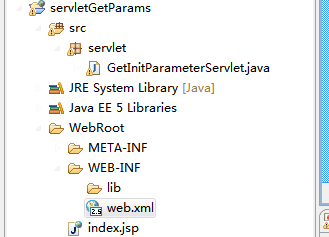
web.xml (添加init-param)
 <?xml version="1.0" encoding="UTF-8"?>

 <web-app version="2.5"

     xmlns="http://java.sun.com/xml/ns/javaee"

     xmlns:xsi="http://www.w3.org/2001/XMLSchema-instance"

     xsi:schemaLocation="http://java.sun.com/xml/ns/javaee

     http://java.sun.com/xml/ns/javaee/web-app_2_5.xsd">

   <display-name></display-name>

   <servlet>

     <description>This is the description of my J2EE component</description>

     <display-name>This is the display name of my J2EE component</display-name>

     <servlet-name>GetInitParameterServlet</servlet-name>

     <servlet-class>servlet.GetInitParameterServlet</servlet-class>

     <init-param>

         <param-name>username</param-name>

         <param-value>admin</param-value>

     </init-param>

     <init-param>

         <param-name>password</param-name>

         <param-value>123456</param-value>

     </init-param>

   </servlet>

   <servlet-mapping>

     <servlet-name>GetInitParameterServlet</servlet-name>

     <url-pattern>/servlet/GetInitParameterServlet</url-pattern>

   </servlet-mapping>

   <welcome-file-list>

     <welcome-file>index.jsp</welcome-file>

   </welcome-file-list>

 </web-app>
index.jsp
   <h1>获取初始化参数演示案例</h1>

     <hr>

     <a href="servlet/GetInitParameterServlet">获取初始化Servlet</a>
GetInitParameterServlet.java:
 package servlet;

 import java.io.IOException;

 import java.io.PrintWriter;

 import javax.servlet.ServletException;

 import javax.servlet.http.HttpServlet;

 import javax.servlet.http.HttpServletRequest;

 import javax.servlet.http.HttpServletResponse;

 public class GetInitParameterServlet extends HttpServlet {

     private String username;

     private String password;

     public String getUsername() {

         return username;

     }

     public void setUsername(String username) {

         this.username = username;

     }

     public String getPassword() {

         return password;

     }

     public void setPassword(String password) {

         this.password = password;

     }

     /**

      * Constructor of the object.

      */

     public GetInitParameterServlet() {

         super();

     }

     /**

      * Destruction of the servlet. <br>

      */

     public void destroy() {

         super.destroy(); // Just puts "destroy" string in log

         // Put your code here

     }

     /**

      * The doGet method of the servlet. <br>

      *

      * This method is called when a form has its tag value method equals to get.

      *

      * @param request the request send by the client to the server

      * @param response the response send by the server to the client

      * @throws ServletException if an error occurred

      * @throws IOException if an error occurred

      */

     public void doGet(HttpServletRequest request, HttpServletResponse response)

             throws ServletException, IOException {

         doPost(request, response);

     }

     /**

      * The doPost method of the servlet. <br>

      *

      * This method is called when a form has its tag value method equals to post.

      *

      * @param request the request send by the client to the server

      * @param response the response send by the server to the client

      * @throws ServletException if an error occurred

      * @throws IOException if an error occurred

      */

     public void doPost(HttpServletRequest request, HttpServletResponse response)

             throws ServletException, IOException {

         response.setContentType("text/html;charset=utf-8");

         PrintWriter out = response.getWriter();

         out.println("<!DOCTYPE HTML PUBLIC \"-//W3C//DTD HTML 4.01 Transitional//EN\">");

         out.println("<HTML>");

         out.println("  <HEAD><TITLE>A Servlet</TITLE></HEAD>");

         out.println("  <BODY>");

     out.println("<h2>用户名:"+this.getUsername()+"</h2>");

     out.println("<h2>密码:"+this.getPassword()+"</h2>");

         out.println("  </BODY>");

         out.println("</HTML>");

         out.flush();

         out.close();

     }

     /**

      * Initialization of the servlet. <br>

      *

      * @throws ServletException if an error occurs

      */

     public void init() throws ServletException {

         this.setUsername(this.getInitParameter("username"));

         this.setPassword(this.getInitParameter("password"));

     }

 }
servlet中获取配置文件中的参数.的更多相关文章
- Servlet中获取POST请求的参数
在servlet.filter等中获取POST请求的参数 form表单形式提交post方式,可以直接从 request 的 getParameterMap 方法中获取到参数 JSON形式提交post方 ...
- Java代码中获取配置文件(config.properties)中内容的两种方法
方法千千万,本人暂时只总结了两种方法. (1)config.properties中的内容如图 在applicationContext.xml中配置 <!-- 引入配置文件 --> < ...
- Spring中抽象类中使用EmbeddedValueResolverAware和@PostConstruct获取配置文件中的参数值
我的需求: 我有一个 abstract class 中包含了很多子类中需要用到的公共方法和变量,我想在抽象类中 使用@Value获取*.properties中的值.但是@Value必须要在Spring ...
- 记录一次bug解决过程:velocity中获取url中的参数
一.总结 在Webx的Velocity中获取url中参数:$rundata.getRequest().getParameter('userId') 在Webx项目中,防止CSRF攻击(Cross-si ...
- ThinkPHP 获取配置文件中的值
C('SPECIAL_USER'):获取配置文件中的值 存入数组
- 如何在Silverlight应用程序中获取ASP.NET页面参数
asp.net Silverlight应用程序中获取载体aspx页面参数 有时候SL应用中需要使用由aspx页面中传递过来的参数值,此时通常有两种方法获取 1. 使用InitParameters属性, ...
- 获取配置文件中key=value
之前一直是写一个方法获取配置文件中的key=value值得,现在提供更简单的. ResourceBundle 是java.utl中的一个专门针对.properties文件的. //获取配置文件对象 R ...
- electron-vue 项目启动动态获取配置文件中的后端服务地址
前言 最近的项目迭代中新增一个需求,需要在electron-vue 项目打包之后,启动exe 可执行程序的时候,动态获取配置文件中的 baseUrl 作为服务端的地址.electron 可以使用 no ...
- CI框架在辅助函数中使用配置文件中的变量
问题: 现有一个自定义的辅助函数,想要获取配置文件中的配置项(配置文件路径为application/config/config.php) 分析: 辅助函数并不是定义在一个class中,而是很多个可供外 ...
随机推荐
- QWebEngineView_CssVariables
1.测试代码,参考网址:http://blog.sina.com.cn/s/blog_1508519340102wgq0.html 2.测试下来,结果: 2.1.Qt5.6开始,没有 WebKit了. ...
- CSS border 属性和 border-collapse 属性
border 简写属性在一个声明设置所有的边框属性. 可以按顺序设置如下属性: border-width border-style border-color 如果不设置其中的某个值,也不会出问题,比如 ...
- 探究JS中对象的深拷贝和浅拷贝
深拷贝和浅拷贝的区别 在讲深拷贝和浅拷贝的区别之前,回想一下我们平时拷贝一个对象时是怎么操作的?是不是像这样? var testObj1 = {a: 1, b:2}, testObj2=testObj ...
- java Web 工程servlet中@WebServlet("/HelloServlet") 是怎么工作的
编写好Servlet之后,接下来要告诉Web容器有关于这个Servlet的一些信息.在Servlet 3.0中,可以使用标注(Annotation)来告知容器哪些Servlet会提供服务以及额外信息. ...
- CentOS6.5系统服务
服务名称 功能 默认 建议 备注说明 NetworkManager 用于自动连接网络,常用在Laptop上 开启 关闭 对服务器无用 abrt-ccpp 开启 自定 对服务器无用 abrt-oop ...
- 201621123010《Java程序设计》第6周学习总结
1. 本周学习总结 1.1 面向对象学习暂告一段落,请使用思维导图,以封装.继承.多态为核心概念画一张思维导图或相关笔记,对面向对象思想进行一个总结. 2. 书面作业 1. clone方法 1.1 在 ...
- Git 学习之 Git Basics
最近在用git,但git学习曲线实在是有点高. 好在找到一个文档 https://www.atlassian.com/git/tutorial/,以下就是学习笔记吧! git init git ini ...
- IE 问题集合
1.zIndex在ie需要 先对比父级的层级
- linux vi常用操作
1.基本操作 进入vi vi 或者 vim 进入一个文件或者新建一个文件 例如:vim 11.txt vi有3种模式 一般模式:刚进入时.按esc时. 编辑模式:按下字母[i, I, o, O, a, ...
- 洛谷九月月赛II
题解:模拟 一旦不匹配就要break #include<iostream> #include<cstdio> #include<cstring> #include& ...